

AV Access Docking Station KVM Switch 1 Laptop & 2 Desktop PCs, Dual 4K@60Hz Monitors, EDID Emulation, 100W USB-C Charging, Gigabit Ethernet,High Refresh Rates,Ideal for Gaming, Office & Creative Work
  •  
  • $219.99 
  • $199.99
  • Free 30-day Returns
  • Ships from China.
    Price alert
    Shop it at NeweggBusiness.

    AUTYUE USB C KVM Switch 3 Monitors 2 PCs 4K/1080P@60Hz,USB-C Triple Monitor KVM Switches with 4 USB3.2 Port for USB Device,10Gbps,80W PD Charging,For Windows and Mac OS,Driver Installation is Required

    Limited time offer, ends 01/10 By Shenzhen Qiuyiyue Store

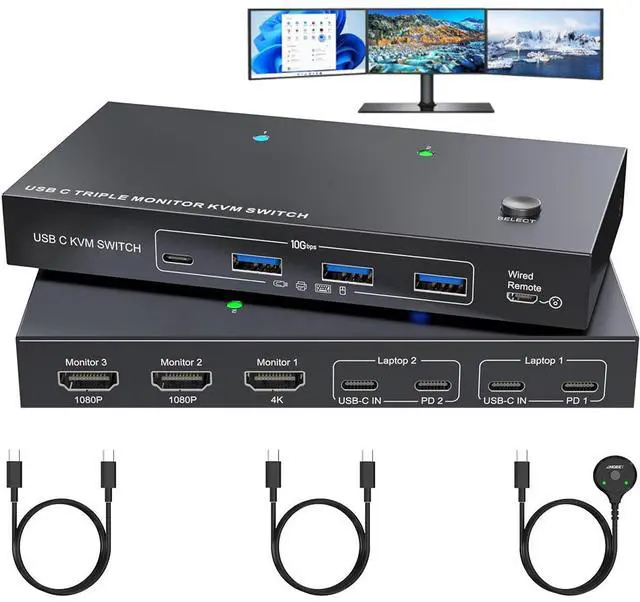
    • USB C Docking KVM: Combines USB-C docking station and 3 monitors KVM switch, which not only does it expand your laptop into a workstation with 3 HDMI monitors, 4x USB 3.2 ports (3×USB-A + 1×USB-C), and 2*80W PD charging ports, but also allows to one-click switching between 2 laptops.
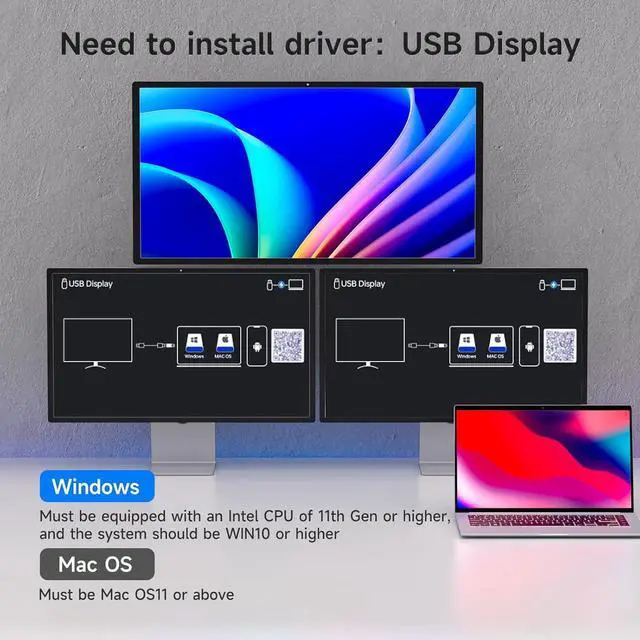
    • Driver Installation is Required: Supports output of 3 HDMI monitors, with resolutions of 1*4K@60Hz+2*1080P@60Hz. Note: After connecting your laptops to the KVM, the laptop will automatically recognise the USB device and a pop-up window will appear.
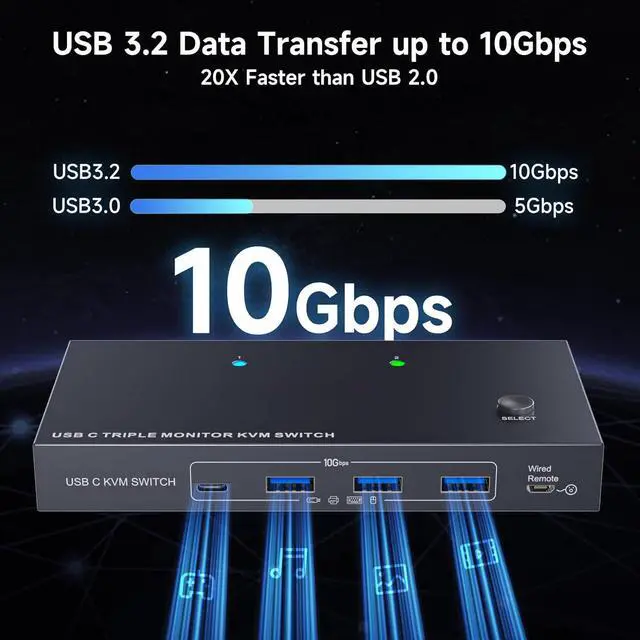
    • with 4 USB 3.2 Ports: Euqipped with 4 USB 3.2 ports(3×USB-A + 1×USB-C) for connecting keyboard,mouse etc. With a data transfer rate of up to 10Gbps,Backward compatibility with USB 1.1/2.0/3.0.
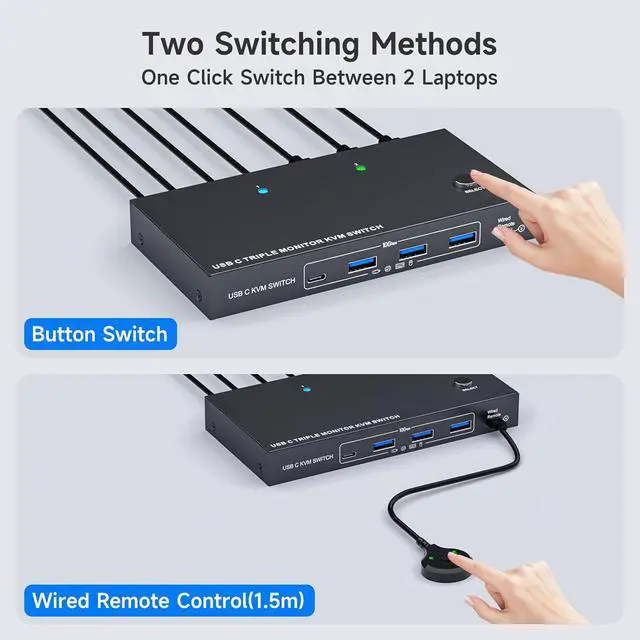
    • Wide Compatibility & Two Switching Ways: The 2 port USB C 2 laptops 3 monitors KVM switch is effortlessly compatible with Windows and Mac OS. Supports two switching methods -- physical button and wired remote(1.5 m),while LED indicators clearly display the active computer.
    +
    +
    Overview
    Specs
    Reviews
    avatar

    Any questions? Our AI beta will help you find out quickly.

    AUTYUE USB C KVM Switch 3 Monitors 2 PCs 4K/1080P@60Hz,USB-C Triple Monitor KVM Switches


    With The USB C 3 monitors KVM switch, you can switch between 2 laptops to share 3 HDMI external displays and 4 USB 3.2 ports.

    AUTYUE USB C KVM Switch 3 Monitors 2 PCs 4K/1080P@60Hz,USB-C Triple Monitor KVM Switches
    AUTYUE USB C KVM Switch 3 Monitors 2 PCs 4K/1080P@60Hz,USB-C Triple Monitor KVM Switches
    AUTYUE USB C KVM Switch 3 Monitors 2 PCs 4K/1080P@60Hz,USB-C Triple Monitor KVM Switches
    AUTYUE USB C KVM Switch 3 Monitors 2 PCs 4K/1080P@60Hz,USB-C Triple Monitor KVM Switches
    AUTYUE USB C KVM Switch 3 Monitors 2 PCs 4K/1080P@60Hz,USB-C Triple Monitor KVM Switches
    AUTYUE USB C KVM Switch 3 Monitors 2 PCs 4K/1080P@60Hz,USB-C Triple Monitor KVM Switches
    AUTYUE USB C KVM Switch 3 Monitors 2 PCs 4K/1080P@60Hz,USB-C Triple Monitor KVM Switches
    AUTYUE USB C KVM Switch 3 Monitors 2 PCs 4K/1080P@60Hz,USB-C Triple Monitor KVM Switches
    AUTYUE USB C KVM Switch 3 Monitors 2 PCs 4K/1080P@60Hz,USB-C Triple Monitor KVM Switches
    AUTYUE USB C KVM Switch 3 Monitors 2 PCs 4K/1080P@60Hz,USB-C Triple Monitor KVM Switches

    Q & A:


    Q: I want to share 3 monitors between 2 Laptops. How do I connect the cables?

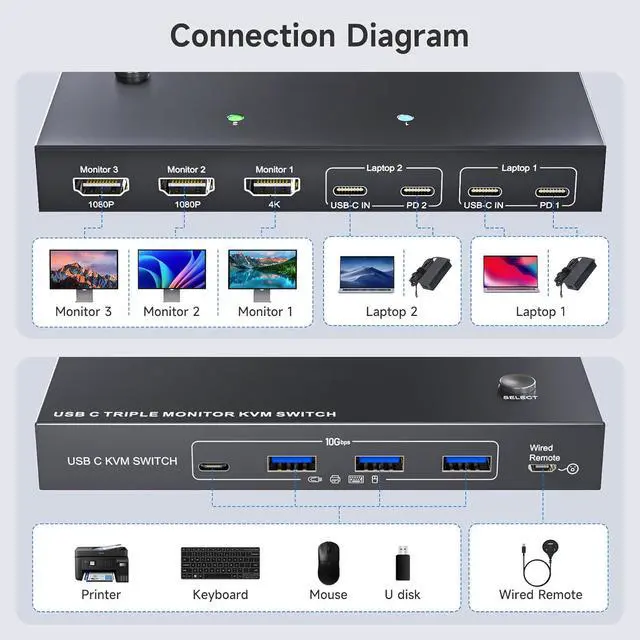
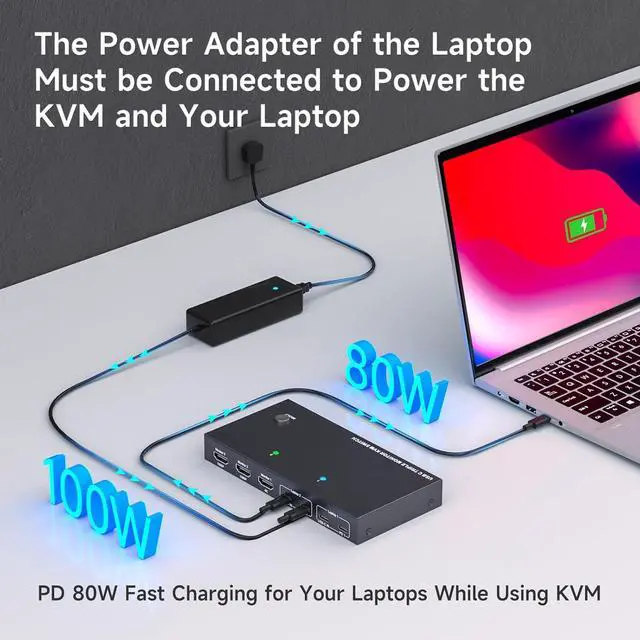
    A: You only need to use 2 USB C cables to connect your 2 laptops to the KVM switch, then plug in the power adapter to charge the laptops, and use 3 HDMI cables to connect 3 external monitors to the USB C KVM.


    Q: Do I need to install drivers to use this 3 monitors KVM switch?

    A: Drivers need to be installed for the triple monitor KVM switch to function properly (detailed installation steps are provided in the user manual).


    Q: Which hosts is this KVM suitable for?

    A: Suitable for laptops and Mini boxes (11th generation or higher CPUs) that support DP alt mode.

    Q: What operating systems can this KVM be used for?

    A: This 3 monitor KVM switch is only compatible with Windows (WIN10 or higher) and Mac OS (MAC OS11 or above), Low version systems may not be able to install the required driver.


    Q: Does this KVM switch support 4K@60Hz?

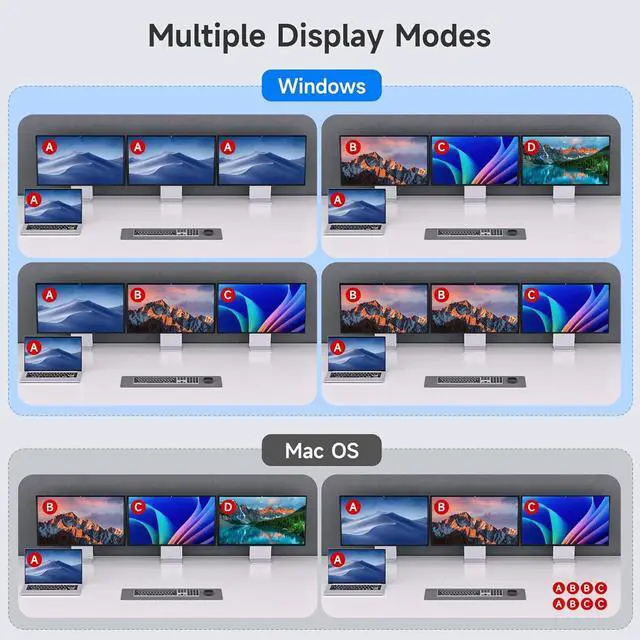
    A: This 3 monitors USB C KVM switch supports simultaneous output of 3 external monitors, 1* 4K@60Hz +2* 1080P@60Hz , and supports mirror and expansion mode output.

    With The USB C 3 monitors KVM switch, you can switch between 2 laptops to share 3 HDMI external displays and 4 USB 3.2 ports.


    Features:


    1. USB C Docking KVM Switch 3 Monitors 2 LaptopsThe USB C 3 monitor KVM switch combines USB-C docking station and 3 monitors KVM switch, which not only does it expand your laptop into a workstation with 3 HDMI monitors, 4x USB 3.2 ports (3×USB-A + 1×USB-C), and 2*80W PD charging ports, but also allows to one-click switching between 2 laptops.
    2. Driver Installation is RequiredThe 2 computers 3 monitors KVM switch supports simultaneous output of 3 HDMI monitors, with resolutions of 1*4K@60Hz+2*1080P@60Hz. Note: After connecting your laptops to the USB C KVM switch, the laptop will automatically recognise the USB device and a pop-up window will appear, please follow the wizard to install the USB driver.This driver does not record any information, Only used for identifying monitors.
    3. 3 Monitors KVM Switch with 4 USB 3.2 PortsThe triple monitor KVM switch USB C docking station is euqipped with 4 USB 3.2 ports(3×USB-A + 1×USB-C) for connecting keyboard, mouse,external hard drives,etc. With a data transfer rate of up to 10Gbps,Backward compatibility with USB 1.1/2.0/3.0.
    4. Charge your laptops via KVM SwitchKVM switch 3 monitors 2 computers USB C features with 2x80W PD charging ports,simply plug your laptop charger into the PD port to charge your laptop,eliminating the hassle of limited laptop ports. Note: It is necessary to plug the laptops charger into the PD port to power the KVM switch for stable operation.
    5. Wide Compatibility & Two Switching Ways The 2 port USB C 2 laptops 3 monitors KVM switch is effortlessly compatible with Windows and Mac OS. Supports two switching methodsphysical button and wired remote(1.5 m),while LED indicators clearly display the active computer.
    6. Important Note (1)Driver installation is required to recognize the monitors;(2)To get the 2 computers 3 monitors USB-C KVM switch work properly, the laptop system must be 11th or above;(3)It is necessary to plug the laptops charger into the PD port to power the KVM switch;(4)2 USB C cables in the packaging, but HDMI cables are not included. (5)Not supporting EDID emulation and hotkey switching.Any problem,just take a little time to email us, you will receive a 100% satisfactory solution.


    Warranty & Returns

    Warranty, Returns, And Additional Information

    Warranty

    • Please contact the Seller directly for warranty information. Warranty information may also be found on the Manufacturer's website.
    • CONTACT

    Return Policies

    Manufacturer Contact Info

    LOADING...