• $349.99
  • Free 30-day Returns
  • Price alert
    Shop it at NeweggBusiness.

    Meet Your Seller

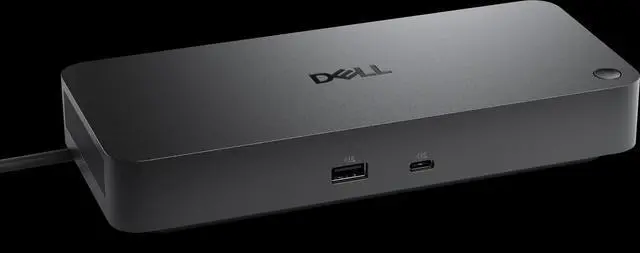
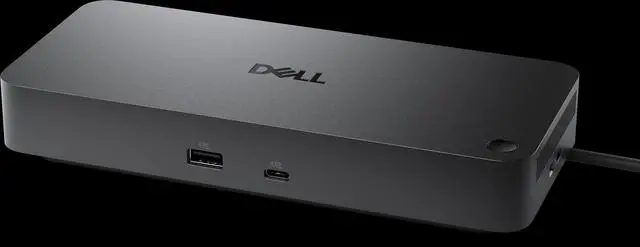
    Dell Pro Thunderbolt 4 Dock WD25TB4 Docking Station

    • Drive unmatched power to your workspace with the latest Thunderbolt 4 dock, featuring up to 130W power delivery.
    +
    +
    Overview
    Specs
    Reviews
    avatar

    Any questions? Our AI beta will help you find out quickly.

    Tech Specs

    Connectivity Technology : Wired

    Device Supported :

    1. Notebook
    2. Desktop PC

    Cable Length : 2.72 ft

    Features

    1. Power Delivery Pass-through
    2. LED Power Indicator
    3. Indicator Light

    Management Features

    1. Intel AMT over Thunderbolt with select Intel vPro PCs
    2. MAC Address Pass-through
    3. PXE Boot
    4. Dock Power Button Sync
    5. Wake-on-LAN
    6. WLAN to LAN Switch
    7. Kernel Direct Memory Access (DMA) Protection
    8. Dell Command Update (DCU)
    9. Port Disablement
    10. Host PC based firmware update
    11. Firmware update on disconnect

    Number of Displays Supported : 4

    Screen Mode Supported

    1. QHD @ 60Hz
    2. WQHD @ 60Hz
    3. 4K @ 60Hz
    4. 5K @ 60Hz
    5. 6K @ 60Hz
    6. 8K @ 60Hz

    Supported Resolutions

    1. 3840 x 2160
    2. 5120 x 2160
    3. 2560 x 1440
    4. 3440 x 1440
    5. 7680 x 4320
    6. 6144 x 3456

    Maximum Data Transfer Rate : 1.25 GB/s

    Security Slot Type

    1. Kensington Security Slot
    2. Noble Wedge Security Slot

    Power Delivery Details

    1. 4 x USB-A 3.2 Gen 2 (4.5W each)
    2. 1 x USB-C 3.2 Gen 2 (15W)
    3. 1 x USB-C Multi-function DisplayPort (7.5W)
    4. 2 x Thunderbolt 4 (15W each)
    5. All deliver power with or without PC

    Power Delivery

    1. 130W (Dell Systems)
    2. 96W (non-Dell Systems)

    Video Resolution Details

    1. QHD - 60 Hz (Quad Display)
    2. WQHD - 60 Hz (Triple Display)
    3. 4K - 60 Hz (Dual Display)
    4. 5K - 60 Hz (Single Display)
    5. 4K - 60 Hz (Quad Display)
    6. 4K - 60 Hz (Triple Display)
    7. 6K - 60 Hz (Dual Display)
    8. 8K - 60 Hz (Single Display)

    Network & Communication

    Ethernet Technology

    2.5 Gigabit Ethernet


    Interfaces/Ports

    Host Interface

    Thunderbolt 4

    Total Number of USB Ports

    6

    USB Type-A

    Yes

    Number of USB 3.2 Gen 2 Type-A Ports

    4

    Number of USB 3.2 Gen 2 Type-C Ports

    1

    Number of USB Type-A Ports

    4

    USB Type-C

    Yes

    USB Type-C Detail

    1 x USB-C 3.2 Gen 2 (10 Gbps), (15W), 1 x USB-C 3.2 Gen 2 Multi-function DisplayPort 1.4

    Number of USB Type-C Ports : 2

    Network (RJ-45) : Yes

    DisplayPort : Yes

    Number of DisplayPorts : 2

    DisplayPort Version : 1.4

    HDMI : Yes

    Number of HDMI Ports : 1

    HDMI Version : 2.1

    Thunderbolt : Yes

    Thunderbolt Ports Quantity : 2

    Number of Thunderbolt 4 Ports : 2

    Interfaces

    1. 2 x DP1.4
    2. 1 x HDMI 2.1
    3. 1 x USB-C 3.2 Gen 2 Multi-function DisplayPort 1.4
    4. 2 x Thunderbolt 4

    Software

    Host Software

    Host Software (Windows):

    1. Dell Firmware Utility
    2. Dell Display and Peripheral Manager
    3. Dell Command Update

    Cloud Management (via host PC software)

    Dell Device Management Console enables:

    1. Automatic firmware updates
    2. Maintain specific firmware version or downgrade
    3. Peripheral inventory and status


    Operating System Supported

    1. Windows 10
    2. Windows 11
    3. Ubuntu 24.04
    4. macOS
    5. ChromeOS 137
    6. Red Hat Enterprise Linux 9.6


    Maximum Power Supply Wattage

    180 W

    Power Source Type

    Power Adapter


    Warranty & Returns

    Warranty, Returns, And Additional Information

    Warranty

    • Please contact the Seller directly for warranty information. Warranty information may also be found on the Manufacturer's website.
    • CONTACT

    Return Policies

    • Return for refund within: 30 days
    • Return for replacement within: 30 days
    • This item is covered by Techome Return Policy

    Manufacturer Contact Info

    LOADING...