Acer Aspire Go 15 AI ready - 15.6" Laptop - Intel Core i9-13900H - Intel Iris Xe Graphics - 16GB RAM - 512GB PCIe SSD - FHD 1920 x 1080 - Windows 11 Home, NX.JSDAA.001 14 AI Copilot+
  •  
  • $849.99 –
  • Save: 5%
  • $149.99
  • Free 30-day Returns
  • Sold by Direct from manufacturerOWC
    4.7 (29 seller ratings)

    Shipped by Direct from manufacturerOWC

    Price alert
    Shop it at NeweggBusiness.

    Meet Your Seller

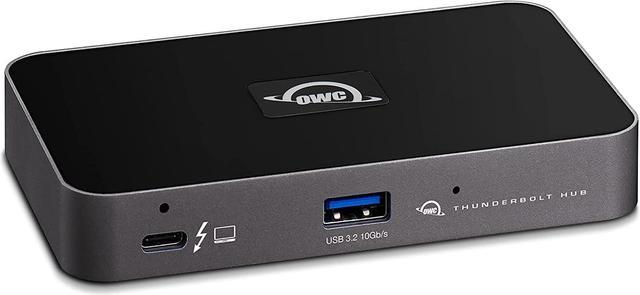
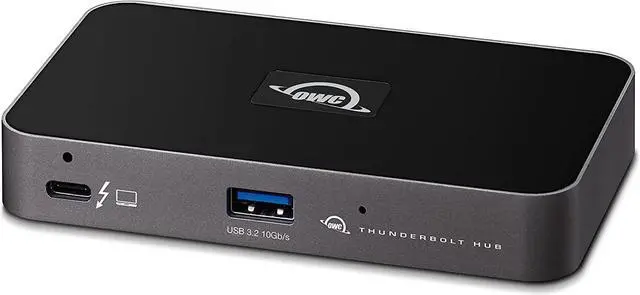
    OWC 5 Port Thunderbolt Hub - 60W Charging, Thunderbolt 4, USB 3.2, Compatible with Macs and PCs

    • Easy Port Expansion: add more universally compatible Thunderbolt (USB-C) ports to your Mac, PC, iPad, or dock to massively expand your device connections and productivity
    • Ultimate Capabilities: utilize the full performance and power of your devices vs handcuffing them with a low-cost, limited capability bus-powered hub
    • Works with Millions: no worries or confusionit works with your Thunderbolt 4, Thunderbolt 3, USB-C, or USB4 machine or device with 100% compatibility
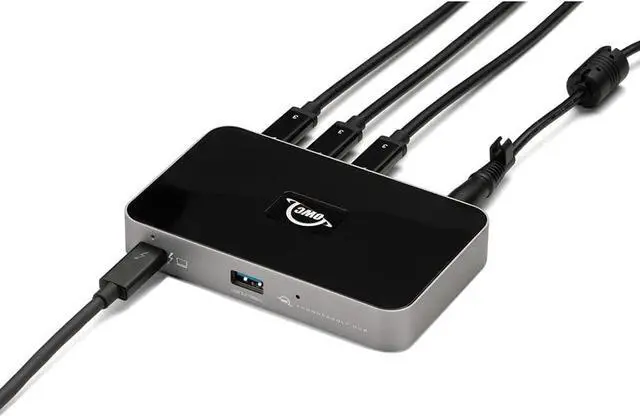
    • Redefine Your Chain: create three separate daisy chains of devices even bus powered - so you can remove devices from one chain without affecting the other chains
    • Thunderbolt Certified: Built-in OWC reliability and dependability for Mac and Windows
    • 2 Year OWC Limited Warranty
    +
    +
    Overview
    Specs
    Reviews

    Any questions? Ask CelesteSM will help you find out quickly.

    OWC Thunderbolt Hub with Three Thunderbolt 4 Ports and One USB Port for Thunderbolt 4 PC
    OWC Thunderbolt Hub
    OWC Thunderbolt Hub
    OWC Thunderbolt Hub
    OWC Thunderbolt Hub
    OWC Thunderbolt Hub
    OWC Thunderbolt Hub
    OWC Thunderbolt Hub with Three Thunderbolt 4 Ports and One USB Port for Thunderbolt 4 PC
    OWC Thunderbolt Hub
    OWC Thunderbolt Hub
    OWC Thunderbolt Hub
    OWC Thunderbolt Hub
    OWC Thunderbolt Hub
    OWC Thunderbolt Hub
    We heard you loud and clear. You simply want to add more universally compatible Thunderbolt (USB-C) ports to your Mac, PC, iPad, or dock so you can connect more devices and create an expanded workflow that is as unique as your imagination.

    Connect more storage, displays, and accessories. Create independent daisy chains. And do it all while charging your notebook. With the OWC Thunderbolt Hub, you can massively increase your productivity and connectivity while enjoying the same performance of your Thunderbolt and USB-C devices as if you had plugged them directly into your machine. In short, you get everything you want without compromise or unnecessary features.

    The average cheap bus-powered hub doesnt have the all-important 3Ps of the
    OWC Thunderbolt Hub: Power, Performance and Possibilities. Plug in a Thunderbolt external drive, and youll get Thunderbolt speeds. Plug in a 6K XDR monitor, and youll get full resolution. Plug in a USB-C bus-powered drive, and it will work flawlessly. Try all that with any other hub, and like the chart shows below, your use possibilities are severely limited.

    Power Delivery: Thunderbolt 4 host port provides up to 60W of power to the host computer; Thunderbolt 4 device ports (for external drives and other devices) provide 15W of power; USB port provides up to 1.5A of power for bus-powered drives and device charging

    Display Support: Up to one 8K display @ 60Hz, one 4K display @ 120Hz, two 4K displays @ 60Hz, one 4K display @ 60Hz, one 4K display @ 30Hz, or two 5K displays @ 60Hz; Display Support by
    Port: Thunderbolt
    4: Up to 8K @ 60Hz or 4K @ 120Hz via a native Thunderbolt 4 display or other display that supports USB-C connections and DisplayPort 1.4;
    NOTE: Actual display support varies by computer specifications; Supported Intel-based Apple Mac models and Thunderbolt 4 PCs support two displays

    Device Ports: (1) Host Port - Thunderbolt 4 up to 40 Gb/s (5000 MB/s); (3) Thunderbolt 4 Ports; (1) USB 3.2 Gen 2 Type-A Port up to 10Gb/s (1250MB/s) - USB 2.0 / 3.0 backwards compatible

    Host Port Support: Thunderbolt or USB (USB-C or USB-A) port; Works with Thunderbolt 4, Thunderbolt 3, USB4, and USB host computers and mobile devices; Thunderbolt/Thunderbolt 2 Mac models are supported via USB-A host connection; Thunderbolt/Thunderbolt 2 host connection is not supported; USB connection may limit some functionality; certified OWC Thunderbolt 4 cable included

    Compatible with: Macs with an available Thunderbolt 3 or later port running macOS 11.1 Big Sur or later, Windows PC with an available Thunderbolt 4 port and non-Thunderbolt USB-C machines like Chromebooks and iPads, USB-C equipped MacBook, iPad, Chromebook, Android device; 2 Year OWC Limited Warranty

    Warranty & Returns

    Warranty, Returns, And Additional Information

    Warranty

    • Please contact the Seller directly for warranty information. Warranty information may also be found on the Manufacturer's website.
    • Read full details
    • CONTACT

    Return Policies

    • Return for refund within: 30 days
    • Return for replacement within: 60 days
    • This item is covered by OWC Return Policy

    Manufacturer Contact Info

    LOADING...

    The OWC 5 Port Thunderbolt Hub is a Thunderbolt 4 connectivity hub with three downstream Thunderbolt ports, one USB-A port, and up to 60W host charging, suited to Mac and PC users who want to expand connections for drives, displays, and other peripherals.

    Recommended For

    • Laptop users at a fixed desk who need more Thunderbolt connections for fast external storage, displays, or other Thunderbolt peripherals, while keeping their setup on one host connection.
    • Creative and technical workflows that connect several Thunderbolt devices—such as external drives, audio interfaces, or displays—and benefit from organizing them into separate device chains.
    • Mac or Windows laptop users who want a powered desk hub for compatible Thunderbolt or USB4 devices and whose laptop can use up to 60W of host charging.
    • Users who already have display adapters or other basic I/O covered and mainly want additional Thunderbolt ports for peripherals rather than a full set of docking-station connections.

    Real-World Use Scenarios

    • When a desktop Mac or PC runs short of Thunderbolt ports, connect the hub to one host port and branch out to a display, external SSD, and other Thunderbolt accessories; this adds connection options without increasing the computer’s total Thunderbolt bandwidth.
    • For a desk setup with a bus-powered SSD and other peripherals, connect them through the hub instead of using up the computer’s limited ports; compatible devices can draw power from the hub, while the host’s available Thunderbolt bandwidth remains shared.
    • When connecting multiple monitors to a laptop, use the hub’s Thunderbolt ports with suitable display cables or adapters; the number and resolution of displays depend on the computer and monitor, so check host support before planning a multi-screen setup.
    • For a laptop desk where the computer supports 60W charging over Thunderbolt, the hub can charge the host while connected peripherals stay plugged in; users of higher-power laptops may still need the laptop’s own charger.
    • If a connected device needs to be unplugged or rearranged, the hub’s separate downstream Thunderbolt branches can make it easier to change one connection without disrupting devices on other branches.