

Your Browsing History
- Free 30-day Returns
$579.99


Meet Your Seller

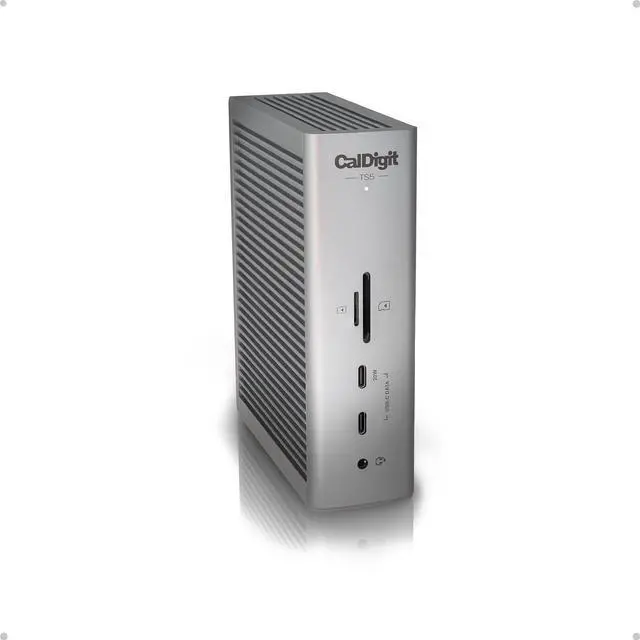


CalDigit TS5 Thunderbolt 5 Dock - 15 Port, 140W Charging, 80Gb/s TBT 5 x 4, USB-C 10Gb x 3, USB-A x2, 2.5Gb Ethernet, Dual 8K@60Hz Displays, SD & microSD UHS-II, 1m Braided Cable, Space Gray 240W PSU
- 15 Ports of Connectivity
- More Power than Ever
- Flexible Display Configurations
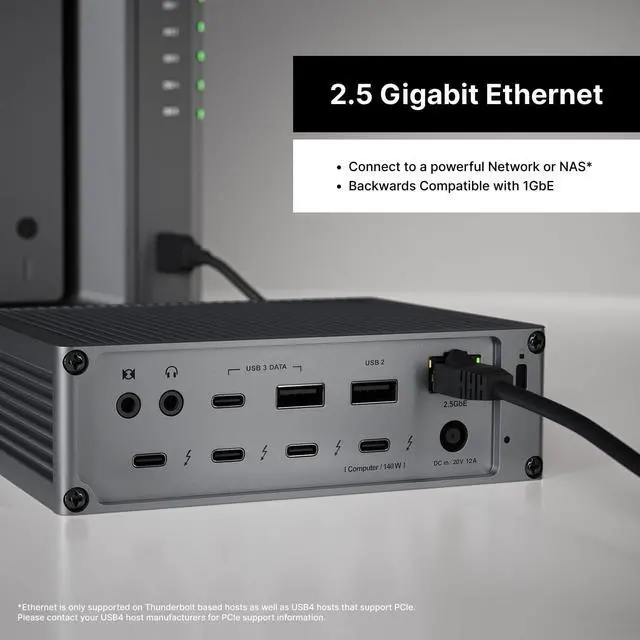
- PCIe Based 2.5 Gigabit Ethernet
- Bandwidth Boost
- Aluminum Heat Sink Chassis
+
+
Overview
Specs
Reviews

Any questions? Our AI beta will help you find out quickly.
Try me now
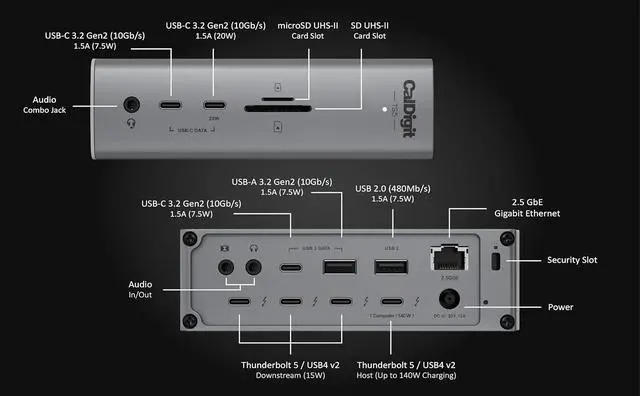
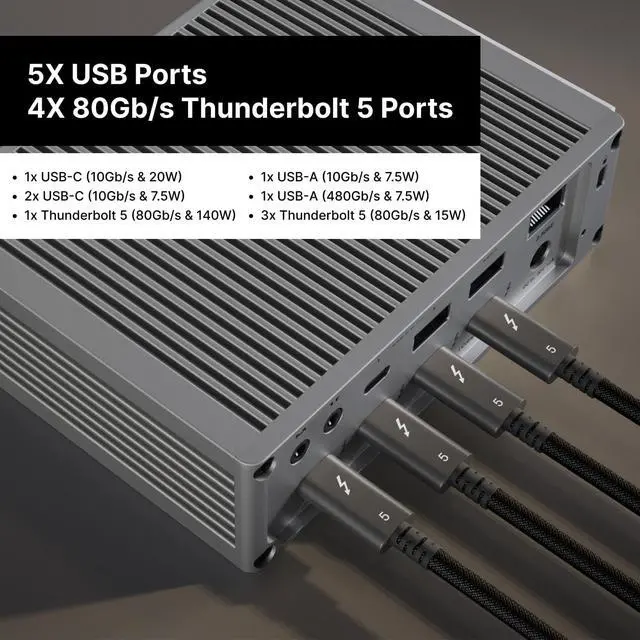
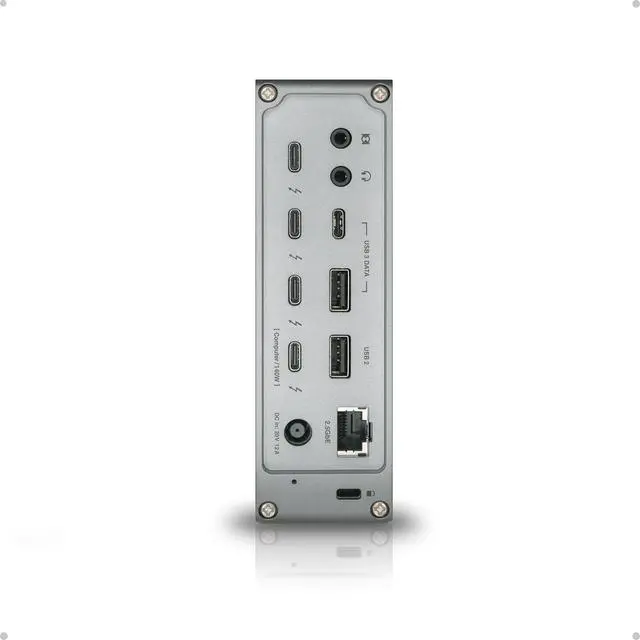
- 15 Ports of Connectivity - The TS5 includes 1x Host and 3x downstream 80Gb/s Thunderbolt 5 / USB4 V2 ports, 1x USB-A Gen 2 10Gb/s port, 1x USB-A 480Mb/s port, 3x USB-C 3.2 Gen 2 10Gb/s ports, DisplayPort 2.1, SD 4.0 & microSD 4.0 UHS-II card readers, 2.5GbE, and 3x audio ports. Thunderbolt 5 supports 64Gb/s PCIe which is ideal for connecting ultra-fast Thunderbolt peripherals to the TS5.
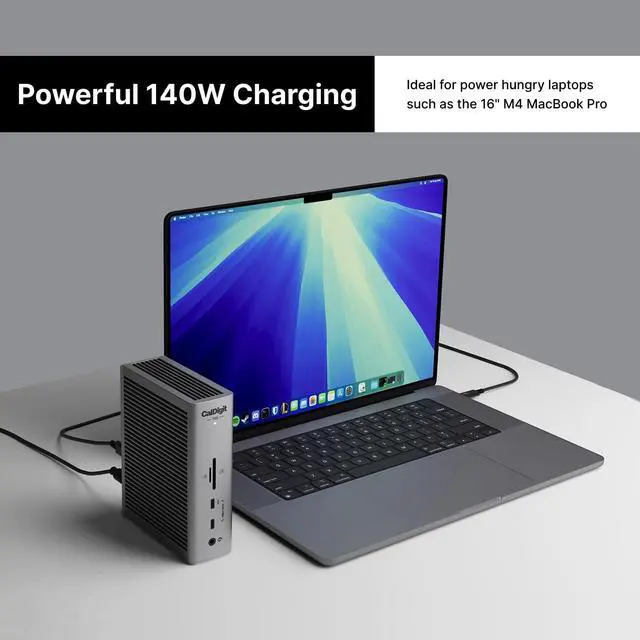
- More Power than Ever - The TS5 host charging port provides up to 140W power delivery. This makes it ideal for power hungry laptops such as the 16 M3/M4/M5 Pro and Max series MacBook Pro which charges at 140W. The TS5 includes a 240W power supply that allows the dock to provide sustained power delivery at all times, not only for the host charging port, but for all of the remaining ports. In addition to all of this power, the downstream Thunderbolt 5 ports offer 15W, and one of the front USB-C ports provides up to 20W of power delivery for charging accessories.
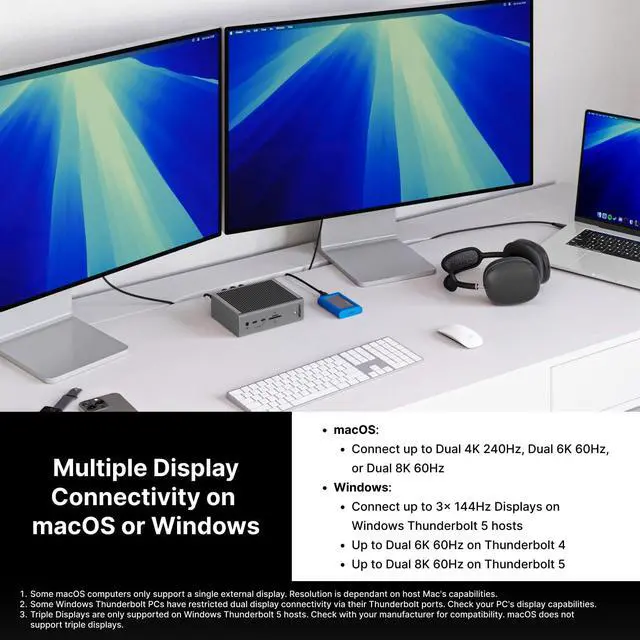
- Flexible Display Configurations - The TS5 on macOS devices can connect up to Dual 6K 60Hz displays, or even Dual 8K 60Hz displays on Macs that support those resolutions. The TS5 supports high-refresh rates at up to Dual 4K 240Hz. On Windows, the TS5 supports up to dual 6K 60Hz on Thunderbolt 4 hosts, and up to Dual 8K 60Hz on Thunderbolt 5 hosts. Thunderbolt 5 Windows users can also connect up to Triple 4K 144Hz displays on supported Windows Thunderbolt 5 hosts (macOS does not support Triple displays).*Check with your manufacturer to see how many displays your computer supports.
- PCIe Based 2.5 Gigabit Ethernet - The TS5 can integrate into 2.5GbE workflows with ease since it is 2.5x faster than traditional 1GbE found on the majority of docking stations. Users can connect to fast networks in order to transfer files quicker than ever and the 2.5GbE port is backwards compatible with 1GbE. *Ethernet is only supported on Thunderbolt based hosts as well as USB4 hosts that support PCIe.
- Compatibility - To get the maximum performance out of the TS5, a Thunderbolt 5 (80Gb/s) or USB4 v2 (80Gb/s) host connection is required. Users on Thunderbolt 3, Thunderbolt 4, USB4, or USB-C hosts will see reduced functionality. The TS5 also supports Thunderbolt and USB-C based tablet/phone devices.
- Bandwidth Boost - A new feature of Thunderbolt 5 is the inclusion of Bandwidth Boost. This powerful function allows up to 120Gb/s performance to be allocated to the connected displays when bandwidth intensive monitors are connected. This is specifically ideal for users that intend on connecting displays with high-refresh rates at high resolutions.
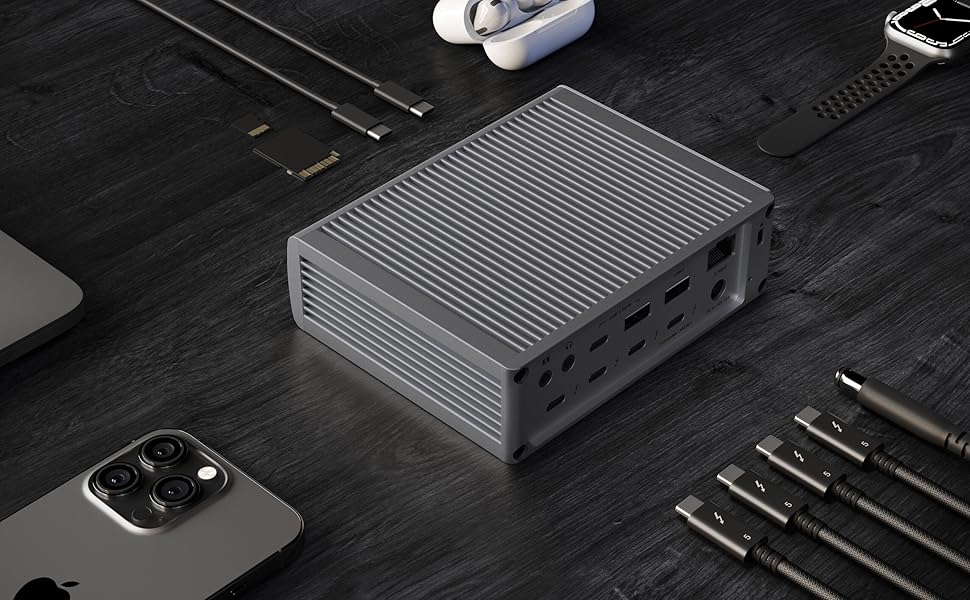
- Aluminum Heat Sink Chassis - The TS5's beautifully crafted aluminum chassis is designed as an external heat sink to dissipate heat generated by the large amount of power it provides. This function has been meticulously tested to ensure the safety of the device and the user. We recommend providing ample clearance around the TS5 to increase the surface area for efficient heat dissipation ensuring optimal performance.
 Get Connected
The TS5 is compatible with Thunderbolt 5, Thunderbolt 4, Thunderbolt 3, USB4, USB4 v2, and USB-C host computers.
- M1/M2/M3/M4 Pro, M1/M2/M3/M4 Max & M1/M2/M3 Ultra Mac¹
- M1/M2/M3/M4 Mac¹
- Thunderbolt 5 PC
- Thunderbolt 4 PC
- Thunderbolt 3 Mac
- USB4 & USB4 v2 PC
- Intel Thunderbolt 3 Mac¹
- USB-C Mac or PC
- Thunderbolt iPad²
- Thunderbolt Chromebook
¹ Requires macOS 15 or above. ² Functionality is dependent on host computer or tablets capabilities.
*To get the maximum performance & features from the TS5 an 80Gb/s Thunderbolt 5 or USB4 v2 host connection is required.
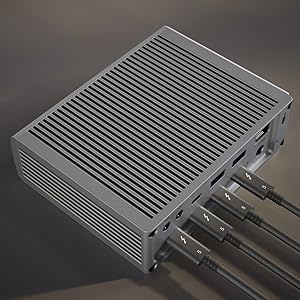
The TS5 features four 80Gb/s bi-directional Thunderbolt 5 ports, which are double the performance of Thunderbolt 4. The PCIe performance of the the Thunderbolt ports have been doubled from the previous generation to 64Gb/s PCIe 4.0. This is ideal for connecting high-performance SSDs or RAID devices, with transfer speeds up to 6,200MB/s.

The TS5 delivers up to 140W power, supporting demanding laptops like the 16 MacBook Pro with M4 Pro or Max chips. The TS5's power supply will always provide the full 140W power delivery, and will never drop that performance even when new devices are connected to it. For devices needing less power, it adjusts to supply only whats required.
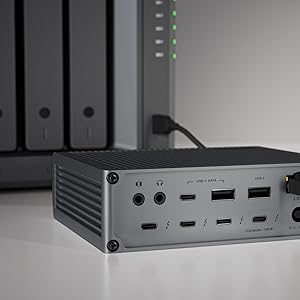
The TS5 features a 2.5 Gigabit Ethernet port for outstanding performance.* 2.5GbE is 2.5x faster than traditional Gigabit Ethernet, and is becoming the new standard for routers, switches, and NAS devices.*
*Ethernet is only supported on Thunderbolt based hosts as well as USB4 hosts that support PCIe. Please contact your USB4 host manufacturers for PCIe support information.
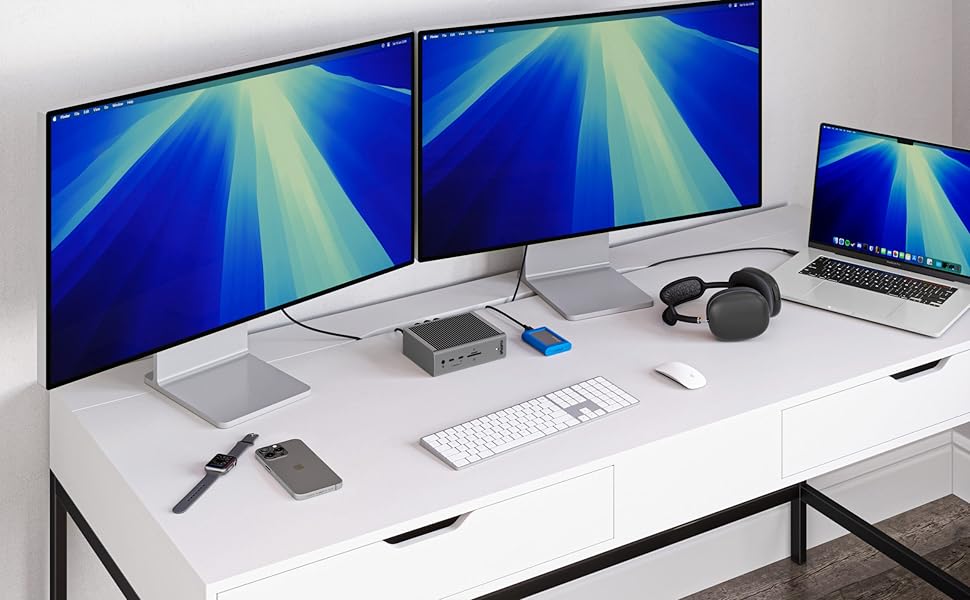 Single, Dual, or Three Displays
Whether you need a high-resolution display, a high-refresh rate display, or up to 3 external displays, the TS5 has you covered.
Single Monitor
If youre looking to add a single monitor to the TS5 you can connect it to one of the spare Thunderbolt 5 ports. If you wish to connect an HDMI monitor you can use a USB-C to HDMI Adapter ***.
Dual Monitors
macOS users on base M4, M1/M2/M3/M4 Pro, M1/M2/M3/M4 Max, M1/M2/M3 Ultra, or Intel based Macs can connect up to dual displays.
M1/M2/M3 based Macs are limited to 1 external monitor by design via their Thunderbolt ports.
Windows PC Thunderbolt 5 and Thunderbolt 4 users can connect up to dual displays.
Triple Monitors
macOS does not support Triple monitors via a Thunderbolt Dock or Hub.
Windows PC Thunderbolt 5 users can connect up to three displays on supported host computers.
Windows PC Thunderbolt 4 users cannot connect three displays natively.
Quad Monitors
macOS users on M5 Max can connect up to four displays.
 * Dual 5K monitors must be Thunderbolt 4 or Apple Studio Displays. Dual LG UltraFine 5K monitors are not supported. 6K monitors can be a Thunderbolt 4 monitor or an Apple Pro Display XDR. DSC (Display Stream Compression) support is required for 6K and 8K resolutions.
** Higher refresh-rates (above 60Hz) may require DSC (Display Stream Compression) support on the monitors and host GPU. The bit/color depth may vary in order to support higher refresh-rates.
*** Some M3 MacBooks such as the MacBook Air can support dual external monitors up to 5K and 6K when the laptop lid is closed (clamshell mode).
**** Currently M1/2/3/4 Macs can only support up to HDMI 2.0b over its Thunderbolt ports. As such, resolutions will be limited to 4K 60Hz when using an HDMI adapter. If a higher refresh-rate is required, please use a USB-C to USB-C or USB-C to DisplayPort or DisplayPort to DisplayPort connection. For more information about a Macs external display support please Apple's or CalDigit's support webpages.
***** Results may vary due to OS updates. For external display compatibility over a single Thunderbolt connection on different Windows computers, please refer to the manufacturers website.

Interface
- Thunderbolt 5: 1x Host (up to 120Gb/s), 3x Ports (80Gb/s)
- USB: 3x USB-C (10Gb/s), 1x USB-A (10Gb/s), 1x USB-A (480MB/s)
- Media: SD 4.0 & microSD 4.0 (UHS-II)
- Networking: 1x 2.5Gb Ethernet
- Audio: Front Combo In/Out, Rear In & Out (3.5mm)
- Power: 1x DC In (20V, 12A)
Minimum System Requirements
- macOS 15+, Windows 11+, iPadOS, Chrome OS
- Thunderbolt 5/4, Thunderbolt 3 (Mac)
- USB-C (USB4 / USB4 v2) Mac, PC, Tablet, Phone
- Thunderbolt/USB4 iPad
Power Delivery
- Thunderbolt 5/USB4 Host Port: Up to 140W
- Each Downstream Thunderbolt 5/USB4 Port: 15W
- Front 20W USB-C Port: 20W
- Remaining USB-C Ports: 7.5W
- USB-A Ports: 7.5W
Size & Weight
- Height: 5.55 (141.0mm)
- Width: 1.65 (42.0mm)
- Length: 4.46 (113.4mm)
- Weight: 1.41lbs (0.64kg)
In the Box
- 1 x CalDigit TS5
- 1 x Thunderbolt 5 Braided Cable (1.0m)
- 2 x Rubber Feet Strips
- 1 x Power Cord and Power Supply (240W)
Warranty & Returns
Warranty, Returns, And Additional Information
Warranty
- Please contact the Seller directly for warranty information. Warranty information may also be found on the Manufacturer's website.
- Read full details
- CONTACT
Return Policies
- Return for refund within: 30 days
- Return for replacement within: 30 days
- This item is covered by B-IN Electronics Return Policy
Manufacturer Contact Info
- For a directory of all our manufacturers, please click below.
- Manufacturers Directory
LOADING...