shipping Holiday Shipping Details & Extended Holiday Returns
  • $82.50
  • Free 30-day Returns
  • Price alert
    Sold by Fegfrght

    Shipped by Fegfrght

    Shop it at NeweggBusiness.

    Meet Your Seller

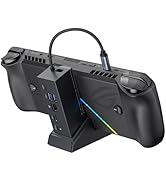
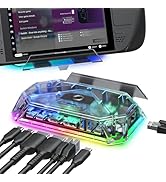
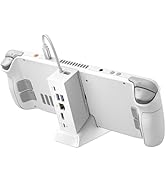
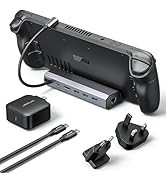
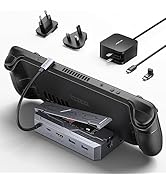
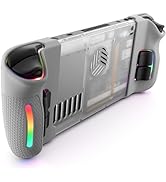
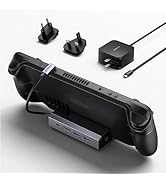
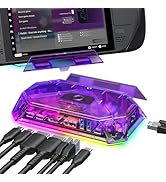
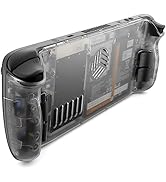
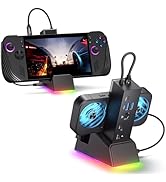
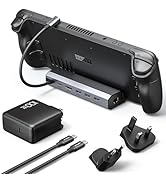
    JSAUX Docking Station for Steam Deck/Rog Ally/Legion Go, 7-in-1 Steam Deck Dock with HDMI 4K@60Hz, DisplayPort, Gigabit Ethernet, USB A 3.2 and 100W Charge Compatible with Steam Deck OLED-HB0702

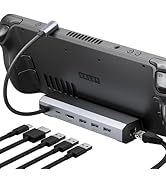
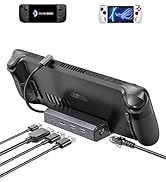
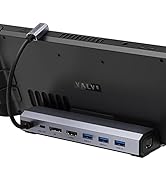
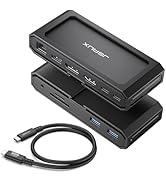
    • 7-in-1 Docking Station: Features 4K@60Hz HDMI and DisplayPort, Gigabit Ethernet, three USB 3.2 ports, and a 100W USB C charging. Compatible with Steam Deck (OLED), ROG Ally, Legion Go, and MSI Claw. NOTE: Ensure your cases are under 2mm thick, Not for ROG Ally X/ROG XBOX Ally / XBOX Ally X.
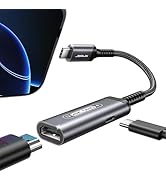
    • 4K@60Hz HDMI Output: The Steam Deck Dock features a 4K@60Hz HDMI 2.0 output for sharper and smoother visuals. Connect to a 4K monitor for stunningly detailed and fluid graphics, enhancing your gaming experience
    • Extra DisplayPort Output: Thanks to the 3rd upgrade, JSAUX HB0702 Steam Deck Dock provides a 4K@60Hz DisplayPort Output, Allowing you to complete your video output in a new way
    • Gigabit Ethernet: Enhance your gaming with gigabit Ethernet for seamless online play, rapid updates, and quick file transfers. Enjoy lightning-fast downloads and uploads, eliminating lag and latency for uninterrupted sessions
    • Advanced USB 3.2: Equipped with USB 3.2 technology, this device offers transfer speeds of up to 10Gbps, enabling quicker and more efficient data transfers while ensuring a stable and seamless performance for external gaming devices. NOTE: Not for ROG Ally X/ROG XBOX Ally / XBOX Ally X.
    +
    +
    Overview
    Specs
    Reviews
    avatar

    Any questions? Our AI beta will help you find out quickly.

    1

    NOTE

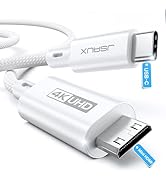
    1. Please make sure that all of the following conditions are met for achieving 4K@60Hz output: [A] Used HDMI to HDMI 2.0/2.1 Cable shorter than 15 feet in length. [B] Manually debuged into desktop mode and set 4K@60Hz output. [C] Set 4K@60Hz Output it in-game.
    2. Ensure that your handheld's protective cases do not exceed a thickness of 2 millimeters.
    3. Not compatible with ROG XBOX Ally / XBOX Ally X, AYANEO & Siwtch Game Consoles.
    4. The ROG Ally 30W Turbo Mode is perfectly supported with 100W power charger.
    5. DO NOT use HDMI to DisplayPort cables or adapters please.
    6. If you need to use HDMI Switch (the 8K one is better), make sure that the HDMI cable at both ends of it does not exceed 6.6 Feet.
    7. We recommend that you connect your Power Adapter (45W and above) while docking your Steam Deck to ensure stable operation of the output video and external devices.
    8. When running big games, too high image can put a large burden on the Steam Deck, which may be not capable of handling such high power consumption. You can reduce the picture quality of the game appropriately to reduce the latency of the external device during the game.

    STEAM DECK DOCK ROG ALLY DOCKING STATION

    steam deck dock

    Merchant Video
    1

    NOTE

    1. Please make sure that all of the following conditions are met for achieving 4K@60Hz output: [A] Used HDMI to HDMI 2.0/2.1 Cable shorter than 15 feet in length. [B] Manually debuged into desktop mode and set 4K@60Hz output. [C] Set 4K@60Hz Output it in-game.
    2. Ensure that your handheld's protective cases do not exceed a thickness of 2 millimeters.
    3. Not compatible with ROG XBOX Ally / XBOX Ally X, AYANEO & Siwtch Game Consoles.
    4. The ROG Ally 30W Turbo Mode is perfectly supported with 100W power charger.
    5. DO NOT use HDMI to DisplayPort cables or adapters please.
    6. If you need to use HDMI Switch (the 8K one is better), make sure that the HDMI cable at both ends of it does not exceed 6.6 Feet.
    7. We recommend that you connect your Power Adapter (45W and above) while docking your Steam Deck to ensure stable operation of the output video and external devices.
    8. When running big games, too high image can put a large burden on the Steam Deck, which may be not capable of handling such high power consumption. You can reduce the picture quality of the game appropriately to reduce the latency of the external device during the game.

    STEAM DECK DOCK ROG ALLY DOCKING STATION

    steam deck dock

    Merchant Video

    Steam Deck Docking Station Generation 3nd (Manufactured by JSAUX)

    NOTE:
    1. Its JSAUX Steam Deck Docking Station Generation 2nd with Gigabit Ethernet input & 3 USB 3.2 ports
    2. JSAUX recommends that you connect your Charger when using the dock to ensure stable and efficient operation.

    6-in-1 Docking Station for Steam Deck :
    Equipped with an HDMI 4K@60Hz output, an Gigabit Ethernet input, three USB A 3.2 ports and a USB C port for charging, letting you explore a new way to play with Steam Deck.

    4K@60Hz HDMI Output :
    The Steam Deck Dock comes with a 4K@60Hz HDMI 2.0 output. When you connect an external 4K monitor, it can provide you sharper and smoother visual experience, so you can enjoy the visual feast on your games.

    Extra DisplayPort Output
    Thanks to the 3rd upgrade, JSAUX HB0702 Steam Deck Dock provides a 4K@60Hz DisplayPort Output, Allowing you to complete your video output in a new way.

    Gigabit Ethernet
    supports up to 1000Mbps Gigabit Ethernet, connecting your network directly to the Steam Deck for faster downloads and uploads than Wi-Fi.

    Advanced USB 3.2
    With up to 5Gbps USB 3.2, you can perform more complex transfers in less time and also provide a more stable and smooth experience for external gaming devices.


    Product information

    Brand JSAUX
    Color 7-IN-1
    Hardware Interface DisplayPort, Ethernet, HDMI, USB 3.2 Gen 1, USB Type C
    Compatible Devices Valve Steam Deck /Steam Deck OLED, ASUS ROG Ally /ROG Ally, Lenovo Legion Go, MSI Claw
    Total USB Ports 4
    Product Dimensions 1.26"L x 4.29"W x 6.02"H
    Number of Ports 7
    Item Weight 0.21 Kilograms
    Total HDMI Ports 1
    Wattage 1E+2
    Date First Available November 14, 2022
    Manufacturer JSAUX

    Warranty & Returns

    Warranty, Returns, And Additional Information

    Warranty

    • Please contact the Seller directly for warranty information. Warranty information may also be found on the Manufacturer's website.
    • CONTACT

    Return Policies

    • Return for refund within: 30 days
    • Return for replacement within: 30 days
    • This item is covered by Fegfrght Return Policy

    Manufacturer Contact Info

    LOADING...