



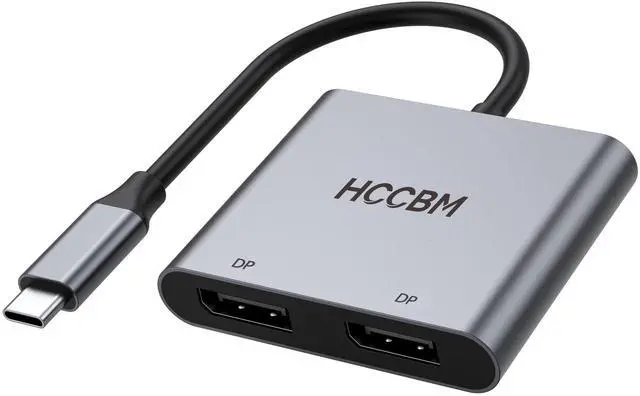


USB C to Dual Displayport Monitor Adapter 8K@30hz/ 4K@144HZ

2 DP Multiple Monitor USB C Adapters for Windows System Laptops
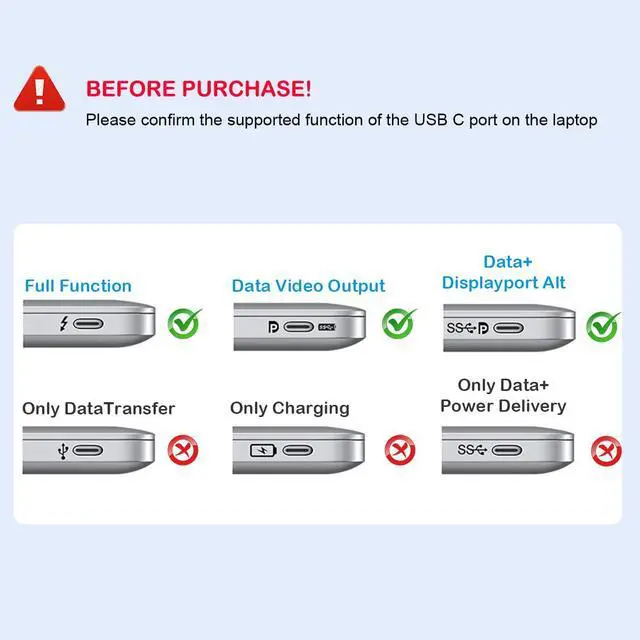
This USB C To Dual DP Adapter allows you to extend multiple different monitors. And you can use 2 monitors, support 4K 60Hz. It is an ideal gardget for your new usb-c thunderbolt 3 laptops and a great gardget for your working or studying or entertainment. With advance chip, provide you more stable performance.
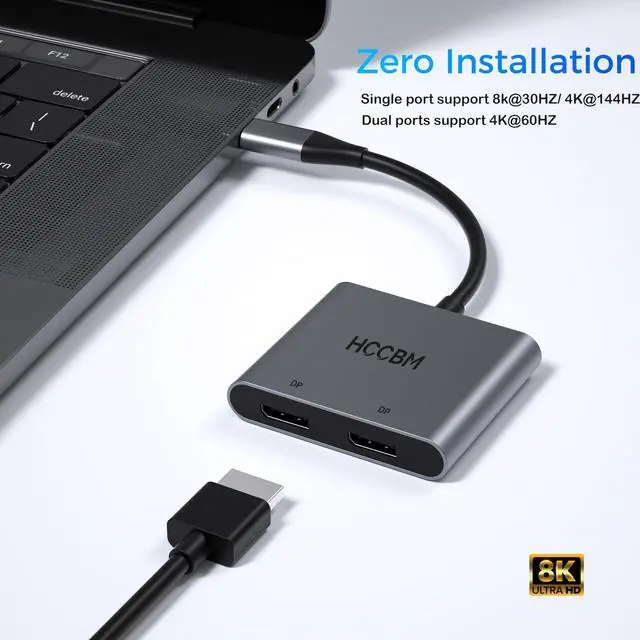
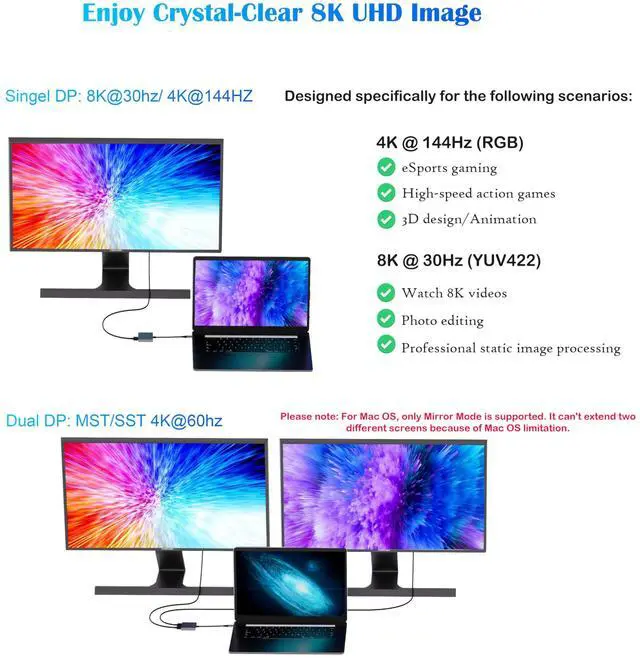
Single DP port: resolution up to 8K@30hz/ 4K@144HZ
Dual DP port used Simultaneously: resolution up to 4K(3840X2160P@60HZ),down compatible with 2K (2560x1440@60Hz),1080P(1920x1080)@60Hz, Extend mode: A-B+C
Compatible List(Not Fulllist):
· ONLY support Mirror Mode For: MacBook/ MacBook Pro (2021/2020/2019/2018/2017/2016), Macbook Air 2018-2021,Mac mini 2018-2020, iPad Pro 2018
· For HP Laptops: HP Spectre Laptop 13-af001TU/ Spectre x360 13t/ Spectre folio (13t-ak000cto)/ Spectre 360 laptop/ Specter x369; Elitebook 840 G5 series/ Elitebook X2/ Elitebook x360 1030 G3/ Elitebook 745 G6/ Elitebook 830 G6/ 2018 HP Elite 800 G4; Envy Geforce mx250/ Envy x360 Laptop (15z-ds100); Z book 15u G3/ Zbook 17 G4
· For Dell Laptops: Dell XPS 9380/ XPS 13 9365/ XPS 15 2018/ XPS 13 9300/ New XPS 15 with i7 dedicated video card 64GB of ram and 2TB SSD; Latitute 7280/ Latitude 5310 2-in-1; Precision 7730/ Precision 7750; Laptop 5590
· For: Samsung Galaxy S10+/S10/S9+ /S9 /S8+ /S8 Plus, Note 10 / 9 / 8
· For Thinkpad Laptops: Yoga 720-13IKB/ Yoga 730/ Yoga 900-13ISK/ Yoga 910/ Yoga 920/ Yoga 930/ Yoga 940-14IIL; 3rd generation Thinkpad Yoga; Yoga15 Thinkpad Ultrabook Pro; Thinkpad E590/ Thinkpad P72/ Thinkpad T470/ Thinkpad X1 Carbon (2019 model); Flex 14 IML (81XG)/ Flex 5; Legion Y530; Lenovo C930/ T480s/ X390/ 81N8
· For Mircrosoft Surface Laptops: Microsoft Surface Book 2/ Surface Go/ Surface Laptop 3; Surface Pro 7
Not Supported Laptops (Tested):
· HP EliteBook 745 G4 / HP Elitebook 820 G3 / HP EliteBook 828 G4 / HP 14s-be102TX / HP 14-ce1004TX 14 / HP Probook 650 G2 / HP Probook 455 G4 / HP Probook 430 G5 / HP Pavilion-14 bf116tx / HP Pavilion 15 ck009 / HP Pavilion Power Laptop 15-cb / Google Pixel phones / Nintendo Switch / Acer Aspire A5 / Oneplus 5T Phone


FAQ
1.How to connect Extend Mode for Windows OS?
Right-click desktop? select Intel display Settings ? pop-up Settings screen select display? select multi-screen display? expand the desktop
(If the display 3 is not display, please to manually select the display?click apply confirm can set OK).
2.If one of display does not display, How to do?
Right click desktop > Graphics Settings > Select One or More Active Displays.
3.How to switch Mac device to Extend Mode?
"Setting" ? "Display" ? click the "mirror display" box to switch to Extend mode ? then you can drag a window of website/movie to the rightest side of your desktop screen until it disappear on your desktop screen and show up on the external monitor screen.
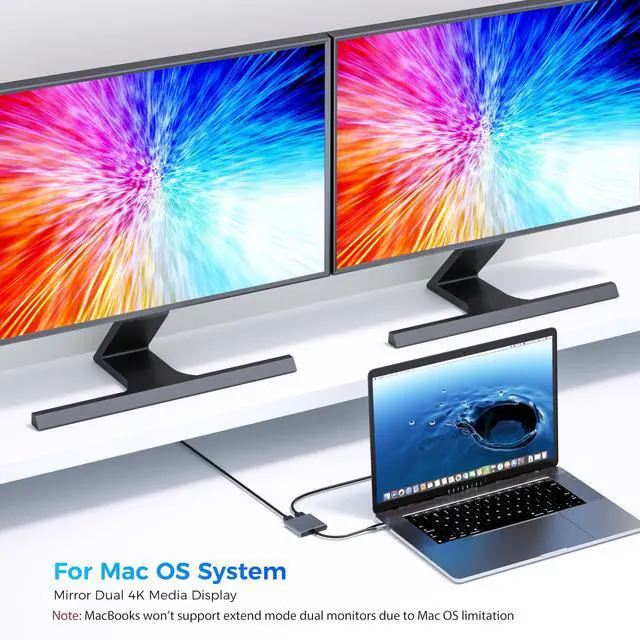
( Important Note: As Apple company itself limited, for Mac OS devices use in extend mode, the image on the two external screens will be the same.)
Extend/Mirror Windows and Mac OS

Extend Multiple Monitors/Displays for your USB-C Windows Laptops
Sigle DP USED: Resolution up to 8K@30hz/ 4K@144HZ,down compatible with 2K (2560x1440@60Hz),1080P(1920x1080)@60Hz
Dual DP USED: Resolution up to 4K(2560x1440@60Hz),down compatible with 2K (2560x1440@60Hz),1080P(1920x1080)@60Hz
With Advance chip, provide you more stable performace.

Support Extend & MST Mode(Triple Display)
If your usb c laptops is win system laptop.
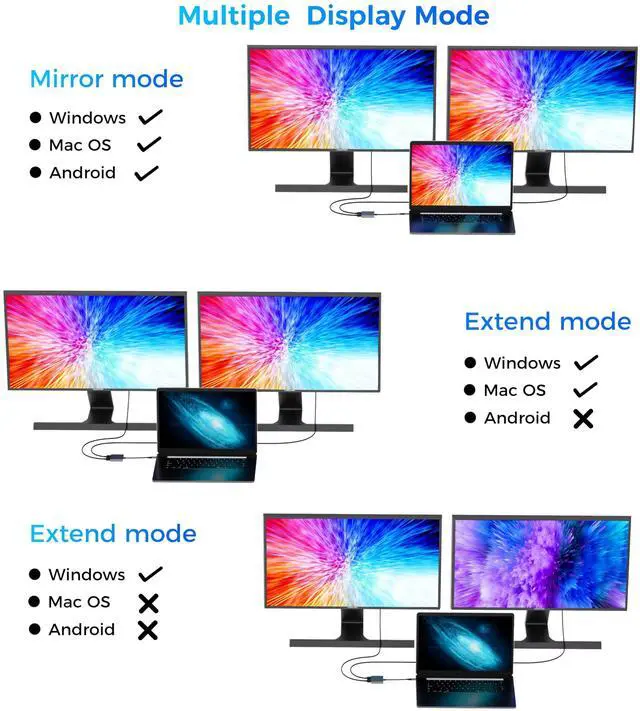
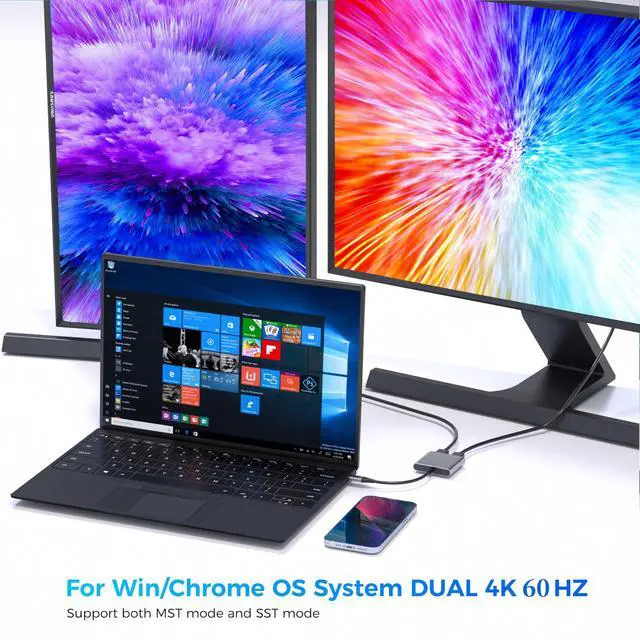
You can you 1 single dp or dual dp to extend your laptops. It allows you to extend extra 1/2 more different monitors. (The monitors' screen will be different as the laptop when in extend mode-same as the picture showed).
A-B/A-B+C

Suitable for Various Places & with Slim&Portable Braided Cable Design
This usb c to dual dp adapter is suitable for meeting,working in office, home theater, gaming, etc. It is an ideal gardget for your life.
With slim & portable design, the product size is only 2.39*1.97*0.46 inches.
Support Systems:windows/chrome os/linux/mac os

Support Extend & MST Mode(Triple Display)
If your usb c laptops is win system laptop.
You can you 1 single dp or dual dp to extend your laptops. It allows you to extend extra 1/2 more different monitors. (The monitors' screen will be different as the laptop when in extend mode-same as the picture showed).
A-B/A-B+C
It is compatible with HP Spectre Laptop 13-af001TU/ Spectre x360 13t/Dell XPS 9380/ XPS 13 9365/XPS 15 2018/Yoga 730/ Yoga 900-13ISK/ Yoga 910/ Yoga 920
Mirror (Clone) Mode for Mac USB-C Laptops
If your usb c laptops is Mac system laptop.
You can you 1 single dp or dual dp to extend your laptops. It allows you to mirror extra 1/2 more monitors.(The monitors' screen will be same as the laptop when in mirror mode-same as the picture showed)
A-A/A-A+A
It is compatible with MacBook/ MacBook Pro (2024/2020/2019/2018/2017/2016); Macbook Air 2018-2020, Mac mini 2018-2020
 2 IN 1 Dual DP adapter |  2 IN 1 Dual HDMI adapter |  2 IN 1 HDMI+DP adapter |  10 IN 1 Docking Station | |
|---|---|---|---|---|
| Customer Reviews | — | — | — | — |
| Price | — | — | — | — |
| Input Port | USBC | USBC | USBC | USBC |
| Output Port | 2*DP | 2*HDMI | HDMI+DP | 2*HDMI/3*USB/1*USBC/1*SD/TF |
| Other Function | no data | no data | no data | PD Charging/Gigabit Ethernet |
USB C to Dual Displayport Monitor Adapter 8K@30hz/ 4K@144HZ
2 DP Multiple Monitor USB C Adapters for Windows System Laptops
This USB C To Dual DP Adapter allows you to extend multiple different monitors. And you can use 2 monitors, support 4K 60Hz. It is an ideal gardget for your new usb-c thunderbolt 3 laptops and a great gardget for your working or studying or entertainment. With advance chip, provide you more stable performance.
Single DP port: resolution up to 8K@30hz/ 4K@144HZ
Dual DP port used Simultaneously: resolution up to 4K(3840X2160P@60HZ),down compatible with 2K (2560x1440@60Hz),1080P(1920x1080)@60Hz, Extend mode: A-B+C
Compatible List(Not Fulllist):
· ONLY support Mirror Mode For: MacBook/ MacBook Pro (2021/2020/2019/2018/2017/2016), Macbook Air 2018-2021,Mac mini 2018-2020, iPad Pro 2018
· For HP Laptops: HP Spectre Laptop 13-af001TU/ Spectre x360 13t/ Spectre folio (13t-ak000cto)/ Spectre 360 laptop/ Specter x369; Elitebook 840 G5 series/ Elitebook X2/ Elitebook x360 1030 G3/ Elitebook 745 G6/ Elitebook 830 G6/ 2018 HP Elite 800 G4; Envy Geforce mx250/ Envy x360 Laptop (15z-ds100); Z book 15u G3/ Zbook 17 G4
· For Dell Laptops: Dell XPS 9380/ XPS 13 9365/ XPS 15 2018/ XPS 13 9300/ New XPS 15 with i7 dedicated video card 64GB of ram and 2TB SSD; Latitute 7280/ Latitude 5310 2-in-1; Precision 7730/ Precision 7750; Laptop 5590
· For: Samsung Galaxy S10+/S10/S9+ /S9 /S8+ /S8 Plus, Note 10 / 9 / 8
· For Thinkpad Laptops: Yoga 720-13IKB/ Yoga 730/ Yoga 900-13ISK/ Yoga 910/ Yoga 920/ Yoga 930/ Yoga 940-14IIL; 3rd generation Thinkpad Yoga; Yoga15 Thinkpad Ultrabook Pro; Thinkpad E590/ Thinkpad P72/ Thinkpad T470/ Thinkpad X1 Carbon (2019 model); Flex 14 IML (81XG)/ Flex 5; Legion Y530; Lenovo C930/ T480s/ X390/ 81N8
· For Mircrosoft Surface Laptops: Microsoft Surface Book 2/ Surface Go/ Surface Laptop 3; Surface Pro 7
Not Supported Laptops (Tested):
· HP EliteBook 745 G4 / HP Elitebook 820 G3 / HP EliteBook 828 G4 / HP 14s-be102TX / HP 14-ce1004TX 14 / HP Probook 650 G2 / HP Probook 455 G4 / HP Probook 430 G5 / HP Pavilion-14 bf116tx / HP Pavilion 15 ck009 / HP Pavilion Power Laptop 15-cb / Google Pixel phones / Nintendo Switch / Acer Aspire A5 / Oneplus 5T Phone
FAQ
1.How to connect Extend Mode for Windows OS?
Right-click desktop? select Intel display Settings ? pop-up Settings screen select display? select multi-screen display? expand the desktop
(If the display 3 is not display, please to manually select the display?click apply confirm can set OK).
2.If one of display does not display, How to do?
Right click desktop > Graphics Settings > Select One or More Active Displays.
3.How to switch Mac device to Extend Mode?
"Setting" ? "Display" ? click the "mirror display" box to switch to Extend mode ? then you can drag a window of website/movie to the rightest side of your desktop screen until it disappear on your desktop screen and show up on the external monitor screen.
( Important Note: As Apple company itself limited, for Mac OS devices use in extend mode, the image on the two external screens will be the same.)
Extend/Mirror Windows and Mac OS
Extend Multiple Monitors/Displays for your USB-C Windows Laptops
Sigle DP USED: Resolution up to 8K@30hz/ 4K@144HZ,down compatible with 2K (2560x1440@60Hz),1080P(1920x1080)@60Hz
Dual DP USED: Resolution up to 4K(2560x1440@60Hz),down compatible with 2K (2560x1440@60Hz),1080P(1920x1080)@60Hz
With Advance chip, provide you more stable performace.
Support Extend & MST Mode(Triple Display)
If your usb c laptops is win system laptop.
You can you 1 single dp or dual dp to extend your laptops. It allows you to extend extra 1/2 more different monitors. (The monitors' screen will be different as the laptop when in extend mode-same as the picture showed).
A-B/A-B+C
Suitable for Various Places & with Slim&Portable Braided Cable Design
This usb c to dual dp adapter is suitable for meeting,working in office, home theater, gaming, etc. It is an ideal gardget for your life.
With slim & portable design, the product size is only 2.39*1.97*0.46 inches.
Support Systems:windows/chrome os/linux/mac os
Support Extend & MST Mode(Triple Display)
If your usb c laptops is win system laptop.
You can you 1 single dp or dual dp to extend your laptops. It allows you to extend extra 1/2 more different monitors. (The monitors' screen will be different as the laptop when in extend mode-same as the picture showed).
A-B/A-B+C
It is compatible with HP Spectre Laptop 13-af001TU/ Spectre x360 13t/Dell XPS 9380/ XPS 13 9365/XPS 15 2018/Yoga 730/ Yoga 900-13ISK/ Yoga 910/ Yoga 920
Mirror (Clone) Mode for Mac USB-C Laptops
If your usb c laptops is Mac system laptop.
You can you 1 single dp or dual dp to extend your laptops. It allows you to mirror extra 1/2 more monitors.(The monitors' screen will be same as the laptop when in mirror mode-same as the picture showed)
A-A/A-A+A
It is compatible with MacBook/ MacBook Pro (2024/2020/2019/2018/2017/2016); Macbook Air 2018-2020, Mac mini 2018-2020
2 IN 1 Dual DP adapter | 2 IN 1 Dual HDMI adapter | 2 IN 1 HDMI+DP adapter | 10 IN 1 Docking Station | |
|---|---|---|---|---|
| Customer Reviews | — | — | — | — |
| Price | — | — | — | — |
| Input Port | USBC | USBC | USBC | USBC |
| Output Port | 2*DP | 2*HDMI | HDMI+DP | 2*HDMI/3*USB/1*USBC/1*SD/TF |
| Other Function | no data | no data | no data | PD Charging/Gigabit Ethernet |