

Your Browsing History


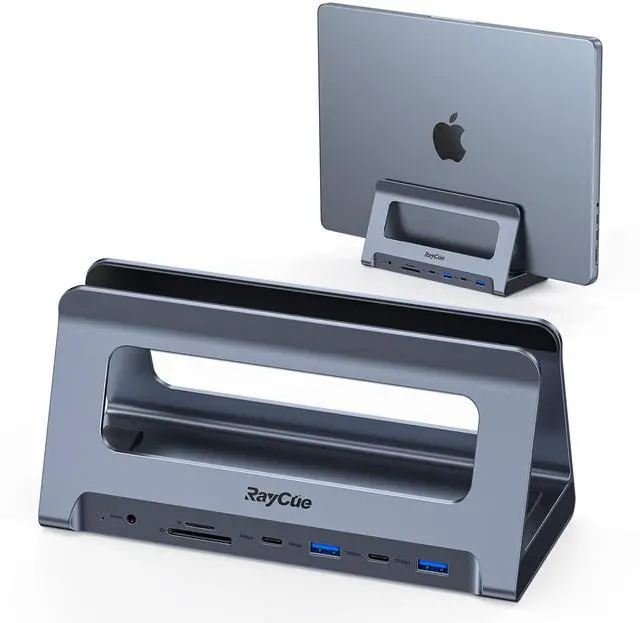

USB-C Docking Station for MacBook Pro/Air, Dual HDMI, USB-C Dock with 10Gbps, PD3.0, RJ45, 2xUSB 3.0, 2xUSB 2.0, SD/TF, Audio
Limited time offer, ends 09/14 By Eristy shop
- This MacBook Pro docking station extends dual monitors for MacBook Air 13'' (2018-2020, Intel chip); MacBook Pro 13'' (2016-2020, Intel chip), 14" (2021, 2023), 15" (2016-2019), and 16" (2019, 2021, 2023). Note: M1/M2/M3 chip models can only support 1 external monitor. It is not compatible with Windows laptops. This USB-C docking station for macOS laptops is equipped with 2*4K HDMI ports, a USB-C PD 3.0 port (supports up to 100W input), 10Gbps USB-C and USB-A 3.1 ports, 5Gbps USB-C and USB 3.0 ports, 2*USB 2.0 ports for wireless devices, SD/Micro SD card readers (can read and write simultaneously), an RJ45 Gigabit Ethernet port (10/100/1000Mbps), a 3.5 mm audio jack, and 2 USB-C host ports (for connecting to the MacBook Pro and the dock). The USB-C MacBook Pro docking station allows you to connect to dual 4K external monitors via the 2 HDMI ports, ideal for highly productive tasks with Ultra HD image and video output, such as streaming movies, presentations, or video games. macOS users can connect two monitors to display up to 2*4K@60Hz via the HDMI ports. **Superspeed Data Transfer - 10Gbps** 10Gbps USB-A and 10Gbps USB-C data ports on the front of the universal docking station provide super-speed data transfer, ideal for drives and HDD devices. The time required to transfer a 20G file is approximately 16.4 seconds. The laptop adapter also offers 1*USB/USB-C 3.0 port and 2*USB 2.0 ports to connect your wireless keyboard and mouse. **Fast 100W PD Charging & Stable 1000Mbps Et
+
+
Overview
Specs
Reviews

Any questions? Our AI mode will help you find out quickly.
Try me now
This MacBook Pro docking station extends dual monitors for MacBook Air 13'' (2018-2020, Intel chip); MacBook Pro 13'' (2016-2020, Intel chip), 14" (2021, 2023), 15" (2016-2019), and 16" (2019, 2021, 2023). Note: M1/M2/M3 chip models can only support 1 external monitor. It is not compatible with Windows laptops. This USB-C docking station for macOS laptops is equipped with 2*4K HDMI ports, a USB-C PD 3.0 port (supports up to 100W input), 10Gbps USB-C and USB-A 3.1 ports, 5Gbps USB-C and USB 3.0 ports, 2*USB 2.0 ports for wireless devices, SD/Micro SD card readers (can read and write simultaneously), an RJ45 Gigabit Ethernet port (10/100/1000Mbps), a 3.5 mm audio jack, and 2 USB-C host ports (for connecting to the MacBook Pro and the dock). The USB-C MacBook Pro docking station allows you to connect to dual 4K external monitors via the 2 HDMI ports, ideal for highly productive tasks with Ultra HD image and video output, such as streaming movies, presentations, or video games. macOS users can connect two monitors to display up to 2*4K@60Hz via the HDMI ports. **Superspeed Data Transfer - 10Gbps** 10Gbps USB-A and 10Gbps USB-C data ports on the front of the universal docking station provide super-speed data transfer, ideal for drives and HDD devices. The time required to transfer a 20G file is approximately 16.4 seconds. The laptop adapter also offers 1*USB/USB-C 3.0 port and 2*USB 2.0 ports to connect your wireless keyboard and mouse. **Fast 100W PD Charging & Stable 1000Mbps Ethernet** This MacBook Pro docking station dual monitor supports up to 100W power input (PD 3.0) and offers a maximum of 85W power charging for your MacBooks. You can quickly charge your MacBook Pro/Air laptop. For stable usage, attach your MacBook Pro laptop's power adapter to the USB-C PD 3.0 charging port on the dock. Note: The charger is not included. The USB-C Ethernet adapter provides faster data transfers and better security than most Wi-Fi connections
Warranty & Returns
Warranty, Returns, And Additional Information
Warranty
- Please contact the Seller directly for warranty information. Warranty information may also be found on the Manufacturer's website.
- CONTACT
Return Policies
- Return for refund within: 30 days
- Return for replacement within: 30 days
- This item is covered by Eristy shop Return Policy
Manufacturer Contact Info
- For a directory of all our manufacturers, please click below.
- Manufacturers Directory
LOADING...