

Your Browsing History
- $199.99
- Free 30-day Returns

Meet Your Seller


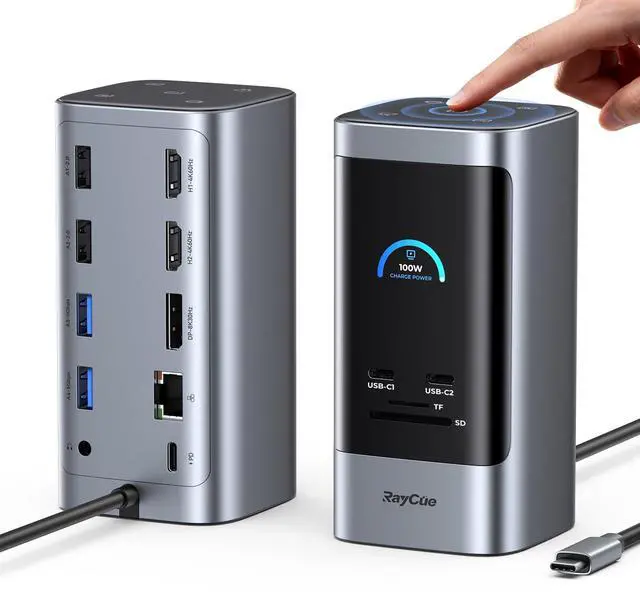

15 in 1 Laptop Docking Station 3 Monitors, Triple 8K Display with 3 HDMI, 6 USB Ports, 5 Shortcut Button, Gigabit Ethernet, PD3.0, Smart Display for Windows/Dell/Lenovo/HP...(No Power Adapter)
Limited time offer, ends 09/14 By Fornierwoly
- [15 in 1 Huge Expansion]: Features 2 HDMI ports (4K@60Hz), a DisplayPort connector (8K@30Hz), 2 USB-C data ports (10Gbps & 5Gbps), 4 USB-A ports (5Gbps & 480Mbps), an SD/TF card reader (160MB/s), Gigabit Ethernet (1Gbps), a 3.5mm AUX jack, a 100W USB-C PD input port, and 5 shortcut buttons. [Efficient Triple Display for Windows]: Extend your display across three monitors in stunning 8K@30Hz and 4K@60Hz resolution via the HDMI and DisplayPort ports, boosting efficient multitasking. This laptop dock enhances your work with professional-grade visual capabilities. (Note: MacOS systems do not support triple-display mode; only one display can be extended with connected monitors under the extension mode.) [Smart LED Status Screen]: The integrated digital display offers real-time feedback on charging power, resolution, and more. Monitor your connections with ease. Redefine your workspace with this compact vertical dock, featuring a sleek aluminum finish and a 1m cable. [5 Shortcut Buttons & Redefine Your Workflow]: Enhance productivity with five dedicated top-panel buttons for instant screen capture, UI switching, display mode toggling, computer lock, and brightness adjustment. Streamline complex tasks into simple taps. For example, use the one-touch screen-lock button for immediate privacy protection when you step away. [Blazing-Fast 10Gbps Data Transfer to Move Files]: Equipped with USB 3.2 Gen 2 ports, this dock delivers incredible transfer speeds up to 10Gbps. Move a 20GB file in
+
+
Overview
Specs
Reviews

Any questions? Our AI mode will help you find out quickly.
Try me now
[15 in 1 Huge Expansion]: Features 2 HDMI ports (4K@60Hz), a DisplayPort connector (8K@30Hz), 2 USB-C data ports (10Gbps & 5Gbps), 4 USB-A ports (5Gbps & 480Mbps), an SD/TF card reader (160MB/s), Gigabit Ethernet (1Gbps), a 3.5mm AUX jack, a 100W USB-C PD input port, and 5 shortcut buttons. [Efficient Triple Display for Windows]: Extend your display across three monitors in stunning 8K@30Hz and 4K@60Hz resolution via the HDMI and DisplayPort ports, boosting efficient multitasking. This laptop dock enhances your work with professional-grade visual capabilities. (Note: MacOS systems do not support triple-display mode; only one display can be extended with connected monitors under the extension mode.) [Smart LED Status Screen]: The integrated digital display offers real-time feedback on charging power, resolution, and more. Monitor your connections with ease. Redefine your workspace with this compact vertical dock, featuring a sleek aluminum finish and a 1m cable. [5 Shortcut Buttons & Redefine Your Workflow]: Enhance productivity with five dedicated top-panel buttons for instant screen capture, UI switching, display mode toggling, computer lock, and brightness adjustment. Streamline complex tasks into simple taps. For example, use the one-touch screen-lock button for immediate privacy protection when you step away. [Blazing-Fast 10Gbps Data Transfer to Move Files]: Equipped with USB 3.2 Gen 2 ports, this dock delivers incredible transfer speeds up to 10Gbps. Move a 20GB file in roughly 20 secondsideal for rapid backups and sharing large projects. [PD 100W Fast Charging & Power Your Laptop Non-Stop]: Provides maximum 100W power input through the USB-C PD port, supporting pass-through charging to your laptop with output up to 85W. It is recommended to connect an adapter of 65W or above; please use a 100W adapter when the device is fully loaded. (Note: Power adapter and input cable are not included.)
Warranty & Returns
Warranty, Returns, And Additional Information
Warranty
- Please contact the Seller directly for warranty information. Warranty information may also be found on the Manufacturer's website.
- CONTACT
Return Policies
- Return for refund within: 30 days
- Return for replacement within: 30 days
- This item is covered by Fornierwoly Return Policy
Manufacturer Contact Info
- For a directory of all our manufacturers, please click below.
- Manufacturers Directory
LOADING...