

Your Browsing History



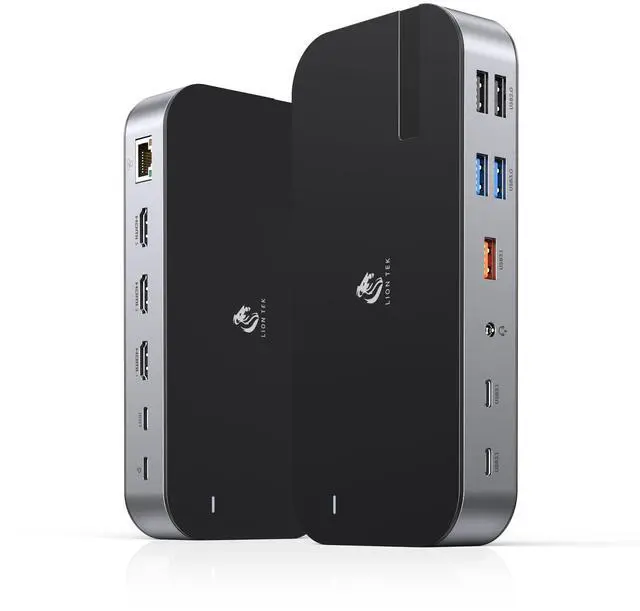

Laptop Docking Station,16 in 1 USB C Docking Triple Monitor,USB C Dock Station with 3 HDMI,PD 100W, USB 3.1/3.0/2.0,RJ 45 Ethernet,microSD/SD Card,Audio for Dell/HP/Lenovo(Exclude Power Adapter
Limited time offer, ends 09/14 By Eristy shop
- 16-IN-1 USB C Docking Station This 16-in-1 USB C Docking Station enables 3 monitors and contains a 100W PD port (for charging), Gigabit RJ45 port, 4K HDMI ports, microSD/SD card slots, 3 USB 3.1 ports, 2 USB 3.0 ports, 2 USB 2.0 ports, and a 3.5mm audio port. With plug-and-play operation, this USB C hub transforms any Windows laptop into a portable workstation. This adaptable 16-in-1 laptop docking station addresses various daily requirements. Ultra 4K HD 3 HDMI Dock This laptop docking station enables triple 4K HDMI monitors on Windows OS. When using only HDMI 1, resolution can reach up to 4K@60Hz. When connecting dual monitors, both HDMI ports support 4K@30Hz (subject to your desktop resolution). Note: macOS laptops only support SST mode; all external displays show identical content in mirror or extend mode. High-Speed Data Transfers This docking station features USB-C 3.1 and USB-A 3.1 data ports, enabling transfer speeds up to 10Gbpstwice the speed of USB 3.0. SD and microSD card slots allow photo transfers at up to 104MB/s. 2 USB-A 3.0 ports are perfect for standard peripherals, and 2 USB-A 2.0 ports deliver stable connections for wireless mice and keyboards. Gigabit Ethernet & 100W Power Delivery This USB C docking station includes an RJ45 Gigabit Ethernet port for reliable wired internet up to 1000Mbps. The 100W USB C Power Delivery port enables pass-through charging for your laptop. It accepts up to 100W input, with a secure output of 87W. Note: PD charger is not inc
+
+
Overview
Specs
Reviews

Any questions? Our AI mode will help you find out quickly.
Try me now
16-IN-1 USB C Docking Station This 16-in-1 USB C Docking Station enables 3 monitors and contains a 100W PD port (for charging), Gigabit RJ45 port, 4K HDMI ports, microSD/SD card slots, 3 USB 3.1 ports, 2 USB 3.0 ports, 2 USB 2.0 ports, and a 3.5mm audio port. With plug-and-play operation, this USB C hub transforms any Windows laptop into a portable workstation. This adaptable 16-in-1 laptop docking station addresses various daily requirements. Ultra 4K HD 3 HDMI Dock This laptop docking station enables triple 4K HDMI monitors on Windows OS. When using only HDMI 1, resolution can reach up to 4K@60Hz. When connecting dual monitors, both HDMI ports support 4K@30Hz (subject to your desktop resolution). Note: macOS laptops only support SST mode; all external displays show identical content in mirror or extend mode. High-Speed Data Transfers This docking station features USB-C 3.1 and USB-A 3.1 data ports, enabling transfer speeds up to 10Gbpstwice the speed of USB 3.0. SD and microSD card slots allow photo transfers at up to 104MB/s. 2 USB-A 3.0 ports are perfect for standard peripherals, and 2 USB-A 2.0 ports deliver stable connections for wireless mice and keyboards. Gigabit Ethernet & 100W Power Delivery This USB C docking station includes an RJ45 Gigabit Ethernet port for reliable wired internet up to 1000Mbps. The 100W USB C Power Delivery port enables pass-through charging for your laptop. It accepts up to 100W input, with a secure output of 87W. Note: PD charger is not included. For complete functionality, employ a charger with a power output of 87W or greater. 3.5mm Audio & Wide Compatibility The 3.5mm 2-in-1 audio/mic jack enables simultaneous audio playback and voice output. This docking station is compatible with Thunderbolt 3 or full-featured USB-C devices, including MacBook, MacBook Pro 20172020, MacBook Air 20182020, iPad Pro 2018+, Lenovo Yoga 720/910/920/930, Microsoft Surface Book 2, Dell XPS13/15, Surface Laptop 3, Dell Latitude 13 7000/E7370, and more. Note: Ensure your devices USB-C port supports DisplayPort Alternate Mode for HDMI output
Warranty & Returns
Warranty, Returns, And Additional Information
Warranty
- Please contact the Seller directly for warranty information. Warranty information may also be found on the Manufacturer's website.
- CONTACT
Return Policies
- Return for refund within: 30 days
- Return for replacement within: 30 days
- This item is covered by Eristy shop Return Policy
Manufacturer Contact Info
- For a directory of all our manufacturers, please click below.
- Manufacturers Directory
LOADING...