

Your Browsing History


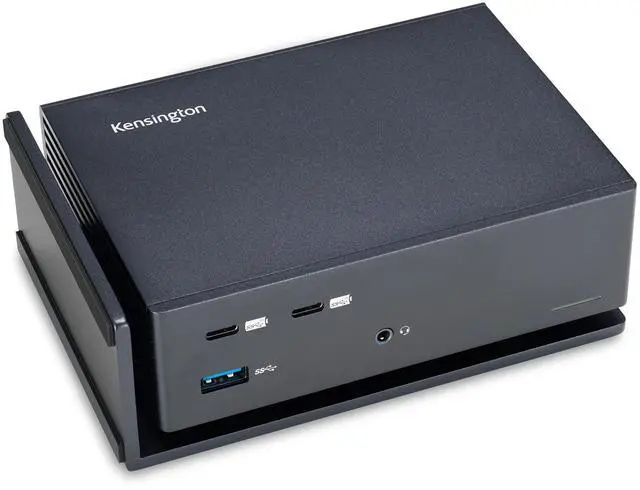





USB-C and Thunderbolt Dock, up to 100W Charging, Dual 4K, for Mac, Windows and Surface (K37010NA)
Limited time offer, ends 07/28 By Fornierwoly
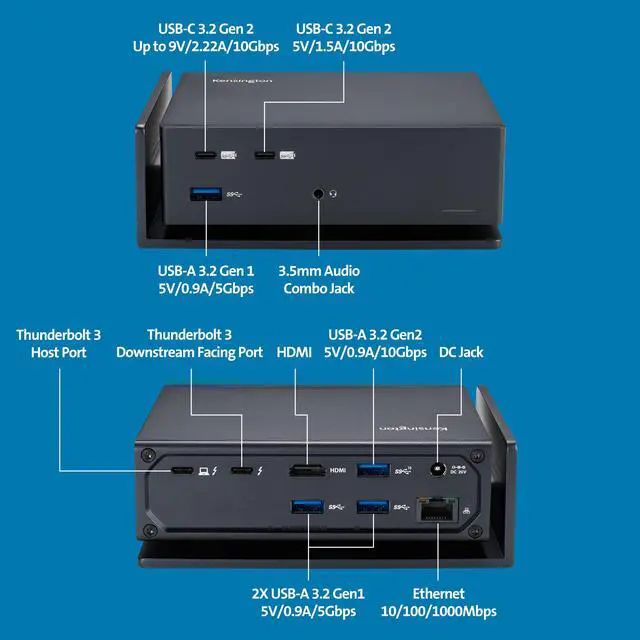
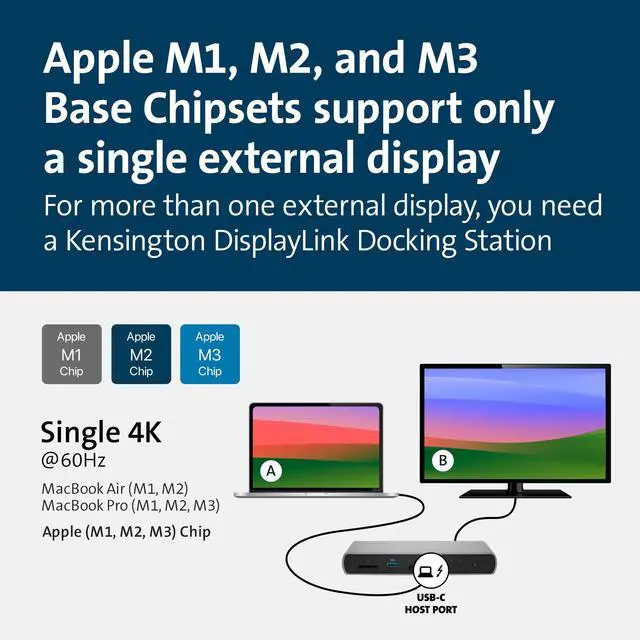
- A USB-C and Thunderbolt 3 dock for Windows and MacBooks equipped with USB-C or Thunderbolt; it is also compatible with Microsoft Surface 9 and Surface Laptop 5. It supports 4K Ultra HD (4096 x 2160 30-bit color @ 60 Hz) to one or two monitors via the HDMI 2.0 port and Thunderbolt 3 downstream port. Note: Macbook Air and Macbook Pro 13 with the original M1 CPU will only display to a single monitor due to Apples chipset limitations, but Macbook Pros with M1 & M2 Pro and M1 & M2 Max CPUs will work with dual displays. For dual display on any MacBook, refer to part number K33620NA. Connect your laptop to the Thunderbolt 3 port (0.8 meter Intel Certified TB3 cable included). Connect your dual displays by using the HDMI 2.0 port and the Thunderbolt 3 downstream port (USB-C to HDMI or USB-C to DisplayPort adapter or cable not included). The 170 Watt Power Supply provides up to 100W power to charge any Thunderbolt 3, Thunderbolt 4, or USB4 laptop. It supplies additional power to run peripherals such as hard drives and for charging phones and tablets. It supports horizontal or vertical placement. Ports include: Two front USB-C 3.2 Gen2 ports (one 5V/1.5A/10Gbps and one 9V/2.22A/10Gbps); four USB-A ports (one front 3.2 Gen2 5V/0.9A/10Gbps, three rear with two supporting 3.2 Gen1 5V/0.9A/5Gbps and one 3.2 Gen2 5V/0.9A/10Gbps); one Gigabit Ethernet port; one audio combo jack; an HDMI 2.0 port; and a Thunderbolt 3 downstream port
+
+
Overview
Specs
Reviews

Any questions? Our AI beta will help you find out quickly.
Try me now
A USB-C and Thunderbolt 3 dock for Windows and MacBooks equipped with USB-C or Thunderbolt; it is also compatible with Microsoft Surface 9 and Surface Laptop 5. It supports 4K Ultra HD (4096 x 2160 30-bit color @ 60 Hz) to one or two monitors via the HDMI 2.0 port and Thunderbolt 3 downstream port. Note: Macbook Air and Macbook Pro 13 with the original M1 CPU will only display to a single monitor due to Apples chipset limitations, but Macbook Pros with M1 & M2 Pro and M1 & M2 Max CPUs will work with dual displays. For dual display on any MacBook, refer to part number K33620NA. Connect your laptop to the Thunderbolt 3 port (0.8 meter Intel Certified TB3 cable included). Connect your dual displays by using the HDMI 2.0 port and the Thunderbolt 3 downstream port (USB-C to HDMI or USB-C to DisplayPort adapter or cable not included). The 170 Watt Power Supply provides up to 100W power to charge any Thunderbolt 3, Thunderbolt 4, or USB4 laptop. It supplies additional power to run peripherals such as hard drives and for charging phones and tablets. It supports horizontal or vertical placement. Ports include: Two front USB-C 3.2 Gen2 ports (one 5V/1.5A/10Gbps and one 9V/2.22A/10Gbps); four USB-A ports (one front 3.2 Gen2 5V/0.9A/10Gbps, three rear with two supporting 3.2 Gen1 5V/0.9A/5Gbps and one 3.2 Gen2 5V/0.9A/10Gbps); one Gigabit Ethernet port; one audio combo jack; an HDMI 2.0 port; and a Thunderbolt 3 downstream port
Warranty & Returns
Warranty, Returns, And Additional Information
Warranty
- Please contact the Seller directly for warranty information. Warranty information may also be found on the Manufacturer's website.
- CONTACT
Return Policies
- Return for refund within: 30 days
- Return for replacement within: 30 days
- This item is covered by Fornierwoly Return Policy
Manufacturer Contact Info
- For a directory of all our manufacturers, please click below.
- Manufacturers Directory
LOADING...