

Your Browsing History
- Free 30-day Returns
$498.98

Meet Your Seller

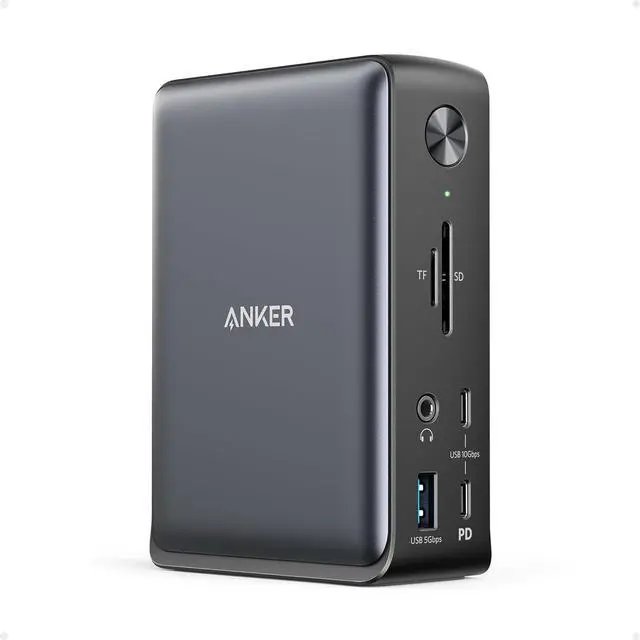


Anker Laptop Docking Station, 13-in-1 USB-C Docking Station, Triple Display with 2xHDMI and 1xDP, 10 Gbps USB-C and 5 Gbps USB-A Data, Ethernet, Audio, SD, 85W Charging for Dell, HP, Lenovo and More
Limited time offer, ends 07/19 By Dazan Technology
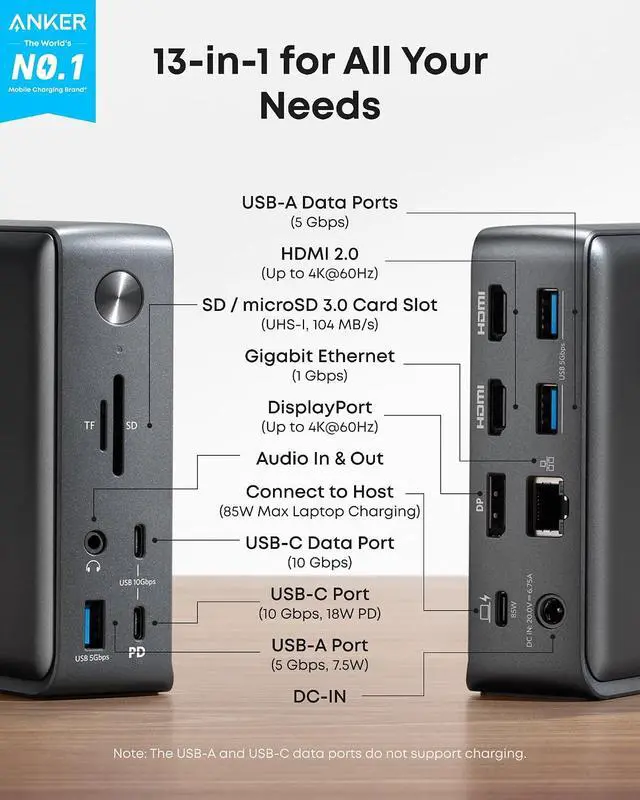
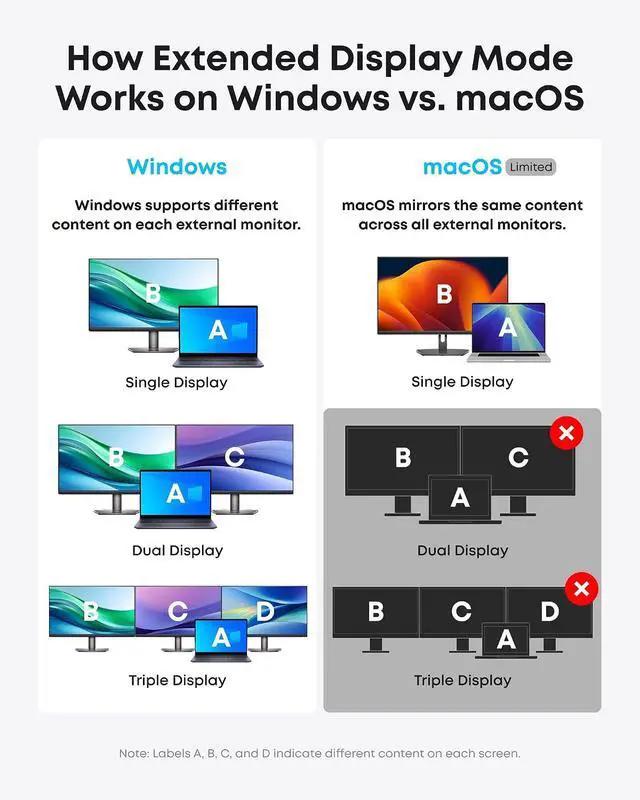
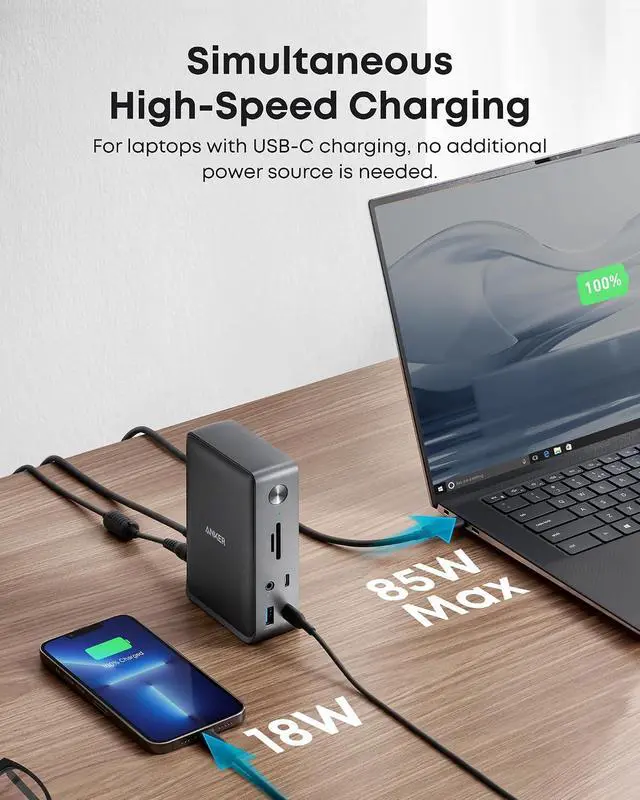
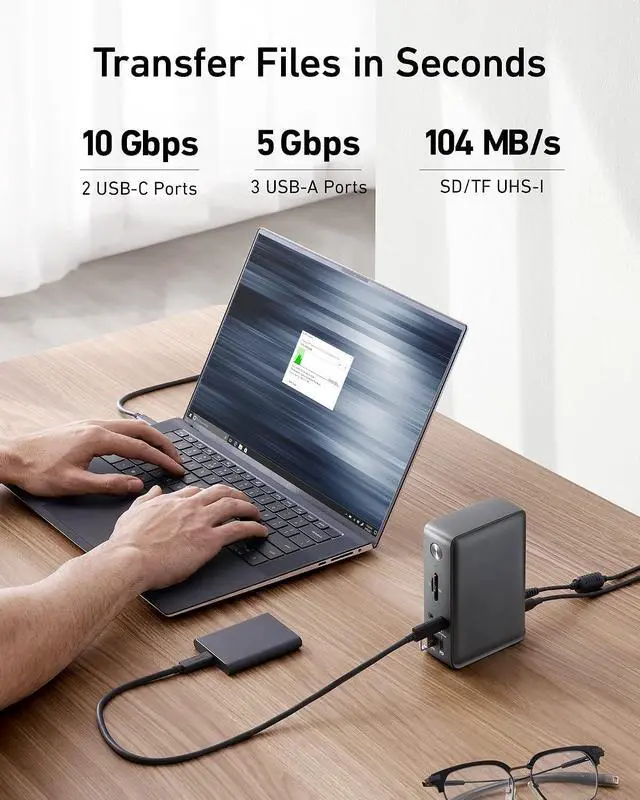
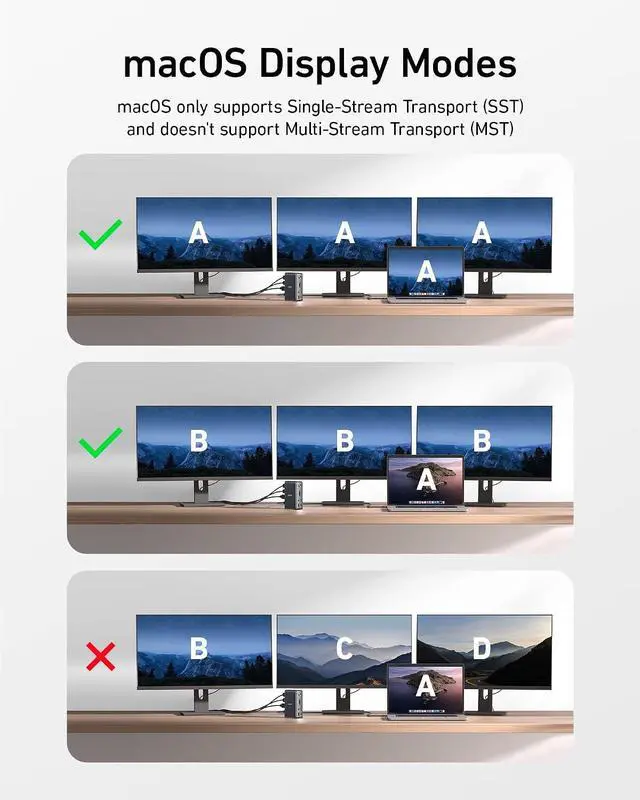
- Huge Expansion: Equipped with an 85W laptop-charging USB-C port, an 18W Power Delivery USB-C port, a USB-C data port, 3 USB-A ports, 2 HDMI ports, a DisplayPort, an Ethernet port, SD/microSD card slots, a 3.5 mm AUX port, and a DC input.; Simultaneous Charging: Connect your laptop to the 85W USB-C port and connect your phone or other mobile device to the 18W Power Delivery USB-C port to get simultaneous high-speed charging.; Comprehensive Media Display: Simultaneously stream media to up to 3 monitors in 1080p@60Hz via the DisplayPort and dual HDMI ports.; Display Information: macOS and iPadOS only support Single-Stream Transport (SST) mode, which means all connected monitors will show the same content.; Compatibility: Supports USB-C, USB4, and Thunderbolt connections. Compatible with Windows 10 and 11, ChromeOS, and laptops that support DP Alt Mode and Power Delivery. Note: 1. For macOS, the displays on the both external monitors are identical. 2. This device is not compatible with Linux.; What You Get: PowerExpand 13-in-1 USB-C Dock, a 135W power adapter, 1 m / 3 ft USB-C to USB-C cable, welcome guide, our worry-free 18-month warranty, and friendly customer service.
+
+
Overview
Specs
Reviews

Any questions? Our AI beta will help you find out quickly.
Try me now
Product description Universally Compatible For macOS For Windows Multi-Device Charging Data & Display Other Ports & Dimensions Resolutions for DP 1.4 Resolutions for DP 1.2
Boost Productivity Frequently Asked Questions:
Q1: Will this dock work with any laptop? How do I make sure my laptop works with this dock
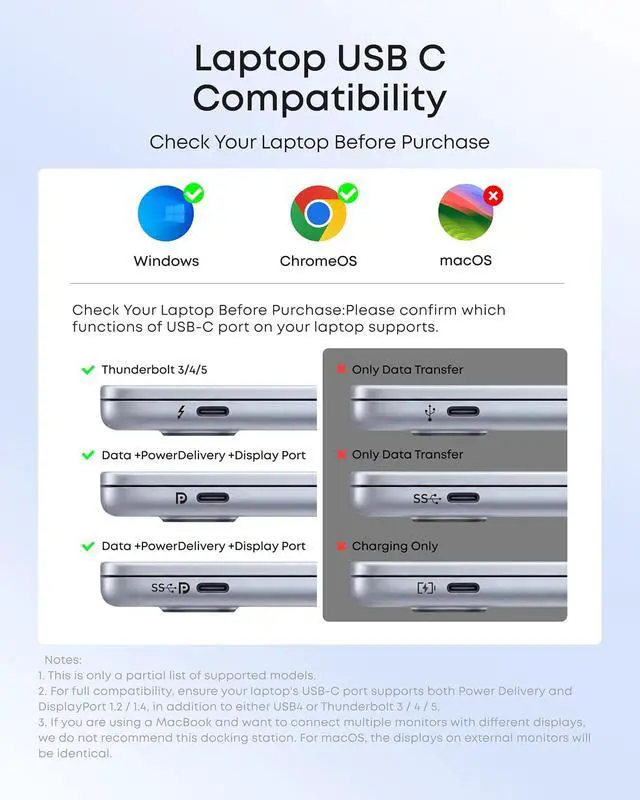
A: This dock works with laptops with a USB-C port that supports DisplayPort Alt Mode and Power Delivery. To confirm the USB-C port function of your laptop, consult your user manual or contact your laptops manufacturer. If your USB-C port doesnt support DisplayPort Alt Mode, you wont receive video output. If your USB-C port doesnt support Power Delivery, the dock will work correctly with video and data (including audio and Ethernet), but would not be able to supply charging to your laptop.
Q2: Can I use my own USB-C cable to connect the dock to my laptop?
A: Its recommended that you use the included 3 ft USB-C cable. If you need to use a different cable (due to loss etc. ), then any other USB-C cable with support for USB 3.1 Gen 2 and 85W Power Delivery would also be compatible.
Q3: When using this dock, can I connect a MacBook to external monitors and have different content on each screen?
A: No, due to limitations within the MacOS system, all monitors connected through this dock will mirror the same content rather than displaying separately extended desktops. In contrast, Windows devices support both Single Stream Transport (SST) and Multi Stream Transport (MST) modes, allowing you to extend your display across multiple monitors and show different content on each.
Q4: Why does my Dell laptop show a slow charging warning even though my power requirement is less than 85W when plugged into this dock?
A: Please note that Dell laptops use a proprietary charging protocol, which can trigger a slow charging warning when using non-Dell echargers. Although maximum power cannot be achieved, it remains sufficient for routine charging needs.
Q5: Sometimes the dock doesnt automatically reconnect after I wake up or restart my laptop. What should I do?
A: This situation doesnt happen very often, but if you are having this problem, try disconnecting and reconnecting the USB-C cable or restarting the dock. Comparison 13-in-1 USB-C Dock Add to Cart 13-in-1 USB-C Dock Add to Cart 9-in-1 USB-C PD Dock Add to Cart 13-in-1 Thunderbolt 3Dock Buying Options Customer Reviews 4.1 out of 5 stars 2, 398 4.4 out of 5 stars 282 3.6 out of 5 stars 499 4.1 out of 5 stars 1, 435 Price $ 199.99 $199. 99 $ 111.99 $111. 99 $ 99.99 $99. 99 Power Input DC-IN (20V/ 6.5A ) DC-IN (140W max) DC-IN (100W) DC-IN (20V/9A) Charging for Laptop 85W Max 100W 60W 85W Data Transfer Speed 10Gbps 10Gbps 5Gbps Up to 40Gbps Video Output 4K@60Hz (Max) 4K@60Hz 4K@60Hz 5K@60Hz Gigabit Ethernet Audio In & Out Y Y Y Y SD / TF Slots SD / TF Slots SD / TF 3.0 Card Slots N SD / TF Slots Dimensions and Weight 4.9 * 3.5 * 1.6 in / 13.1 oz 3.74 * 1.57 * 5.51 in / 14.4 oz 5.7 * 2.5 * 1.0 in / 6.64 oz 4.9 * 3.5 * 1.6 in / 17.3 oz
Boost Productivity Frequently Asked Questions:
Q1: Will this dock work with any laptop? How do I make sure my laptop works with this dock
A: This dock works with laptops with a USB-C port that supports DisplayPort Alt Mode and Power Delivery. To confirm the USB-C port function of your laptop, consult your user manual or contact your laptops manufacturer. If your USB-C port doesnt support DisplayPort Alt Mode, you wont receive video output. If your USB-C port doesnt support Power Delivery, the dock will work correctly with video and data (including audio and Ethernet), but would not be able to supply charging to your laptop.
Q2: Can I use my own USB-C cable to connect the dock to my laptop?
A: Its recommended that you use the included 3 ft USB-C cable. If you need to use a different cable (due to loss etc. ), then any other USB-C cable with support for USB 3.1 Gen 2 and 85W Power Delivery would also be compatible.
Q3: When using this dock, can I connect a MacBook to external monitors and have different content on each screen?
A: No, due to limitations within the MacOS system, all monitors connected through this dock will mirror the same content rather than displaying separately extended desktops. In contrast, Windows devices support both Single Stream Transport (SST) and Multi Stream Transport (MST) modes, allowing you to extend your display across multiple monitors and show different content on each.
Q4: Why does my Dell laptop show a slow charging warning even though my power requirement is less than 85W when plugged into this dock?
A: Please note that Dell laptops use a proprietary charging protocol, which can trigger a slow charging warning when using non-Dell echargers. Although maximum power cannot be achieved, it remains sufficient for routine charging needs.
Q5: Sometimes the dock doesnt automatically reconnect after I wake up or restart my laptop. What should I do?
A: This situation doesnt happen very often, but if you are having this problem, try disconnecting and reconnecting the USB-C cable or restarting the dock. Comparison 13-in-1 USB-C Dock Add to Cart 13-in-1 USB-C Dock Add to Cart 9-in-1 USB-C PD Dock Add to Cart 13-in-1 Thunderbolt 3Dock Buying Options Customer Reviews 4.1 out of 5 stars 2, 398 4.4 out of 5 stars 282 3.6 out of 5 stars 499 4.1 out of 5 stars 1, 435 Price $ 199.99 $199. 99 $ 111.99 $111. 99 $ 99.99 $99. 99 Power Input DC-IN (20V/ 6.5A ) DC-IN (140W max) DC-IN (100W) DC-IN (20V/9A) Charging for Laptop 85W Max 100W 60W 85W Data Transfer Speed 10Gbps 10Gbps 5Gbps Up to 40Gbps Video Output 4K@60Hz (Max) 4K@60Hz 4K@60Hz 5K@60Hz Gigabit Ethernet Audio In & Out Y Y Y Y SD / TF Slots SD / TF Slots SD / TF 3.0 Card Slots N SD / TF Slots Dimensions and Weight 4.9 * 3.5 * 1.6 in / 13.1 oz 3.74 * 1.57 * 5.51 in / 14.4 oz 5.7 * 2.5 * 1.0 in / 6.64 oz 4.9 * 3.5 * 1.6 in / 17.3 oz
Warranty & Returns
Warranty, Returns, And Additional Information
Warranty
- Please contact the Seller directly for warranty information. Warranty information may also be found on the Manufacturer's website.
- CONTACT
Return Policies
- Return for refund within: 30 days
- Return for replacement within: 30 days
- This item is covered by Dazan Technology Return Policy
Manufacturer Contact Info
- For a directory of all our manufacturers, please click below.
- Manufacturers Directory
LOADING...