Your Browsing History
- Free 30-day Returns
$798.98
Meet Your Seller
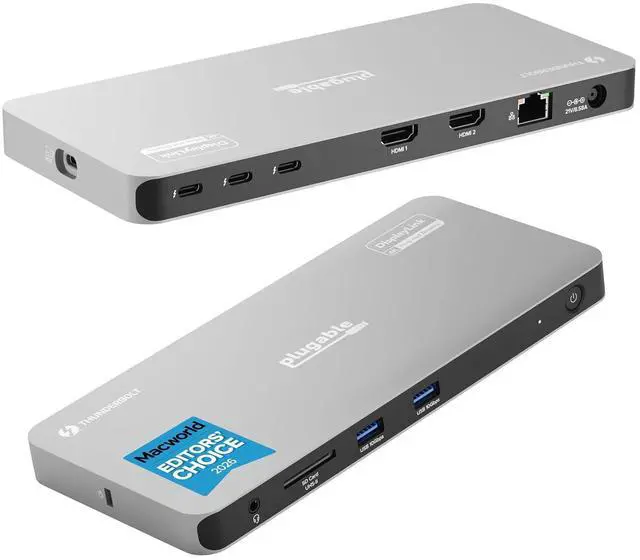
Plugable Thunderbolt 4 Dock for Quad Monitors 100W, Thunderbolt Docking Station Connects up to Four 4K Monitors for Windows and Mac Laptops, 2x HDMI, 4x Thunderbolt 4/USB C, Driver Required TBT-6950PD
Limited time offer, ends 07/25 By Dazan Technology
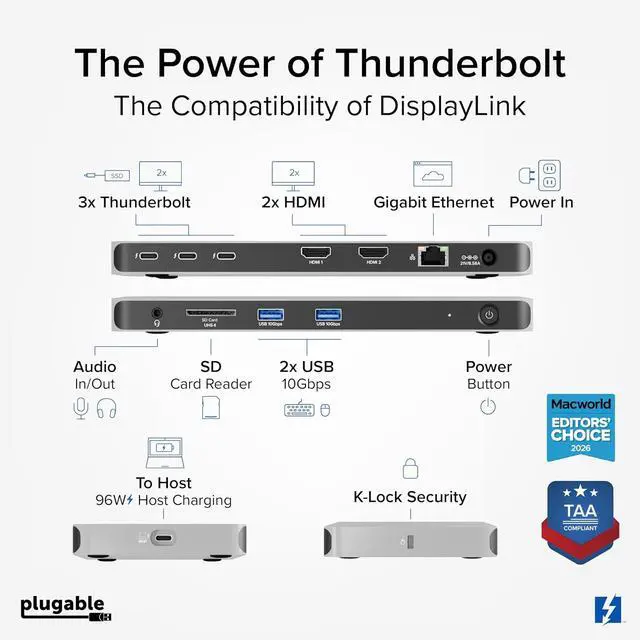
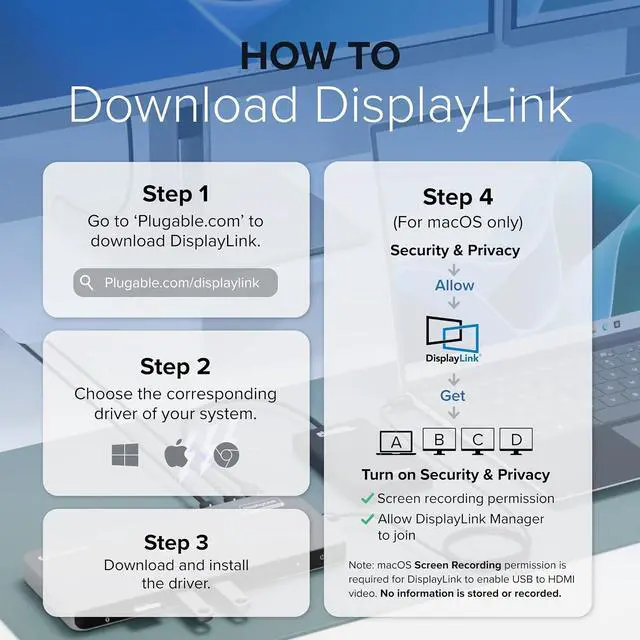
- Product description Click to play video DisplayLink Thunderbolt The power of a Thunderbolt Certified dock with the universal compatibility of DisplayLink Powerful Charging Keep your laptop fully powered with up to 100W (96W certified) host charging. Full Speed Data 40Gbps Thunderbolt connection to the host and three downstream Thunderbolt 4 ports for fast data Charge it all At the Same Time With 96W laptop charging and three 15W Thunderbolt ports, your gadgets are good to go All The Ports Powerful Compatibility 100W Charging 40Gbps Data Device Charging How to Install Driver on macOS Note - macOS requires Screen Recording permission for the DisplayLink software to work. Granting this permission enables sending data from your computer over USB to the HDMI outputs. No data, images, or pixels are being stored or recorded. Click to play video Up to Four Displays Connect up to four displays on Windows computers through two HDMI ports and Two Thunderbolt Ports Up to Four Displays 2xHDMI, 2x Thunderbolt for 4 displays on M4, M5, and Pro/Max Macs, 4x on Base M3 Macs clamshell mode Display Options Windows Mac Durable Design Tech Specs Quad Display Support Up to four 4K 60Hz displays via a combination of HDMI and USB-C connections.
+
+
Overview
Specs
Reviews
Any questions? Our AI beta will help you find out quickly.
Try me now
Why Choose This Dock: The MacWorld Editors' Choice winning Plugable Quad Display Dock is a productivity powerhouse with up to 4 displays on PC and Mac, 100W (96W certified) host charging, 4x 40Gbps Thunderbolt ports, and high-speed USB ports, HDMI, Gigabit Ethernet, and an SD Card slot;
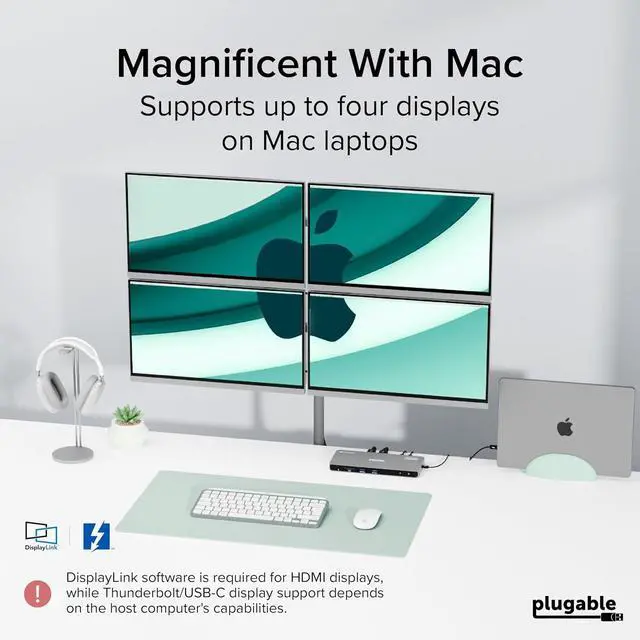
Quad Display: Featuring the power of Thunderbolt and the flexibility of DisplayLink technology, connect up to 4 displays (2x HDMI, 2x Thunderbolt). All four displays up to 4K or a single 8K display (Thunderbolt/USB-C display output capabilities determined by the host system).
Note: The DisplayLink software application must be installed on a Windows or Mac computer for the docks HDMI video outputs to function. This process is typically automatic on Windows, manual install required on macOS.;
Thunderbolt 4 Dock: This Plugable docking station features 1x 40Gbps Thunderbolt port that connects the dock to your computer and offers up to 96W laptop charging, and 3x 40Gbps Thunderbolt ports for data, video, and 15W charging for your connected Thunderbolt, USB4, and USB-C devices;
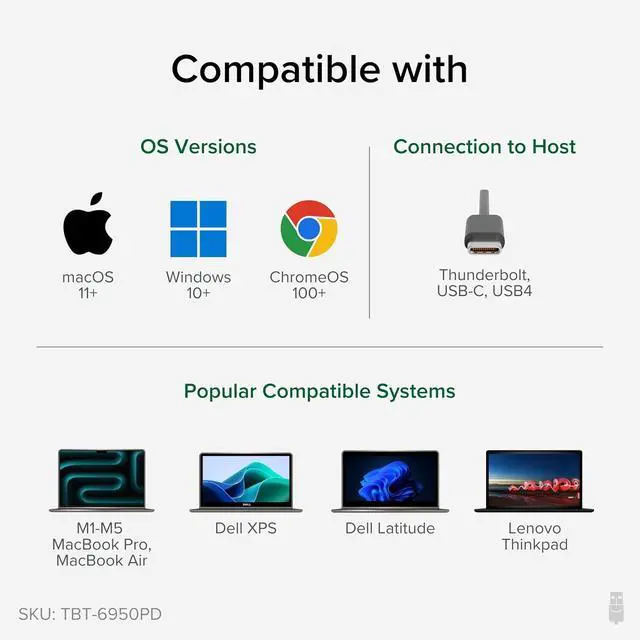
Works With: This certified Thunderbolt dock works with Windows 10 and newer, macOS 11+, and ChromeOS 100+ computers with a Thunderbolt, USB4, or full-featured USB-C port. Most Thunderbolt 4 Windows, and Mac computers will support up to 4x extended displays (Base model M3 Macs need to be in clamshell mode for 4x displays).

Quad Display: Featuring the power of Thunderbolt and the flexibility of DisplayLink technology, connect up to 4 displays (2x HDMI, 2x Thunderbolt). All four displays up to 4K or a single 8K display (Thunderbolt/USB-C display output capabilities determined by the host system).
Note: The DisplayLink software application must be installed on a Windows or Mac computer for the docks HDMI video outputs to function. This process is typically automatic on Windows, manual install required on macOS.;
Thunderbolt 4 Dock: This Plugable docking station features 1x 40Gbps Thunderbolt port that connects the dock to your computer and offers up to 96W laptop charging, and 3x 40Gbps Thunderbolt ports for data, video, and 15W charging for your connected Thunderbolt, USB4, and USB-C devices;
Works With: This certified Thunderbolt dock works with Windows 10 and newer, macOS 11+, and ChromeOS 100+ computers with a Thunderbolt, USB4, or full-featured USB-C port. Most Thunderbolt 4 Windows, and Mac computers will support up to 4x extended displays (Base model M3 Macs need to be in clamshell mode for 4x displays).
Warranty & Returns
Warranty, Returns, And Additional Information
Warranty
- Please contact the Seller directly for warranty information. Warranty information may also be found on the Manufacturer's website.
- CONTACT
Return Policies
- Return for refund within: 30 days
- Return for replacement within: 30 days
- This item is covered by Dazan Technology Return Policy
Manufacturer Contact Info
- For a directory of all our manufacturers, please click below.
- Manufacturers Directory
LOADING...