• $61.99
  • Free 30-day Returns
  • Ships from China.
    Sold by Direct from manufacturerHOOCCC

    Shipped by Direct from manufacturerHOOCCC

    Price alert
    Shop it at NeweggBusiness.

    Meet Your Seller

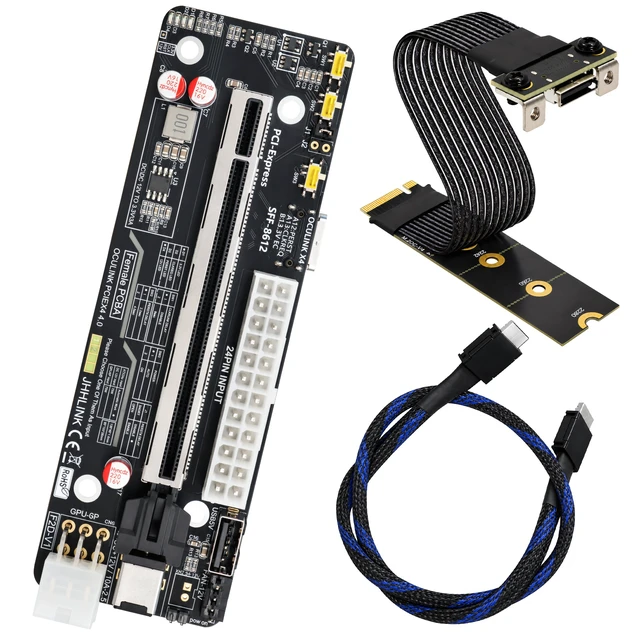
    HOOCCC OCuLink eGPU Dock Kit, M.2 NVMe to SFF-8612 Adapter Card + 50cm OCuLink 4i Cable, PCIe 4.0 x4 64Gbps External GPU Dock for Mini PC Laptop RTX 4090

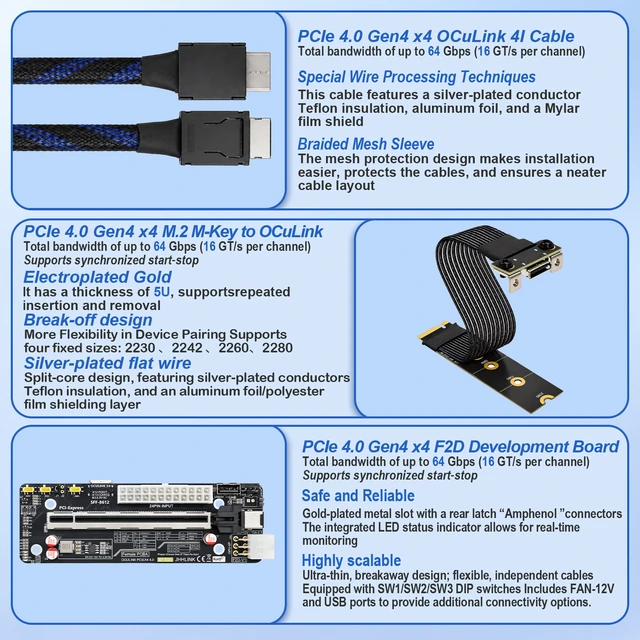
    • Blazing Fast 64Gbps: PCIe 4.0 Gen4 x4 OCuLink 4I interface (16 GT/s per channel). Backward compatible, delivering lossless transmission for flagship GPUs (RTX 4090, 4080, RX 7900 XT).
    • Complete Expansion Kit: Includes Main Riser Board (SFF-8612), M.2 Key-M Adapter, and 50cm Braided OCuLink Cable. Converts M.2 NVMe (PCIe) to external GPU dock.
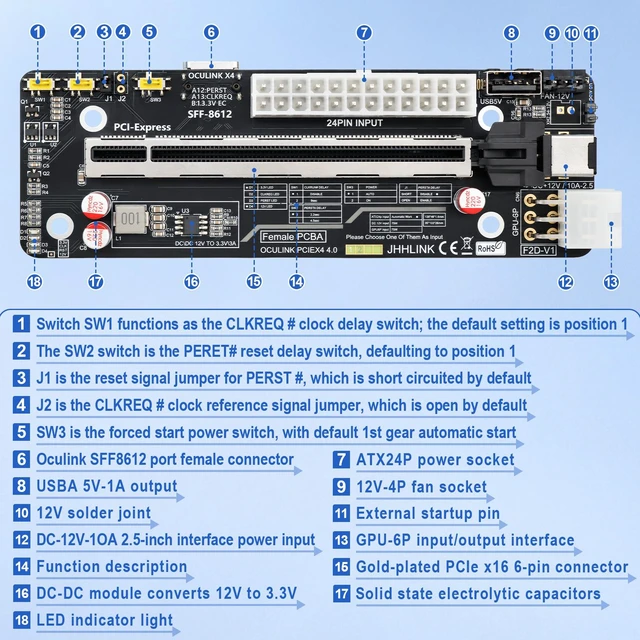
    • Powerful Power Design: Supports 24-pin ATX / SFX / FLEX power supply. Built-in DC-DC module (12V to 3.3V), 12V-4P fan socket, and external 12V-10A input.
    • Premium Build Quality: Gold-plated PCIe x16 connector, solid-state electrolytic capacitors. Cable features silver-plated conductors, Teflon insulation & aluminum foil shielding.
    • Smart Control & I/O: Equipped with SW1/SW2/SW3 DIP switches (CLKREQ/Reset/Start), USB 5V-1A output, GPU 6-pin input, and LED status indicator.
    • Broad Compatibility: Requires M.2 NVMe protocol. Ideal for Mini PCs, Laptops, AI Deep Learning, Gaming, and 3D Rendering.
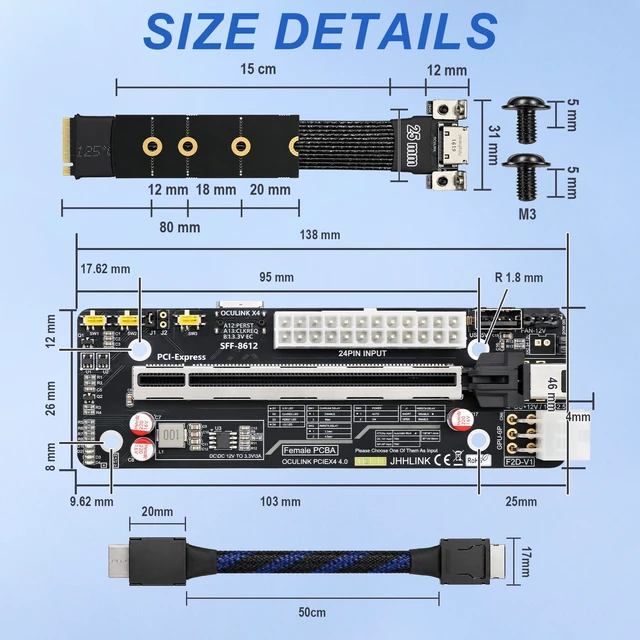
    • Size Details:
    • Main Board: ~138mm x 46mm | M.2 Adapter: ~150mm | Cable Length: 50cm
    • Includes M3 screws; break-off design for M.2 mounting (2230/2242/2260/2280).
    • Quick Installation:
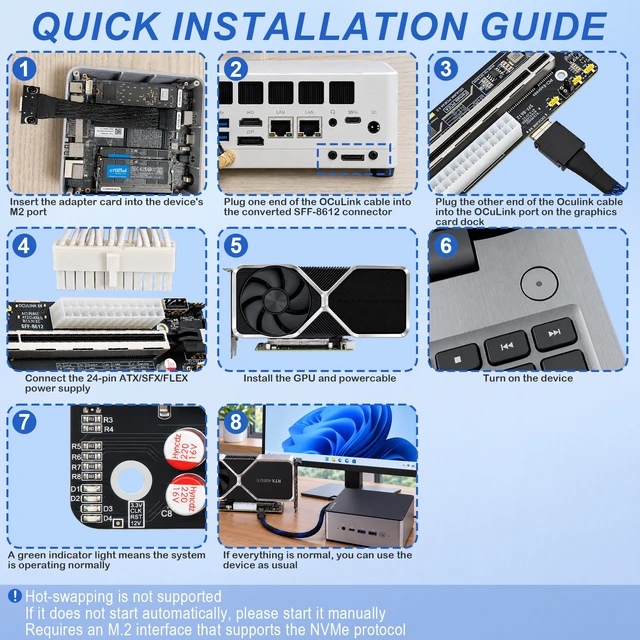
    • Insert M.2 adapter into device (Mini PC/Laptop) NVMe port.
    • Connect OCuLink cable to SFF-8612 & Graphics Card Dock.
    • Connect 24-pin PSU, install GPU, and power on.
    • (Note: Hot-swapping not supported. Ensure NVMe protocol. Manual start if auto-start fails).
    • Package Includes:
    • 1 x PCIe 4.0 Riser Main Board, 1 x M.2 OCuLink Adapter, 1 x 50cm OCuLink Cable.
    +
    +
    Overview
    Specs
    Reviews

    Any questions? Ask CelesteSM will help you find out quickly.

    PCIe 4.0 x4 EGPU DOCK Kit with M.2 Extension Cable and Oculink Cable
    F2D
    Oculink Cable
    M.2 to Oculink Adapter Card
    Key Features
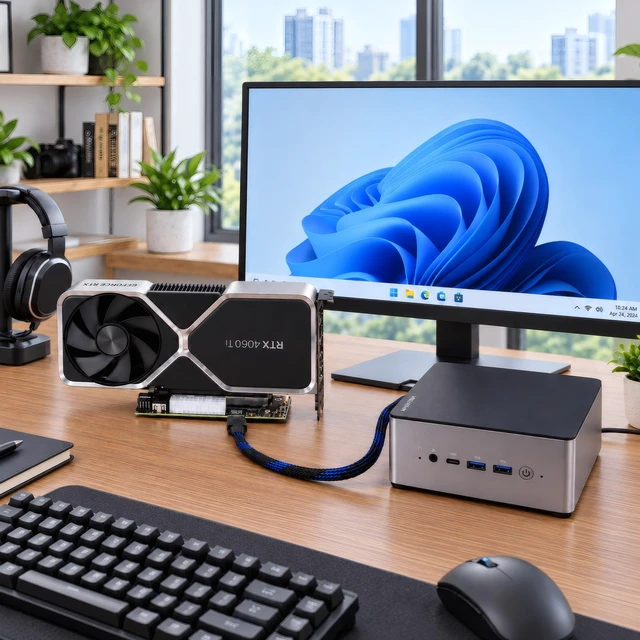
    Installation scene
    PCIe 4.0 x4 EGPU DOCK Kit with M.2 Extension Cable and Oculink Cable
    F2D
    Oculink Cable
    M.2 to Oculink Adapter Card
    Key Features
    Installation scene

    OCuLink eGPU Dock Kit M.2 to External Graphics Expansion Solution

    Build a desktop-class GPU setup for your Mini PC or laptop in minutes.

    What's in the Kit:

    1. 1 × OCuLink eGPU Dock (SFF-8612 to PCIe x16 slot)
    2. 1 × M.2 NVMe (M-Key) to OCuLink SFF-8612 Adapter Card
    3. 1 × 50cm OCuLink 4i Shielded Cable

    Core Specs:

    1. Interface: OCuLink 4i (SFF-8612), PCIe 4.0 x4
    2. Bandwidth: Up to 64Gbps (backward compatible with PCIe 3.0)
    3. GPU Slot: PCIe x16 (physical, runs at x4)
    4. Power: Supports ATX / SFX / FLEX PSU (not included)
    5. Cable: Silver-plated, shielded, low-latency

    Key Features:

    1. M.2 to OCuLink Conversion: Turn any spare M.2 NVMe M-Key slot into a high-speed OCuLink port for external GPU docking.
    2. True PCIe Signal Path: Lower latency than USB4/Thunderbolt, near-native GPU performance for gaming, 3D rendering, AI/LLM workloads.
    3. Open Dock Design: No GPU length limit; fits RTX 4090, RX 7900 XTX and most full-size graphics cards.
    4. Stable Signal Integrity: Gold-plated contacts, multi-layer shielding, ReDriver/clock buffer ready.
    5. Smart Power Control: Sync ON/OFF with host (depending on BIOS), manual force-power switch + status LEDs.

    Compatibility:

    1. Hosts: Mini PCs, laptops, SFF desktops with M.2 M-Key NVMe slot (PCIe mode, not SATA)
    2. GPUs: NVIDIA RTX 40/30 series, AMD RX 7000/6000 series
    3. Use cases: eGPU, AI inference, local LLM, video rendering, high-speed PCIe expansion

    Notes:

    1. OCuLink is NOT hot-swappable. Always power off before plugging/unplugging.
    2. GPU and power supply are NOT included.
    3. Enable 4x4 or NVMe PCIe bifurcation/segmentation in BIOS if required by your device.


    Warranty & Returns

    Warranty, Returns, And Additional Information

    Warranty

    • Please contact the Seller directly for warranty information. Warranty information may also be found on the Manufacturer's website.
    • CONTACT

    Return Policies

    • Return for refund within: 30 days
    • Return for replacement within: non-replaceable
    • This item is covered by HOOCCC Return Policy

    Manufacturer Contact Info

    LOADING...