here!
here!
I’m your shopping assistant for PC builds, upgrades, and everything tech.
Got questions? Ask away!
Start a conversation
here!
I’m your shopping assistant for PC builds, upgrades, and everything tech.
Got questions? Ask away!
Start a conversation Top Rated




Any questions? Ask CelesteSM will help you find out quickly.
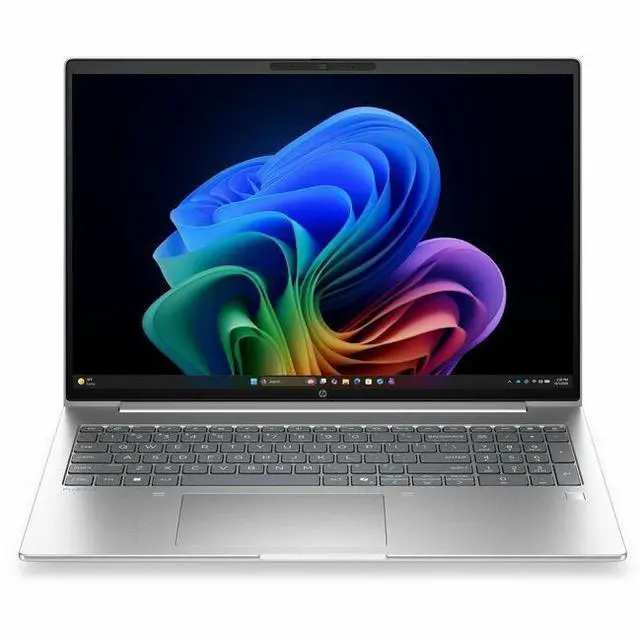
The HP ProBook 4 G2i is a 16-inch Windows 11 Pro laptop with an Intel Core Ultra 7 355, 32GB memory, and a 512GB SSD, making it a strong fit for professionals, students, and home users who want a large-screen PC for productivity, multitasking, video calls, and everyday business apps.
| Attribute | Value |
|---|---|
| Best For | Home, personal, business and student users who want a 16.0-inch notebook with integrated Intel graphics, 32 GB RAM and a 512 GB M.2 SSD for everyday productivity tasks |
| Processor And Core Count | Intel Core Ultra 7 series '355' processor (Intel brand) with up to 4.7 GHz maximum boost and 12 MB L3 cache |
| GPU And VRAM | Integrated Intel graphics (integrated GPU, uses system DDR5 SDRAM for graphics memory); no discrete GPU listed |
| Display Spec | 16.0-inch IPS LCD with native 1920 x 1200 resolution, up to 300 nit brightness and ~62% sRGB color gamut |
| Memory Configuration | 32 GB DDR5 SDRAM installed (2 memory slots), expandable to 64 GB maximum |
| Storage And Expansion | 512 GB solid-state drive in M.2 form factor |
| High Speed I O | Includes 1 HDMI port, 4 total USB ports and an Ethernet port |
| Battery And Power | Includes AC adapter and power cord; batteries not required |
| Wired And Wireless Networking | Wi-Fi and Bluetooth wireless connectivity; wired Ethernet supported |
| Webcam And Privacy | Built-in webcam |
| Audio Setup | Stereo audio |
| Portability | Dimensions 20 x 12.2 x 2.4 inches; weight 5.45 pounds; color Pike Silver Aluminum |
| Operating System | Windows 11 Pro |
| Model Identifiers | HP ProBook 4 G2i edition, model DG5J9UT#ABA; Manufacturer Hewlett Packard; form factor: Notebook |
Q: Should I choose the HP ProBook 4 G2i 16 over a lower-spec ProBook 4 G2i with Core Ultra 5 and 16GB RAM?
A: Choose this 32GB Core Ultra 7 configuration if you regularly keep many browser tabs, large spreadsheets, video calls, and office apps open at the same time, or if you want more headroom for a longer replacement cycle. Lower-tier ProBook 4 G2i models are a practical fit for standard email, documents, and web work, but this configuration is the safer choice for heavier multitasking because HP positions the series across multiple CPU and memory tiers, and independent testing of the Core Ultra 7 355 shows a clear step up over lower Ultra 5 and 255U-class chips in multi-tasking and CPU-heavy work. The trade-off is cost, not usability.
Q: Is the HP ProBook 4 G2i 16 a better fit than an HP EliteBook for most office users?
A: For most office users, this ProBook 4 G2i 16 is the better fit when the priority is a larger 16-inch workspace, business features, and a more value-focused configuration. An EliteBook usually makes more sense when you want a thinner or more premium chassis, broader enterprise options, or a higher-end display and mobility package. HP's lineup places ProBook below EliteBook in commercial positioning, so the practical decision is ProBook for balanced business value and EliteBook for premium fleet or executive deployments.
Q: How does the HP ProBook 4 G2i 16 compare with the previous ProBook 4 G1i 16?
A: The G2i is the better choice if you specifically want HP's newer 'Next Gen AI PC' positioning and the updated Intel Core Ultra Series 3 platform. The G1i remains a sensible alternative if price matters more and you mainly need a dependable large-screen business laptop for everyday office work. In practice, this is more of a platform refresh than a category change: both target mainstream business productivity, but the G2i adds newer AI-PC-era branding and newer silicon options rather than changing the core role of the device.
Q: Should I buy this 16-inch ProBook or a lighter 14-inch business laptop?
A: Buy this 16-inch ProBook if you spend most of your day in spreadsheets, documents, browser windows, or side-by-side apps and want a full-size workspace without stepping up to a premium mobile workstation. Choose a 14-inch business laptop if portability, lap use, and easier travel matter more than screen area. The decision is mainly about form factor: this model favors desk-first productivity, while a 14-inch alternative is usually the better travel-first choice.
Q: Is this ProBook 4 G2i 16 enough, or should I step up to a higher-performance Copilot+ laptop?
A: This ProBook 4 G2i 16 is enough if your workload is centered on Office apps, browser-heavy multitasking, meetings, and general business productivity with local AI features. Step up to a higher-performance Copilot+ laptop only if you expect sustained CPU-heavy work, more demanding creator tasks, or want higher-tier integrated graphics. Independent testing around the Core Ultra 7 355 shows it is competent for mainstream work, but higher-tier Core Ultra X7 systems deliver materially more multi-core performance, so the upgrade only pays off when your software can use that extra performance regularly.
Q: Is this a good laptop for office work, meetings, and everyday business use?
A: Yes. This configuration is well suited to office productivity, browser-heavy multitasking, video calls, and general business work. The main reasons are its 32GB memory, 512GB SSD, 16-inch 1920x1200 IPS display, Windows 11 Pro, Bluetooth, webcam, and integrated graphics that are appropriate for non-graphics-heavy workloads. It is a better fit for spreadsheets, documents, meetings, and multitasking than for gaming or workstation-class creative work.
Q: Is it worth buying as a travel work laptop?
A: It can work well for travel if you want a larger screen for productivity, but the trade-off is portability. A 16-inch business laptop is typically easier for multitasking, documents, and side-by-side windows than a smaller model, but it is usually less compact for frequent flights or daily commuting. Choose it if screen space matters more than minimum carry weight; choose a 13- or 14-inch alternative if portability is the top priority.
Q: Can it handle Zoom, Teams, and remote meetings well?
A: Yes. Based on the listed hardware, it should handle Zoom, Microsoft Teams, and similar meeting apps without issue for normal business use. The product includes a webcam, Bluetooth, and a front camera, and comparable 16-inch business-oriented laptops in retail Q&A are commonly used for regular Zoom meetings. It is suitable for video calls, online classes, and hybrid work, assuming your workflow is not unusually demanding.
Q: Who is this laptop best suited for?
A: This model is best for professionals, remote workers, and home-office users who want a larger 16-inch screen and strong multitasking headroom. The 32GB RAM makes it a practical choice for people who keep many browser tabs, office apps, and communication tools open at once. It is less ideal for buyers who specifically need a touchscreen, a very compact travel laptop, or dedicated graphics for gaming, 3D work, or heavier video production.
Q: Is this a better choice than a consumer 16-inch laptop for creative work or gaming?
A: Not usually. This HP configuration looks stronger for business productivity than for gaming or GPU-heavy creative work because it uses integrated graphics and a 60Hz 1920x1200 display. Its 32GB RAM is helpful for multitasking, but if your priority is gaming, 3D work, or faster video editing, a model with dedicated graphics and a higher-spec display is the better choice. If your priority is work, meetings, documents, and reliability-oriented business use, this ProBook is the more appropriate type of device.
Q: Is this HP ProBook 16 a good buy for work and general productivity?
A: Yes for office work, multitasking, web use, and general business productivity. The 32GB RAM, 512GB SSD, 16-inch 1920x1200 display, and Windows 11 Pro make it a practical fit for users who want a larger-screen work laptop. It is less compelling if you want premium display features, touchscreen input, or gaming-focused graphics.
Q: Who is this ProBook best suited for?
A: It is best suited for users who want a business-style 16-inch laptop for spreadsheets, documents, browser-heavy workloads, video calls, and light creative work. It makes more sense for professionals, students, and home users who value memory capacity and a larger screen than for buyers looking for a thin premium ultraportable or a gaming machine.
Q: Can this replace a desktop or older workstation for coding and heavy multitasking?
A: For many users, yes as a productivity replacement, but not as a graphics-heavy workstation. With 32GB RAM and an Intel Core Ultra 7, it should handle coding, analysis, large browser sessions, office apps, and everyday multitasking well. The main limit is integrated graphics, so it is not the right choice if your workflow depends on stronger GPU performance for gaming, 3D work, or heavier video production.
Q: What are the main trade-offs of this model?
A: The main trade-offs are portability and media features versus work-oriented practicality. This configuration gives you a large 16-inch 16:10 screen, 32GB RAM, and business-focused Windows 11 Pro, but it only has integrated graphics, a basic 60Hz non-touch display, and no obvious premium entertainment features from the provided specs. It is a better fit for productivity than for gaming, pen input, or display-focused media use.
Q: Is a ProBook a safer choice than a typical consumer HP laptop?
A: Usually yes if you specifically want HP's business lineup. Reddit discussion repeatedly separates ProBook from HP's consumer lines and treats ProBook as the more work-focused, sturdier category. That does not guarantee perfect reliability, but it does make this model a more sensible choice than a budget consumer laptop if your priority is everyday work use.