Best Sellers
Sponsored Products
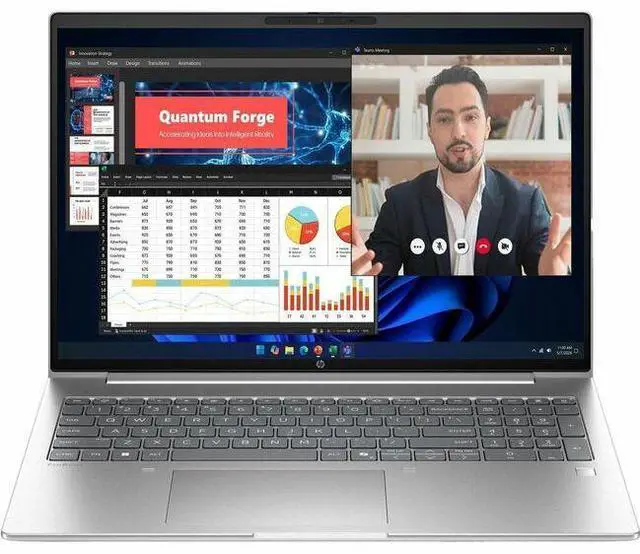
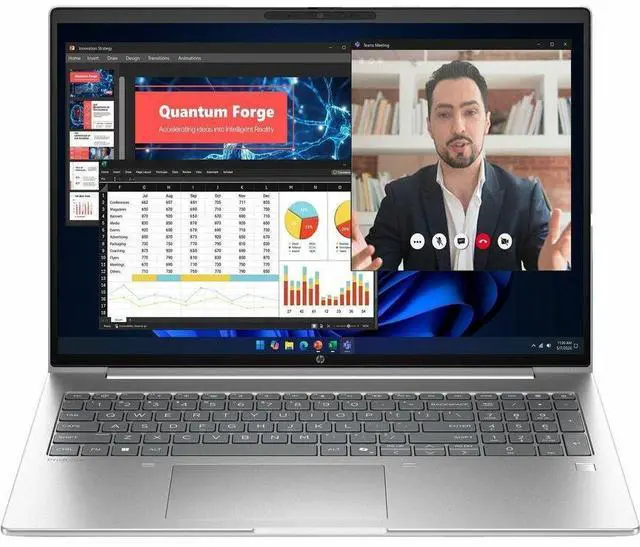
HP ProBook 4 G2a 16" Touchscreen Copilot+ PC Notebook - WUXGA - AMD Ryzen AI 7 Ryzen AI 400 445 - 16 GB - 512 GB SSD - English Keyboard - Pike Silver Aluminum - AMD Chip - 1920 x 1200 - Windows 11 Pro
- WUXGA
- AMD Ryzen AI 7 445
- 16 GB
- 512 GB SSD
- English Keyboard
- Pike Silver Aluminum
- AMD Chip
- 1920 x 1200
- Windows 11 Pro
- AMD
- In-plane Switching (IPS) Technology
- Front Camera/Webcam^
Any questions? Our AI mode will help you find out quickly.
Warranty & Returns
Warranty, Returns, And Additional Information
Warranty
- Limited Warranty period (parts): 1 year
- Limited Warranty period (labor): 1 year
- Read full details
Return Policies
- Return for refund within: 15 days
- Return for replacement within: 15 days
- This item is covered by Newegg.com's 15-Day Return Policy.
- Read full return policy for details.
Manufacturer Contact Info
- Manufacturer Website
- Support Phone: 1-800-474-6836
- Support Website
- View other products from HP
Learn about this product
The HP ProBook 4 G2a is a 16-inch touchscreen Windows 11 Pro laptop with an AMD Ryzen AI 7 processor, 16GB memory, and 512GB SSD, making it a strong fit for professionals, students, and home users who want a roomy display and responsive everyday performance for productivity, web work, video calls, and multitasking.
Recommended For
- Office-based professionals and hybrid workers who mainly live in Microsoft 365, web apps, video calls, and document-heavy workflows, and want a 16-inch business laptop with Windows 11 Pro, a full keyboard with number pad, wired Ethernet, and HP’s business security stack.
- Small-business users or IT-managed teams that need a mainstream fleet laptop with commercial features such as replaceable SO-DIMM memory, optional second SSD support, standard ports, and optional WWAN rather than an ultra-thin sealed design.
- Users who want a larger-screen productivity laptop for spreadsheets, multitasking, browser tabs, and long typing sessions, but do not need dedicated graphics; the 16:10 16-inch format, IPS touch option, and integrated Radeon graphics fit that workflow better than gaming or creator-first use.
- Buyers interested in on-device AI features for meeting, webcam, and Windows Copilot+ style workflows, especially if they value a 5MP IR camera, AI presence features, and business-focused security more than raw CPU or GPU throughput.
Real-World Use Scenarios
- Working in Chrome, Outlook, Slack, Teams, and Office at the same time is a realistic fit. In reviews, the ProBook 4 G2a handled heavy tab loads and multiple business apps without noticeable slowdowns, so typical office multitasking should feel smooth.
- For remote work or hybrid meetings, this laptop is suited to running video calls while keeping documents, email, and browser tabs open on-screen. The 16-inch 16:10 display and business-oriented webcam setup make it better matched to long meeting-and-documents days than ultra-portable consumer laptops.
- It is a practical choice for spreadsheets, web apps, research, and line-of-business software during a full workday. Official positioning and business-laptop reviews consistently place the ProBook 4 G2a in the productivity-first category rather than as a creator or gaming machine.
- Light photo editing, simple social video edits, and presentation media work are realistic. Reviews indicate the platform is comfortable with lighter creative apps, but users doing frequent 4K editing, advanced effects, or 3D rendering should expect limits.
- Students or professionals doing coding, web development, and document-heavy coursework should find it well suited, especially if they value a larger screen and full port selection more than minimum weight. Community discussion around AMD ProBook models regularly points to this kind of use as a good match.
- Casual gaming and GPU-heavy creation are secondary uses at best. Review coverage of the ProBook 4 G2a class suggests light games may run at reduced settings, but this is not the right pick for demanding modern games, CAD, or sustained 3D work.
Spec Summary
| Attribute | Value |
|---|---|
| Best For | Everyday productivity and business/student use on a home/personal notebook with an AMD Ryzen AI 7 processor and integrated Radeon graphics, suitable for office work, web collaboration and light AI-assisted workflows implied by the Ryzen AI series |
| Processor And Core Count | AMD Ryzen AI 7 (model 445) processor, 6 cores, up to 4.6 GHz boost and 8 MB L3 cache |
| GPU And VRAM | Integrated AMD Radeon 840M graphics (integrated graphics coprocessor) using DDR5 SDRAM as graphics memory type |
| Display Spec | 16.0-inch touchscreen LCD, WUXGA 1920 x 1200 native resolution on an IPS panel, up to 300 nits brightness with low blue light and anti‑glare coating |
| Memory Configuration | 16 GB DDR5 SDRAM installed, 2 memory slots, supports up to 64 GB |
| Storage And Expansion | 512 GB solid-state drive in M.2 form factor (M.2 interface) |
| High Speed I O | 4 total USB ports (includes USB-C), 1 HDMI output, no Thunderbolt ports; hardware interfaces include USB, HDMI, USB-C and Bluetooth |
| Battery And Power | Built-in lithium polymer battery (3 cells), listed energy content 4000 mAh; battery included and installed |
| Wired And Wireless Networking | Wi‑Fi and Bluetooth wireless connectivity; sources list Wi‑Fi 7 while also noting 802.11ax compatibility |
| Webcam And Privacy | Front-facing webcam and fingerprint reader for biometric security |
| Keyboard And Control | Touchscreen input with touch control (human-interface input: touchscreen) |
| Portability | Approximate weight ~3.8 lb and thickness around 0.69–0.7 in; product footprint listings include ~14.1 x 9.9 in and some listings show larger package dimensions (17.6 x 11.1 in) |
| Chassis And Color | Pike Silver Aluminum finish |
| External Display And Docking Fit | HDMI video output for external monitors; no Thunderbolt ports listed |
| Model Identifiers | HP ProBook 4 G2a model DK0F2UT#ABA (2026), notebook form factor, North America/United States region listing |
Reference Q&A
Q: Should I buy the HP ProBook 4 G2a 16 with Ryzen AI 7 445 or step up to a Ryzen AI 9 laptop?
A: Choose the ProBook 4 G2a with Ryzen AI 7 445 if you want a business-focused 16-inch laptop for office work, web apps, video calls, and on-device Copilot+ features without paying for a higher-performance class. Step up to a Ryzen AI 9 system if your workload includes heavier multitasking, sustained content creation, or stronger integrated graphics needs. The main trade-off is that Ryzen AI 9 models typically add more CPU cores and much stronger Radeon graphics, while this ProBook configuration stays closer to mainstream productivity and commercial use.
Q: Is the HP ProBook 4 G2a 16 better than a similar Intel Core Ultra 7 business laptop?
A: The ProBook 4 G2a is the better fit if you prioritize AMD-based Copilot+ capability, mainstream business performance, and a 16-inch productivity layout. A comparable Intel Core Ultra 7 258V system is the better fit if battery efficiency and higher-end integrated graphics are the main goals in a premium thin-and-light design. In practice, this is usually a platform choice rather than a clear overall winner: the HP ProBook leans toward commercial productivity value, while Lunar Lake systems more often target mobility-first premium usage.
Q: Should I choose this HP ProBook 4 G2a 16 over a lower-tier Ryzen AI 5 configuration?
A: Choose this Ryzen AI 7 445 configuration if the price difference is small and you want the safer mid-tier business spec with 16 GB RAM and 512 GB storage already in place. A lower-tier Ryzen AI 5 version can still make sense for standard office use, but current third-party coverage suggests the Ryzen AI 7 445 does not create a large real-world jump over some nearby lower-tier AMD options. That means the buying decision should depend more on total laptop configuration, display, memory, storage, and price than on the processor label alone.
Q: Is the HP ProBook 4 G2a 16 a better choice than an older ProBook generation?
A: Yes, this model is the better choice if you specifically want a newer commercial platform with Copilot+ support, a modern Ryzen AI NPU, and updated business security positioning. An older ProBook generation can still be the value choice for basic office work, but it will usually miss the newer AI feature set and platform updates that define this model. The trade-off is simple: older ProBooks can save money, while the ProBook 4 G2a is the more future-facing option for buyers who plan to keep the laptop through the next Windows and AI feature cycle.
Q: Should I choose the HP ProBook 4 G2a 16 for portability or buy a smaller 14-inch alternative?
A: Choose the ProBook 4 G2a 16 if you want more screen space for spreadsheets, side-by-side documents, and desk-based work with fewer compromises in keyboard and viewing comfort. Choose a 14-inch alternative if lower travel weight and easier daily carry matter more than screen area. This is mainly a form-factor decision: the 16-inch ProBook is better for workspace and visibility, while 14-inch systems are usually the better fit for frequent commuting.
Q: Is this a good fit for office work, meetings, and note-taking?
A: Yes. Based on the listed specs, this HP ProBook is well suited to everyday productivity work such as documents, web apps, video meetings, email, and note-taking. Its 16GB memory and 512GB SSD are a practical baseline for business multitasking, and the 16-inch 1920x1200 touchscreen gives more vertical workspace than a standard 1080p panel. The main trade-off is that it uses integrated Radeon 840M graphics, so it is better for office and general-use tasks than for demanding 3D or creator workloads.
Q: Is it worth buying as a travel work laptop?
A: It can work well as a travel productivity laptop if you want a larger screen, but it is not the most compact travel-first option. The 16-inch display is helpful for spreadsheets, multitasking, and remote work, while the built-in webcam, Bluetooth, HDMI, and business-oriented Windows 11 Pro setup support meetings and presentations. The trade-off is portability: a 16-inch notebook is usually less convenient for frequent flights or tight bag space than a 13- or 14-inch alternative.
Q: Who is this laptop most suitable for?
A: This model is most suitable for users who want a larger-screen Windows laptop for work, school, and general home use, especially if they value a touchscreen and business features over gaming power. It fits buyers doing office apps, browser-heavy multitasking, meetings, and light creative tasks. It is less suitable for users who need dedicated graphics for high-end gaming, 3D work, or heavier video production.
Q: What are the main trade-offs versus a similar Copilot+ laptop?
A: The main trade-off is balance rather than specialization. This HP ProBook offers a 16-inch WUXGA touchscreen, 16GB RAM, 512GB SSD, Windows 11 Pro, and integrated AMD graphics, which makes it a practical business-style configuration. Compared with more consumer-focused Copilot+ models, you may give up extras like OLED displays or larger SSDs, but you gain a straightforward work-oriented setup. Compared with thinner premium models, this type of ProBook is usually the safer choice for productivity value, while premium alternatives may prioritize display quality, battery life, or lighter design.
Q: Is this HP ProBook 4 G2a 16 a good fit for office work, web apps, and everyday multitasking?
A: Yes. Based on the listed specs, it fits general business and personal productivity well: a 16-inch 1920x1200 IPS touch display, Ryzen AI 7 processor, 16GB memory, and 512GB SSD are appropriate for documents, browser-heavy work, video calls, and typical multitasking. The main trade-off is that the Radeon 840M integrated graphics indicate this is not aimed at demanding 3D or GPU-heavy creative workloads.
Q: Who is this laptop best suited for?
A: This model is best suited for users who want a large-screen productivity laptop for work, study, note-taking, meetings, and general home use. The 16-inch WUXGA touchscreen and Windows 11 Pro make more sense for spreadsheet work, multitasking, and business use than for gaming-first buyers. It is less suitable for users who specifically need strong discrete-graphics performance.
Q: Is it worth buying if I want one laptop for work and light personal use?
A: It can be, if your priority is a business-style laptop with a large display, modern AMD platform, 16GB RAM, and SSD storage. The value case is strongest for buyers who care more about productivity, ports, video calls, and day-to-day responsiveness than gaming or high-end content creation. Whether it is truly worth it depends heavily on price, because community discussion around ProBook models often becomes much less favorable when the configuration is priced close to more premium or more powerful alternatives.
Q: What are the main trade-offs of this configuration?
A: The main trade-offs are portability, graphics capability, and upgrade headroom uncertainty. A 16-inch touchscreen chassis is usually better for desk use than frequent travel, and Radeon 840M integrated graphics are better matched to everyday productivity than serious gaming or heavy visual workloads. Also, with 16GB RAM and 512GB SSD, buyers should confirm whether memory or storage can be upgraded later if long-term expansion matters.