• $214.99
  • Free 30-day Returns
  • Price alert
    Shop it at NeweggBusiness.

    Comica CVM-WS50(H) Wireless Microphone System, 6 Channels Handheld Interview Microphone with Flexible Combination Grip for Smartphone, Camera, Perfect for YouTube, Interview, Video Conference, Podcast

    • 6 UHF Selectable Channels for Disturbance-free RecordingThe CVM-WS50 H wireless handheld microphone offers 6 channels to choose from, allowing you to easily select the best channel to prevent interference from other devices in the same space or nearby. Perfect for achieving high-quality and uninterrupted recordings.
    • Real-time Audio Monitoring for Professional RecordingExperience the convenience of real-time audio monitoring with the built-in function of this mobile professional lavalier wireless system. Monitor your recording while simultaneously ensuring the audio quality. The transmitter's LCD screen displays reception quality, battery status, and available channels for easy control.
    • Long Battery Life for Extended ShootsPowered by internal rechargeable lithium-ion polymer batteries, the receiver provides up to 8 hours of continuous use, ensuring it can handle lengthy shoots without interruption. It also supports external power supply, making it adaptable to various occasions
    +
    +
    Overview
    Specs
    Reviews
    avatar

    Any questions? Our AI beta will help you find out quickly.

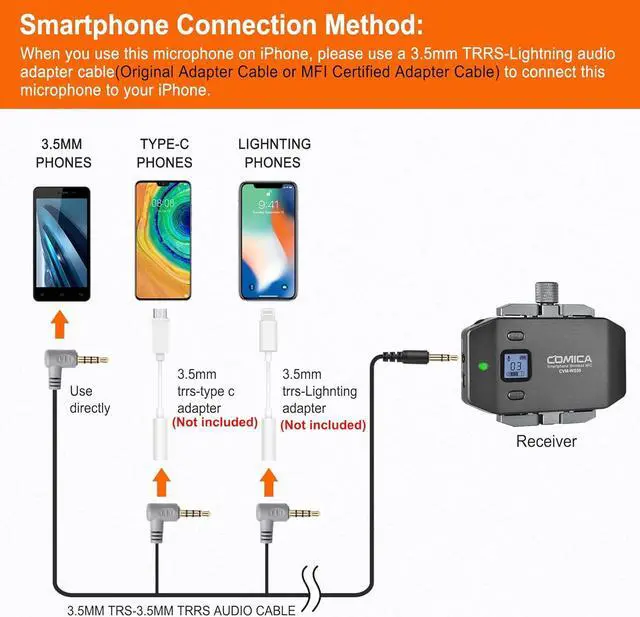
    How do I connect it to my iPhone?
    For iPhone users, connect the 3.5mm to Lightning adapter with OTG to the receiver.It is highly recommended to use the CVM-D-MI audio output cable from COMICA.
    How do I connect it to my USB C Phone/Laptop?
    For USB C device, connect the 3.5mm TRS to USB C audio adapter with OTG (not included). It is highly recommended to use the CVM-D-UC II Output Adapter Cablefrom COMICA.
    How do I connect it to my camera?
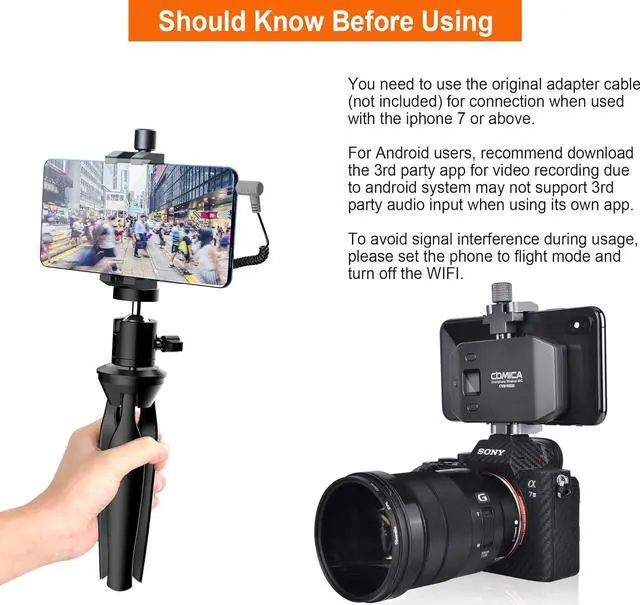
    Comica CVM-WS50H wireless handheld microphone comes with only one 3.5mm TRS to TRRS audio cable. If you want to connect it to a camera, you will need to prepare a 3.5mm TRS to TRS audio adapter cable by yourself.
    hero-video Wireless Pairing, 6 Channels Options How do I connect it to my iPhone?
    How do I connect it to my USB C Phone/Laptop?
    How do I connect it to my camera?

    Warranty & Returns

    Warranty, Returns, And Additional Information

    Warranty

    • Please contact the Seller directly for warranty information. Warranty information may also be found on the Manufacturer's website.
    • CONTACT

    Return Policies

    Manufacturer Contact Info

    LOADING...