here!
I’m your shopping assistant for PC builds, upgrades, and everything tech.
Got questions? Ask away!
Start a conversation
here!
I’m your shopping assistant for PC builds, upgrades, and everything tech.
Got questions? Ask away!
Start a conversation Top Rated
 Hot Seller Top Rated





Any questions? Ask CelesteSM will help you find out quickly.
We want to ensure your holiday shopping this year is hassle-free. That’s why we’re automatically extending our return policies on almost every product! For purchases placed between November 1st, 2026 and December 31, 2026 you will have until January 31, 2027 to return your product.
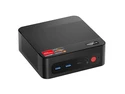
The ASUS Chromebox 5a S5081UN is a Chrome OS desktop with a 13th Gen Intel Core i5-1335U, 8GB memory, 128GB SSD, and Intel Iris Xe Graphics, suited to students and home-office users who want a desktop for everyday computing; a monitor is not included.
| Attribute | Value |
|---|---|
| Best For | Student, home-office, business, education, and personal desktop use in a mini PC setup; a monitor is not included |
| Processor | Intel Core i5-1335U, 13th generation, with a listed processor speed of 1.3 GHz |
| Graphics | Integrated Intel Iris Xe Graphics with shared graphics memory |
| Memory | 8GB DDR5 SO-DIMM memory at 4800 MHz, expandable to a listed maximum of 16GB |
| Storage | 128GB PCIe x4 SSD; no HDD |
| Operating System | Google ChromeOS |
| Ports And Connectivity | 7 USB ports; listed interfaces include USB-C, USB 3.2 Gen 2, microSD, HDMI, and DisplayPort, with two HDMI ports. Wireless connectivity includes Wi-Fi 802.11ax and Bluetooth; Ethernet is also listed |
| External Display Support | No built-in screen; supports up to four displays, with video resolution listed up to 3840 × 2160 (4K) |
| Power And Energy | 90W listed power consumption; Energy Star 8.0 compliant |
| Physical Design | Black mini PC measuring 6.56 × 6.53 × 1.81 inches and weighing 1.76 pounds |
| Included Items | VESA mount, user manual, AC adapter, and power cord |
| Model Identifiers | ASUS Chromebox 5a, model CHROMEBOX5a-S5081UN |
Q: Should I get the ASUS Chromebox 5a with Core i5 or the Celeron version?
A: Choose this Core i5-1335U configuration for more CPU headroom and Intel Iris Xe graphics; ASUS lists the Celeron 7305 version with Intel UHD graphics. The Celeron option suits buyers prioritizing a lower processor tier for everyday ChromeOS use.
Q: ASUS Chromebox 5a Core i5 or Core i3—which should I choose?
A: Choose the Core i5-1335U model when you want the higher processor tier and Iris Xe graphics. The Core i3-1315U version is the lower Core option in the 5a family; this i5 configuration combines its processor with 8GB memory and a 128GB SSD.
Q: Is the ASUS Chromebox 5a Core i5 enough, or should I get the Core i7?
A: The Core i5-1335U is a strong fit for everyday ChromeOS, home-office, and multitasking use. Choose a 5a Core i7-1355U configuration if you want the family’s highest listed processor tier; both Core i5 and Core i7 configurations use Intel Iris Xe graphics.
Q: ASUS Chromebox 5a or Chromebox 5—which is the newer model?
A: The Chromebox 5a is the newer-generation choice, with 13th Gen Intel Core processor options including this Core i5-1335U. The Chromebox 5 uses 12th Gen Core processor options. Choose the 5a for its 13th Gen processor platform and USB-C display output; choose the 5 if Thunderbolt 4 and 2.5Gb Ethernet are priorities.
Q: Does this Chromebox include a monitor, keyboard, and mouse?
A: No monitor is included, and the product listing does not include a keyboard or mouse. You will need to supply a display and input devices; compatible USB and Bluetooth peripherals can be used.
Q: Is it suitable for everyday office work and video meetings?
A: It is configured for ChromeOS use, with a 13th-generation Core i5 processor and 8GB of memory, making it suitable for browser-based office tasks and meetings. It has no built-in microphone or speakers, so plan to connect a headset or other audio equipment; a webcam may also be needed.
Q: Can I add storage if 128GB is not enough?
A: The system has a 128GB SSD and a microSD card slot, so compatible microSD cards can provide additional storage. Check the product specifications and ChromeOS support for the storage device you plan to use.
Q: Is this a good computer to take on trips?
A: It is a compact desktop, not a self-contained travel computer: it has no screen and requires an external display and input devices. It is best suited to a fixed desk or a setup where those peripherals are available at the destination.
Q: Can the Chromebox 5a drive a high-resolution or dual-monitor setup?
A: A Reddit user testing the i5-1335U Chromebox 5a reported that its DisplayPort output drove a 7680×2160 display at 120 Hz, while its HDMI ports were reported to top out at 5120×1440 at 60 Hz. Treat this as an individual test, not a guarantee for every monitor or cable combination; check your display’s inputs and the exact connection before buying.
Q: Can I upgrade the Chromebox 5a’s RAM or SSD later?
A: A Reddit owner of the i5-1335U Chromebox 5a reported upgrading its RAM and NVMe storage. That suggests the modules can be replaced, but the listed 8 GB RAM and 128 GB SSD are the supplied configuration; verify compatibility and recovery requirements before planning an upgrade.
Q: Is the Chromebox 5a a sensible choice for basic home browsing instead of a Chromebook?
A: It can suit someone who wants a fixed ChromeOS desktop and already has a monitor and peripherals. It has an i5-1335U and 8 GB of RAM, but it has no built-in screen and is not portable. A Reddit discussion comparing a Chromebox with a Chromebook for light browsing questioned the need to pay more for a desktop when similar browsing needs could be met by a Chromebook; the better fit depends on your setup and price.