




 here!
I’m your shopping assistant for PC builds, upgrades, and everything tech.
Got questions? Ask away!
Start a conversation
here!
I’m your shopping assistant for PC builds, upgrades, and everything tech.
Got questions? Ask away!
Start a conversation





Any questions? Ask CelesteSM will help you find out quickly.


We want to ensure your holiday shopping this year is hassle-free. That’s why we’re automatically extending our return policies on almost every product! For purchases placed between November 1st, 2025 and December 31, 2025 you will have until January 31, 2026 to return your product.
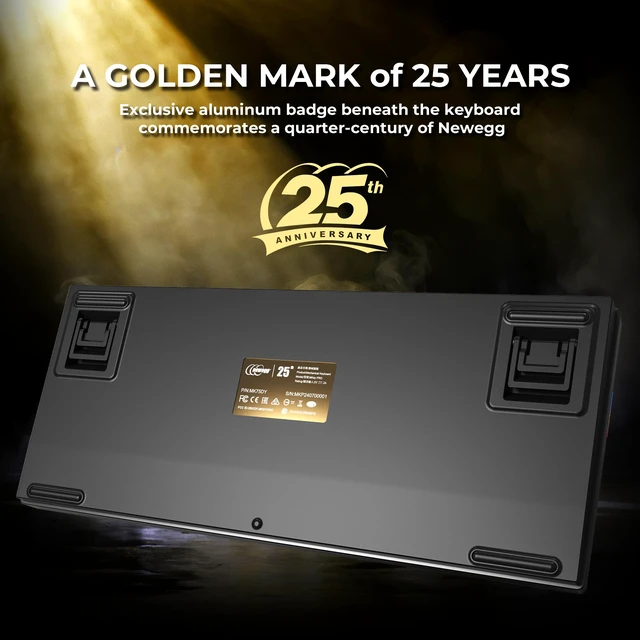
The MONTECH MKey Pro Newegg 25th Anniversary Limited Gold Edition is a 75% tri-mode mechanical gaming keyboard with hot-swappable Gateron G Pro 3.0 Brown switches, VIA/QMK support, and per-key RGB, making it a strong fit for enthusiasts who want collectible styling, flexible connectivity, and customizable typing for both gaming and everyday work.
| Attribute | Value |
|---|---|
| Best For | Gaming and compact productivity setups that favor a tactile 75% mechanical keyboard with per-key RGB and tri-mode connectivity |
| Connectivity | Tri-mode connectivity: Bluetooth 5.2, 2.4GHz wireless, or USB Type-C wired |
| Layout And Design | 75% compact layout with function keys, no palm rest, black and gold colorway |
| Switches And Keycaps | Mechanical Gateron G Pro 3.0 Brown tactile switches paired with PBT double-shot keycaps |
| Backlighting | Per-key RGB LED lighting |
| Anti-Ghosting And NKRO | N-key rollover for anti-ghosting |
| Dimensions | 327 x 137 x 44 mm (12.87 x 5.39 x 1.73 in) |
| Model Identifiers | Mechanical gaming keyboard (gaming design style) |
| Accessories And Inclusions | No mouse included |
Q: Should I buy the MONTECH MKey Pro Gold Edition or the original MONTECH MKey?
A: Choose the MKey Pro Gold Edition if you want a more modern 75% layout, wireless flexibility, and deeper customization. Compared with the original MKey, the Pro adds tri-mode connectivity, macOS support, and VIA/QMK support, while also moving to Gateron G Pro 3.0 switches and double-shot PBT keycaps. The original MKey is the simpler choice if you prefer a larger wired-only full-size layout.
Q: Is the MONTECH MKey Pro Gold Edition a better fit than the Keychron K2 Pro?
A: Pick the MONTECH MKey Pro Gold Edition if you want a prebuilt 75% board with 2.4GHz wireless, Bluetooth, a volume knob, and an enthusiast-style gasket-mounted feel out of the box. Pick the Keychron K2 Pro if you mainly care about a well-known cross-platform QMK/VIA option and do not need 2.4GHz wireless. A common trade-off is that the MONTECH targets convenience and gaming-friendly wireless use, while the K2 Pro is more often chosen for general productivity and established ecosystem familiarity.
Q: Should I choose the MONTECH MKey Pro Gold Edition or a cheaper 75% board like the Epomaker x Aula F75?
A: Choose the MONTECH MKey Pro Gold Edition if you want stronger firmware-level customization through VIA/QMK, a more established product-positioning around enthusiast features, and an edition aimed at users who value both typing feel and multi-device flexibility. Choose a budget 75% board like the Aula F75 if lower upfront cost matters most and you mainly want a hot-swappable wireless keyboard with sound-dampening features. The usual trade-off is price versus software and platform flexibility.
Q: When is the MONTECH MKey Pro Gold Edition a better choice than a higher-end 75% keyboard like the NuPhy Halo75 V2?
A: The MONTECH MKey Pro Gold Edition is the better choice when you want a feature-complete prebuilt 75% keyboard with tri-mode connectivity, hot-swap support, and QMK/VIA customization without moving into a more premium price tier. A higher-end option like the NuPhy Halo75 V2 makes more sense if you are prioritizing refined wireless performance and are willing to spend more for an enthusiast-focused alternative. The trade-off is value and broad feature coverage on MONTECH versus a more premium tuning focus on NuPhy.
Q: Is the MONTECH MKey Pro Gold Edition better for travel and multi-device use, or for desk-first gaming and typing?
A: The MONTECH MKey Pro Gold Edition fits both, but it leans more toward desk-first use with flexible connectivity. Its 75% layout saves space, and Bluetooth plus 2.4GHz make it practical for switching between devices, but it is still a high-profile mechanical keyboard designed around typing feel, hot-swap customization, and a volume knob. Choose it for mixed gaming and productivity on a main setup; choose a lower-profile 75% keyboard instead if portability and slimmer carry size matter more than a traditional mechanical feel.
Q: Is this a good keyboard for both office work and gaming?
A: Yes, if you want one keyboard for mixed use. The 75% layout saves desk space but keeps function keys, the Gateron G Pro 3.0 Brown switches are tactile without being as loud or as gaming-focused as clicky switches, and tri-mode connectivity makes it practical across a desktop, laptop, or tablet setup. The trade-off is that it is still a mechanical keyboard, so it is usually less quiet and less travel-friendly than a slim office keyboard.
Q: Is it worth buying as a travel or portable work keyboard?
A: It can work as a portable productivity keyboard, but it is better described as transportable than ultra-portable. A 75% layout is smaller than a full-size board and keeps arrow keys and function keys, which is useful for work, but this model is still a fairly thick mechanical keyboard at 327 x 137 x 44 mm. It makes more sense for commuting between desks or working in multiple rooms than for minimalist travel bags.
Q: Who is this keyboard most suitable for?
A: It is best suited to buyers who want enthusiast features without giving up everyday practicality. That includes users who care about hot-swap support, VIA/QMK remapping, wireless flexibility, and a softer gasket-mounted typing feel. It is less suitable for buyers who just want a basic low-cost office keyboard, a full numpad, or the thinnest possible travel keyboard.
Q: What are the main trade-offs versus a simpler wireless keyboard or membrane office keyboard?
A: The main advantages are better typing feel, switch replacement without soldering, deeper customization through VIA/QMK, and more enthusiast-oriented construction. The main trade-offs are higher weight and thickness, more visible gaming-style RGB, no numpad, and typically more typing noise than a basic office keyboard. For users who only need quiet typing and portability, a slim membrane keyboard is usually the easier choice.
Q: Is this better than a similar 75% wireless keyboard if I do not plan to customize switches or key mappings?
A: Not necessarily. If you will not use hot-swap support, VIA/QMK remapping, or the gasket-mounted build, much of this keyboard's value goes unused. In that case, a simpler 75% wireless keyboard may deliver similar day-to-day typing and connectivity for less complexity. This model makes more sense when customization, enthusiast feel, and premium construction are part of the buying decision.
Q: Is the MONTECH MKey Pro a good buy if I want one keyboard for both gaming and everyday work?
A: Yes, if you want a compact keyboard that can switch between gaming and desk work without much setup. The 75% layout keeps function keys and a knob while saving space, and the tri-mode connection makes it practical for a PC, laptop, or tablet setup. The main trade-off is that 75% is less spacious than full-size, so it is better for users who are comfortable without a numpad.
Q: Who is this keyboard most suitable for?
A: It is best suited to users who want a prebuilt mechanical keyboard with enthusiast features but do not want to build from scratch. The strongest fit is for people who value hot-swap support, VIA/QMK remapping, wireless options, and a softer gasket-style typing feel. It is less ideal for buyers who want a very simple plug-and-play keyboard with no interest in customization.
Q: Is the MONTECH MKey Pro a good choice if I care about typing feel and noise more than raw gaming features?
A: Yes. Its gasket-mounted design, foam layers, PBT keycaps, and tactile Gateron G Pro 3.0 Brown switches make it a better fit for users who prioritize typing feel and sound than for users choosing only by esports-focused specs. It still supports N-key rollover and low-latency 2.4GHz wireless, but its main appeal is the overall typing experience and customization.
Q: What are the main trade-offs before buying the MONTECH MKey Pro?
A: The main trade-offs are layout, learning curve, and niche appeal. A 75% layout saves desk space but removes the numpad, and the VIA/QMK side can be more than some beginners want to manage. For this Newegg 25th Anniversary Gold Edition specifically, the collector styling is distinctive, but it may appeal more to enthusiasts than to buyers who want a more understated keyboard.
Q: Is this a good replacement for a basic office keyboard or first mechanical keyboard?
A: It can be, but mainly for buyers who already know they want a compact mechanical keyboard. It offers a clear upgrade in build, switch quality, connectivity, and customization over a basic office keyboard. However, if you want the easiest transition from a full-size membrane board, a 75% layout and customization features may feel less straightforward at first.


