




Why Choose AKIYO O1 5G WiFi Bluetooth Projector?
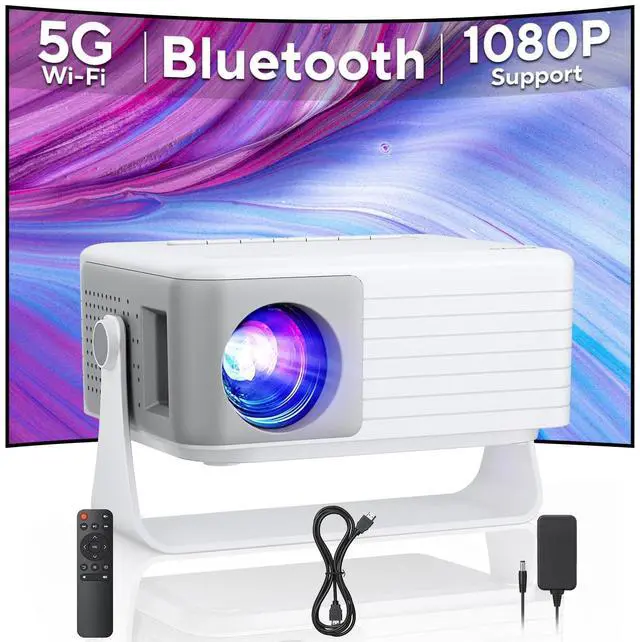
AKIYO has focused on projectors for nearly ten years, and this WiFi projector is the latest upgraded projector in 2026! The smallest body on the market with the most powerful features:Native 720p, Automatic Trapezoidal, 2026 Upgraded P2P connection, 5G WiFi and 5.2 Bluetooth capability.
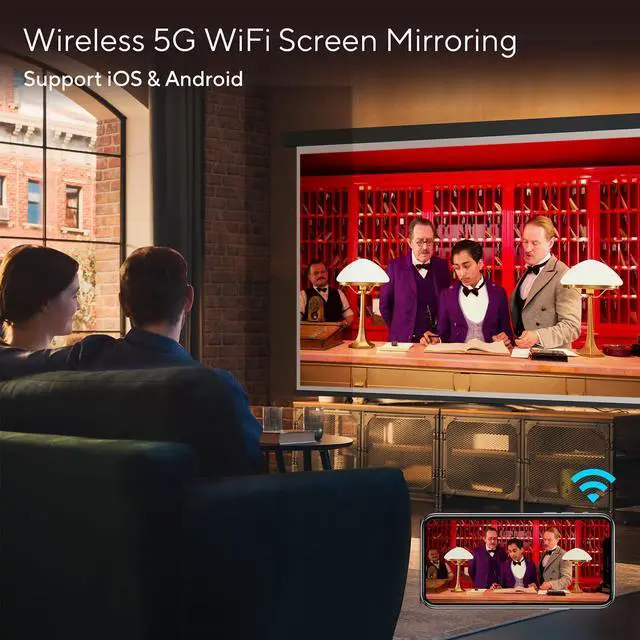
- ?P2P Connection: Mirror your projector without a network
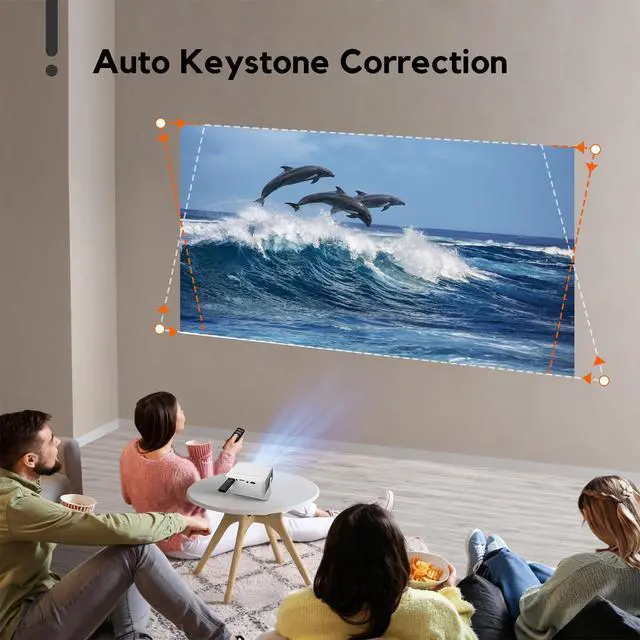
- ?Automatic Trapezoidal Correction: The all-new automatic keystone correction function eliminates the need for tedious manual adjustments, providing a more comfortable viewing experience!
- ?50% Zoom Function:The screen size can be adjusted to 50% of the original size without moving the projector.
- ?WiFi-6: Easily ditch cables for fast wireless connectivity.
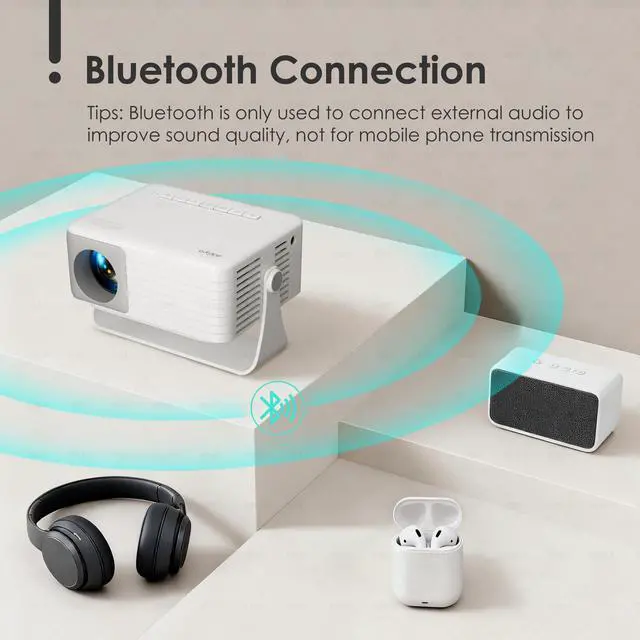
- ?Bluetooth 5.2:Supports stable connection to various speakers, Bluetooth headsets, etc.
- ? 360° Rotation: The built-in 360° rotating stand eliminates the limitation of angle, allowing you to enjoy a diverse viewing experience
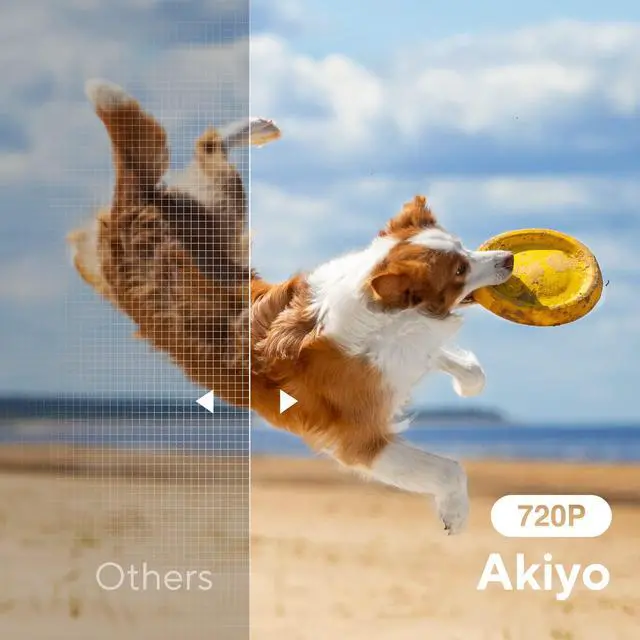
- ?Native 720P: Restore more realistic high-definition images.
- ?Eye Protection:German high-refractive LED lens and diffuse reflection technology effectively protect your eyes from light damage.
Note: Please Read The Following Instructions Carefully Before Purchasing !
1.Unlimited options via TV Stick( not included)
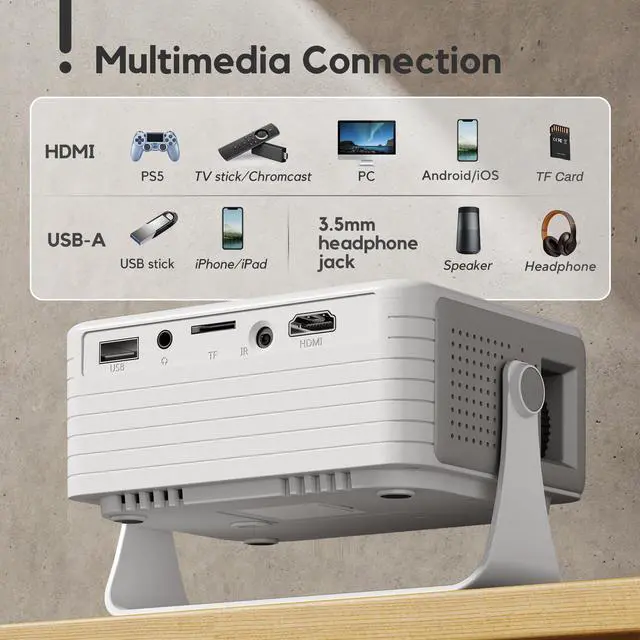
Videos such as Netflix, Prime, Disney, etc. are protected by copyright, and nearly 99.99% of projectors on cannot play these videos through a mobile phone WiFi connection! If you want to use a projector to watch videos from these platforms, you'll need to use a Fire Stick or connect your computer to the projector with an HDMI cable to play the videos.
2.The projector’s Bluetooth function does not support connection with smartphones.
3. AKIYO projector is only available on

Important Parameters:
- Resolution:Native 720P & Support Full HD 1080P
- Projection Distance: 0.6-3m
- Projection size: 30 to 120 inches.
- Zoom Function: 100% to 50%
- Keystone Correction: Automatic Trapezoidal Correction
- Speakers: Built-in high-fidelity speakers.
- Aspect Ratio: 4:3/16:9
- Projection Modes: front/rear/ceiling
- Lamp Life: 55,000 Hours
Packing list: O1 WiFi Mini projector, HDMI Cable, Power Adapter, User Manual

WiF-6 Connection & 5.2 Bluetooth Function
- iOS P2P wireless connection:
1. Select "Screen Mirroring" on the projector and enter "iOS Wirreless"
2. Open "Screen Mirroring" on the iOS device and connect to 01_xxxx.
3. Enter the PIN code in the pop-up input window: 1234
- Android Connection
1. Select "Connection Android" on the projector
2. Turn on the WLAN button on the Android device (no need to actually connect to WiFi)
3. Turn on the "Cast" function in the phone settings and select "O1_xxx" to connect
- Bluetooth Connection
1. Click “Setting” on the projector.
2. Open the "Bluetooth Setting" option. Find your Bluetooth device and pair it with the projector.
3. If the projector's Bluetooth does not recognise your speakers, try resetting the projector, turning the speakers off and then back on.
(Note: The Bluetooth function can only connect to Bluetooth speakers, headphones and other Bluetooth devices, and CANNOT connect to mobile phones or computers!)

Automatic Keystone Correction
The AKIYO O1 projector features automatic vertical keystone correction of ±50°. Compared to the tedious manual screen adjustments of traditional projectors, the O1 projector automatically corrects image distortion as the projector is moved.

120" Large Screen
Project images up to 120 inches in size! Adjust the projection distance to achieve the ideal projection size. (Recommended projection distance: 0.6 m - 3 m, projection size: 30" - 120")

The Perfect Gift
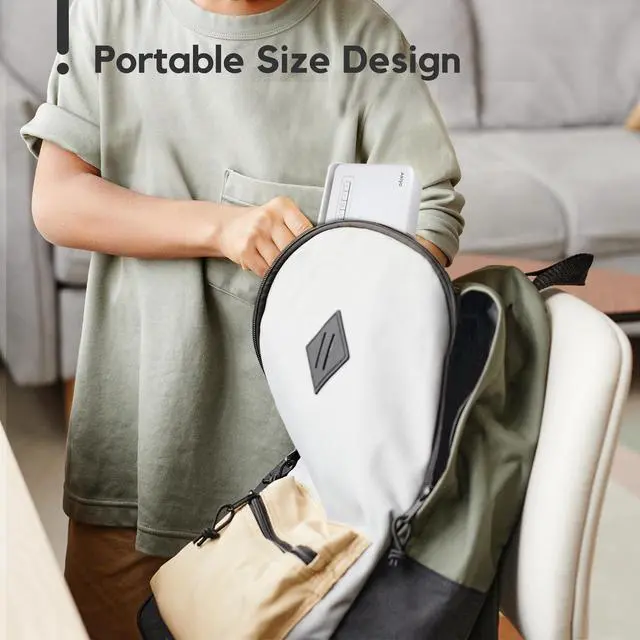
This mini projector is portable, easy to use, and durable. If you want to surprise your family or friends, this is undoubtedly the most affordable and special gift. Enjoy a fun movie night with family and friends using the AKIYO mini projector.

- Zoom Function 50%
Compared with other projectors, the upgraded AKIYO projector is equipped with a 50% screen zoom function and a more user-friendly design. The screen size can be adjusted to 50% of the original size without moving the projector.
- Multiple Mounting Options
1. Ceiling Mount: The AKIYO projector can be suspended. Simply remove the screw cap to easily mount the projector to the suspension bracket.
2. Placement on a desk.
- Ultra Short Throw Ratio
The AKIYO mini projector has a projection ratio of 1:1.1, which means you can get a 36-inch large screen at a distance of 1m. (Projection distance is 0.6-4m, projection size is 32-120 inches)
To Get the Best Image:
1. Make sure the projector lens is perpendicular to the wall to achieve a perfectly rectangular projected image.
2. Slowly adjust the focus knob on the side of the projector until the image is clear.
3. For optimal image quality, we recommend using the projector in a dark room.

AKIYO Mini Projector Brings Endless Joy and Warmth to You and Your Family!
AKIYO Mini Projector features a built-in 360° rotation stand, eliminating the need for a traditional tripod. Simply rotate the stand to easily project onto walls and ceilings. On warm evenings, you can snuggle up with your kids and watch animations projected onto the ceiling, letting them fall asleep to a wonderful movie.
Note: The connecting screws, of particular concern to users, have been tested over 10,000 times to ensure stable and smooth adjustment, ensuring they will not loosen even after prolonged use.

Some Questions You May be Interested in:
Q1:How to watch Netflix, Prime Video, Disney+, Apple TV+, YouTube, HBO Max, Hulu and more on this projector?
A1:Since these platforms require copyright agreements to play, if you want to use the projector to watch videos from these platforms, you will need to use a Fire Stick or connect your computer to the projector with an HDMI cable to play the videos! ( Fire Stick NOT INCLUDED).
Q2:Why can't my phone project via Bluetooth connection?
A2::The Bluetooth function of the projector can only connect to Bluetooth devices (such as Bluetooth speakers, Bluetooth headsets, etc.). The Bluetooth function of most projectors currently on the market cannot connect to the Bluetooth of mobile phones.
Q3:Why can't I log in even after following the steps??
A3:Please make sure your phone has screen mirroring capabilities. In addition, due to the privacy protection of some Android phones , screen mirroring cannot be performed.
Q4:Why is there no sound when playing videos?
A4:The projector does NOT SUPPORT Dolby Audio, if it is Dolby Audio, please turn it off (Settings > Display & Sound > Audio > Dolby Digital Output > Turn off Dolby Digital+). Additionally, some AC3/DTS encoded files may not be playable due to copyright issues.
Q5:Does the Mini Projector need to be connected to a power source at all times in order to work?
A5:The Mini Projector does not require batteries and must always be connected to a power source to function properly.
Q6:Why is it not recognized when I insert a USB stick?
A6:The Mini Projector supports USB2.0 (black) USB flash drives (up to 64GB), please check the file system format of the USB flash drive on your computer. The projector supports USB flash drives with "NTFS" and "FAT32" system file formats but does not support "exFAT".
Why Choose AKIYO O1 5G WiFi Bluetooth Projector?
AKIYO has focused on projectors for nearly ten years, and this WiFi projector is the latest upgraded projector in 2026! The smallest body on the market with the most powerful features:Native 720p, Automatic Trapezoidal, 2026 Upgraded P2P connection, 5G WiFi and 5.2 Bluetooth capability.
- ?P2P Connection: Mirror your projector without a network
- ?Automatic Trapezoidal Correction: The all-new automatic keystone correction function eliminates the need for tedious manual adjustments, providing a more comfortable viewing experience!
- ?50% Zoom Function:The screen size can be adjusted to 50% of the original size without moving the projector.
- ?WiFi-6: Easily ditch cables for fast wireless connectivity.
- ?Bluetooth 5.2:Supports stable connection to various speakers, Bluetooth headsets, etc.
- ? 360° Rotation: The built-in 360° rotating stand eliminates the limitation of angle, allowing you to enjoy a diverse viewing experience
- ?Native 720P: Restore more realistic high-definition images.
- ?Eye Protection:German high-refractive LED lens and diffuse reflection technology effectively protect your eyes from light damage.
Note: Please Read The Following Instructions Carefully Before Purchasing !
1.Unlimited options via TV Stick( not included)
Videos such as Netflix, Prime, Disney, etc. are protected by copyright, and nearly 99.99% of projectors on cannot play these videos through a mobile phone WiFi connection! If you want to use a projector to watch videos from these platforms, you'll need to use a Fire Stick or connect your computer to the projector with an HDMI cable to play the videos.
2.The projector’s Bluetooth function does not support connection with smartphones.
3. AKIYO projector is only available on
Important Parameters:
- Resolution:Native 720P & Support Full HD 1080P
- Projection Distance: 0.6-3m
- Projection size: 30 to 120 inches.
- Zoom Function: 100% to 50%
- Keystone Correction: Automatic Trapezoidal Correction
- Speakers: Built-in high-fidelity speakers.
- Aspect Ratio: 4:3/16:9
- Projection Modes: front/rear/ceiling
- Lamp Life: 55,000 Hours
Packing list: O1 WiFi Mini projector, HDMI Cable, Power Adapter, User Manual
WiF-6 Connection & 5.2 Bluetooth Function
- iOS P2P wireless connection:
1. Select "Screen Mirroring" on the projector and enter "iOS Wirreless"
2. Open "Screen Mirroring" on the iOS device and connect to 01_xxxx.
3. Enter the PIN code in the pop-up input window: 1234
- Android Connection
1. Select "Connection Android" on the projector
2. Turn on the WLAN button on the Android device (no need to actually connect to WiFi)
3. Turn on the "Cast" function in the phone settings and select "O1_xxx" to connect
- Bluetooth Connection
1. Click “Setting” on the projector.
2. Open the "Bluetooth Setting" option. Find your Bluetooth device and pair it with the projector.
3. If the projector's Bluetooth does not recognise your speakers, try resetting the projector, turning the speakers off and then back on.
(Note: The Bluetooth function can only connect to Bluetooth speakers, headphones and other Bluetooth devices, and CANNOT connect to mobile phones or computers!)
Automatic Keystone Correction
The AKIYO O1 projector features automatic vertical keystone correction of ±50°. Compared to the tedious manual screen adjustments of traditional projectors, the O1 projector automatically corrects image distortion as the projector is moved.
120" Large Screen
Project images up to 120 inches in size! Adjust the projection distance to achieve the ideal projection size. (Recommended projection distance: 0.6 m - 3 m, projection size: 30" - 120")
The Perfect Gift
This mini projector is portable, easy to use, and durable. If you want to surprise your family or friends, this is undoubtedly the most affordable and special gift. Enjoy a fun movie night with family and friends using the AKIYO mini projector.
- Zoom Function 50%
Compared with other projectors, the upgraded AKIYO projector is equipped with a 50% screen zoom function and a more user-friendly design. The screen size can be adjusted to 50% of the original size without moving the projector.
- Multiple Mounting Options
1. Ceiling Mount: The AKIYO projector can be suspended. Simply remove the screw cap to easily mount the projector to the suspension bracket.
2. Placement on a desk.
- Ultra Short Throw Ratio
The AKIYO mini projector has a projection ratio of 1:1.1, which means you can get a 36-inch large screen at a distance of 1m. (Projection distance is 0.6-4m, projection size is 32-120 inches)
To Get the Best Image:
1. Make sure the projector lens is perpendicular to the wall to achieve a perfectly rectangular projected image.
2. Slowly adjust the focus knob on the side of the projector until the image is clear.
3. For optimal image quality, we recommend using the projector in a dark room.
AKIYO Mini Projector Brings Endless Joy and Warmth to You and Your Family!
AKIYO Mini Projector features a built-in 360° rotation stand, eliminating the need for a traditional tripod. Simply rotate the stand to easily project onto walls and ceilings. On warm evenings, you can snuggle up with your kids and watch animations projected onto the ceiling, letting them fall asleep to a wonderful movie.
Note: The connecting screws, of particular concern to users, have been tested over 10,000 times to ensure stable and smooth adjustment, ensuring they will not loosen even after prolonged use.
Some Questions You May be Interested in:
Q1:How to watch Netflix, Prime Video, Disney+, Apple TV+, YouTube, HBO Max, Hulu and more on this projector?
A1:Since these platforms require copyright agreements to play, if you want to use the projector to watch videos from these platforms, you will need to use a Fire Stick or connect your computer to the projector with an HDMI cable to play the videos! ( Fire Stick NOT INCLUDED).
Q2:Why can't my phone project via Bluetooth connection?
A2::The Bluetooth function of the projector can only connect to Bluetooth devices (such as Bluetooth speakers, Bluetooth headsets, etc.). The Bluetooth function of most projectors currently on the market cannot connect to the Bluetooth of mobile phones.
Q3:Why can't I log in even after following the steps??
A3:Please make sure your phone has screen mirroring capabilities. In addition, due to the privacy protection of some Android phones , screen mirroring cannot be performed.
Q4:Why is there no sound when playing videos?
A4:The projector does NOT SUPPORT Dolby Audio, if it is Dolby Audio, please turn it off (Settings > Display & Sound > Audio > Dolby Digital Output > Turn off Dolby Digital+). Additionally, some AC3/DTS encoded files may not be playable due to copyright issues.
Q5:Does the Mini Projector need to be connected to a power source at all times in order to work?
A5:The Mini Projector does not require batteries and must always be connected to a power source to function properly.
Q6:Why is it not recognized when I insert a USB stick?
A6:The Mini Projector supports USB2.0 (black) USB flash drives (up to 64GB), please check the file system format of the USB flash drive on your computer. The projector supports USB flash drives with "NTFS" and "FAT32" system file formats but does not support "exFAT".