




 here!
I’m your shopping assistant for PC builds, upgrades, and everything tech.
Got questions? Ask away!
Start a conversation
here!
I’m your shopping assistant for PC builds, upgrades, and everything tech.
Got questions? Ask away!
Start a conversation FEELWORLD Official Store US
Shipped by FEELWORLD Official Store US




Any questions? Ask CelesteSM will help you find out quickly.


 Firmware Update Notice
Upgrade your firmware to V2.41 to enable RTMPS secure streaming and Apple ProRes recording.
Please obtain the firmware upgrade file and upgrade procedure in the "Download" section.
Low Cost,Broadcast Quality,Multi-cam Fast Video Production and Live Streaming
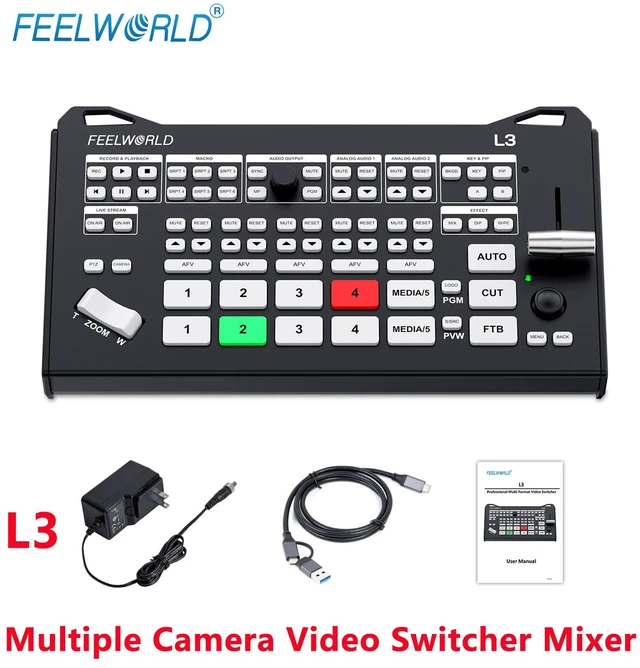
The FEELWORLD L3 is a compact, multi-camera broadcast video switcher,you don’t have to have a big budget or a huge staff to achieve a professional and glitch-free live streaming. It supports up to 6 high-quality signal inputs and allows for seamless switching between 5-channel video sources.Compatible with various consumer cameras UVC camera and more. It helps you easily create professional multi-camera production for YouTube live streaming and business presentations via Zoom or Teams.You can also achieve low-latency, secure, and reliable streaming via Ethernet.The L3 includes a wealth of video effects and broadcast features, supporting one-click transitions for high-end production.
Medium to Large Live Streaming Solutions
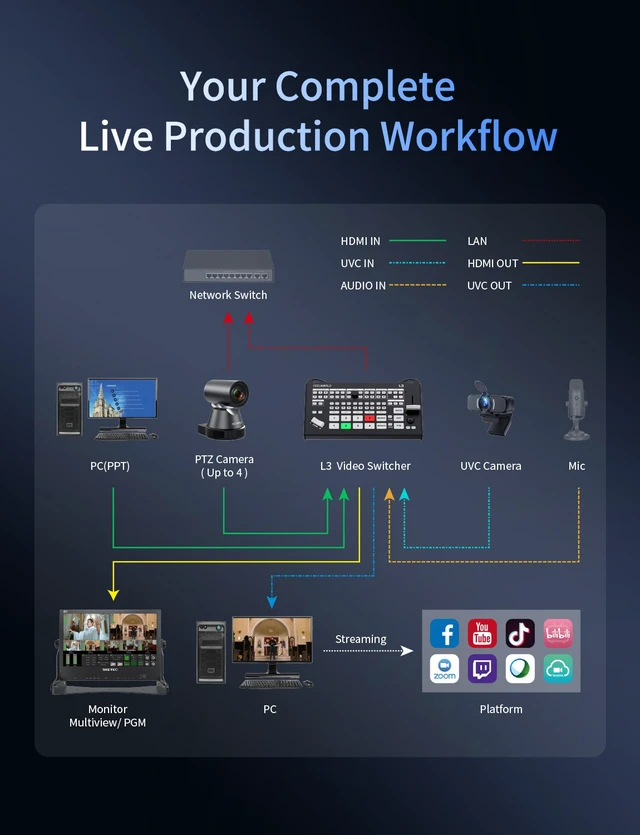
1.Multi-camera connection: The L3 supports up to 6 signal inputs and 5 video channels, making it ideal for medium and large-scale multi-camera live productions. For medium live streams, you can deploy 2 to 3 cameras to capture wide shots and close-ups, with a computer connected to play PPT slides. For large live events, expand to 3–5 cameras, and link a computer for PPT playback. All video sources can be switched instantly during live broadcast via the T-bar or physical buttons;
2. PTZ Camera Control:The L3 can control up to 4 PTZ cameras directly. Whether for medium or large live productions, all PTZ operations are accessible on the L3 unit without an external dedicated PTZ controller;
3. Multi-View Monitoring: Connect an external monitor to the HDMI A output for multi-view split monitoring and menu configuration. The HDMI B output can be hooked up to a separate display for independent program output monitoring;
4. Multi-Platform Live Streaming:Equipped with a UVC streaming port, the unit connects to a computer to enable live broadcasting on all your preferred streaming platforms.
Understanding L3
Learn quickly to start live production
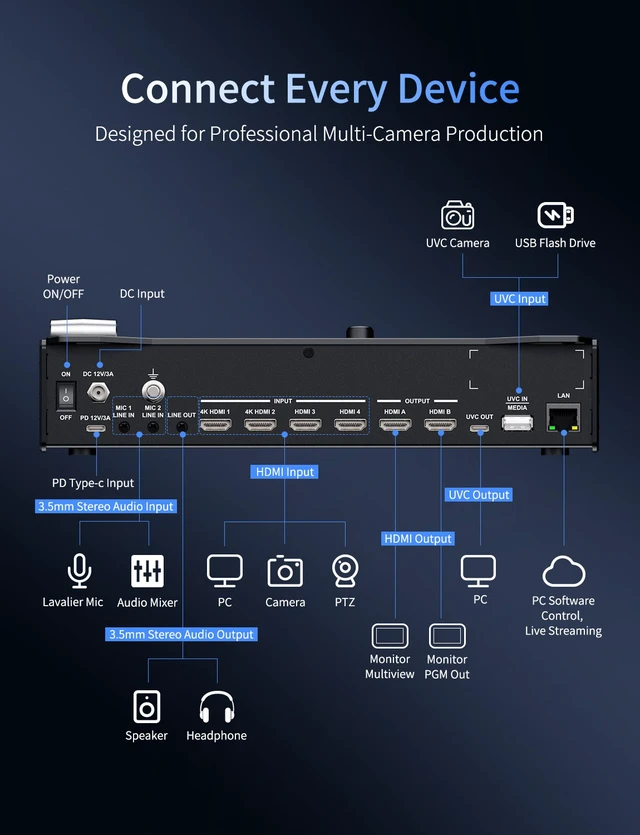
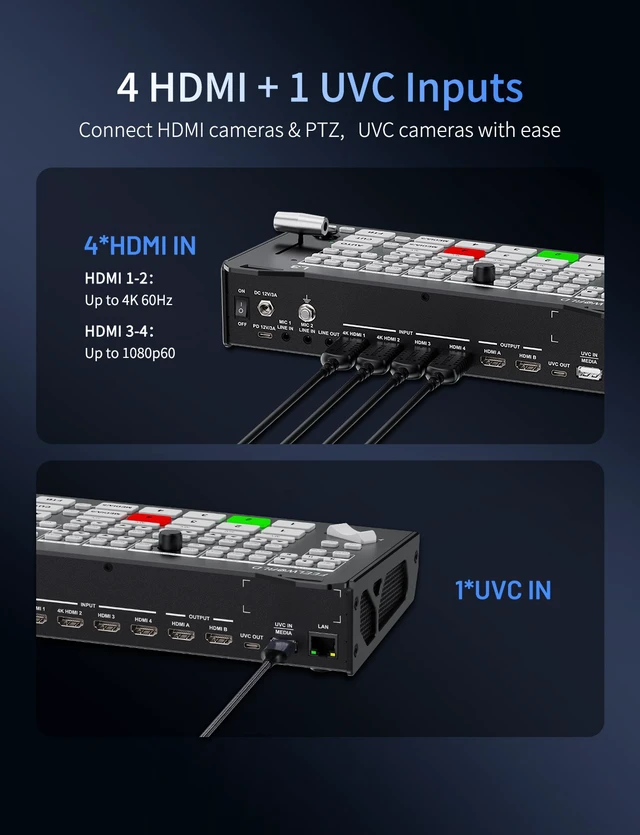
FEELWORLD L3 is a compact multi-camera broadcast video switcher. It supports up to 6 signal inputs and enables switching among 5 video sources, including 4 HDMI signals and 1 UVC webcam/media source. Equipped with 2 HDMI outputs as well as audio input and output ports, it features UVC output for seamless compatibility with various video software. Its built-in control panel integrates all essential operation functions to realize easy program switching. With L3, streaming live broadcast and multi-camera video production have never been easier.
Compatible With Various DSLR , PTZ and UVC Cameras
4K HDMI/2K HDMI/UVC Inputs
The L3 features two 4K HDMI inputs supporting up to 2160P60, two 2K HDMI inputs supporting 1080P60, and one UVC input, making it compatible with various DSLRs, PTZ cameras, and UVC camera. Fully meet your multi-camera live production need.
Dual HDMI Outputs
Multi-view | PGM
The L3 is equipped with two HDMI output ports (HDMI A and HDMI B). HDMI A outputs a multi-view preview, allowing users to view all audio and video inputs, recording and live streaming status, and operation menus in real time; HDMI B independently outputs the PGM program signal.
Broadcast Control Panel & Built-in Menu, Grow from Beginner to Pro
The L3 comes with a dedicated control panel featuring zoned button layout for intuitive broadcast workflow and user-friendly operation. It supports one-key recording, picture-in-picture and mute functions, with seamless scene transitions via the T-bar fader. This all in one unit integrates multi-camera switching, audio mixing and live streaming.Furthermore, the L3 has a built-in menu, allowing for easy operation of various functions using the five-way joystick and MENU button on the panel.
USB3.X UVC Fast Streaming
Plug and Play
USB3.X UVC streaming output supports plug-and-play without extra drivers, compatible with Windows, Android, macOS and Linux systems. Higher bandwidth delivers stable high-definition transmission with reduced latency. Identified as a standard webcam by computers, it works seamlessly with OBS, Zoom, Teams, YouTube and other mainstream streaming & conference software, enabling quick setup for multi-camera live production and business presentations.
RTMP Streaming
Stream to 4 Platforms Simultaneously | 16Mbps Bitrate
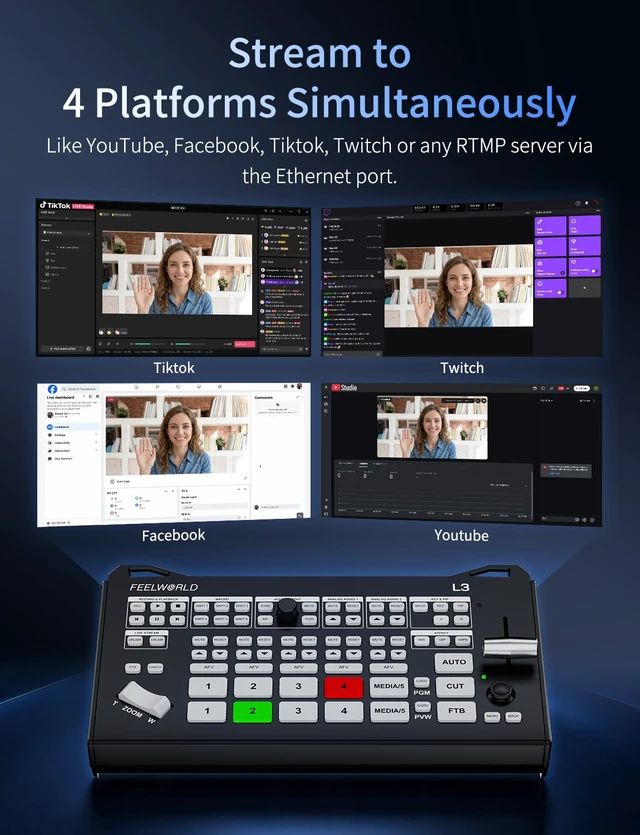
L3 supports network streaming,after the network is connected,just need to import RTMP streaming URLs from various live platforms to the switcher via a USB flash drive for quick streaming setup. Supporting simultaneous streaming to up to four platforms, and streaming bitrate up to 16 Mbps. It minimizes compression artifacts and preserves rich image details. No obvious blockiness occurs with moving shots and layered effects, enabling stable high-definition output for premium live streaming.Press the ON AIR button on the control panel to start streaming quickly. The two ON AIR buttons correspond to Stream Address 1 and Stream Address 2 in the menu respectively.
Horizontal Live Streaming
L3 supports 16:9 landscape screen output for network streaming, perfectly adapting to video conferences, game live streams, enterprise live broadcasts and other mainstream horizontal-screen live platforms to present a complete and wide viewing field.
Vertical Live Streaming
L3 also supports 9:16 portrait screen output for network streaming, perfectly matching the viewing habits of short video platforms and mobile terminal live broadcasts, covering all vertical-screen live streaming scenarios.
Record your Live Broadcast and Playback
L3 comes with built-in recording function, you just need to insert a FAT32 or exFAT formatted USB drive into the USB2.0 port of device and start recording by pressing the REC button on the front panel.Recorded files are saved in the USB drive directory x:\LSeries\record by default. A single file is approximately 4GB in size. When one file is full, the system will automatically switch to a new file for storage. Saved videos can be retrieved and played back anytime; highlight clips can be inserted into live streams with one tap, enabling instant replay for sports and events to enrich live presentation.
PTZ & UVC Camera Control
The L3 can control PTZ cameras which support IP VISCA protocol.Connect the camera to the LAN network, and you can link up to 4 PTZ cameras. Press the PTZ button on the control panel to quickly activate the PTZ function. Use the ZOOM key and 5-direction joystick to control camera rotation, focus and lens zoom.In addition, select the CAMERA button, then use the ZOOM button and 5-way joystick to adjust the zoom and rotation direction of the UVC camera.
Remark: The L3 and PTZ cameras must be on the same network segment.
Up to 7 Channels Audio Mixing
The audio menu enables you to mix all audio signals, including audio from all HDMI sources, media library, and two MIC/LINE input channels (mixing is enabled for MIC/LINE by default). The audio level of each signal can be adjusted directly on the control panel, with one-touch mute and audio follow video functions available.
Work with Professional Microphones
The L3 is equipped with two independent 3.5mm stereo audio inputs,you can connect desktop or lapel microphones.You can also connect an external sound console to mix multiple external sound inputs.The two audio inputs have dedicated buttons on the panel for real-time audio level adjustment and one-touch mute.
Dual-Mode Audio Output Control
The switcher allows direct audio output control via the panel. Headphone monitoring and program output support two control modes: synchronized and independent.
In synchronized mode, the headphone volume adjusts in tandem with the program output. A single operation unifies volume levels for quick audio monitoring, streamlining live commerce and outdoor live streaming workflows.
Independent mode is ideal for interview programs. The monitoring and output volumes operate separately without interference. You can turn up the headphone volume to clearly hear guests while maintaining standard broadcast volume, or lower the monitoring volume to protect your hearing without compromising broadcast audio quality, catering to precise multi-camera live production.
16 Professional Broadcast Transitions
The control panel is equipped with three transition buttons--MIX, DIP, WIPE and various switching buttons. From a creative point of view,a mix transition is a perfect choice,it can feel very elegant as it gradually fades from one source into the next, while slower mix transitions can feel dreamy and gentle. The DIP transition delivers an immersive video transition effect by means of dip color field immersion.A wipe transition will move a line across the original source revealing the next source.The CUT button ensures an instant cut when switching between sources. The AUTO button is a professional term that's used on large broadcast switchers to enable video effect transitions. Manual Transition T-Bar, freely adjust the speed of video switching.
Picture-in-Picture Overlay
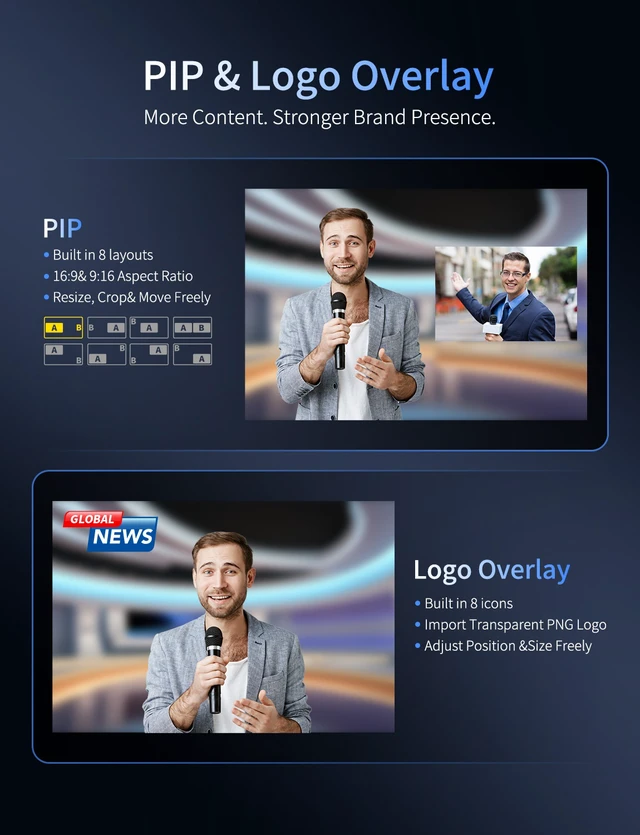
The switcher support PIP overlay function to float sub-screen over main display. Present host content on main window while displaying product close-ups or auxiliary materials in small window, avoiding frequent source switching and enriching live streaming content Eight selectable modes are available,16:9 landscape and 9:16 portrait aspect ratios are optional. Both main and sub screens can be scaled and cropped independently. The position and size of the window can be flexibly customized adjustment. It fully meets the live switching demands for horizontal large-screen events and vertical short-video live streaming. Simply press the PIP button on the front panel to quickly activate the PiP function.
Chroma Key & Luma Key
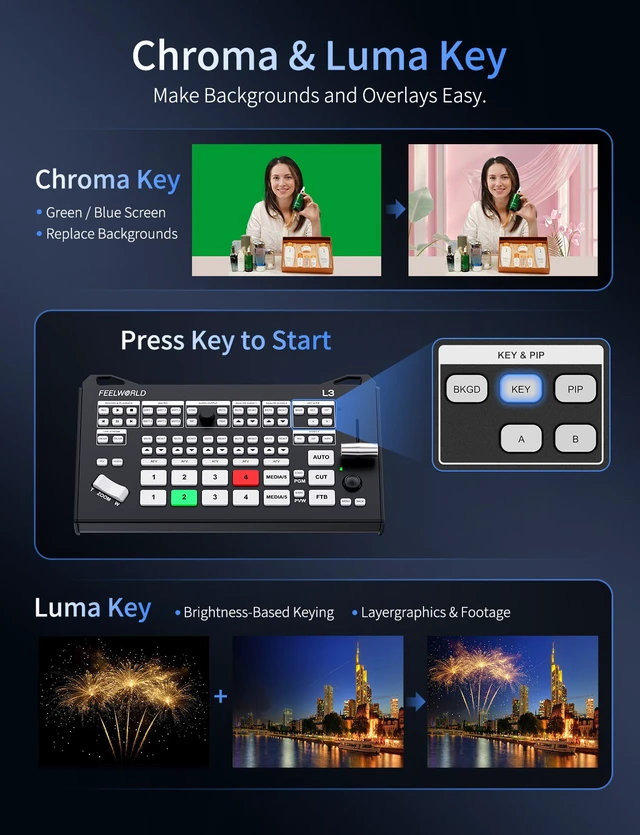
The L3 comes with Chroma key and Luma Key function.The chroma key is for green or blue screen keying effects,fine-tunable threshold preserve complete subject details for seamless virtual background replacement, perfect for green screen live and virtual studio.Luma key separates images based on brightness difference to cut out bright or dark backgrounds without solid-color backdrop, ideal for overlay of subtitles, logos and real-scene materials.Press KEY button on the control panel to quickly activate the key function.
LOGO Overlay,Create Exclusive Live Visual Texture
The L3 supports logo overlay with 8 built in icons for various live streaming scenarios. Import high resolution transparent PNG files to customize station logos and brand watermarks. The logo position is freely adjustable, with overlay output in real time. It works concurrently with signal switching, transition effects, streaming and recording, delivering stable performance for meetings, sports events and commercial broadcast live productions to enhance visual professionalism and brand recognition.
Script Buttons,One-click For Complex Operations
The front panel of L3 features 6 script keys. These keys can record a sequence of switcher operations to automate workflows. Once saved, you can replay the whole sequence with a single press anytime. It supports storing operations including signal selection and switching for PGM and PVW, transitions via AUTO, CUT and T-BAR, as well as enabling FTB, Recording, KEY and PIP functions and selecting corresponding signal sources. Up to 12 actions can be recorded per operation. Presets can be flexibly configured to suit different needs, simple or complex, making them a reliable tool for on-site production.
Professional Background, Elevate Live Stream Quality & Professionalism
lack, blue or messy blank screens during camera switching, pre-live warm up and transitions will degrade live stream quality and cause viewer loss. The L3 comes with 6 exclusive built in backgrounds and supports custom image import to avoid unprofessional blank screens for polished live visuals. Press the BKGD key on the control panel to quickly recall the selected background.
Multi-scene Presets, One-Click Access
The L3 comes with 4 built-in preset scene modes for Teaching, Meetings, E-sport and Church use. You can also create custom scenes, with up to 8 presets available (VIEW 1 ~ VIEW 8).
Simply press the S/SRC button on the control panel to switch scenes in sequence from VIEW 1 to VIEW 8. No repeated parameter adjustments are required. Even beginners can operate it with ease. It maintains a consistent visual style, helps you take full control of live streaming flow, and delivers outstanding professional visual and audio performance.
Free PC Control Software NexSwitch
Connect the switcher to your computer via an Ethernet cable to gain full control of all device operations on PC.Compatible with Windows and macOS systems.
Remark: The control software can be get from the "Download" section of L3 detail page.
Auto Cooling Fan, Stable For Long Live Stream
Built-in automatic cooling fan delivers stable operation even during long-hour live streaming. The fan supports manual speed adjustment and shutdown, suitable for all kinds of live streaming environments.
Hot Redundant Dual Power Supply
The L3 features hot redundant dual power input ports DC 12V and Type-C (PD). Supports dual power input for power redundancy. Both power sources work online simultaneously. If one power supply fails or loses power, the system automatically switches to the other seamlessly to keep the unit running, preventing live stream interruptions caused by power failure.


