

Your Browsing History



Meet Your Seller

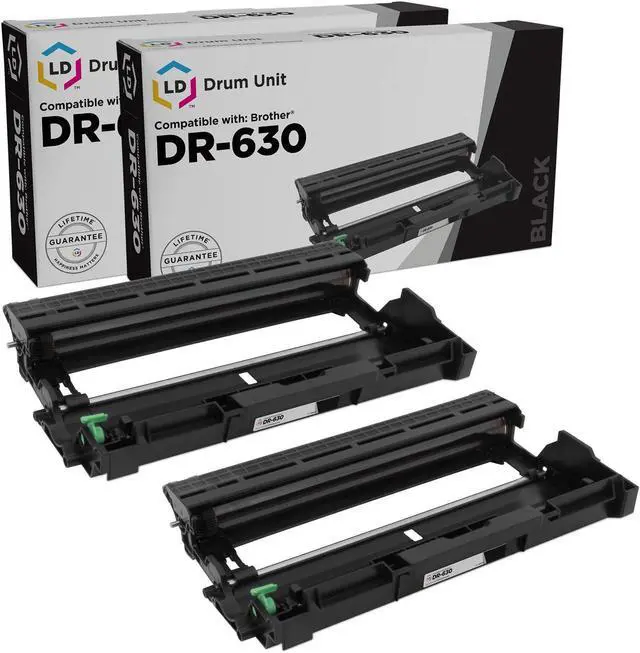




LD Products Compatible Drum Unit Replacement for Brother DR630 (2-Pack)
- Includes: Compatible Drum Unit Replacement for Brother DR630 (2-Pack)
- Compatible with HL-L2360DW, HL-L2380DW, MFC-L2680W, MFC-L2685DW, MFC-L2700DW, MFC-L2705DW, MFC-L2707DW, MFC-L2720DW, and MFC-L2740DW
- All LD Products compatible replacement cartridges are quality tested to ensure long-lasting use and bold, vivid print on every page.
- Brother is a registered trademark and is not affiliated with and does not endorse LD Products.
- Please contact us first with any product issues. We want all of our customers to be happy because happiness matters.
+
+
Overview
Specs
Reviews

Any questions? Our AI mode will help you find out quickly.
Try me now
Priced 69% Less than an Original DR630 Just as good as the original at a third of the cost! Highly-recommended by customers. This compatible Brother DR630 drum unit fits and installs in your Brother printer like the original. Prints 12, 000 pages. What printers use the Brother DR630 drum unit? This compatible DR630 works in monochrome Brother DCP-L2520DW, DCP-L2540DW, HL-L2300D, HL-L2305W, HL-L2315DW, HL-L2320D, HL-L2340DW, HL-L2360DW, HL-L2380DW, MFC-L2680W, MFC-L2685DW, MFC-L2700DW, MFC-L2705DW, MFC-L2707DW, MFC-L2720DW, and MFC-L2740DW. These are the same printers that use a Brother DR630 drum unit.
When do you need to replace your Brother DR630 drum unit? You do not need to replace your Brother DR630 drum unit every time you replace your Brother TN660 or TN630 toner cartridge. You can go through four toner replacements before needing to replace the Brother DR630. How do I reset my brother DR630 drum? You need to reset your drum every time you replace your Brother DR630 drum unit. 1. Make sure your printer is powered on. 2. Open the front cover. 3. On the printer display, press and hold down the OK button for two seconds until you see "Drum Unit" on the display.
Press OK. 4. Press the Up arrow to choose the "Reset" option and to reset your printer's drum counter. The display will say "Accepted". 5. Close the front cover. Compatible Brother DR630 Drum Unit Description Our compatible Brother DR630 (DR-630) laser drum unit is professionally designed to produce the highest quality printouts for your Brother laser printer, meeting or exceeding (Original Equipment Manufacturer) standards. Carefully constructed and put through a rigorous quality control test, our compatible replacement DR630 is the best value laser drum. Why buy expensive Brother DR630 laser drum units when our replacement compatible Brother DR630 laser drum units are built to deliver excellent, dependable results, page after page? Use of our compatible DR630 / DR-630 drum unit does not void your printer's Waranty.
Should I buy a toner or a drum? Brother sells a toner cartridge and a drum unit for your printer and you will need both in order to print. The toner cartridge usually needs to be replaced first and the drum unit typically requires replacement after the use of 3 or 4 toner cartridges. Your printer will let you know when it is time to replace each consumable with a message on the printer display.
When do you need to replace your Brother DR630 drum unit? You do not need to replace your Brother DR630 drum unit every time you replace your Brother TN660 or TN630 toner cartridge. You can go through four toner replacements before needing to replace the Brother DR630. How do I reset my brother DR630 drum? You need to reset your drum every time you replace your Brother DR630 drum unit. 1. Make sure your printer is powered on. 2. Open the front cover. 3. On the printer display, press and hold down the OK button for two seconds until you see "Drum Unit" on the display.
Press OK. 4. Press the Up arrow to choose the "Reset" option and to reset your printer's drum counter. The display will say "Accepted". 5. Close the front cover. Compatible Brother DR630 Drum Unit Description Our compatible Brother DR630 (DR-630) laser drum unit is professionally designed to produce the highest quality printouts for your Brother laser printer, meeting or exceeding (Original Equipment Manufacturer) standards. Carefully constructed and put through a rigorous quality control test, our compatible replacement DR630 is the best value laser drum. Why buy expensive Brother DR630 laser drum units when our replacement compatible Brother DR630 laser drum units are built to deliver excellent, dependable results, page after page? Use of our compatible DR630 / DR-630 drum unit does not void your printer's Waranty.
Should I buy a toner or a drum? Brother sells a toner cartridge and a drum unit for your printer and you will need both in order to print. The toner cartridge usually needs to be replaced first and the drum unit typically requires replacement after the use of 3 or 4 toner cartridges. Your printer will let you know when it is time to replace each consumable with a message on the printer display.
Warranty & Returns
Warranty, Returns, And Additional Information
Warranty
- Please contact the Seller directly for warranty information. Warranty information may also be found on the Manufacturer's website.
- CONTACT
Return Policies
- Return for refund within: 90 days
- Return for replacement within: 90 days
- This item is covered by LD Products Ink and Toner Store Return Policy
Manufacturer Contact Info
- For a directory of all our manufacturers, please click below.
- Manufacturers Directory
LOADING...