

Your Browsing History
- Free 30-day Returns
$99.99

Meet Your Seller

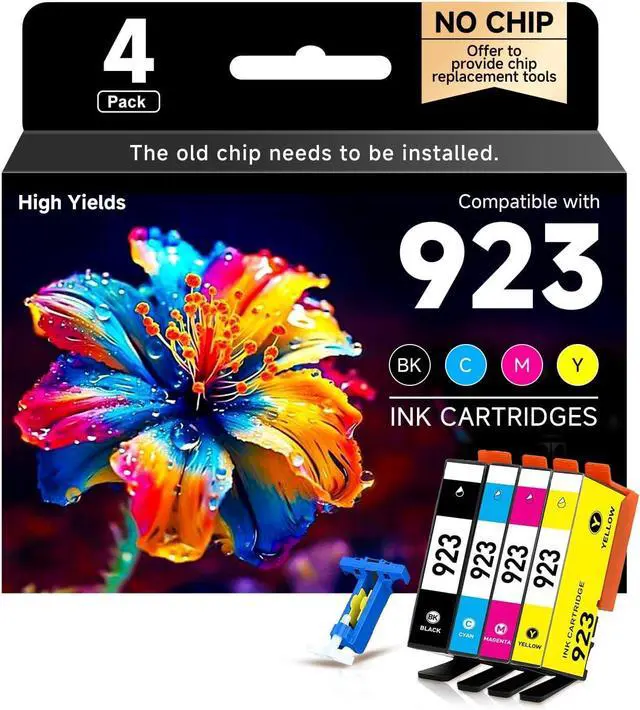





Ronhart 923 Ink Cartridges Combo Pack (Without Chip) High Yield Compatible for HP 923 Ink Cartridges 923XL Work for OfficeJet Pro 8130e 8135e 8139e 8138e 8120e 8122e 8124e 4 Pack (B,C,M,Y)
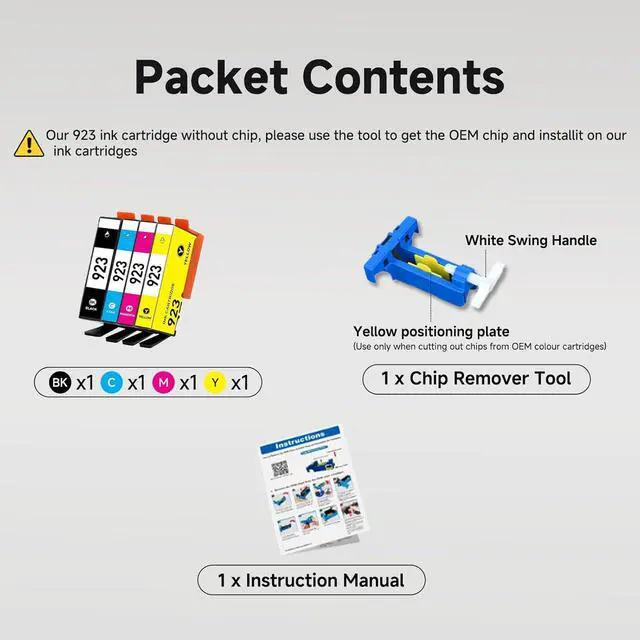
- Package List:4-Pack 923 Ink Cartridges for HP Printers (1 Black, 1 Cyan, 1 Magenta, 1 Yellow) + 1 Chip Removal Tool + 1 User Manual. NO CHIP!
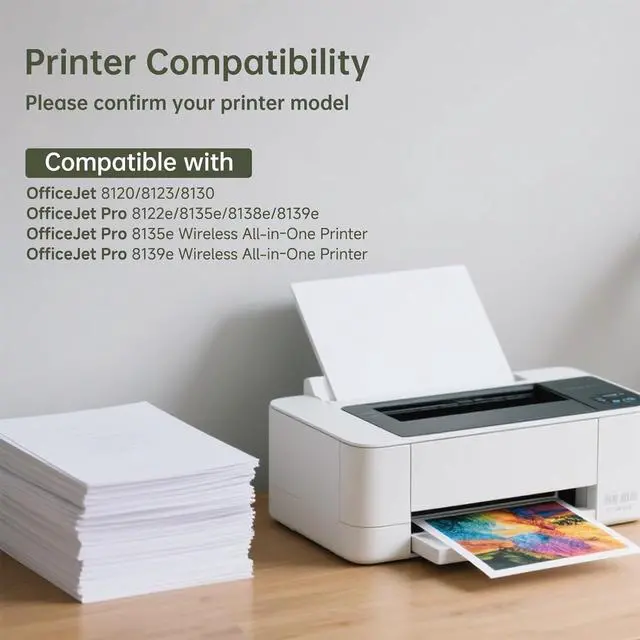
- 923XL Ink Combo Pack: Compatible with HP OfficeJet 8120e, 8122e, 8124e, 8125e and OfficeJet Pro 8130e, 8132e, 8134e, 8135e, 8138e, 8139e Printers.
- Page Yield: 923 black ink cartridge delivers up to 500 pages, while each 923 color ink cartridge yields up to 400 pages. Page counts are based on 5% coverage on Letter or A4 paper.
- No Chips:Our 923 ink cartridges combo pack is without chip, and you need to keep the old chips and install them to drive the whole set of 923 ink cartridges. The ink cartridges equipped with a chip remover tool and instruction, easy to operate and use.
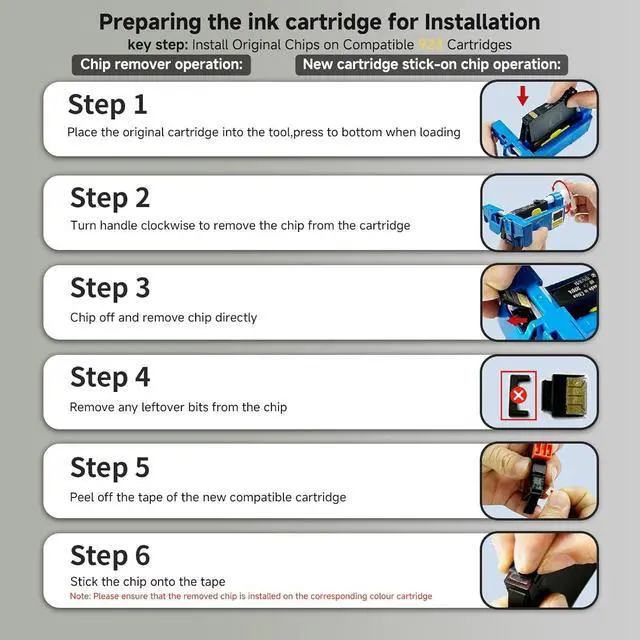
- How to Remove the OEM Cartridge Chip and Install It onto the Compatible 923 Ink Cartridge: 1. Remove the chip from the OEM ink cartridge. 2. Install the OEM chip onto the compatible 923 ink cartridge. 3. Insert the compatible cartridge (with the newly installed OEM chip)
+
+
Overview
Specs
Reviews

Any questions? Our AI mode will help you find out quickly.
Try me now
Package List:4-Pack 923 Ink Cartridges for HP Printers (1 Black, 1 Cyan, 1 Magenta, 1 Yellow) + 1 Chip Removal Tool + 1 User Manual. NO CHIP!
923XL Ink Combo Pack: Compatible with HP OfficeJet 8120e, 8122e, 8124e, 8125e and OfficeJet Pro 8130e, 8132e, 8134e, 8135e, 8138e, 8139e Printers.
Page Yield: 923 black ink cartridge delivers up to 500 pages, while each 923 color ink cartridge yields up to 400 pages. Page counts are based on 5% coverage on Letter or A4 paper.
No Chips:Our 923 ink cartridges combo pack is without chip, and you need to keep the old chips and install them to drive the whole set of 923 ink cartridges. The ink cartridges equipped with a chip remover tool and instruction, easy to operate and use.
How to Remove the OEM Cartridge Chip and Install It onto the Compatible 923 Ink Cartridge: 1. Remove the chip from the OEM ink cartridge. 2. Install the OEM chip onto the compatible 923 ink cartridge. 3. Insert the compatible cartridge (with the newly installed OEM chip) into the printer. Tip: Please follow the steps in the enclosed instruction manual, A+, or video. If you encounter any issues during removal and installation, please contact us.
Reminder: Our packaging design is updated regularly, so the retail packaging may differ from the images on the website. As a result, products will be shipped with either the old or new packaging at random. However, the product inside remains identical. Please feel free to purchase and usewe ensure every item you receive meets your expected standards.
923XL Ink Combo Pack: Compatible with HP OfficeJet 8120e, 8122e, 8124e, 8125e and OfficeJet Pro 8130e, 8132e, 8134e, 8135e, 8138e, 8139e Printers.
Page Yield: 923 black ink cartridge delivers up to 500 pages, while each 923 color ink cartridge yields up to 400 pages. Page counts are based on 5% coverage on Letter or A4 paper.
No Chips:Our 923 ink cartridges combo pack is without chip, and you need to keep the old chips and install them to drive the whole set of 923 ink cartridges. The ink cartridges equipped with a chip remover tool and instruction, easy to operate and use.
How to Remove the OEM Cartridge Chip and Install It onto the Compatible 923 Ink Cartridge: 1. Remove the chip from the OEM ink cartridge. 2. Install the OEM chip onto the compatible 923 ink cartridge. 3. Insert the compatible cartridge (with the newly installed OEM chip) into the printer. Tip: Please follow the steps in the enclosed instruction manual, A+, or video. If you encounter any issues during removal and installation, please contact us.
Reminder: Our packaging design is updated regularly, so the retail packaging may differ from the images on the website. As a result, products will be shipped with either the old or new packaging at random. However, the product inside remains identical. Please feel free to purchase and usewe ensure every item you receive meets your expected standards.
Warranty & Returns
Warranty, Returns, And Additional Information
Warranty
- Please contact the Seller directly for warranty information. Warranty information may also be found on the Manufacturer's website.
- CONTACT
Return Policies
- Return for refund within: 30 days
- Return for replacement within: 45 days
- This item is covered by Ali Wangwang E-commerce Limited Return Policy
Manufacturer Contact Info
- For a directory of all our manufacturers, please click below.
- Manufacturers Directory
LOADING...