




 here!
I’m your shopping assistant for PC builds, upgrades, and everything tech.
Got questions? Ask away!
Start a conversation
here!
I’m your shopping assistant for PC builds, upgrades, and everything tech.
Got questions? Ask away!
Start a conversation






Any questions? Ask CelesteSM will help you find out quickly.
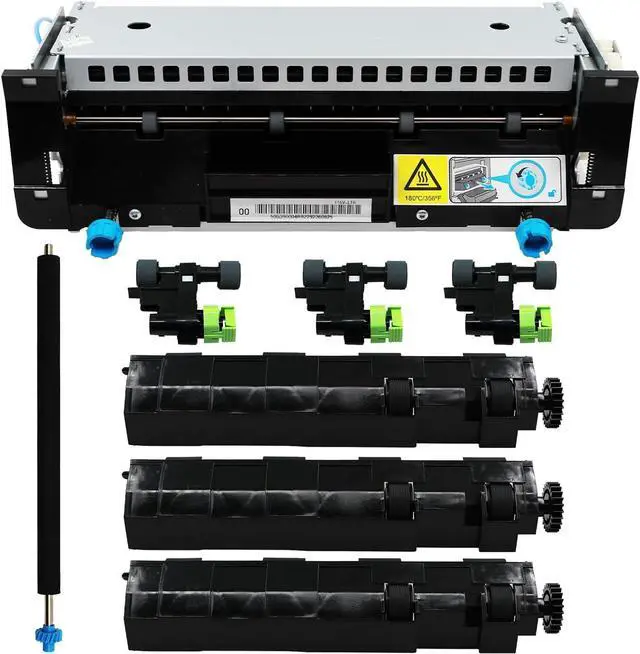
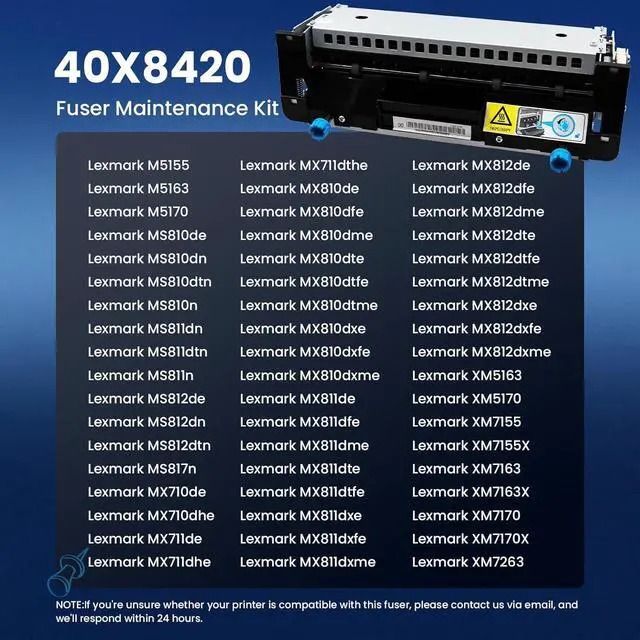
This is a 110V replacement fuser maintenance kit for select Lexmark MS810, MS811, MS812, MX710, MX711, MX810, MX811, and MX812 laser printers, suited for offices and IT teams that need to restore print performance with a kit rated for up to 200,000 pages.
| Attribute | Value |
|---|---|
| Best For | Servicing Lexmark MS- and MX-series monochrome laser printers (models listed below); intended for routine fuser maintenance and mid/high-volume office use |
| Compatibility | Compatible with Lexmark MS810, MS811, MS812 and Lexmark MX710, MX711, MX810, MX811, MX812 |
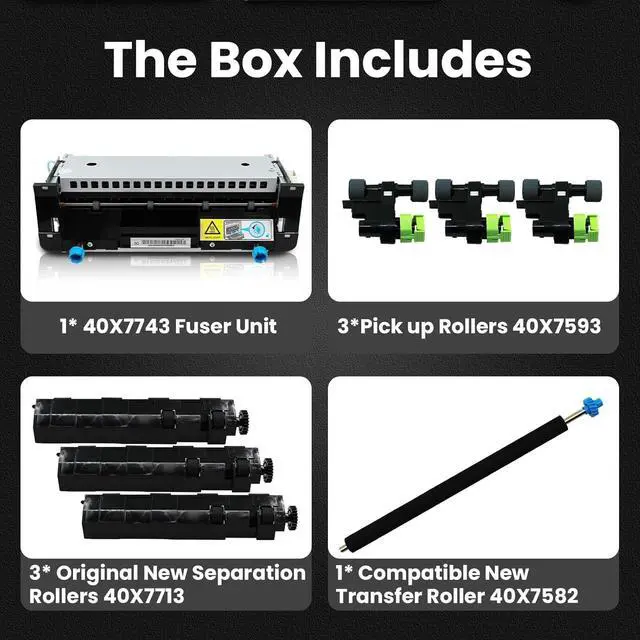
| Kit Contents | Fuser maintenance kit that includes the fuser unit, three media pick rollers, and a separator roller assembly |
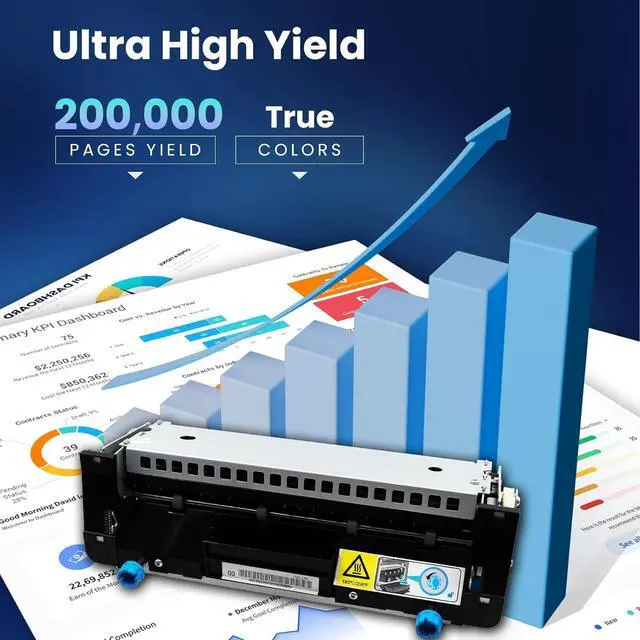
| Electrical And Page Life | 110V fuser unit specified for up to 200,000 pages |
| Installation And Packaging | User-installable with included installation instructions (installation described as about 5 minutes); shipped in multi-layer vacuum plastic bags with foam padding for protection |
| Model Identifiers | Part numbers 40X8420 / 40X8425 (Type 00) — fuser maintenance kit / fuse unit |
Q: Should I buy the Lexmark 40X8420/40X8425 Type 00 kit or a fuser-only replacement?
A: Choose the full 40X8420/40X8425 Type 00 maintenance kit when your printer is at its scheduled maintenance interval or you want to refresh the paper-feed path at the same time as the fuser. Official Lexmark materials position 40X8420 and 40X8425 as 110–120V maintenance kits for supported MS810/MS811/MS812 and MX710/MX711/MX810/MX811/MX812-family printers with a 200,000-page life, while install videos show the kit typically includes the fuser plus rollers. A fuser-only replacement is the narrower choice when the printer specifically has a fuser issue and the feed rollers do not need service.
Q: What is the practical difference between Lexmark 40X8420 and 40X8425?
A: For buyers, the main decision point is usually not performance but exact part matching. Both part numbers are listed by Lexmark as 110–120V fuser maintenance kits with a 200,000-page rating for the same general printer family, but Lexmark labels them as different maintenance-kit types in official materials. The safer choice is to match the part number or maintenance-kit type specified for your exact printer model and region rather than treating them as universally interchangeable.
Q: Is this Type 00 kit a better fit than a maintenance kit for Lexmark MS710/MS711 printers?
A: Yes, if you have an MS810/MS811/MS812 or MX710/MX711/MX810/MX811/MX812-family machine, the Type 00 40X8420/40X8425 kit is the more appropriate match. Installation references distinguish the 40X8420 maintenance kit used for MS810-related platforms from the different maintenance kit used for MS710/MS711 models. Choose the lower-tier MS710/MS711 kit only when your printer specifically belongs to that platform.
Q: Should I choose an OEM Lexmark maintenance kit or an aftermarket replacement like this one?
A: Choose OEM when you want the closest match to Lexmark's specified maintenance-kit type, voltage, and printer compatibility. Choose an aftermarket replacement when price and availability matter more and the seller clearly states support for the exact printer family and kit type. The buying trade-off is predictability versus cost: official Lexmark sources define the part mapping and duty-cycle target, while third-party install content and community discussions show that buyers commonly use alternative suppliers for older high-volume printers.
Q: Will this kit fit my Lexmark printer, or do I need to match a specific fuser type?
A: This kit is only a good buy if your printer uses the 110V Type 00 or Type 05 maintenance kit. For the MS810/MS811/MS812 family, Lexmark lists 40X8420 as Type 00 and 40X8425 as Type 05, and the correct two-digit type code should be checked on the installed fuser before ordering. If the printer model matches but the type code does not, this is not the right replacement.
Q: What does this maintenance kit actually include?
A: It is more than just a fuser. The standard 40X8420 maintenance kit typically includes the letter-size fuser plus pick rollers, a transfer roller, and separation rollers. That makes it a better choice than buying only a bare fuser when the printer is due for full scheduled maintenance.
Q: Is this worth buying if my printer shows a replace-maintenance-kit or 80.3x error?
A: Yes, if your printer is using the matching 110V Type 00 or Type 05 kit. Lexmark documents that 80.3x means the fuser has reached rated life and the printer stops until the correct maintenance kit is installed. This product is mainly for keeping an existing high-volume printer in service, not for casual spare-part stocking.
Q: Will replacing this kit help print quality and paper feeding problems?
A: Usually yes, if the issue is caused by normal wear in the fuser and feed components. A maintenance kit refreshes the fuser and roller parts that affect toner bonding and paper handling, so it is a practical fix for fading, poor fusing, or recurring pickup issues on supported printers. It is less likely to help if the root cause is the toner cartridge, imaging unit, or another hardware fault.
Q: Who is this product best for?
A: This is best for offices or technicians maintaining older Lexmark MS810/MS811/MS812 and MX710/MX711/MX810/MX811/MX812-class printers with moderate to heavy page volume. It is not an everyday consumer accessory; it is a scheduled maintenance part rated for up to about 200,000 pages, so it makes the most sense when you want to extend the life of a working business laser printer instead of replacing the device.
Q: Is this the right replacement kit for a Lexmark MS810, MS811, MS812, MX710, MX711, MX810, MX811, or MX812?
A: Yes, if your printer is one of those listed models and needs the 40X8420 maintenance kit. Reddit and YouTube discussions consistently associate 40X8420 with the MS810/MX810 family. Buyers should still confirm voltage and exact part number before ordering, because maintenance-kit part numbers differ across nearby Lexmark series.
Q: Is this a good buy if my printer shows a maintenance-kit or fuser end-of-life message?
A: Usually yes, if the printer is otherwise working well and the message specifically points to the maintenance kit or fuser. Community discussions indicate these Lexmark models can hard-stop when the kit reaches end of life, so replacing the kit is often the practical repair. It is less suitable if your printer already has unrelated print-quality or hardware problems, because a new fuser kit will not fix every issue.
Q: Who is this maintenance kit best suited for?
A: It is best suited for offices or heavy-duty users keeping an MS810/MX810-series printer in service. Reddit discussion around the MS810 family describes these printers as high-volume workhorses that need periodic replacement of the fuser and rollers. This kit makes more sense for maintaining an existing business printer than for light home printing.
Q: Is installation simple enough to do without a technician?
A: Often yes for users already comfortable servicing office printers. YouTube coverage of the MS810 maintenance kit focuses on a straightforward replacement process, and Reddit comments describe these maintenance kits as relatively easy to swap. The trade-off is that less experienced users should still verify the exact kit and follow model-specific steps carefully.
Q: What are the main trade-offs of buying a replacement maintenance kit instead of trying a smaller repair?
A: The main advantage is a more complete maintenance refresh, since this product includes the fuser and feed-related rollers rather than only one worn part. The trade-off is cost and scope: if your problem is not actually caused by the maintenance kit, replacing it may not solve the issue. It is the better choice when the printer has a maintenance-kit end-of-life warning or clear fuser-related wear, but less certain for general print defects with unknown cause.


