

Your Browsing History
- Free 30-day Returns
$162.99

Meet Your Seller




NIIMBOT M2 2 Inch Thermal Transfer Label Maker, 300DPI Bluetooth Label Printer, Label Maker Machine for Office, Garden, Lab, Outdoor Equipment, Cable, Jewelry, 8-10 Years Duration for Label No Fade
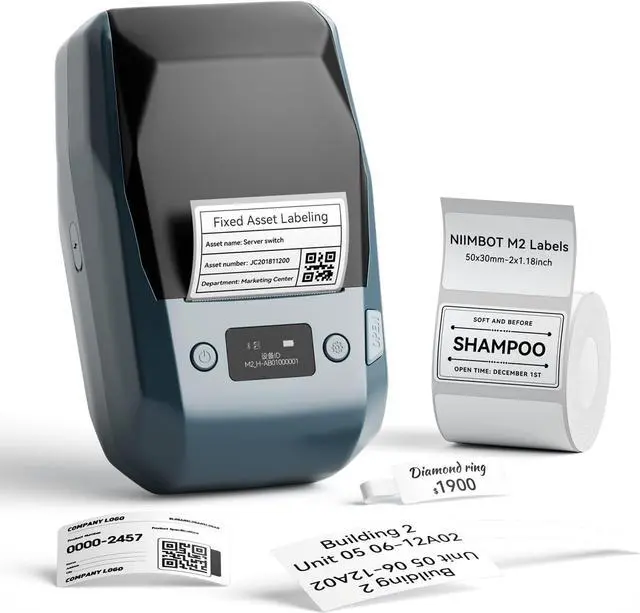
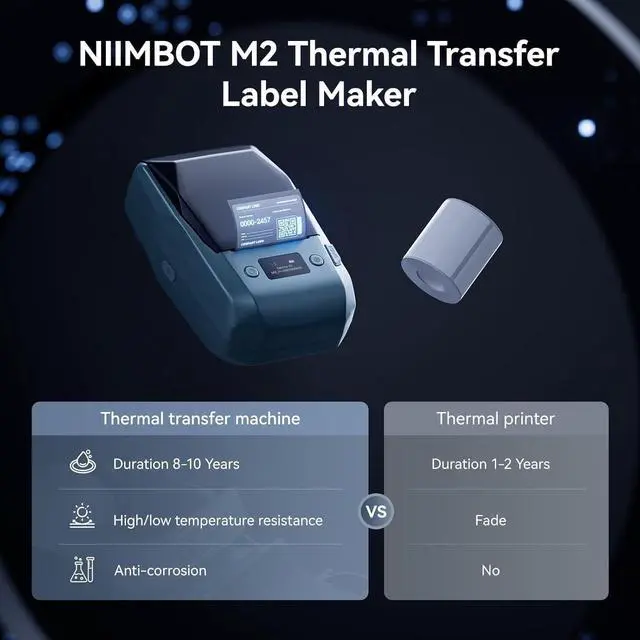
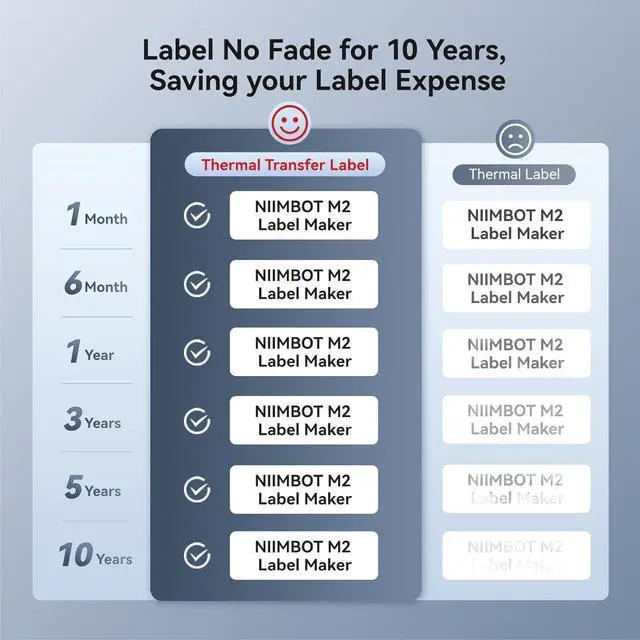
- NIIMBOT M2 Label MakerNIIMBOT M2 bluetooth label printer adopts thermal transfer upgrade technology. Different with thermal printers, the labels that print with the M2 label maker machine can be stored longer for 8-10 years, not only waterproof, oil-proof, and scratch-resistant, but also chemical resistance, can withstand high and low temperatures(-4°F-248°F), solving the limitation of short storage time of thermal labels.
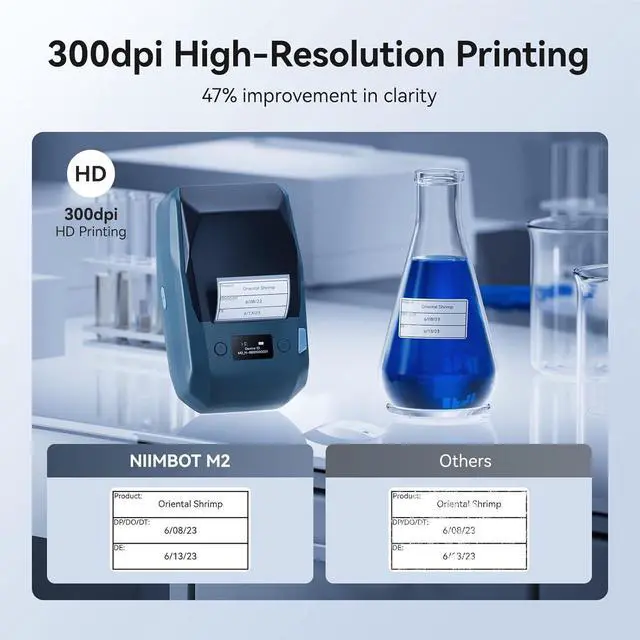
- Print More ClearWith its 300 dpi upgraded resolution, M2 portable label printer let you create clearer words, images. And you can use it anytime and anywhere. NIIMBOT M2 label maker machine's label width range of is 20mm-50mm(1-2 inch).The effective printable width is 48mm. Come with 1 roll label tape size 2x1.18 inch (50x30 mm), 230pcs/Roll.NoteM2 label maker is only compatable with thermal transfer label not for normal thermal label.
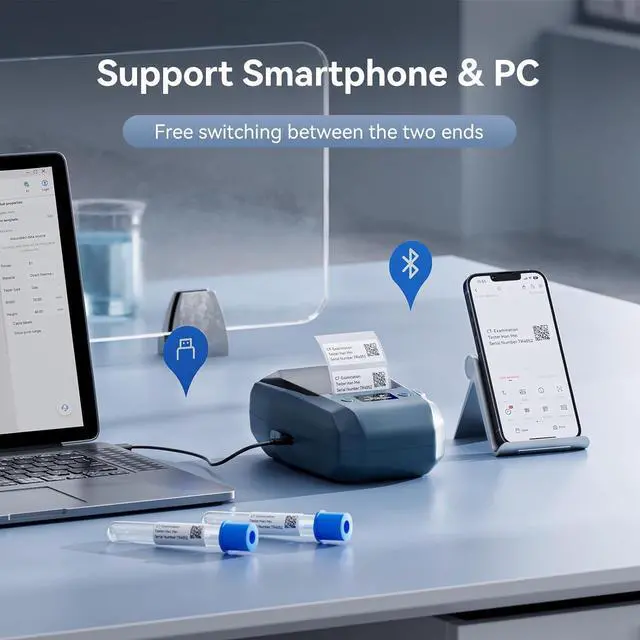
- Support Smartphone & PCThis Bluetooth label printer is compatible with iOS & Android smartphone, it can support 10 mobile
+
+
Overview
Specs
Reviews

Any questions? Our AI mode will help you find out quickly.
Try me now
NIIMBOT M2 Label MakerNIIMBOT M2 bluetooth label printer adopts thermal transfer upgrade technology. Different with thermal printers, the labels that print with the M2 label maker machine can be stored longer for 8-10 years, not only waterproof, oil-proof, and scratch-resistant, but also chemical resistance, can withstand high and low temperatures(-4°F-248°F), solving the limitation of short storage time of thermal labels.
Print More ClearWith its 300 dpi upgraded resolution, M2 portable label printer let you create clearer words, images. And you can use it anytime and anywhere. NIIMBOT M2 label maker machine's label width range of is 20mm-50mm(1-2 inch).The effective printable width is 48mm. Come with 1 roll label tape size 2x1.18 inch (50x30 mm), 230pcs/Roll.NoteM2 label maker is only compatable with thermal transfer label not for normal thermal label.
Support Smartphone & PCThis Bluetooth label printer is compatible with iOS & Android smartphone, it can support 10 mobile phones at the same time (3 IOS+7 Android) via bluetooth connection, in addition, our label maker also compatible with PC via usb cable, need to download the driver from the NIIMBOT official web.
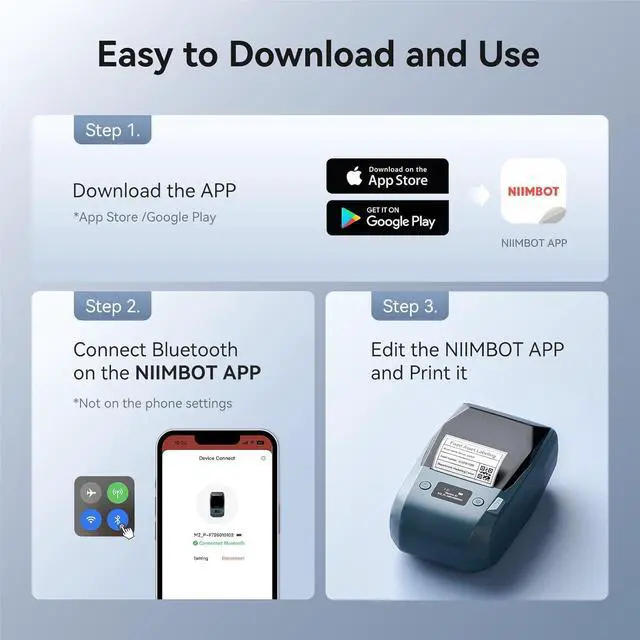
Rich in FeaturesSupport auto recognition for label(only support NIIMBOT Label), automatic paper return, save the first paper.The printing density is adaptive according to different labels,don't need to set it manually.For NIIMBOT APP, it contains multiple templates like texts, Icons, tables, logos, barcodes, QR codes, images, time, excel, scan, voice recg, and more.You can easily create various design labels from the NIIMBOT App. Get the M2 label printer and you can enjoy 6 months of NIIMBOT APP member VIP service.
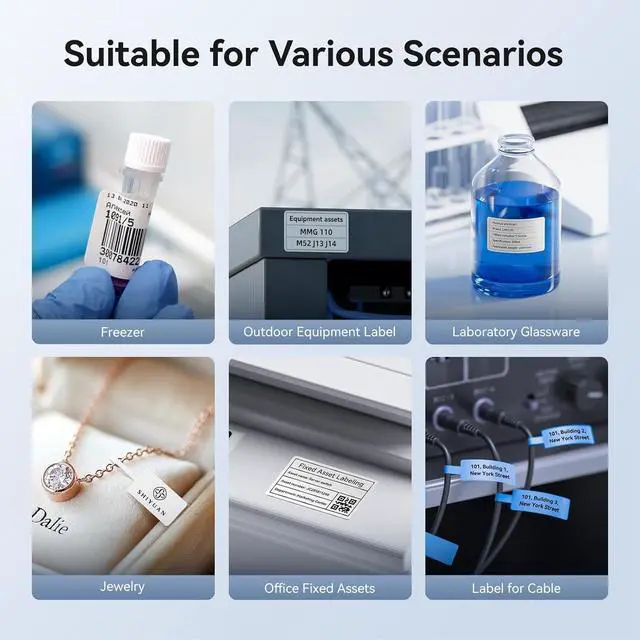
Wide ApplicationThe M2 label maker machine is used widely in small business, retail, office fixed assets management, jewelry, cable sort, medical/laboratory identification, item storage in freeze space, outdoor and gardening. Suitable for storage item and classification under various harsh conditions indoors and outdoors, etc.
For the Noise LevelThe sound you are hearing is primarily caused by the physical contact and separation between the ink ribbon and the label paper during the printing process. Unlike thermal printers (which apply heat directly to thermal paper without a ribbon).Additionally, the content being printed and the print volume can influence the noise level. Designs with high coverage or complex graphics require the print head to work more intensively.Continuous, high-quantity printing sessions can also make the sound more noticeable as the mechanism is engaged for longer periods.
Update for firmwareWhen facing Bluetooth connection issues with Android phones, upgrade the printer's Bluetooth firmware via iOS or PC cloud printing. After the upgrade, double-press the printers power button to print a self-test page. The firmware version remains unchanged, but the Bluetooth version will become 7470, confirming a successful upgrade.
Print More ClearWith its 300 dpi upgraded resolution, M2 portable label printer let you create clearer words, images. And you can use it anytime and anywhere. NIIMBOT M2 label maker machine's label width range of is 20mm-50mm(1-2 inch).The effective printable width is 48mm. Come with 1 roll label tape size 2x1.18 inch (50x30 mm), 230pcs/Roll.NoteM2 label maker is only compatable with thermal transfer label not for normal thermal label.
Support Smartphone & PCThis Bluetooth label printer is compatible with iOS & Android smartphone, it can support 10 mobile phones at the same time (3 IOS+7 Android) via bluetooth connection, in addition, our label maker also compatible with PC via usb cable, need to download the driver from the NIIMBOT official web.
Rich in FeaturesSupport auto recognition for label(only support NIIMBOT Label), automatic paper return, save the first paper.The printing density is adaptive according to different labels,don't need to set it manually.For NIIMBOT APP, it contains multiple templates like texts, Icons, tables, logos, barcodes, QR codes, images, time, excel, scan, voice recg, and more.You can easily create various design labels from the NIIMBOT App. Get the M2 label printer and you can enjoy 6 months of NIIMBOT APP member VIP service.
Wide ApplicationThe M2 label maker machine is used widely in small business, retail, office fixed assets management, jewelry, cable sort, medical/laboratory identification, item storage in freeze space, outdoor and gardening. Suitable for storage item and classification under various harsh conditions indoors and outdoors, etc.
For the Noise LevelThe sound you are hearing is primarily caused by the physical contact and separation between the ink ribbon and the label paper during the printing process. Unlike thermal printers (which apply heat directly to thermal paper without a ribbon).Additionally, the content being printed and the print volume can influence the noise level. Designs with high coverage or complex graphics require the print head to work more intensively.Continuous, high-quantity printing sessions can also make the sound more noticeable as the mechanism is engaged for longer periods.
Update for firmwareWhen facing Bluetooth connection issues with Android phones, upgrade the printer's Bluetooth firmware via iOS or PC cloud printing. After the upgrade, double-press the printers power button to print a self-test page. The firmware version remains unchanged, but the Bluetooth version will become 7470, confirming a successful upgrade.
Warranty & Returns
Warranty, Returns, And Additional Information
Warranty
- Please contact the Seller directly for warranty information. Warranty information may also be found on the Manufacturer's website.
- CONTACT
Return Policies
- Return for refund within: 30 days
- Return for replacement within: 30 days
- This item is covered by Chinathru Trading Co., Limited Return Policy
Manufacturer Contact Info
- For a directory of all our manufacturers, please click below.
- Manufacturers Directory
LOADING...