

Your Browsing History
- Free 30-day Returns
$90.99

Meet Your Seller

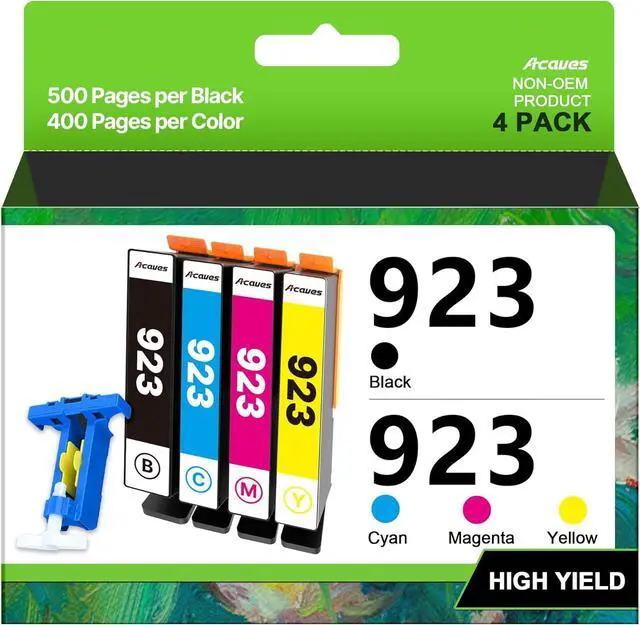




923 Ink Cartridges for HP Printers Compatible for HP 923 Ink Cartridges HP923 for HP Officejet Pro 8130e 8120e 8135e 8139e 8120e 8125e Printers (4 Pack 923 Ink Black Cyan Magenta Yellow Without Chip)
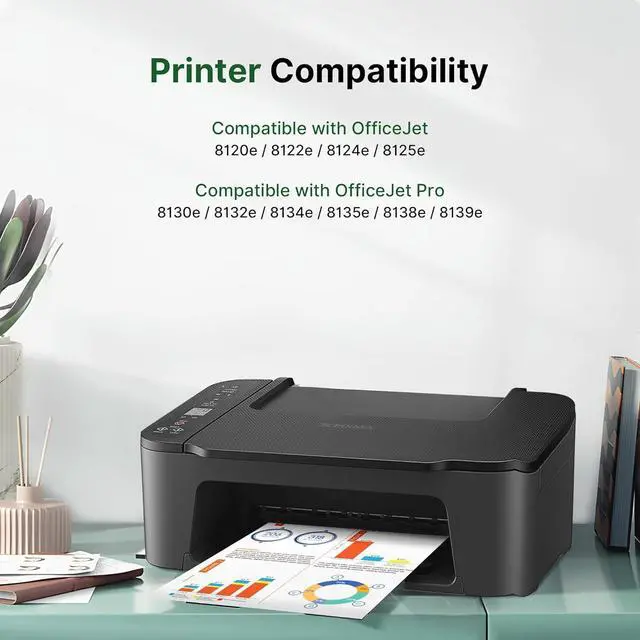
- Compatible Printers: Acaves for HP 923 ink cartridges works with HP OfficeJet Pro 8130e 8135e 8138e 8139e 8122e 8124e 8125e 8132e 8134e series Printer ; HP923 works with HP OfficeJet 8020 8122 8124 8125 8130 8132 8134 8135 8138 8139 Series Printer
- Package Contents: Totally 4 Pack 923 Ink Cartridges for HP Printers, 1 x 923 Black Ink Cartridges, 1 x 923 Cyan Ink Cartridges, 1 x 923 Magenta Ink Cartridges, 1 x 923 Yellow Ink Cartridges,1 x Chip Tool and 1 x User Guide. NO CHIP ! NO OEM
- High Printing Capacity: Capable of printing 500 pages per black cartridge for HP 923 ink, and 400 pages per 923 ink for HP 923 XL color combo pack (based on 5% coverage for A4 paper)
- NOTE: NO CHIPS! REQUIRES CHIPS. Our 923 ink for HP 8130e printer ink cartridges are not equipped with chips, and you need to prepare and install chips to drive them
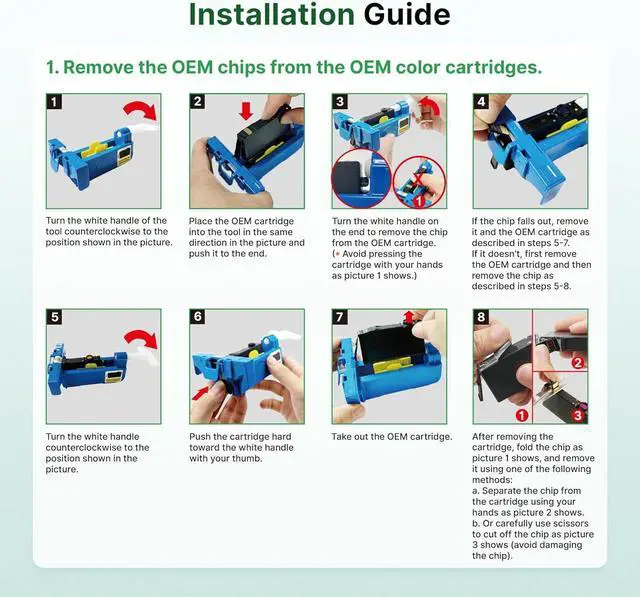
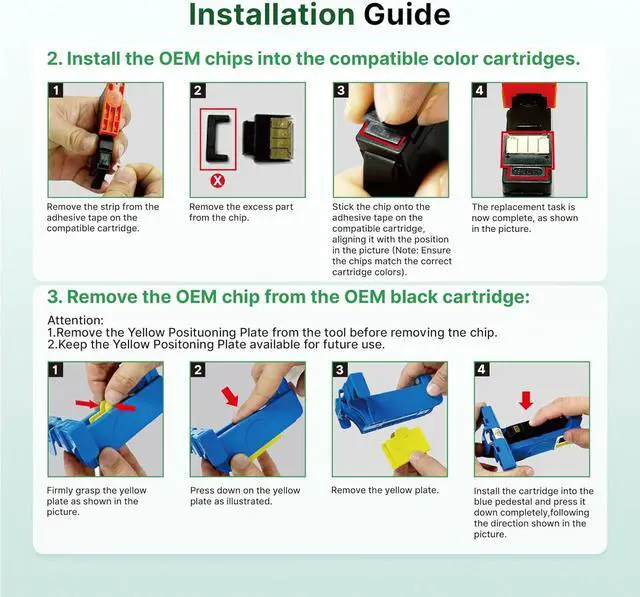
- Chip Replacement Guide: 1. You need to remove the original chips on HP923 ink cartridges through our tool. 2. Peel off the tape of the new compatible cartridg
+
+
Overview
Specs
Reviews

Any questions? Our AI mode will help you find out quickly.
Try me now
Compatible Printers: Acaves for HP 923 ink cartridges works with HP OfficeJet Pro 8130e 8135e 8138e 8139e 8122e 8124e 8125e 8132e 8134e series Printer ; HP923 works with HP OfficeJet 8020 8122 8124 8125 8130 8132 8134 8135 8138 8139 Series Printer
Package Contents: Totally 4 Pack 923 Ink Cartridges for HP Printers, 1 x 923 Black Ink Cartridges, 1 x 923 Cyan Ink Cartridges, 1 x 923 Magenta Ink Cartridges, 1 x 923 Yellow Ink Cartridges,1 x Chip Tool and 1 x User Guide. NO CHIP ! NO OEM
High Printing Capacity: Capable of printing 500 pages per black cartridge for HP 923 ink, and 400 pages per 923 ink for HP 923 XL color combo pack (based on 5% coverage for A4 paper)
NOTE: NO CHIPS! REQUIRES CHIPS. Our 923 ink for HP 8130e printer ink cartridges are not equipped with chips, and you need to prepare and install chips to drive them
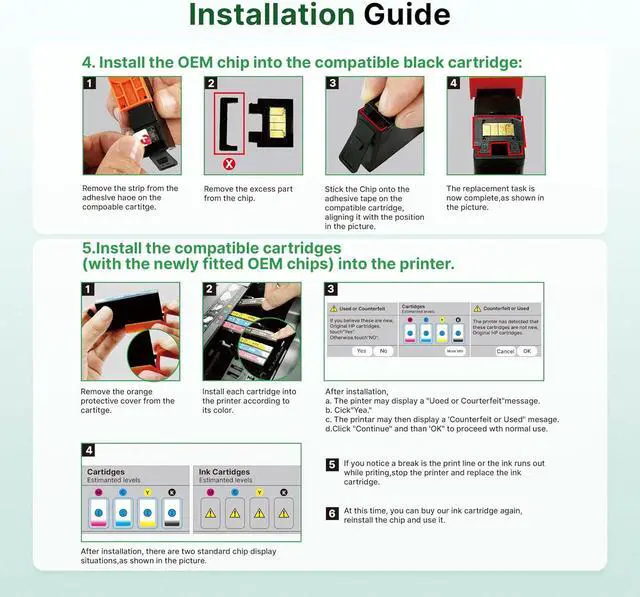
Chip Replacement Guide: 1. You need to remove the original chips on HP923 ink cartridges through our tool. 2. Peel off the tape of the new compatible cartridge and Stick the OME chips onto the tape. 3. Install the compatible 923 ink cartridges (with the newly fitted OEM chips) into the printer.
TipPlease follow the steps in the attached pictures or video for chip removal and installation, please contact us if you have any issue during use our 923 ink
Package Contents: Totally 4 Pack 923 Ink Cartridges for HP Printers, 1 x 923 Black Ink Cartridges, 1 x 923 Cyan Ink Cartridges, 1 x 923 Magenta Ink Cartridges, 1 x 923 Yellow Ink Cartridges,1 x Chip Tool and 1 x User Guide. NO CHIP ! NO OEM
High Printing Capacity: Capable of printing 500 pages per black cartridge for HP 923 ink, and 400 pages per 923 ink for HP 923 XL color combo pack (based on 5% coverage for A4 paper)
NOTE: NO CHIPS! REQUIRES CHIPS. Our 923 ink for HP 8130e printer ink cartridges are not equipped with chips, and you need to prepare and install chips to drive them
Chip Replacement Guide: 1. You need to remove the original chips on HP923 ink cartridges through our tool. 2. Peel off the tape of the new compatible cartridge and Stick the OME chips onto the tape. 3. Install the compatible 923 ink cartridges (with the newly fitted OEM chips) into the printer.
TipPlease follow the steps in the attached pictures or video for chip removal and installation, please contact us if you have any issue during use our 923 ink
Warranty & Returns
Warranty, Returns, And Additional Information
Warranty
- Please contact the Seller directly for warranty information. Warranty information may also be found on the Manufacturer's website.
- CONTACT
Return Policies
- Return for refund within: 30 days
- Return for replacement within: 45 days
- This item is covered by Ali Wangwang E-commerce Limited Return Policy
Manufacturer Contact Info
- For a directory of all our manufacturers, please click below.
- Manufacturers Directory
LOADING...