• $90.99
  • Free 30-day Returns
  • Price alert
    Shop it at NeweggBusiness.

    Meet Your Seller

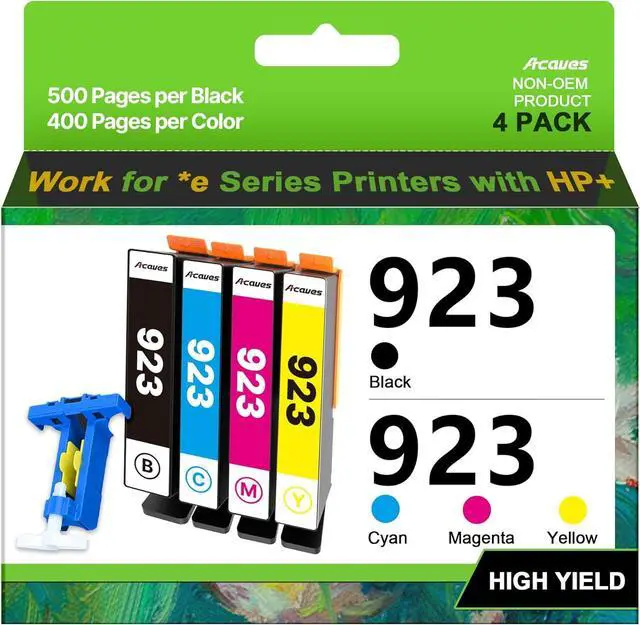
    Compatible Ink Cartridge Replacement for 923 Ink Cartridges (Black Cyan Magenta Yellow, 4-Pack, Without Chip) Work with Officejet Pro 8130e 8120e 8135e 8139e 8120e 8125e Printers

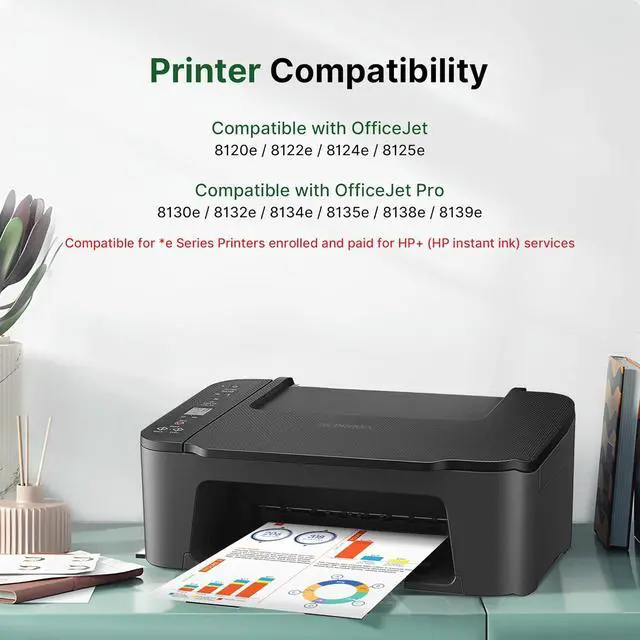
    • Compatible with e-series printers enrolled in HP+ Service: Acaves 923 ink cartridges work with HP OfficeJet Pro 8130e, 8135e, 8138e, 8139e, 8122e, 8124e, 8125e, 8132e, 8134e series printers; also compatible with HP OfficeJet Pro 8122, 8124, 8125, 8130, 8132, 8134, 8135, 8138, 8139 series printers
    • Package Contents: 4-Pack 923 ink cartridges include 1 black, 1 cyan, 1 magenta, 1 yellow cartridge, 1 chip tool, and 1 user guide. No chips, non-OEM product
    • High Printing Capacity: Up to 500 pages per 923 black cartridge and 400 pages per 923XL color cartridge at 5% coverage on A4 paper
    • Note: No chips included. Chips are required. These 923 ink cartridges do not come with chips; you need to install your existing or replacement chips to use
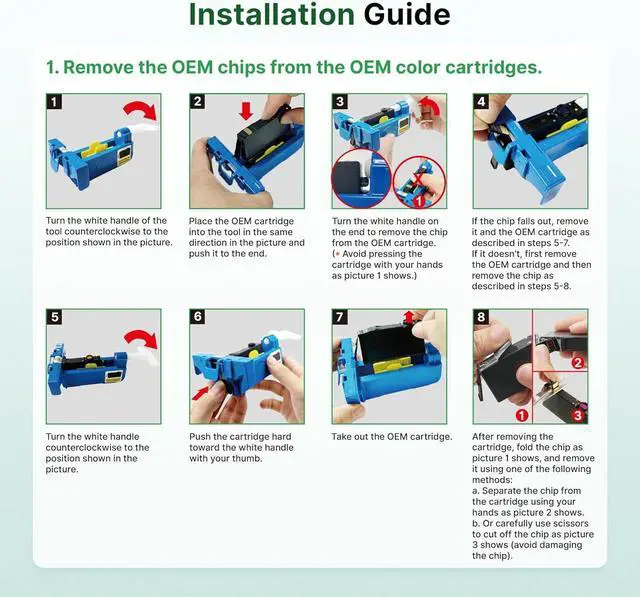
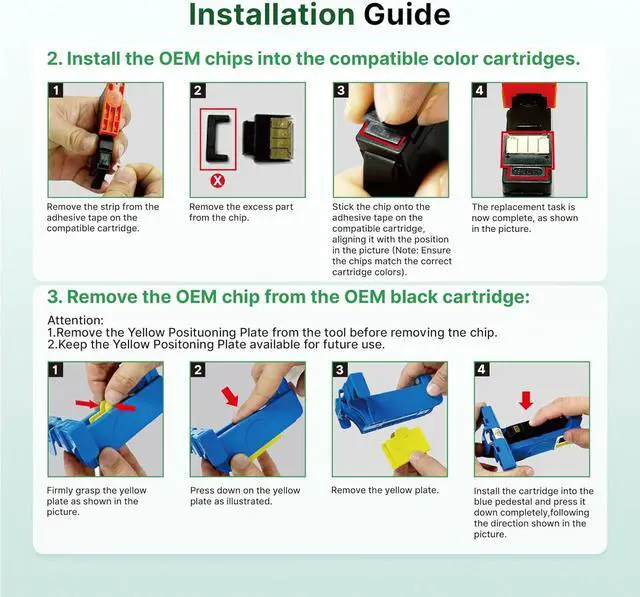
    • Chip Replacement Guide: 1. Remove the original chips from your OEM HP 923 cartridges using the included tool. 2. Peel off the tape on the new compatible cartridge and attach the OEM chips to the tape. 3. Install the compatible 923 cartridge (with the at
    +
    +
    Overview
    Reviews
    avatar

    Any questions? Our AI beta will help you find out quickly.

    Compatible with e-series printers enrolled in HP+ Service: Acaves 923 ink cartridges work with HP OfficeJet Pro 8130e, 8135e, 8138e, 8139e, 8122e, 8124e, 8125e, 8132e, 8134e series printers; also compatible with HP OfficeJet Pro 8122, 8124, 8125, 8130, 8132, 8134, 8135, 8138, 8139 series printers
    Package Contents: 4-Pack 923 ink cartridges include 1 black, 1 cyan, 1 magenta, 1 yellow cartridge, 1 chip tool, and 1 user guide. No chips, non-OEM product
    High Printing Capacity: Up to 500 pages per 923 black cartridge and 400 pages per 923XL color cartridge at 5% coverage on A4 paper
    Note: No chips included. Chips are required. These 923 ink cartridges do not come with chips; you need to install your existing or replacement chips to use
    Chip Replacement Guide: 1. Remove the original chips from your OEM HP 923 cartridges using the included tool. 2. Peel off the tape on the new compatible cartridge and attach the OEM chips to the tape. 3. Install the compatible 923 cartridge (with the attached OEM chips) into your printer
    Tip: Please refer to the included pictures or video for chip installation steps. Contact us if you encounter any issues while using these 923 ink cartridges

    Warranty & Returns

    Warranty, Returns, And Additional Information

    Warranty

    • Please contact the Seller directly for warranty information. Warranty information may also be found on the Manufacturer's website.
    • CONTACT

    Return Policies

    Manufacturer Contact Info

    LOADING...