

Your Browsing History

Meet Your Seller


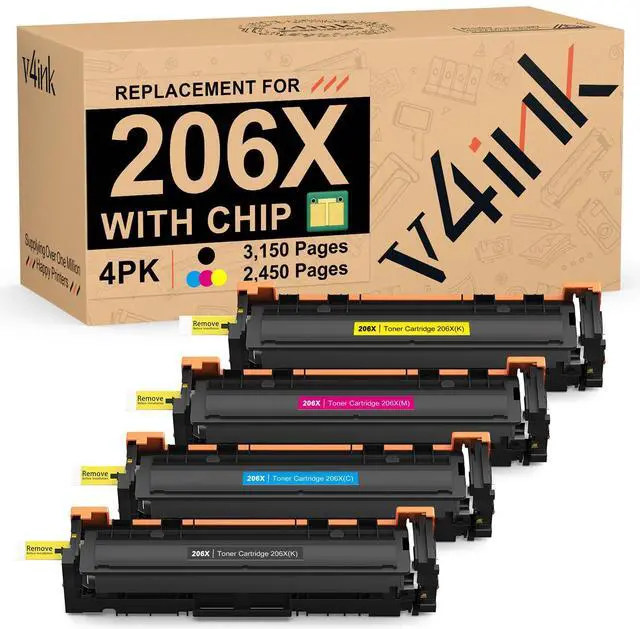

206X 206A Toner Cartridge 4-Pack High Yield Replacement for HP 206X W2110X | Compatible for HP Color Pro MFP M283fdw M283cdw M282nw M255dw M255nw Printer M283 M282 M255 Series | Latest Upgraded Chip
Limited time offer, ends 09/17 By CoreComp Shop
- With Integrated Chip Displays Accurate Toner Level: The 206X toner cartridges come with a newly upgraded chip that works with the latest firmware version and shows precise toner levels. No manual chip installation is required. Designed for Printers: HP Color Pro M255, M255dw, M255nw; HP Color Pro MFP M282, M282nw, M283, M283cdw, M283fdw, M283fdn. Print more and spend less: Each Black cartridge yields up to 3,150 pages, and each Cyan, Yellow, or Magenta cartridge yields up to 2,450 pages at 5% coverage (Letter/A4). Note: To use these compatible 206X toner cartridges, we recommend following the instructions to disable the "Cartridge Policy" and turn off the Automatic Upgrade Function on your printer. Tip: After installation, the printer may display the error message "Non-HP ink cartridges". Please click "OK" to ignore it and proceed with printing. This will not impact the print quality
+
+
Overview
Specs
Reviews

Any questions? Our AI mode will help you find out quickly.
Try me now
With Integrated Chip Displays Accurate Toner Level: The 206X toner cartridges come with a newly upgraded chip that works with the latest firmware version and shows precise toner levels. No manual chip installation is required.
Designed for Printers: HP Color Pro M255, M255dw, M255nw; HP Color Pro MFP M282, M282nw, M283, M283cdw, M283fdw, M283fdn.
Print more and spend less: Each Black cartridge yields up to 3, 150 pages, and each Cyan, Yellow, or Magenta cartridge yields up to 2, 450 pages at 5% coverage (Letter/A4).
Note: To use these compatible 206X toner cartridges, we recommend following the instructions to disable the "Cartridge Policy" and turn off the Automatic Upgrade Function on your printer.
Tip: After installation, the printer may display the error message "Non-HP ink cartridges". Please click "OK" to ignore it and proceed with printing. This will not impact the print quality
Designed for Printers: HP Color Pro M255, M255dw, M255nw; HP Color Pro MFP M282, M282nw, M283, M283cdw, M283fdw, M283fdn.
Print more and spend less: Each Black cartridge yields up to 3, 150 pages, and each Cyan, Yellow, or Magenta cartridge yields up to 2, 450 pages at 5% coverage (Letter/A4).
Note: To use these compatible 206X toner cartridges, we recommend following the instructions to disable the "Cartridge Policy" and turn off the Automatic Upgrade Function on your printer.
Tip: After installation, the printer may display the error message "Non-HP ink cartridges". Please click "OK" to ignore it and proceed with printing. This will not impact the print quality
Warranty & Returns
Warranty, Returns, And Additional Information
Warranty
- Please contact the Seller directly for warranty information. Warranty information may also be found on the Manufacturer's website.
- CONTACT
Return Policies
- Return for refund within: 30 days
- Return for replacement within: 30 days
- This item is covered by CoreComp Shop Return Policy
Manufacturer Contact Info
- For a directory of all our manufacturers, please click below.
- Manufacturers Directory
LOADING...