here!
I’m your shopping assistant for PC builds, upgrades, and everything tech.
Got questions? Ask away!
Start a conversation
here!
I’m your shopping assistant for PC builds, upgrades, and everything tech.
Got questions? Ask away!
Start a conversation




Any questions? Ask CelesteSM will help you find out quickly.


LincPlus is a publicly listed company headquartered in Shenzhen, China, with a team of 500 employees and annual sales reaching $80 million. The company is dedicated to providing global users with high-quality smart terminal products that deliver an excellent user experience, designed to make work, entertainment, and daily life easier and more comfortable.


We provide powerful and affordable products with high quality for customers
All of our products passed CE, FCC and other required certificates. All the products has been tested for many times before shipping. We have established a strategic partnership .
We are responsible for resolving all product quality issues. If you have any questions, please tell us


LincPlus is a publicly listed company headquartered in Shenzhen, China, with a team of 500 employees and annual sales reaching $80 million. The company is dedicated to providing global users with high-quality smart terminal products that deliver an excellent user experience, designed to make work, entertainment, and daily life easier and more comfortable.

We provide powerful and affordable products with high quality for customers
All of our products passed CE, FCC and other required certificates. All the products has been tested for many times before shipping. We have established a strategic partnership .
We are responsible for resolving all product quality issues. If you have any questions, please tell us
Tired of paying month after month for virtual cloud storage that you dont even own? The Lincstation E1 is the ultimate solution to centralize, secure, and share your entire digital lifecompletely free of monthly recurring fees.
AI-Powered Smart Media ManagementStop wasting hours searching through thousands of unorganized files. With LincOSs integrated AI recognition, the NAS automatically analyzes, tags, and categorizes faces, scenes, and objects. Easily find any memory in seconds using the smart search bar, whether you are on your smartphone, tablet, or PC.
The Ultimate Hybrid PerformanceThe Lincstation E1 redefines home network storage with its versatile 4-bay hybrid layout. You have the total flexibility to configure your storage:
In an era of rising cyber threats, your data security shouldn't be a gamble. The Lincstation E1 operates entirely within your local area network (LAN) and can function independently of the internet. Your encryption keys and private files never leave the physical box inside your house, fulfilling strict privacy demands for both families and home offices.
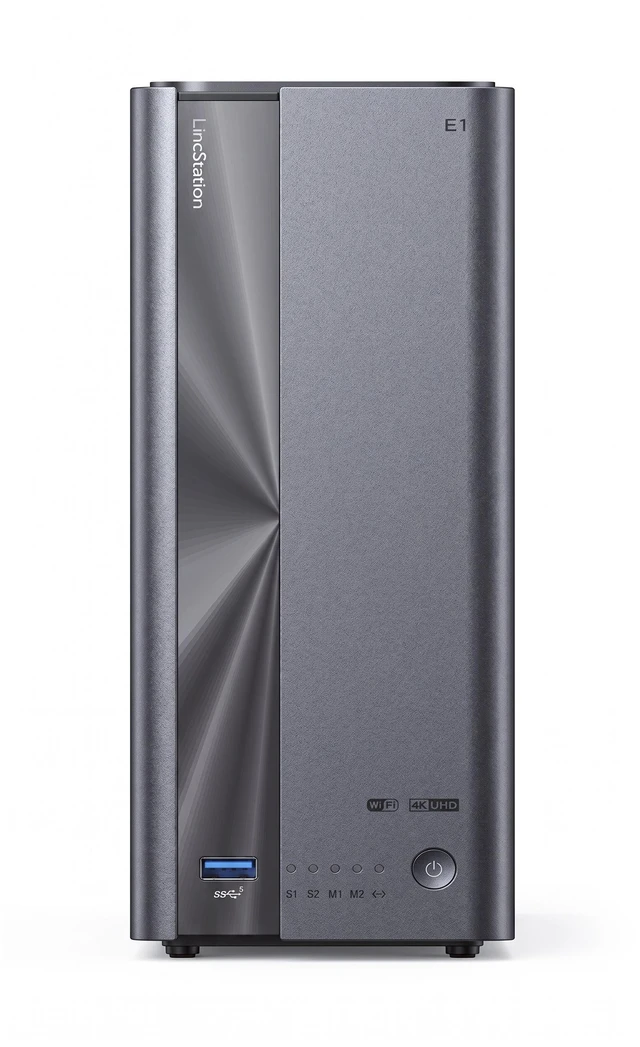
The LincStation E1 is a 4-bay hybrid private cloud NAS for home users, creators, and families who want subscription-free storage, automatic phone backups, and local media streaming. It combines two SATA bays, two NVMe M.2 slots, 2.5GbE networking, and 4K HDMI output for expandable storage and fast multimedia access.
| Attribute | Value |
|---|---|
| Best For | Personal-cloud backup and media streaming in a desktop NAS setup |
| Storage Bays And Interfaces | 4-bay chassis with two SATA and two NVMe drive interfaces for expandable network storage |
| Memory Configuration | 64GB of installed memory |
| Wired Networking | One RJ-45 port with 2.5GbE connectivity for network file transfers and media streaming |
Q: Should I buy the LincStation E1 or Synology DS224+?
A: Choose the LincStation E1 if you want a hybrid 2-SATA-plus-2-NVMe layout, 2.5GbE networking, direct 4K HDMI output, and automatic phone backup in a compact private-cloud device. Choose the Synology DS224+ if you prioritize Synology’s more mature DSM software, established backup tools, and broader long-term ecosystem over extra NVMe slots and local HDMI playback.
Q: Is the LincStation E1 better than the UGREEN NASync DXP2800 for a home media server?
A: The LincStation E1 is the better fit if you want four total storage positions, automatic phone photo backup, and direct HDMI connection to a TV or projector. The UGREEN DXP2800 is the stronger choice for users who need an Intel N100 x86 platform for Docker, Plex-style workloads, or broader server experimentation. Choose the E1 for simpler local storage and backup; choose the DXP2800 for greater software flexibility.
Q: Should I get the LincStation E1 or spend more on the LincStation N1?
A: Choose the LincStation E1 for personal cloud storage, phone backups, file sharing, and local media access with a compact 2-SATA-plus-2-NVMe design. Move up to the LincStation N1 if you expect to run more demanding server software, containers, or self-hosted services and are willing to prioritize processing capability and expandability over the E1’s simpler entry-level focus.
Q: Is the LincStation E1 a better choice than building a DIY NAS?
A: Choose the LincStation E1 when you want a ready-to-use appliance for local file storage, phone backups, and basic media access without selecting hardware or installing an operating system. A DIY NAS is more suitable when you want full control over TrueNAS, UnRAID, Docker, drive layouts, and future upgrades. The main trade-off is convenience versus customization: the E1 simplifies setup, while a DIY build provides a wider software and hardware path.
Q: Are the storage drives included, or do I need to buy them separately?
A: The provided product information does not state that HDDs or NVMe SSDs are included. Buyers should assume the LincStation E1 is a diskless NAS unless the seller confirms otherwise. It has two SATA bays and two NVMe M.2 slots, with up to 76TB of expandable storage based on the installed drives.
Q: Can it automatically back up photos and videos from an iPhone or Android phone?
A: Yes. The product is designed to automatically back up photos and videos from iOS and Android devices through its companion app over 2.4GHz or 5GHz Wi-Fi. The listing states that backups retain the original, uncompressed resolution. This feature is best suited to users who want local phone backup rather than relying entirely on a monthly cloud service.
Q: Who is the LincStation E1 suitable for?
A: It is suitable for households, creators, and small offices that need centralized file storage, automatic phone backup, media streaming, and local network access without a recurring cloud-storage fee. It is less suitable for buyers seeking a simple plug-and-play external drive, because NAS setup, drive installation, network configuration, and data-management decisions may be required.
Q: Can I add storage gradually, or do all four drive positions need to be populated at setup?
A: The hardware provides two SATA bays and two NVMe M.2 slots, so storage can be planned around the available drive positions. However, the product information does not specify how LincOS handles adding drives, RAID, or storage-pool expansion. Buyers who want to start with one or two drives should confirm supported expansion and RAID modes before purchase.
Q: Can I access the files away from home, or is it only for use on my home network?
A: The listing confirms network storage and Wi-Fi phone backup, but it does not explicitly confirm internet-based remote access. Local access through the home network is supported by the product’s NAS design; remote access depends on LincOS software, app support, and network configuration. Buyers who need travel or work-from-anywhere access should verify remote-access features before purchasing.
Q: Is the LincStation E1 worth buying as a budget home NAS?
A: It is worth considering if you prioritize low hardware cost, compact storage, 2.5GbE networking, and a hybrid SATA/NVMe layout. The main trade-off is software maturity: reviews describe the web interface, security features, and backup workflow as areas that still need refinement.
Q: Who is the LincStation E1 best suited for?
A: It is best suited for budget-conscious home users, DIY NAS buyers, and people who want local phone-photo backup and media storage without a monthly cloud fee. It is less suitable for users who want a highly polished, turnkey NAS platform with mature security and administration tools.
Q: Can the LincStation E1 replace iCloud or Google Photos for phone backups?
A: It can provide local, subscription-free photo and video backup through its iOS and Android app, retaining the original files according to the product information. However, the review discussion indicates that the mobile app is more capable than the web interface and that the backup workflow may require user setup and verification.
Q: What are the main trade-offs of choosing the LincStation E1?
A: The hardware provides two SATA bays, two NVMe slots, 2.5GbE, and direct 4K HDMI output, but the platform trades software polish for price. Reported concerns include an unfinished software experience, a weak web interface, limited security features, backup confusion, external DNS activity, and ARM-based operating-system limitations.