

Your Browsing History

Meet Your Seller

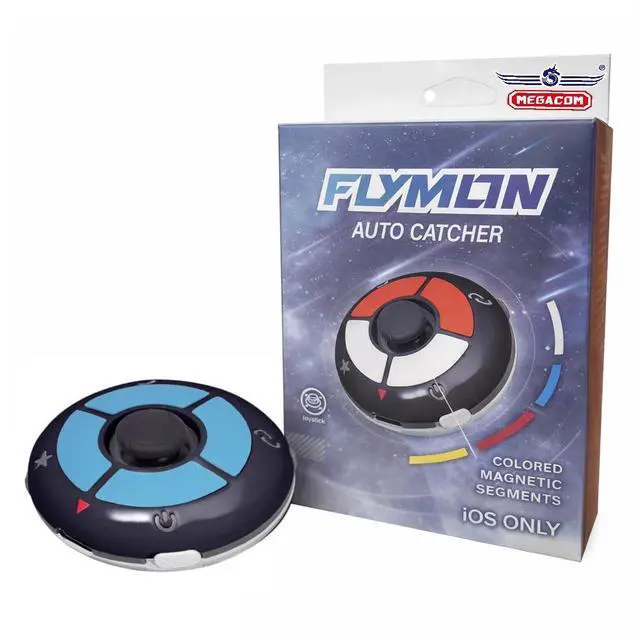

FLYMON Poket Go Auto Catcher | Earn Candy, XP & Stardust | AR Exploration Enhancer | Portable Location Navigation Assistant-Based AR Games | USB-C Charging | iOS Only | Flymon App (Black)
Limited time offer, ends 08/03 By Jeronrtion
- Pokémon GO Auto Catcher for iOS This gadget merges automatic catching with joystick movement, enabling trainers to explore maps and engage with AR features more effectively while playing location-based games. Joystick Movement & Route Walking Fluid joystick navigation with adjustable speeds (walk or jog). Effortlessly explore virtual maps and preview different routes without lag or freezing. Supports GPX Route Import Import GPX files to preview routes, tracks, and waypoints generated by compatible GPS tools. Streamlines route setup without manual point-by-point navigation. Portable USB-C Rechargeable Design Small and lightweight device with built-in rechargeable battery. Simple to carry and prepared for extended gameplay sessions. Compatible with Pokémon GO & GPS-Based AR Games Made for iOS devices to improve exploration and gameplay for Pokémon GO trainers, testers, and developers working with location-based apps. Firmware Updates & Troubleshooting The companion app delivers firmware updates to enhance performance and connection stability. If location resets happen, please update firmware or follow the setup guide and video tutorial. Location Reset Issue (Rubber Banding) If your avatar keeps returning to original location, this is typical and can often be resolved by checking the settings below. Quick Checklist: Share My Location OFF Find My location sharing OFF Wi-Fi OFF (recommended for long-distance movement) Reset Location Services (turn off then turn
+
+
Overview
Specs
Reviews

Any questions? Our AI beta will help you find out quickly.
Try me now
Pokémon GO Auto Catcher for iOS This gadget merges automatic catching with joystick movement, enabling trainers to explore maps and engage with AR features more effectively while playing location-based games. Joystick Movement & Route Walking Fluid joystick navigation with adjustable speeds (walk or jog). Effortlessly explore virtual maps and preview different routes without lag or freezing. Supports GPX Route Import Import GPX files to preview routes, tracks, and waypoints generated by compatible GPS tools. Streamlines route setup without manual point-by-point navigation. Portable USB-C Rechargeable Design Small and lightweight device with built-in rechargeable battery. Simple to carry and prepared for extended gameplay sessions. Compatible with Pokémon GO & GPS-Based AR Games Made for iOS devices to improve exploration and gameplay for Pokémon GO trainers, testers, and developers working with location-based apps. Firmware Updates & Troubleshooting The companion app delivers firmware updates to enhance performance and connection stability. If location resets happen, please update firmware or follow the setup guide and video tutorial. Location Reset Issue (Rubber Banding) If your avatar keeps returning to original location, this is typical and can often be resolved by checking the settings below. Quick Checklist: Share My Location OFF Find My location sharing OFF Wi-Fi OFF (recommended for long-distance movement) Reset Location Services (turn off then turn on) before starting movement. After completing these steps, your location should remain stable
Warranty & Returns
Warranty, Returns, And Additional Information
Warranty
- Please contact the Seller directly for warranty information. Warranty information may also be found on the Manufacturer's website.
- CONTACT
Return Policies
- Return for refund within: 30 days
- Return for replacement within: 30 days
- This item is covered by Jeronrtion Return Policy
Manufacturer Contact Info
- For a directory of all our manufacturers, please click below.
- Manufacturers Directory
LOADING...