


• $11.99
  • Free 30-day Returns
  • Price alert
    Shop it at NeweggBusiness.

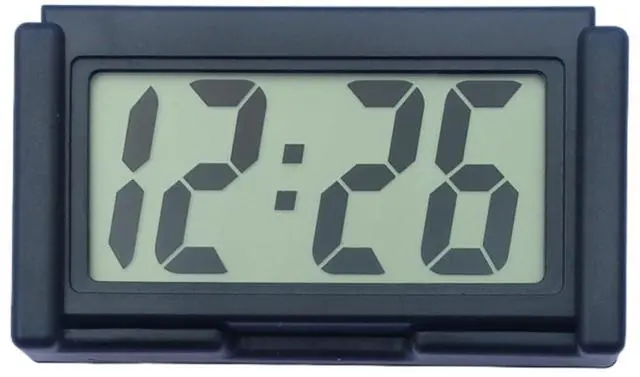
    Small Digital Clock with Jumbo LCD Time & Day DisplayMini Automotive Small Digital Clock Battery Operated for Desktop Nightstand Pocket Car Truck Dashboard & Air Vent (1, Black)

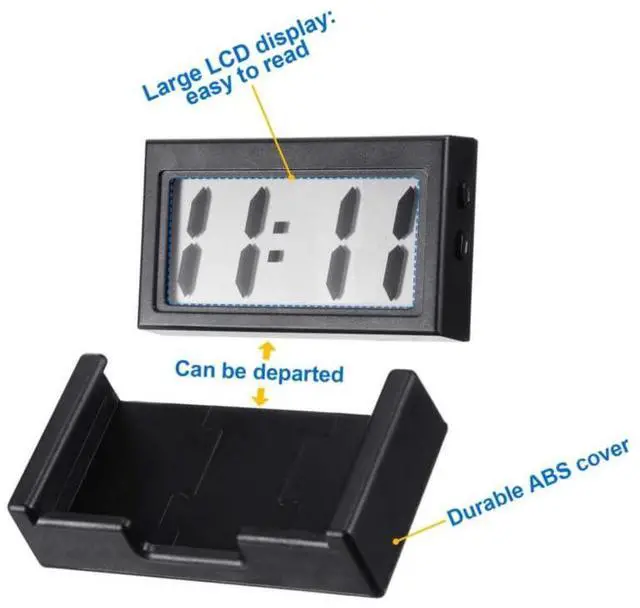
    • Extra-large digital LCD display, The display of hours and minutes is very large, with clear numbers and a simple design that makes it easy to read, giving you a safer driving experience
    • The mini digital clock is made of high-quality plastic material, which is non-toxic and durable; In addition, it is shockproof, and you can use them with confidence
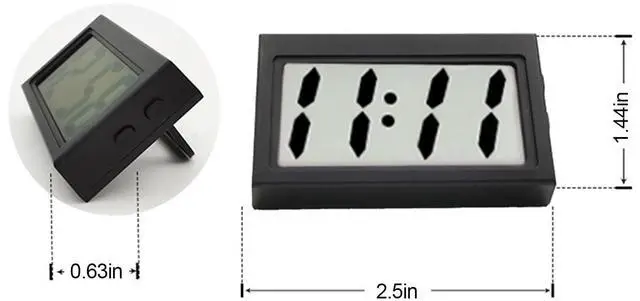
    • Measuring about 1.4 x 2.4 inches in miniature,that it can be placed in a conspicuous place and takes up little space. Riding is quick and easy to keep track of time without worrying about the danger of distraction, ensuring your safety
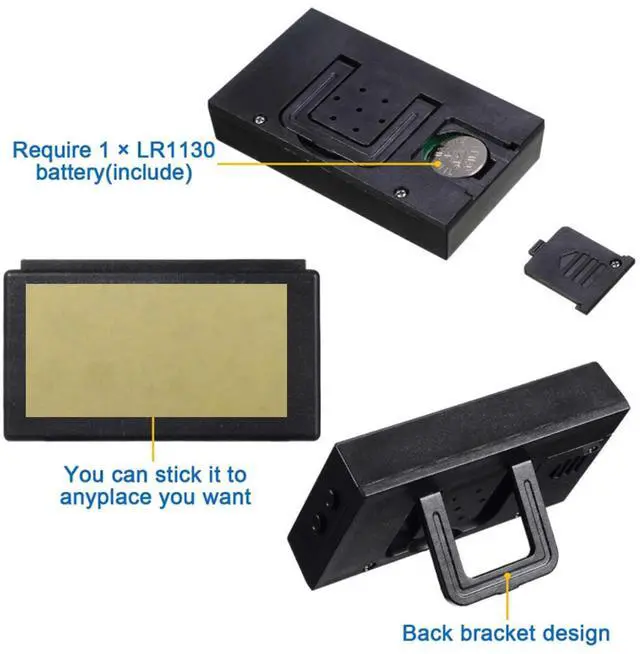
    • Each clock comes with a strong sticker that sets the right time when using it, tears off the sticker and sticks the clock where you want it to be, and you're ready to go
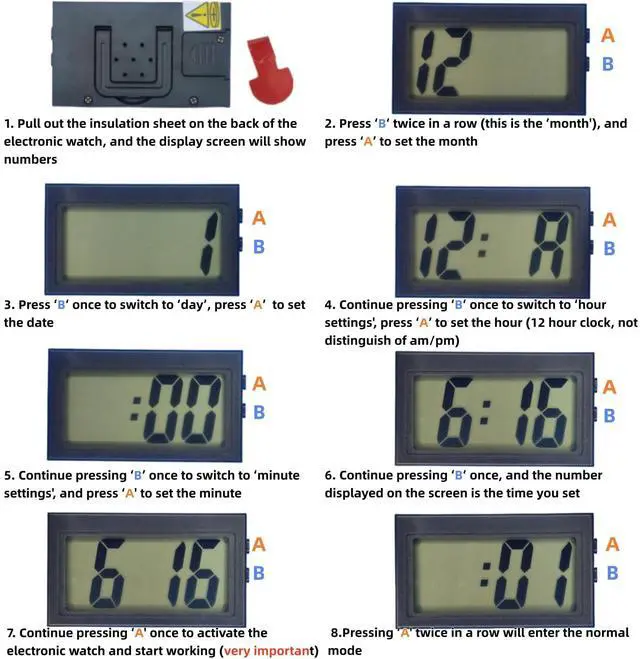
    • There are detailed setup steps in the picture, please check. If there are any abnormalities with the product, please contact us directly, and I will provide 100% service
    +
    +
    Overview
    Specs
    Reviews
    avatar

    Any questions? Our AI beta will help you find out quickly.

    HOW TO ADJUST THE TIME

    Time Setting Manual
    clock digital small battery operated clocks desk car mini alarm travel magnetic wall bathroom

    How to handle simple exceptions

    Abnormal date and time flashing issue

    1.Assuming that the top buttonon the back is 'A' and thebottombutton is 'B'

    2.Press 'A' once to display the number of seconds

    3.Press 'A' again to display as time

    Time Setting:

    1.Press DOWN until it displays 'Hour & Minute'.

    2.Press DOWN twice to show the month, then press UP to set. Press DOWN once to show day, then press UP to set.

    3.Press DOWN when the clock displays “A/P”, then press UP to set hour. Press DOWN once to show minute, press UP to set, then press DOWN to finish this step.

    Red, Black, Blue, Red, Purple clock digital small battery operated clocks

    Red, Black, Blue, Red, Purple clock digital small battery operated clocks

    Red, Black, Blue, Red, Purple clock digital small battery operated clocks

    Red, Black, Blue, Red, Purple clock digital small battery operated clocks

    If you want to set the specific parameter:

    1.Please press DOWN serval times until it displays 'Hour & Minute'.

    2.Set your desired parameter:

    Month:Press down twice to show Month, then press up to set.

    Day: Press down 3 times to show Day, then press up to set.

    Hour: Press down 4 times to show Hour, then press up to set.

    Minute: Press down 5 times to show Minute, then press up to set.

    3. You can restart the process by pressing down until it displays hour and minute.

    HOW TO ADJUST THE TIME

    Time Setting Manual
    clock digital small battery operated clocks desk car mini alarm travel magnetic wall bathroom

    How to handle simple exceptions

    Abnormal date and time flashing issue

    1.Assuming that the top buttonon the back is 'A' and thebottombutton is 'B'

    2.Press 'A' once to display the number of seconds

    3.Press 'A' again to display as time

    Time Setting:

    1.Press DOWN until it displays 'Hour & Minute'.

    2.Press DOWN twice to show the month, then press UP to set. Press DOWN once to show day, then press UP to set.

    3.Press DOWN when the clock displays “A/P”, then press UP to set hour. Press DOWN once to show minute, press UP to set, then press DOWN to finish this step.

    Red, Black, Blue, Red, Purple clock digital small battery operated clocks

    Red, Black, Blue, Red, Purple clock digital small battery operated clocks

    Red, Black, Blue, Red, Purple clock digital small battery operated clocks

    Red, Black, Blue, Red, Purple clock digital small battery operated clocks

    If you want to set the specific parameter:

    1.Please press DOWN serval times until it displays 'Hour & Minute'.

    2.Set your desired parameter:

    Month:Press down twice to show Month, then press up to set.

    Day: Press down 3 times to show Day, then press up to set.

    Hour: Press down 4 times to show Hour, then press up to set.

    Minute: Press down 5 times to show Minute, then press up to set.

    3. You can restart the process by pressing down until it displays hour and minute.

    Small Digital Clock with Jumbo LCD Time & Day DisplayMini Automotive Small Digital Clock Battery Operated for Desktop Nightstand Pocket Car Truck Dashboard & Air Vent (1, Black)

    Warranty & Returns

    Warranty, Returns, And Additional Information

    Warranty

    • Please contact the Seller directly for warranty information. Warranty information may also be found on the Manufacturer's website.
    • CONTACT

    Return Policies

    Manufacturer Contact Info

    LOADING...