




 here!
here!
I’m your shopping assistant for PC builds, upgrades, and everything tech.
Got questions? Ask away!
Start a conversation
here!
I’m your shopping assistant for PC builds, upgrades, and everything tech.
Got questions? Ask away!
Start a conversation
![Main image of 3 Pack 13 W/m.K Thermal Pads M.2, 70 x 20 mm x [0.5 mm + 1 mm + 1.5 mm] Highly Efficient Thermal Conductivity Silicone Cooling Pads for Laptop Heatsink CPU GPU SSD IC LED Cooler](https://c1.neweggimages.com/productimage/nb640/C863D2608180F2NJQF5.jpg)
![Alt view image 2 of 7 - 3 Pack 13 W/m.K Thermal Pads M.2, 70 x 20 mm x [0.5 mm + 1 mm + 1.5 mm] Highly Efficient Thermal Conductivity Silicone Cooling Pads for Laptop Heatsink CPU GPU SSD IC LED Cooler](https://c1.neweggimages.com/productimage/nb640/C691D26041103H9XK97.jpg)
![Alt view image 3 of 7 - 3 Pack 13 W/m.K Thermal Pads M.2, 70 x 20 mm x [0.5 mm + 1 mm + 1.5 mm] Highly Efficient Thermal Conductivity Silicone Cooling Pads for Laptop Heatsink CPU GPU SSD IC LED Cooler](https://c1.neweggimages.com/productimage/nb640/C863D2608180F2O0I04.jpg)
![Alt view image 4 of 7 - 3 Pack 13 W/m.K Thermal Pads M.2, 70 x 20 mm x [0.5 mm + 1 mm + 1.5 mm] Highly Efficient Thermal Conductivity Silicone Cooling Pads for Laptop Heatsink CPU GPU SSD IC LED Cooler](https://c1.neweggimages.com/productimage/nb640/C863D2608180F2NO790.jpg)
![Alt view image 5 of 7 - 3 Pack 13 W/m.K Thermal Pads M.2, 70 x 20 mm x [0.5 mm + 1 mm + 1.5 mm] Highly Efficient Thermal Conductivity Silicone Cooling Pads for Laptop Heatsink CPU GPU SSD IC LED Cooler](https://c1.neweggimages.com/productimage/nb640/C691D26041103HA02A1.jpg)
![Alt view image 6 of 7 - 3 Pack 13 W/m.K Thermal Pads M.2, 70 x 20 mm x [0.5 mm + 1 mm + 1.5 mm] Highly Efficient Thermal Conductivity Silicone Cooling Pads for Laptop Heatsink CPU GPU SSD IC LED Cooler](https://c1.neweggimages.com/productimage/nb640/C863D2608180F2NR06D.jpg)
![Alt view image 7 of 7 - 3 Pack 13 W/m.K Thermal Pads M.2, 70 x 20 mm x [0.5 mm + 1 mm + 1.5 mm] Highly Efficient Thermal Conductivity Silicone Cooling Pads for Laptop Heatsink CPU GPU SSD IC LED Cooler](https://c1.neweggimages.com/productimage/nb640/C691D26041103HA425D.jpg)



Any questions? Ask CelesteSM will help you find out quickly.

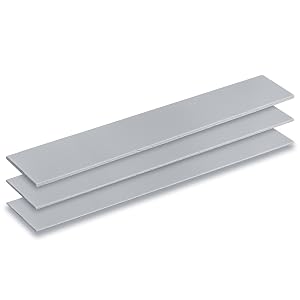
One package, multiple uses
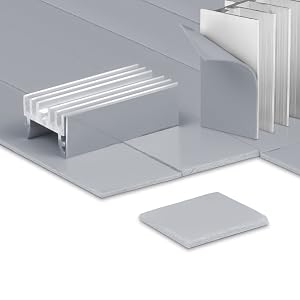
Trim to any size with scissors or a knife
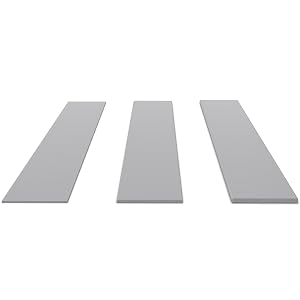
Find the right fit for your device


Q: How can I tell if a thermal pad has high conductivity physically?
A: Physical feel alone is not a reliable indicator of thermal conductivity. Different formulations produce different textures. For guaranteed performance, trust the published specifications and brand reputation. Aairhut pads are lab-tested to meet their rated conductivity.
Q: Which thickness should I choose for my RAM?
A: We recommend using the same thickness as the original pads on your RAM. The pad should not be too thick (which could lift or bend components) nor too thin (which would fail to make proper contact). When in doubt, 1.0mm or 1.5mm works for most standard RAM modules.
Q: How do I cut a thermal pad to the right size?
A: Measure the component surface first. Place the pad on a clean cutting mat, mark the dimensions, then carefully cut along the lines using a sharp knife or scissors. For best results, cut slightly smaller than the component to avoid overhang.
Q: Is it beginner-friendly?
A: Yes, installation is very straightforward: 1.Cut the pad to size. 2.Peel off one protective film. 3.Apply the pad to the component, pressing firmly to remove air bubbles. 4.Peel off the remaining film and install your heatsink. No special skills or tools required.
Q: What sizes does Aairhut offer?
A: We offer six thickness options: 0.5mm, 1.0mm, 1.5mm, 2.0mm, 2.5mm, and 3.0mm. Available pad sizes include 120x120mm, 100x100mm, and 85x45mm. More sizes are coming soon.
Q: What thermal conductivity ratings does Aairhut offer?
A: We currently offer three options on : 6W/m·K for general-purpose cooling, 9W and 13W/m·K for high-performance gaming PCs and workstations, and 15W + 20W/m·K for extreme cooling demands (GPUs, high-TDP CPUs).
One package, multiple uses
Trim to any size with scissors or a knife
Find the right fit for your device
Q: How can I tell if a thermal pad has high conductivity physically?
A: Physical feel alone is not a reliable indicator of thermal conductivity. Different formulations produce different textures. For guaranteed performance, trust the published specifications and brand reputation. Aairhut pads are lab-tested to meet their rated conductivity.
Q: Which thickness should I choose for my RAM?
A: We recommend using the same thickness as the original pads on your RAM. The pad should not be too thick (which could lift or bend components) nor too thin (which would fail to make proper contact). When in doubt, 1.0mm or 1.5mm works for most standard RAM modules.
Q: How do I cut a thermal pad to the right size?
A: Measure the component surface first. Place the pad on a clean cutting mat, mark the dimensions, then carefully cut along the lines using a sharp knife or scissors. For best results, cut slightly smaller than the component to avoid overhang.
Q: Is it beginner-friendly?
A: Yes, installation is very straightforward: 1.Cut the pad to size. 2.Peel off one protective film. 3.Apply the pad to the component, pressing firmly to remove air bubbles. 4.Peel off the remaining film and install your heatsink. No special skills or tools required.
Q: What sizes does Aairhut offer?
A: We offer six thickness options: 0.5mm, 1.0mm, 1.5mm, 2.0mm, 2.5mm, and 3.0mm. Available pad sizes include 120x120mm, 100x100mm, and 85x45mm. More sizes are coming soon.
Q: What thermal conductivity ratings does Aairhut offer?
A: We currently offer three options on : 6W/m·K for general-purpose cooling, 9W and 13W/m·K for high-performance gaming PCs and workstations, and 15W + 20W/m·K for extreme cooling demands (GPUs, high-TDP CPUs).



