Type:Power Cable
Origin:Mainland China
Certification:NONE
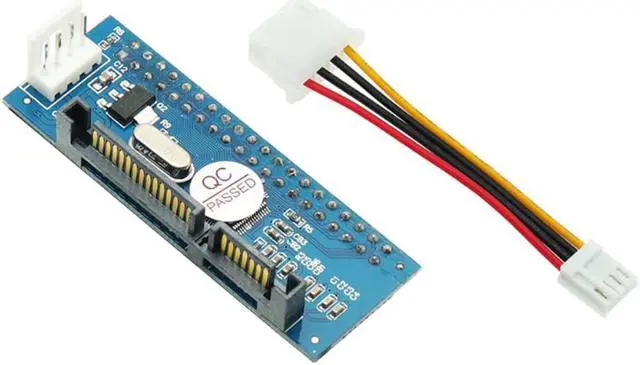
Product Name: ide to SATA transfer card
Product size: 6 * 2.2cm
Product material: PCB double-layer circuit board is adopted
Scope of application: suitable for IDE optical drive, recorder, 3.5-inch hard disk and video recorder hard disk
Compatible system: compatible with WindowsXP \ win7 \ win8 32-bit \ 64 bit system
Compatible with all brands of desktops:
1. The IDE hard disk of the video recorder is converted to SATA and connected to the SATA port of the motherboard
2. 3.5-inch IDE hard disk to SATA, connected to the SATA port of the motherboard
3. IDE optical drive to SATA, connected to SATA port of motherboard
4. IDE recorder to SATA, connected to SATA port of motherboard
5. The 3.5-inch IDE hard disk of desktop can be transferred to SATA video recorder (please format the hard disk on the computer first).
6. The transferred hard disk can be used as master disk and slave disk (you need to reinstall the system, refresh in BIOSs, etc.).
7. The transferred optical drive can guide the system.
8. The adapter card supports a parallel hard disk with a maximum capacity of 1000g.
9. For IDE equipment using adapter card, the jumper cap must be inserted at the position of master.
10. Compatible with SATA generation 1, SATA generation 2 and SATA generation 3
11. Plug and play, no driver required
Common faults of product failure:
1. Check the SATA data cable for looseness. Or change a normally used SATA cable.
2. Check whether the jumper is connected to the main board and the value is at the mastser position.
3. Whether the setting in the boot BIOS is correct. Some motherboards require BIOS settings (set SATA mode to ide mode)
4. If it cannot be used, it may be a compatibility problem. A few devices of this kind of conversion card have compatibility problems.
5. Compatibility is not recognized due to product reasons. It will be done later. Let's share it below. When it cannot be recognized: right click "my computer - Properties" - "hardware" - "device manager". Open "ide ATA / PATA controller", double-click the primary and secondary ide channels respectively, select "advanced settings", set "device type" to "automatic detection", set "transfer mode" to "DMA (if available)" -- click OK. After restarting, see whether the system finds hardware.
6. This model does not support the conversion of mainboard IDE interface to SATA hard disk. Please pay attention to purchase.
Special note: the manufacturer of this product is equipped with 4Pin power cable by default, as shown in the figure. The SATA of the picture is required for taking pictures and is not included in the buy it now price. If you need another SATA power cable and data cable, please buy it separately.


 Holiday Shipping Details & Extended Holiday Returns

