- Free 30-day Returns
Meet Your Seller
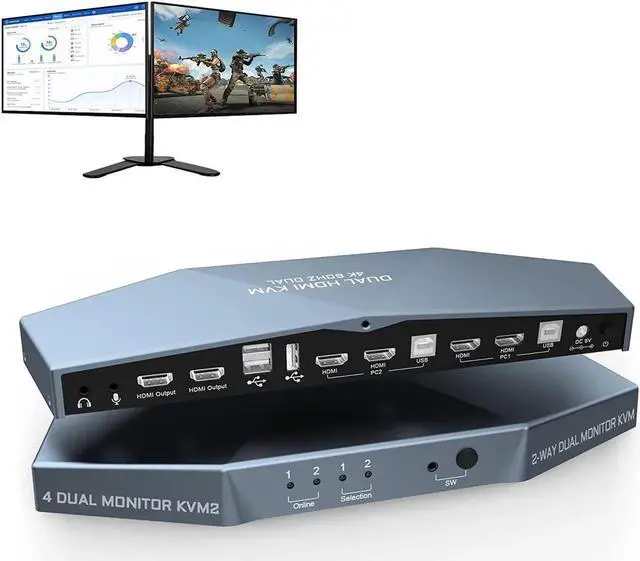
DIXSG 2 PCs Dual Monitor HDMI KVM Switch 4K @60Hz, Support HDCP 2.2, HDMI + HDMI 4x2 Dual Monitor KVM Switch for 2 PCs and 2 Monitors
- [Dual Monitor KVM Switch HDMI 2 Port] 2 PCs dual monitor HDMI 2.0 KVM switch, using only 1 set of keyboard, mouse and 2 monitors to control 2 computers, support display one computers main and extended desktop.
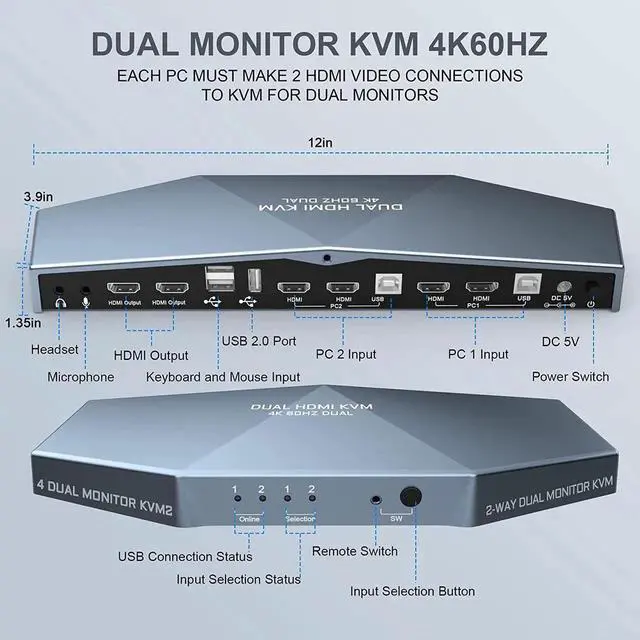
- [KVM Switch 2 Monitors 2 computers with 3 USB2.0 Port] Supports connecting your USB 2.0 port device such as Mouse/Keyboard/Scanner/USB driver/3D Printer/Monitor Camera. Also supports separate audio and microphone output.
- [4K 60Hz Resolution & Smart EDID] Supports max resolution up to 3840*2160@60Hz. Automatically adapt to EDID/HDCP, which can keep PCs always having correct display information.
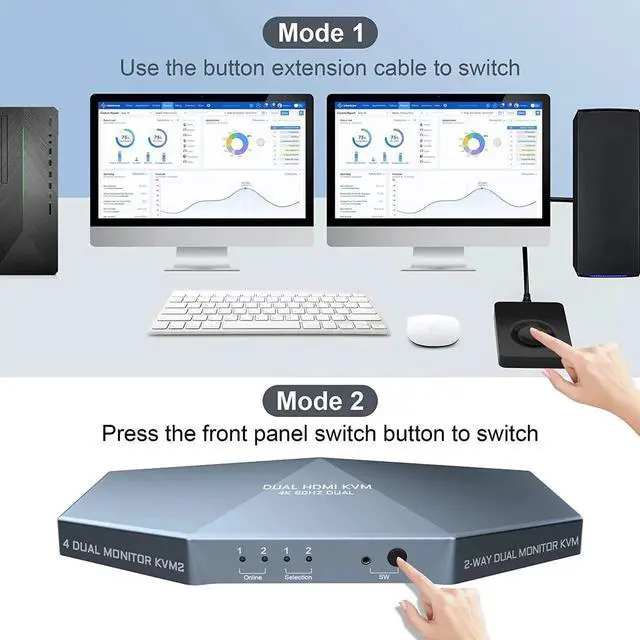
- [Support Two Ways to Control] Dual monitor KVM switch HDMI 2 Port support front panel switch buttons and external remote control switch button to control this dual monitor KVM.
- [Excellent after-sales service] Heavy weight high-end anti interference metal design to ensure sturdiness. It is our responsibility to ensure that every user has a great product experience and shopping experience.
Any questions? Our AI beta will help you find out quickly.

2 Port Dual Monitor KVM Switch (HDMI + HDMI) Port 4K@60Hz
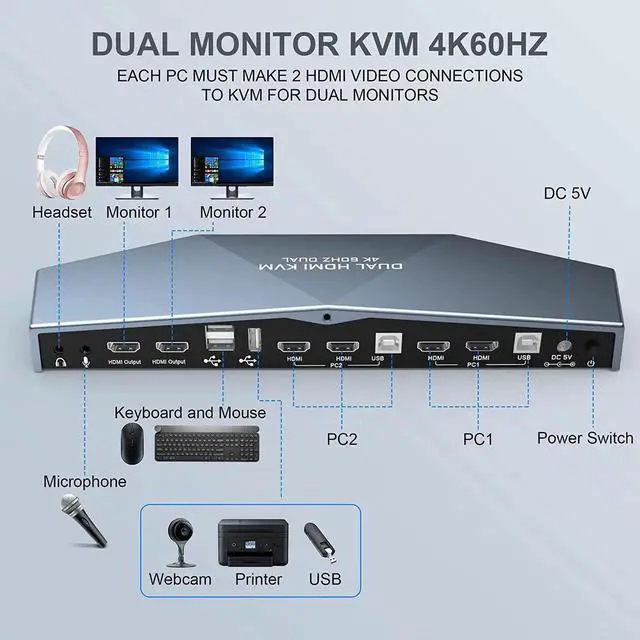
EACH PC MUST MAKE 2 VIDEO CONNECTIONS FOR DUAL MONITORS
- This 2 computer KVM switch allows you to share one set of keyboard, two video monitors, and mouse with two PC's.
- Dual monitors output support extended and mirrored display. The dual monitor displays are from a same input source selected, it does not support computer 1 on monitor A, computer 2 on monitor B.
- Support front panel switch buttons and external remote control switch button to control this Dual Monitor HDMI KVM switch.
- Support wired or wireless keyboard and mouse. Allow you to quickly switch to the mode you need anytime and anywhere during the work, improve your work efficiency.
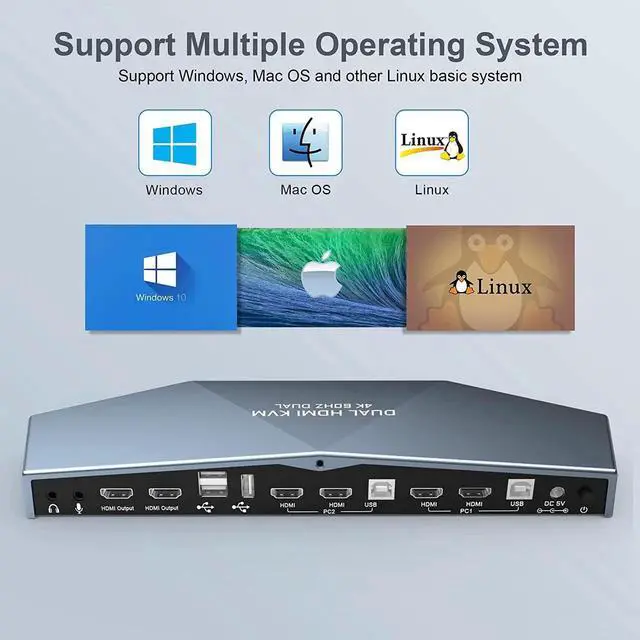
- Does not require software or drivers and works with Windows, MacOS, Linux, etc.
6. With extra 3 USB 2.0 port , by using USB 2.0 hub ports on the KVM, you even can attach USB drive, printer, barcode scanner or other USB devices to the KVM.
7. HDMI 2.0 supports 4K (3840 x 2160 @ 60hz) resolution. downward compatible. If monitor is not displaying properly, try reduce resolution.
8. Automatically adapt to EDID/HDCP, which can keep PCs always having correct display information.
9. Supports separate audio and microphone output.

How do you use:
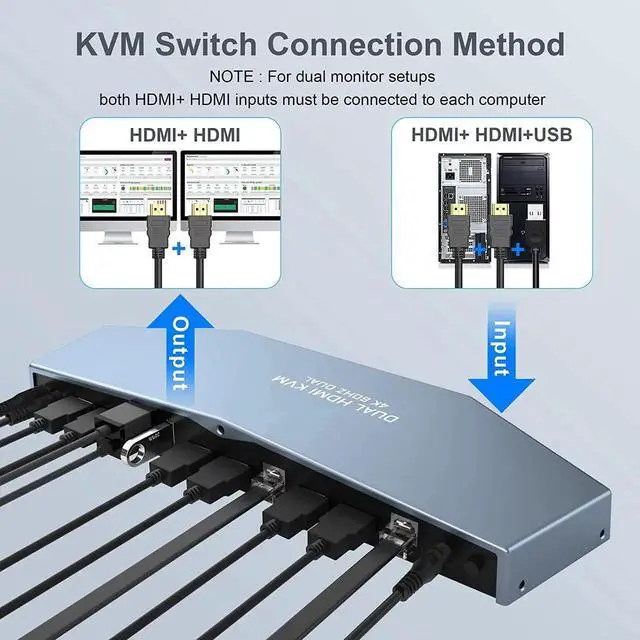
- Use HDMI cable and USB-B cable to connect the computerand PC1 and PC2 realizes two-in and two-out connection.
- Use DC 5V 2A auxiliary power to connect the switch and turn on the power switch.
- Use the 2 HDMI cables to connect 2 monitors and the 2 HDMI output interface of the switcher.
- Use the switch button to switch the input computer.
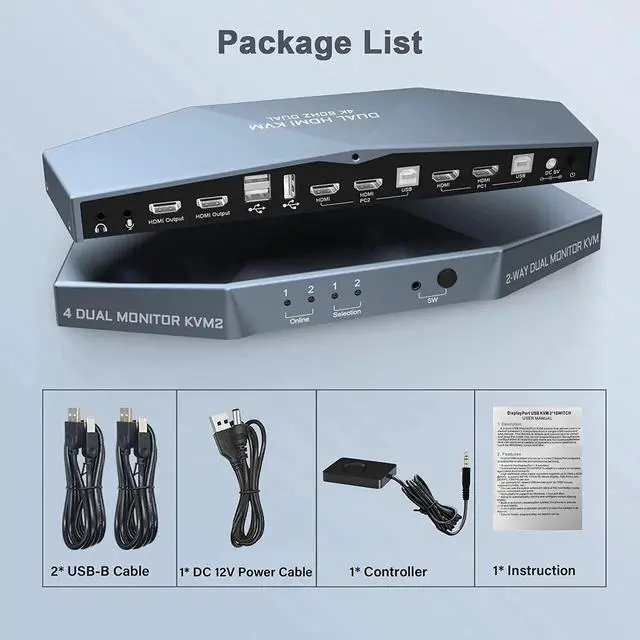
What's in the Package:
- Dual Monitor KVM Switch x1
- USB-B to USB-A Cables x2
- DC Cables x1
- Remote control cable x1
- User Manual x1

Installation Guide Tips (incorrect connection will cause malfunction):
- Each computer must connect 2 HDMI cable and 1 USB A / B cable to ensure keyboard, mouse and monitor to work correctly.
- The 2 HDMI port is used to connect the second video output of the same computer, so that the monitor can display correctly (extended display)


Support 4K @ 60Hz
Ultra HD 4K Brings you Better Definition and Clarity, Makes Images that Look Life-like, this KVM Switch is equipped with top grade image sensor

Dual KVM Switch with USB 2.0 Port
Supports Connecting your USB 2.0 port device such as Mouse/Keyboard/Scanner/USB driver/3D Printer/Monitor Camera.

Easy to Change in Different Ways
- Front panel buttons
- Button Extension Cable
- Not Support hotkey switching

FAQ:
- This 2 Port Dual Monitor KVM Switch does NOT support hotkey switching.
- Use powered USB hub to expand the USB2.0 port if multiple connections are needed.
- Most of the reasons why only onevideo output works is because of incorrect connection. Please make sure eachcomputer have 2 HDMI cables connect to the KVM.
- If dual Monitor KVM Switch is normal working, then thereis a sudden failure, please unplug all the cables and plug again.
- Please feel free to contect us when encountering problems during the usage. We will provid you guidance and assistance as soon as we receive your message.
2 Port Dual Monitor KVM Switch (HDMI + HDMI) Port 4K@60Hz
EACH PC MUST MAKE 2 VIDEO CONNECTIONS FOR DUAL MONITORS
- This 2 computer KVM switch allows you to share one set of keyboard, two video monitors, and mouse with two PCs.
- Dual monitors output support extended and mirrored display. The dual monitor displays are from a same input source selected, it does not support computer 1 on monitor A, computer 2 on monitor B.
- Support front panel switch buttons and external remote control switch button to control this Dual Monitor HDMI KVM switch.
- Support wired or wireless keyboard and mouse. Allow you to quickly switch to the mode you need anytime and anywhere during the work, improve your work efficiency.
- Does not require software or drivers and works with Windows, MacOS, Linux, etc.
- With extra 3 USB 2.0 port, by using USB 2.0 hub ports on the KVM, you even can attach USB drive, printer, barcode scanner or other USB devices to the KVM.
- HDMI 2.0 supports 4K (3840 x 2160 @ 60hz) resolution. downward compatible. If monitor is not displaying properly, try reduce resolution.
- Automatically adapt to EDID/HDCP, which can keep PCs always having correct display information.
- Supports separate audio and microphone output.
What's in the Package:
Dual Monitor KVM Switch X1
USB-B to USB-A Cables X2
DC Cables X1
Remote control cable X1
User Manual X 1
Warranty & Returns
Warranty, Returns, And Additional Information
Warranty
- Please contact the Seller directly for warranty information. Warranty information may also be found on the Manufacturer's website.
- CONTACT
Return Policies
- Return for refund within: 30 days
- Return for replacement within: non-replaceable
- This item is covered by Nexus3C Return Policy
Manufacturer Contact Info
- For a directory of all our manufacturers, please click below.
- Manufacturers Directory