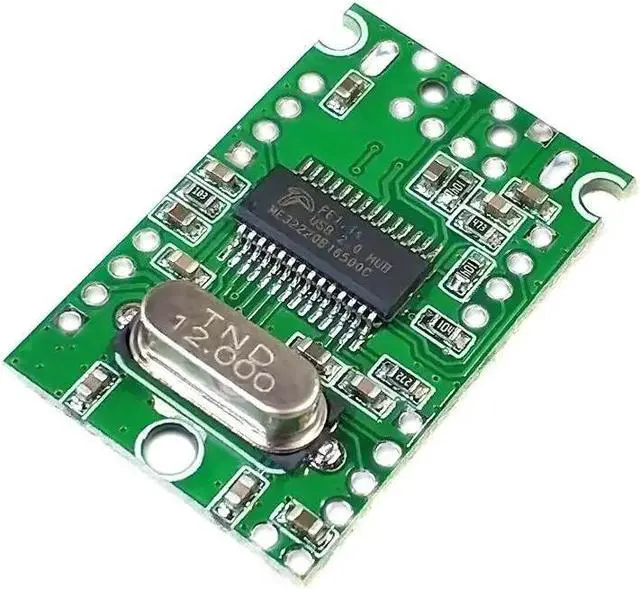
USB 2.0 high-speed extender module HUB module Splitter One-to-four hub module.
Size: 29.5 mm* 18.9 mm* 4.8 mm (length * width * height)
Reserve the power input port at the upper left corner of the board, marking the 5Vin position.
Tip: After connecting high-current peripherals, when the 5V power supply current from the USB input port is not enough, you can enable the external reserved power input port.
High speed, stability, low heat generation and low power consumption are our design concepts
All systems are drive-free, plug-and-play, and one-way expansion module for 4-way multi-interface equipment.
Computer motherboard (the input of this module reserves a 2.54 mm interface)
Expansion of the USB port of the all-in-one computer
USB port expansion for notebooks and tablets
Expansion of USB interface of Raspberry Pi, ARM, MIPS chip development board
Expansion of USB interface of advertising machine and network TV
Expansion of the USB port of the network camera, etc.
The USB extender module has no connection sockets, and reserves the pads for each pin. The input holes are reserved for the standard 2.54 mm and 2.0 mm single-row pins on the main brain motherboard. The four USB ports are all 2.0 mm single-row pins. Three 2mm diameter positioning holes
The bare PCBA board is convenient for users to DIY various interface peripherals.
The input adopts a standard USB male interface that matches the computer, which can be directly inserted into the computer's USB socket and used to expand each of the four reserved welding holes, which is convenient for DIY. Application examples, usually USB peripherals such as USB mouse, USB keyboard, etc. After a long time, the connection line is easy to break, resulting in the peripherals cannot be used normally. In fact, the Bunsen peripherals are not damaged. You can directly solder the peripherals to the following On the module, connected to the computer, the peripherals due to the line connection failure can be restored to use again.