

Your Browsing History



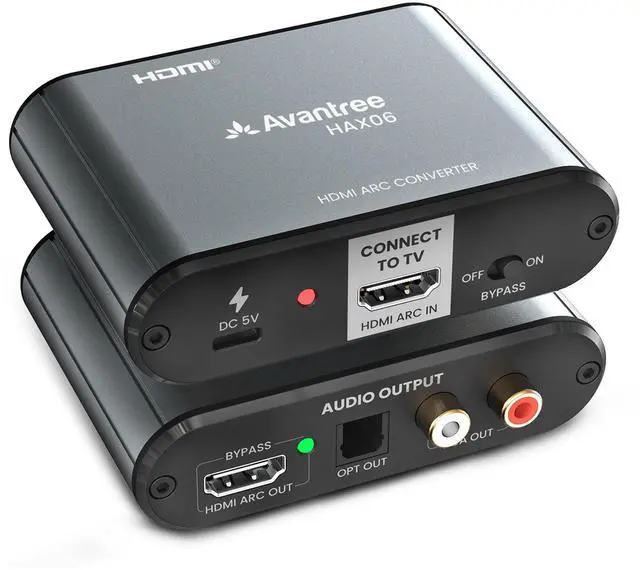




HAX06 HDMI ARC Audio Extractor for TV with Passthrough, Play Soundbar & Headphones Simultaneously, Optical & RCA Outputs
Limited time offer, ends 09/14 By Eristy shop
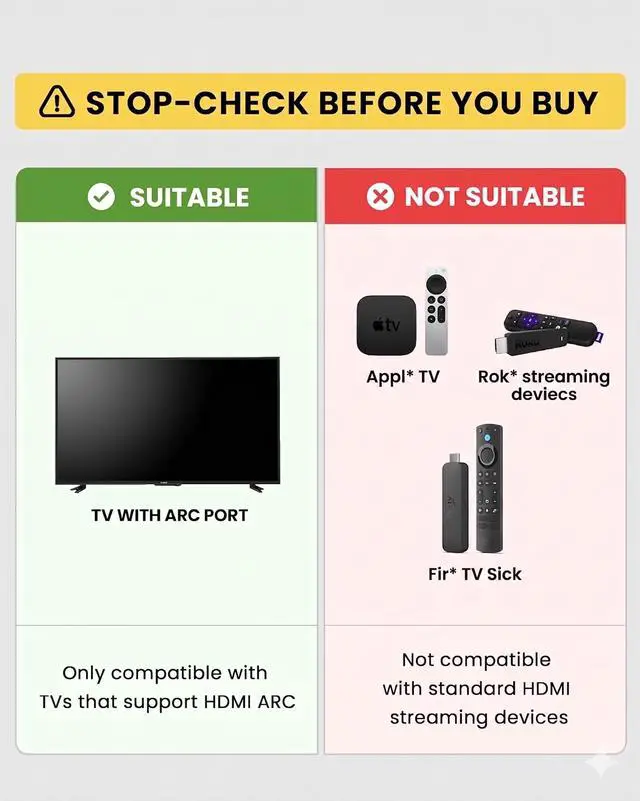
- Add Audio Outputs to HDMI ARC-Only TVs: This unit extracts audio from your TV's HDMI ARC port and sends it to Optical or RCA connections, making it perfect for TVs without standard audio-out ports. If your TV has eARC, simply turn off the eARC function in your TV settings to activate ARC mode. Use HDMI Soundbar and RCA/Optical Devices Together: Want to keep your HDMI ARC soundbar while also connecting wireless headphones or hearing aids? Activate Bypass Mode to use both at the same time. Just connect a Bluetooth transmitter (not included) to the Optical or RCA output. Not for HDMI Sources or Non-ARC Outputs: This device works only with the HDMI ARC port on your TV. It is not compatible with HDMI streaming devices or external media players (such as certain streaming devices, smart TV boxes, or game consoles). Its HDMI OUT port is made for HDMI ARC soundbars only and is not meant for use with monitors or projectors. Control Your Soundbar with the TV Remote: If both your TV and soundbar support HDMI-CEC, you can change the volume using your TV remote. Note that CEC functionality works over HDMI connections only and is not supported on Optical or RCA connections. Preserves 5.1 Surround Sound for HDMI Soundbars: When the Optical or RCA outputs are not being used, this device passes through full 5.1 surround sound to your HDMI ARC soundbar. There is no need to switch to PCM, provided your TV and soundbar support this feature
+
+
Overview
Specs
Reviews

Any questions? Our AI mode will help you find out quickly.
Try me now
Add Audio Outputs to HDMI ARC-Only TVs: This unit extracts audio from your TV's HDMI ARC port and sends it to Optical or RCA connections, making it perfect for TVs without standard audio-out ports. If your TV has eARC, simply turn off the eARC function in your TV settings to activate ARC mode. Use HDMI Soundbar and RCA/Optical Devices Together: Want to keep your HDMI ARC soundbar while also connecting wireless headphones or hearing aids? Activate Bypass Mode to use both at the same time. Just connect a Bluetooth transmitter (not included) to the Optical or RCA output. Not for HDMI Sources or Non-ARC Outputs: This device works only with the HDMI ARC port on your TV. It is not compatible with HDMI streaming devices or external media players (such as certain streaming devices, smart TV boxes, or game consoles). Its HDMI OUT port is made for HDMI ARC soundbars only and is not meant for use with monitors or projectors. Control Your Soundbar with the TV Remote: If both your TV and soundbar support HDMI-CEC, you can change the volume using your TV remote. Note that CEC functionality works over HDMI connections only and is not supported on Optical or RCA connections. Preserves 5.1 Surround Sound for HDMI Soundbars: When the Optical or RCA outputs are not being used, this device passes through full 5.1 surround sound to your HDMI ARC soundbar. There is no need to switch to PCM, provided your TV and soundbar support this feature
Warranty & Returns
Warranty, Returns, And Additional Information
Warranty
- Please contact the Seller directly for warranty information. Warranty information may also be found on the Manufacturer's website.
- CONTACT
Return Policies
- Return for refund within: 30 days
- Return for replacement within: 30 days
- This item is covered by Eristy shop Return Policy
Manufacturer Contact Info
- For a directory of all our manufacturers, please click below.
- Manufacturers Directory
LOADING...