

Your Browsing History

Meet Your Seller

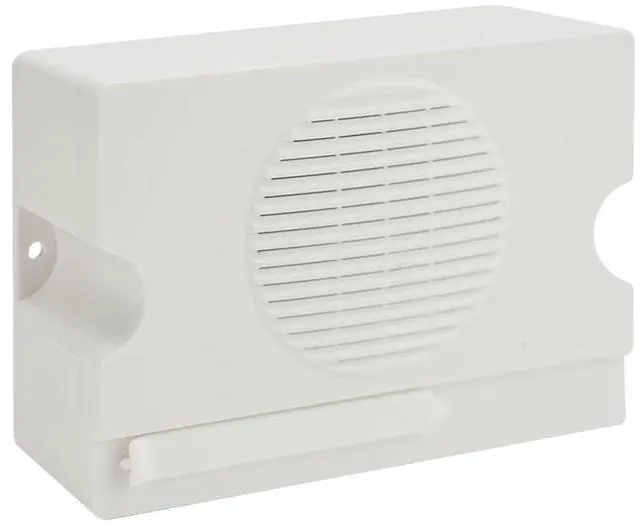


Voice Playback Module, Y5610 Voice Sound Alarm,Sound Players, Entry Switching Serial Multi Trigger High/Low Level Control Announcer Outdoor Horns Sirens for Schools, Gyms Other Public Places
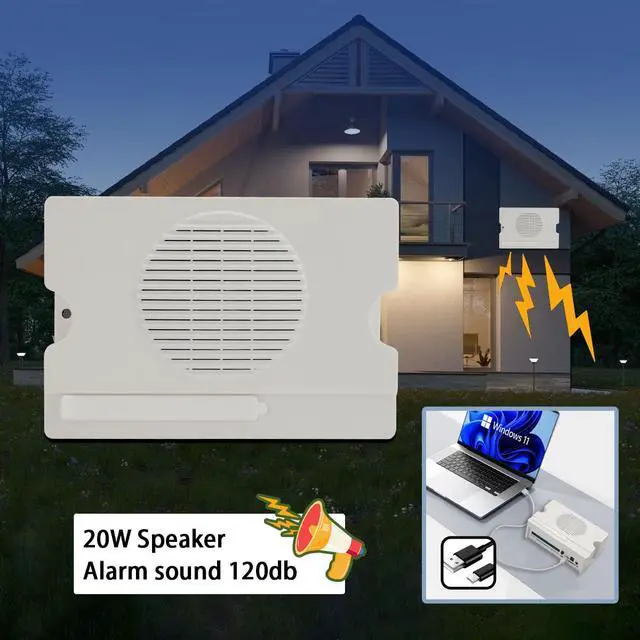
- Industrial Voice Alarm: Y5610 voice players featuring a 20W amplifier output, delivering clear and robust sound, equipped with an adjustable potentiometer for volume control, suitable for a variety of settings; includes a 12V output interface that provides 12V voltage while playing audio, allowing connection to police lights, relays, and similar devices; engineered to industrial-grade standards, offering strong anti-interference capability for sound alarms. Product Features: The MP3 voice prompt sound board comes with 8MB of memory, offering fast transfer speeds and the capacity to store roughly 8 minutes of audio files; connect to a computer via a USB-C cable to copy voice content, making operation simple and convenient; supports 10-channel independent switch volume with one-to-one playback; plays MP3 and WAV audio formats; accepts DC 6 ~ 35V wide voltage input, utilizing switching power supply for voltage reduction with low power consumption; multiple playback modes can be configured freely, including 'power cycle play' and 'trigger play' with interruptible or non-interruptible options. Voice Alarm Electrical Parameters: The 8MB sound alarm operates on DC6V35V; rated output power is 20W/8; audio formats include MP3 and WAV; standby current is 30MA; maximum working current is 1500MA; operating ambient temperature ranges from -40 to +85 , meeting industrial-grade standards; operating ambient humidity ranges from 10% to 90%. Good for broadcasting in shopping malls, school
+
+
Overview
Specs
Reviews

Any questions? Our AI mode will help you find out quickly.
Try me now
Industrial Voice Alarm: Y5610 voice players featuring a 20W amplifier output, delivering clear and robust sound, equipped with an adjustable potentiometer for volume control, suitable for a variety of settings; includes a 12V output interface that provides 12V voltage while playing audio, allowing connection to police lights, relays, and similar devices; engineered to industrial-grade standards, offering strong anti-interference capability for sound alarms.
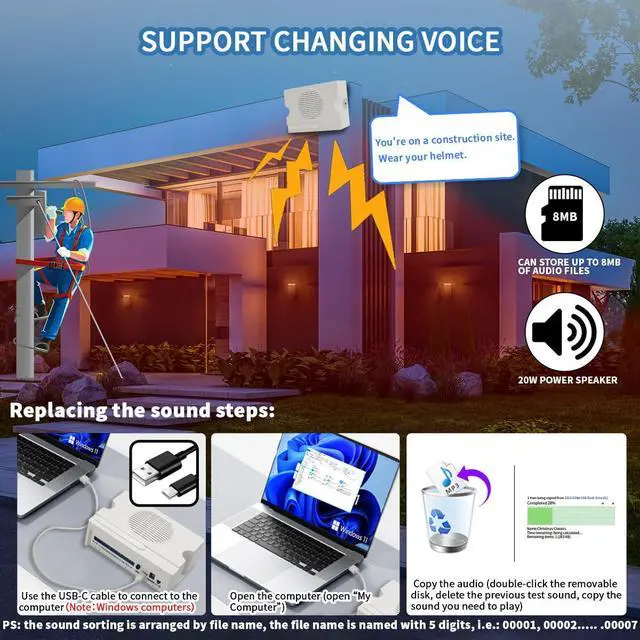
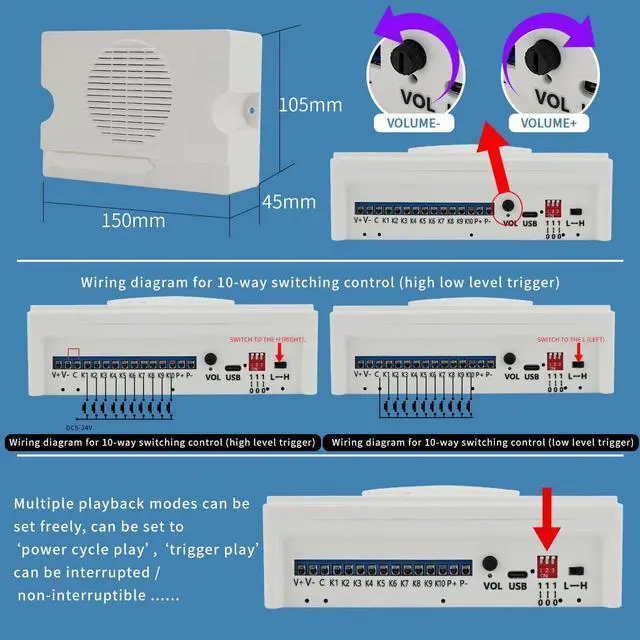
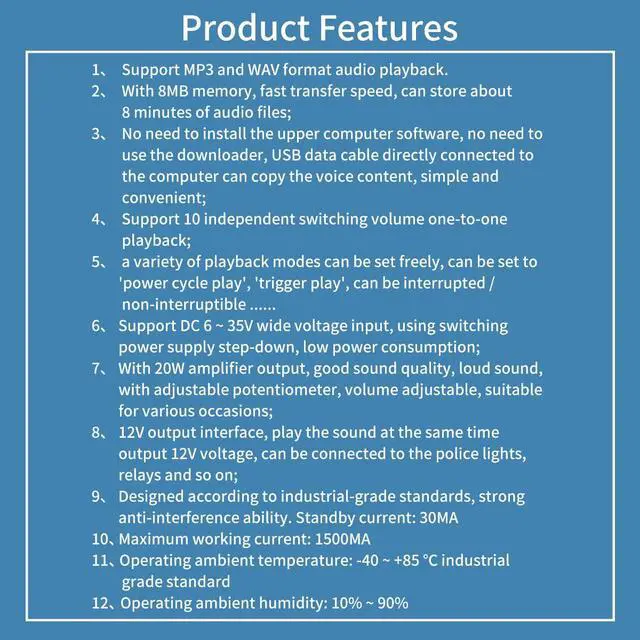
Product Features: The MP3 voice prompt sound board comes with 8MB of memory, offering fast transfer speeds and the capacity to store roughly 8 minutes of audio files; connect to a computer via a USB-C cable to copy voice content, making operation simple and convenient; supports 10-channel independent switch volume with one-to-one playback; plays MP3 and WAV audio formats; accepts DC 6 ~ 35V wide voltage input, utilizing switching power supply for voltage reduction with low power consumption; multiple playback modes can be configured freely, including 'power cycle play' and 'trigger play' with interruptible or non-interruptible options.
Voice Alarm Electrical Parameters: The 8MB sound alarm operates on DC6V35V; rated output power is 20W/8; audio formats include MP3 and WAV; standby current is 30MA; maximum working current is 1500MA; operating ambient temperature ranges from -40 to +85, meeting industrial-grade standards; operating ambient humidity ranges from 10% to 90%. Good for broadcasting in shopping malls, schools, gymnasiums, office buildings, and other public venues.
Replace Voice Sirens Ways:
1: Connect one end of a type-c cable to the Y5610 Voice Prompter and the other end to a computer; 2: Open 'My
Computer'; 3: Double-click on the removable disc, delete the previous test audio, and copy in the audio you need to play.
Note: Audio files are sorted by filename, and filenames must use 5 digits, such
as: 00001, 00002.00010.
Industrial Sound Alarm Function: Playback modes are selected using the red 3-position dip switches, offering 8 modes in total. DIP switches 1, 2, and 3 dialed to the bottom indicate '0', while dialed to the top indicate '1', creating 8 combinations across the three gears, each corresponding to a playback mode.
Other Application Notes:
1.
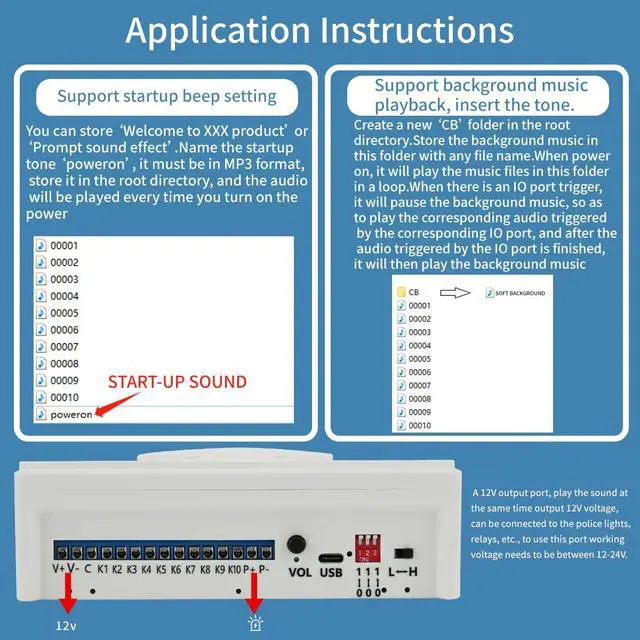
Start-up Sound: You can store 'Welcome to XXX product' or 'Prompt sound effect'. Name the startup tone 'poweron', ensure it is in MP3 format, place it in the root directory, and the audio will play each time the power is turned on.
Other Application Notes:
2. Background music
notes for insertion: Create a new 'CB' folder in the root directory. Store background music in this folder with any file name. Upon power-on, the music files in this folder will play in a loop. When an IO port trigger occurs, the background music pauses to play the corresponding audio triggered by that IO port, and after the triggered audio finishes, the background music resumes.
Sound Horns Sirens: Various styles, support customization
Product Features: The MP3 voice prompt sound board comes with 8MB of memory, offering fast transfer speeds and the capacity to store roughly 8 minutes of audio files; connect to a computer via a USB-C cable to copy voice content, making operation simple and convenient; supports 10-channel independent switch volume with one-to-one playback; plays MP3 and WAV audio formats; accepts DC 6 ~ 35V wide voltage input, utilizing switching power supply for voltage reduction with low power consumption; multiple playback modes can be configured freely, including 'power cycle play' and 'trigger play' with interruptible or non-interruptible options.
Voice Alarm Electrical Parameters: The 8MB sound alarm operates on DC6V35V; rated output power is 20W/8; audio formats include MP3 and WAV; standby current is 30MA; maximum working current is 1500MA; operating ambient temperature ranges from -40 to +85, meeting industrial-grade standards; operating ambient humidity ranges from 10% to 90%. Good for broadcasting in shopping malls, schools, gymnasiums, office buildings, and other public venues.
Replace Voice Sirens Ways:
1: Connect one end of a type-c cable to the Y5610 Voice Prompter and the other end to a computer; 2: Open 'My
Computer'; 3: Double-click on the removable disc, delete the previous test audio, and copy in the audio you need to play.
Note: Audio files are sorted by filename, and filenames must use 5 digits, such
as: 00001, 00002.00010.
Industrial Sound Alarm Function: Playback modes are selected using the red 3-position dip switches, offering 8 modes in total. DIP switches 1, 2, and 3 dialed to the bottom indicate '0', while dialed to the top indicate '1', creating 8 combinations across the three gears, each corresponding to a playback mode.
Other Application Notes:
1.
Start-up Sound: You can store 'Welcome to XXX product' or 'Prompt sound effect'. Name the startup tone 'poweron', ensure it is in MP3 format, place it in the root directory, and the audio will play each time the power is turned on.
Other Application Notes:
2. Background music
notes for insertion: Create a new 'CB' folder in the root directory. Store background music in this folder with any file name. Upon power-on, the music files in this folder will play in a loop. When an IO port trigger occurs, the background music pauses to play the corresponding audio triggered by that IO port, and after the triggered audio finishes, the background music resumes.
Sound Horns Sirens: Various styles, support customization
Warranty & Returns
Warranty, Returns, And Additional Information
Warranty
- Please contact the Seller directly for warranty information. Warranty information may also be found on the Manufacturer's website.
- CONTACT
Return Policies
- Return for refund within: 30 days
- Return for replacement within: 30 days
- This item is covered by Brightflag Electronics Return Policy
Manufacturer Contact Info
- For a directory of all our manufacturers, please click below.
- Manufacturers Directory
LOADING...