Your Browsing History
Meet Your Seller
11-in-2 USB C Docking Station Dual Monitor 4K@60Hz for for M5/M4/M3 Pro/Max MacBook Docking Station with 2 HDMI, Vertical Stand Dock, PD, Ethernet, SD/TF, 10Gbps USB A/C, USB 2.0, Audio- Silver
Limited time offer, ends 10/27 By Muxiju Store
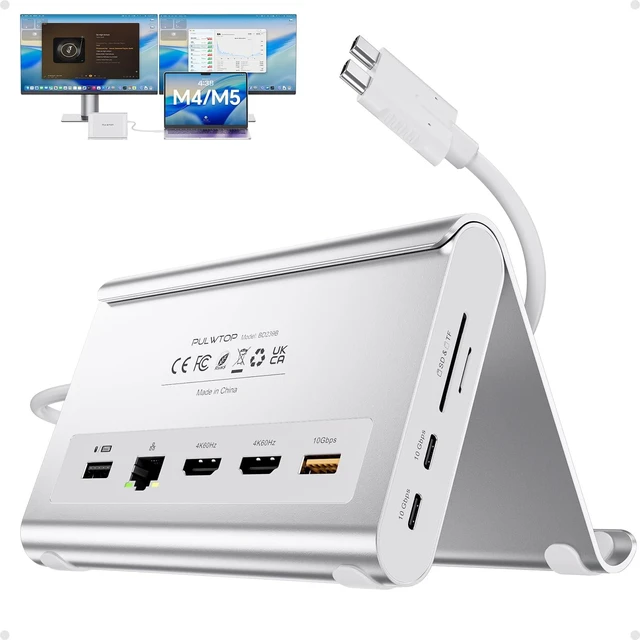
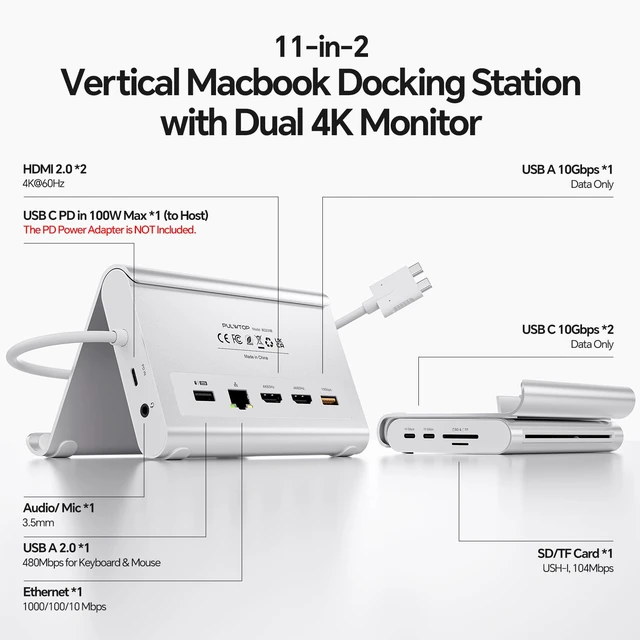
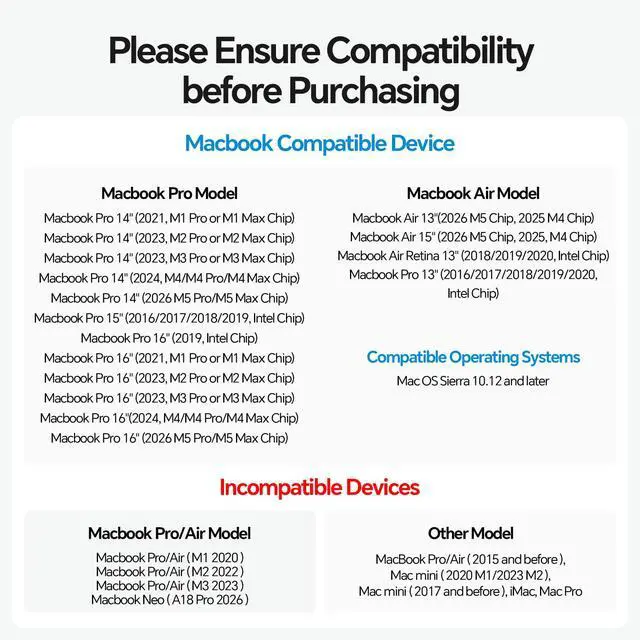
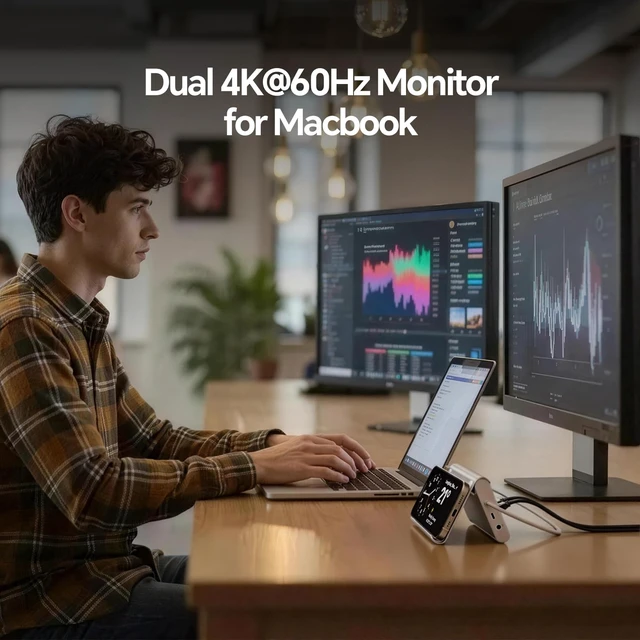
- Dual 4K@60Hz Display & Plug-and-PlayProvides clear visuals through 2x HDMI ports. No drivers are required; simply plug in and expand your workspace. Supports smooth display output for editing footage or presentations. Compatibility for MacBook Pro and MacBook Air M5Designed for MacBook Pro and MacBook Air M5 users. Supports Intel models from 2016-2020, M1M5 Pro/Max, and M4/M5 base chips. M1/M2/M3 base chip models support a single display only. Not for Windows, ChromeOS, or MacBook Neo. High-Speed 10Gbps TransferIncludes 2x USB-C ports for 10Gbps data transfer only, 1x USB-A 10Gbps port, USB 2.0, audio, Gigabit Ethernet, and an SD/TF card reader. Connect drives, monitors, keyboards, mice, and printers simultaneously. The 10Gbps ports transfer 4K videos or RAW photos quickly, while USB 2.0 supports keyboards and mice. 100W PD 3.0 Fast Charging & Gigabit EthernetProvides a maximum 100W input with 95W charging for your MacBook. A 65W+ power supply is required and not included. Built-in Gigabit Ethernet provides wired internet speeds up to 1000Mbps. 2-in-1 Docking Station with Vertical StandCombines a laptop stand and docking station in a compact design. Raises your MacBook in clamshell mode for improved airflow and ergonomics. The vertical stand holds laptops, tablets, or phones while freeing workspace for dual monitors and accessories. Clamshell Mode SetupOpen Terminal through MacBook Applications > Utilities. Enter: sudo pmset -a disablesleep 1, then enter your a
+
+
Overview
Specs
Reviews
Any questions? Ask CelesteSM will help you find out quickly.
Try me now
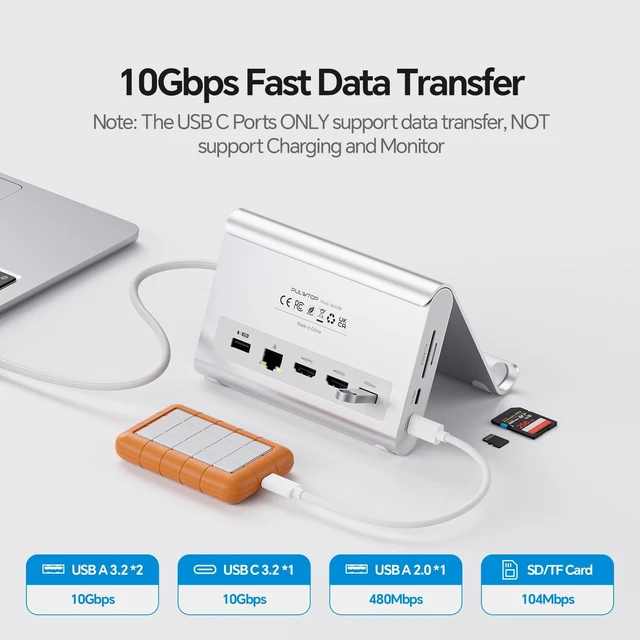
Dual 4K@60Hz Display & Plug-and-PlayProvides clear visuals through 2x HDMI ports. No drivers are required; simply plug in and expand your workspace. Supports smooth display output for editing footage or presentations. Compatibility for MacBook Pro and MacBook Air M5Designed for MacBook Pro and MacBook Air M5 users. Supports Intel models from 2016-2020, M1M5 Pro/Max, and M4/M5 base chips. M1/M2/M3 base chip models support a single display only. Not for Windows, ChromeOS, or MacBook Neo. High-Speed 10Gbps TransferIncludes 2x USB-C ports for 10Gbps data transfer only, 1x USB-A 10Gbps port, USB 2.0, audio, Gigabit Ethernet, and an SD/TF card reader.
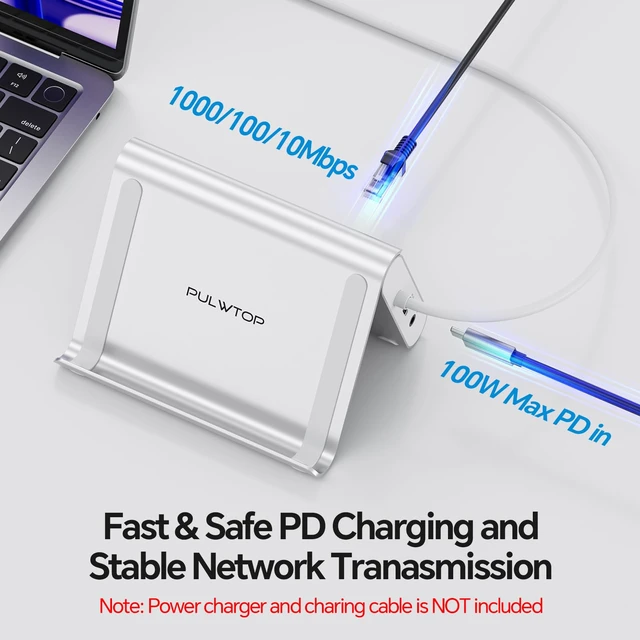
Connect drives, monitors, keyboards, mice, and printers simultaneously. The 10Gbps ports transfer 4K videos or RAW photos quickly, while USB 2.0 supports keyboards and mice. 100W PD 3.0 Fast Charging & Gigabit EthernetProvides a maximum 100W input with 95W charging for your MacBook. A 65W+ power supply is required and not included. Built-in Gigabit Ethernet provides wired internet speeds up to 1000Mbps. 2-in-1 Docking Station with Vertical StandCombines a laptop stand and docking station in a compact design. Raises your MacBook in clamshell mode for improved airflow and ergonomics.
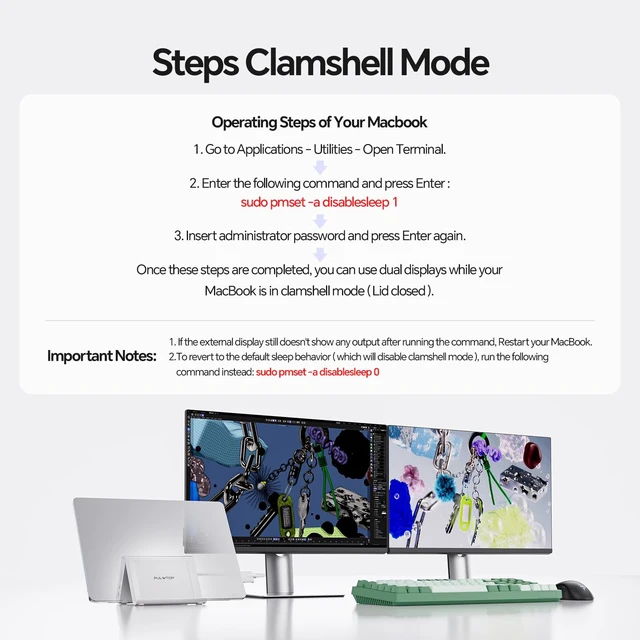
The vertical stand holds laptops, tablets, or phones while freeing workspace for dual monitors and accessories. Clamshell Mode SetupOpen Terminal through MacBook Applications > Utilities.
Enter: sudo pmset -a disablesleep 1, then enter your administrator password. Your MacBook can then use dual displays with the lid closed. To restore default sleep behavior, enter: sudo pmset -a disablesleep 0

Connect drives, monitors, keyboards, mice, and printers simultaneously. The 10Gbps ports transfer 4K videos or RAW photos quickly, while USB 2.0 supports keyboards and mice. 100W PD 3.0 Fast Charging & Gigabit EthernetProvides a maximum 100W input with 95W charging for your MacBook. A 65W+ power supply is required and not included. Built-in Gigabit Ethernet provides wired internet speeds up to 1000Mbps. 2-in-1 Docking Station with Vertical StandCombines a laptop stand and docking station in a compact design. Raises your MacBook in clamshell mode for improved airflow and ergonomics.
The vertical stand holds laptops, tablets, or phones while freeing workspace for dual monitors and accessories. Clamshell Mode SetupOpen Terminal through MacBook Applications > Utilities.
Enter: sudo pmset -a disablesleep 1, then enter your administrator password. Your MacBook can then use dual displays with the lid closed. To restore default sleep behavior, enter: sudo pmset -a disablesleep 0
Warranty & Returns
Warranty, Returns, And Additional Information
Warranty
- Please contact the Seller directly for warranty information. Warranty information may also be found on the Manufacturer's website.
- CONTACT
Return Policies
- Return for refund within: 30 days
- Return for replacement within: 30 days
- This item is covered by Muxiju Store Return Policy
Manufacturer Contact Info
- For a directory of all our manufacturers, please click below.
- Manufacturers Directory
LOADING...