Your Browsing History
- Free 30-day Returns
$44.99
Sold by DrakeMount FortunaTech Parts
Shipped by DrakeMount FortunaTech Parts
Meet Your Seller
HDMI eARC Audio Extractor Only Work for HDTV ARC/eARC Audio Adapter Converter HDTV Audio Transmitted via Toslink+Coaxial ports Support 192KHZ for Soundbars Home Theaters and Audio Systems No CEC
Limited time offer, ends 10/27 By DrakeMount FortunaTech Parts
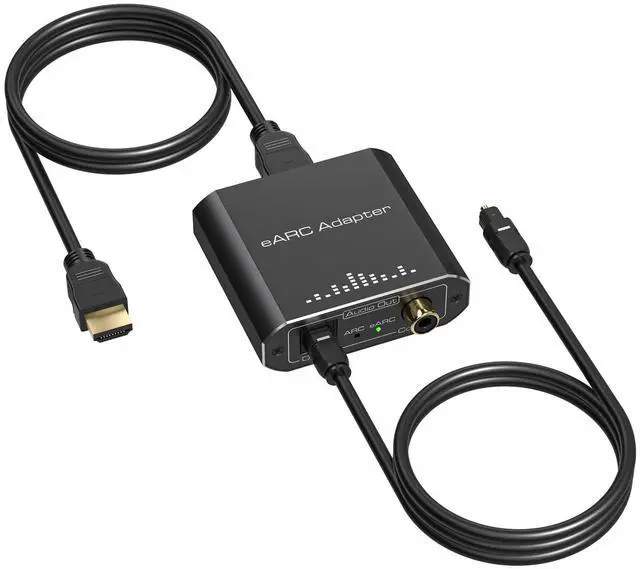
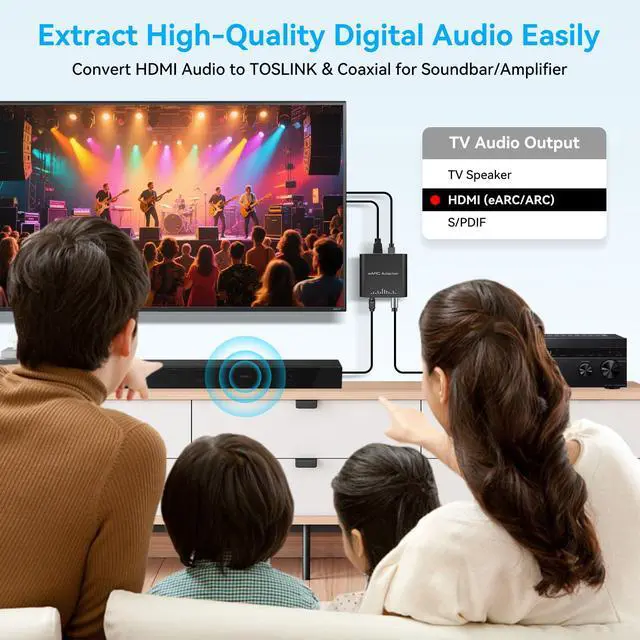
- [HDMI ARC/eARC Audio Extractor] Our HDMI to Optical Audio Adapter converts digital audio signals from your TV's HDMI eARC port into optical and coaxial dual outputs, addressing the issue of TVs lacking other audio output ports. It breaks the limitations of TV sound, delivering a cinema-grade audio experience. [Note: Only supports the HDTV ARC/eARC port; other HDMI devices are not supported.] [Application Scenarios] This HDMI to Optical Converter is ideal for use with TV apps when outputting audio to external speakers, amplifiers, or headphones. It is also perfect for when the TV only supports HDMI eARC output and lacks optical or coaxial interfacesenabling seamless audio separation. Additionally, it can be used at night or in quiet environments to listen to TV sound through headphones without disturbing others. [Supports 192kHz High Sampling Rates] Our ARC/eARC Audio Converter chip supports high sampling rates of up to 24-bit/192 kHz, accurately reproducing every audio detail and eliminating sound quality loss. It's the perfect solution for upgrading older audio systems to eARC/ARC, enabling seamless, lossless high-definition audio conversion. [eARC Dedicated Interface] Breaking through traditional audio return limitations. Compared to standard ARC interfaces, the eARC channel offers higher bandwidth, allowing lossless transmission of multi-channel digital audio. This enables your TV's built-in streaming content to output cinema-grade surround sound. Equipped with an indep
+
+
Overview
Specs
Reviews
Any questions? Ask CelesteSM will help you find out quickly.
Try me now
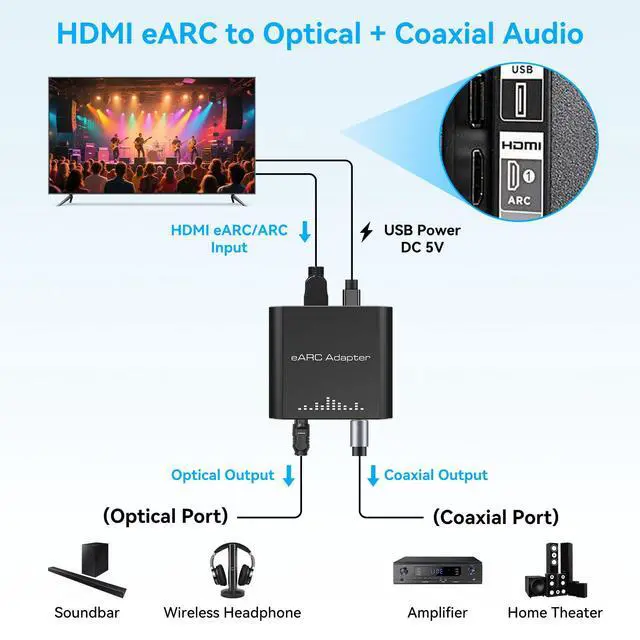
[HDMI ARC/eARC Audio Extractor] Our HDMI to Optical Audio Adapter converts digital audio signals from your TV's HDMI eARC port into optical and coaxial dual outputs, addressing the issue of TVs lacking other audio output ports. It breaks the limitations of TV sound, delivering a cinema-grade audio experience.
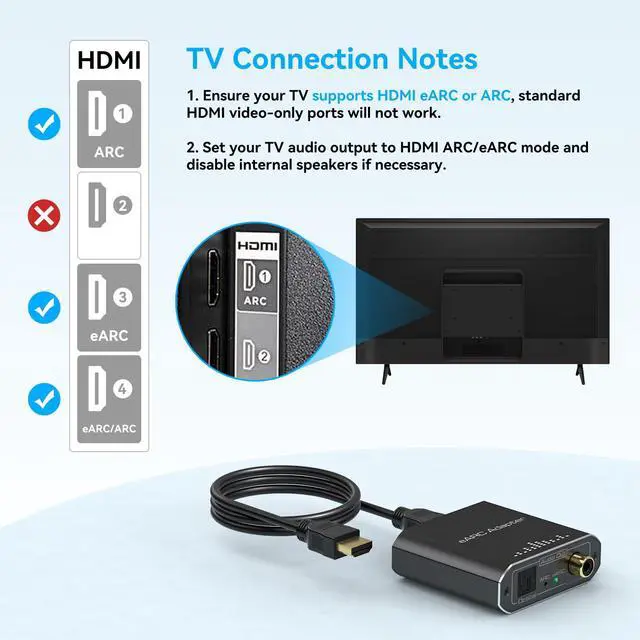
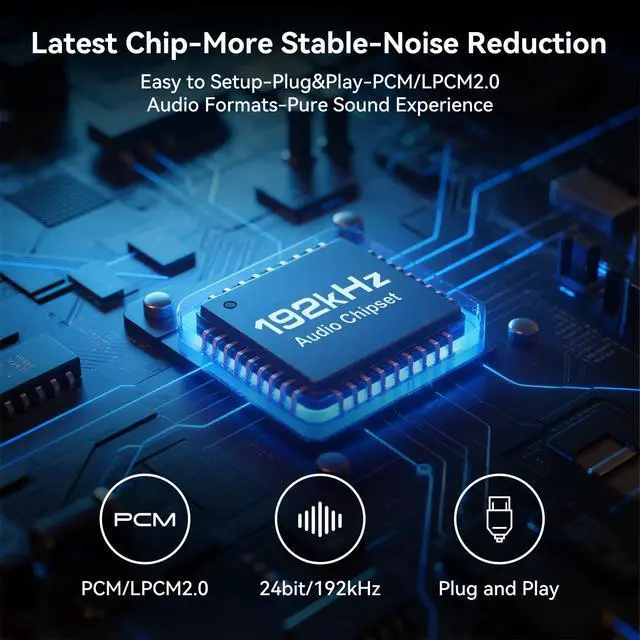
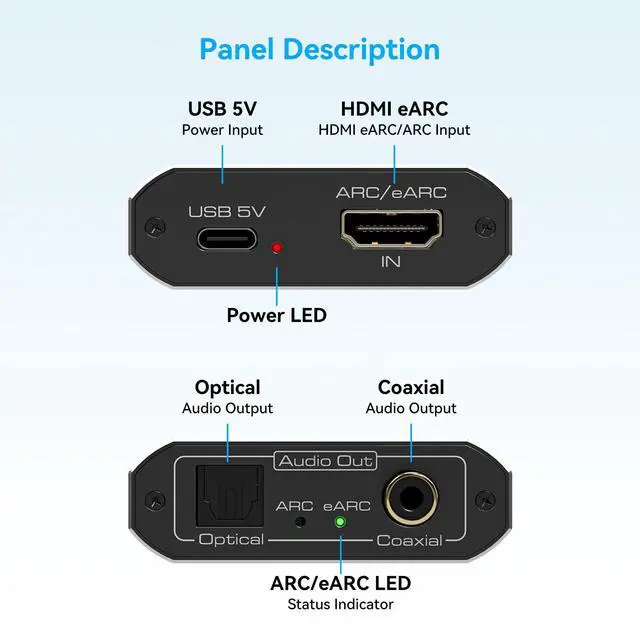
[Note: Only supports the HDTV ARC/eARC port; other HDMI devices are not supported. ] [Application Scenarios] This HDMI to Optical Converter is ideal for use with TV apps when outputting audio to external speakers, amplifiers, or headphones. It is also perfect for when the TV only supports HDMI eARC output and lacks optical or coaxial interfacesenabling seamless audio separation. Additionally, it can be used at night or in quiet environments to listen to TV sound through headphones without disturbing others. [Supports 192kHz High Sampling Rates] Our ARC/eARC Audio Converter chip supports high sampling rates of up to 24-bit/192 kHz, accurately reproducing every audio detail and eliminating sound quality loss. It's the perfect solution for upgrading older audio systems to eARC/ARC, enabling seamless, lossless high-definition audio conversion. [eARC Dedicated Interface] Breaking through traditional audio return limitations. Compared to standard ARC interfaces, the eARC channel offers higher bandwidth, allowing lossless transmission of multi-channel digital audio. This enables your TV's built-in streaming content to output cinema-grade surround sound. Equipped with an independent ARC/eARC status indicator, it visually shows the current operating mode. [Toslink + Coaxial Output] This HDMI ARC/eARC to Optical Adapter supports simultaneous optical (Toslink) and coaxial audio output, offering broad compatibility with a wide range of speakers, amplifiers, DACs, and headphone amplifiers equipped with digital audio interfaces.
Powered by DC5V, it is plug-and-play, compact, and easy to integrate into any home theater setup. It is also backward compatible with HDMI ARC, covering a wider range of usage needs. [Helpful Tips] 1. Please verify that your TV supports HDMI eARC (not a standard HDMI port) before purchasing. 2. On some TVs, you may need to manually enable eARC in the settings and disable the "TV speakers. " 3. To ensure stable signal transmission, please use an HDMI cable that meets the 19+1 high-pin standard for the eARC/ARC port. 4. Some TVs do not support ARC volume control; you will need to adjust the volume on your audio device. [Package Contents] The ARC/eARC Audio Extractor

[Note: Only supports the HDTV ARC/eARC port; other HDMI devices are not supported. ] [Application Scenarios] This HDMI to Optical Converter is ideal for use with TV apps when outputting audio to external speakers, amplifiers, or headphones. It is also perfect for when the TV only supports HDMI eARC output and lacks optical or coaxial interfacesenabling seamless audio separation. Additionally, it can be used at night or in quiet environments to listen to TV sound through headphones without disturbing others. [Supports 192kHz High Sampling Rates] Our ARC/eARC Audio Converter chip supports high sampling rates of up to 24-bit/192 kHz, accurately reproducing every audio detail and eliminating sound quality loss. It's the perfect solution for upgrading older audio systems to eARC/ARC, enabling seamless, lossless high-definition audio conversion. [eARC Dedicated Interface] Breaking through traditional audio return limitations. Compared to standard ARC interfaces, the eARC channel offers higher bandwidth, allowing lossless transmission of multi-channel digital audio. This enables your TV's built-in streaming content to output cinema-grade surround sound. Equipped with an independent ARC/eARC status indicator, it visually shows the current operating mode. [Toslink + Coaxial Output] This HDMI ARC/eARC to Optical Adapter supports simultaneous optical (Toslink) and coaxial audio output, offering broad compatibility with a wide range of speakers, amplifiers, DACs, and headphone amplifiers equipped with digital audio interfaces.
Powered by DC5V, it is plug-and-play, compact, and easy to integrate into any home theater setup. It is also backward compatible with HDMI ARC, covering a wider range of usage needs. [Helpful Tips] 1. Please verify that your TV supports HDMI eARC (not a standard HDMI port) before purchasing. 2. On some TVs, you may need to manually enable eARC in the settings and disable the "TV speakers. " 3. To ensure stable signal transmission, please use an HDMI cable that meets the 19+1 high-pin standard for the eARC/ARC port. 4. Some TVs do not support ARC volume control; you will need to adjust the volume on your audio device. [Package Contents] The ARC/eARC Audio Extractor
Warranty & Returns
Warranty, Returns, And Additional Information
Warranty
- Please contact the Seller directly for warranty information. Warranty information may also be found on the Manufacturer's website.
- CONTACT
Return Policies
- Return for refund within: 30 days
- Return for replacement within: 30 days
- This item is covered by DrakeMount FortunaTech Parts Return Policy
Manufacturer Contact Info
- For a directory of all our manufacturers, please click below.
- Manufacturers Directory
LOADING...