




 here!
I’m your shopping assistant for PC builds, upgrades, and everything tech.
Got questions? Ask away!
Start a conversation
here!
I’m your shopping assistant for PC builds, upgrades, and everything tech.
Got questions? Ask away!
Start a conversation
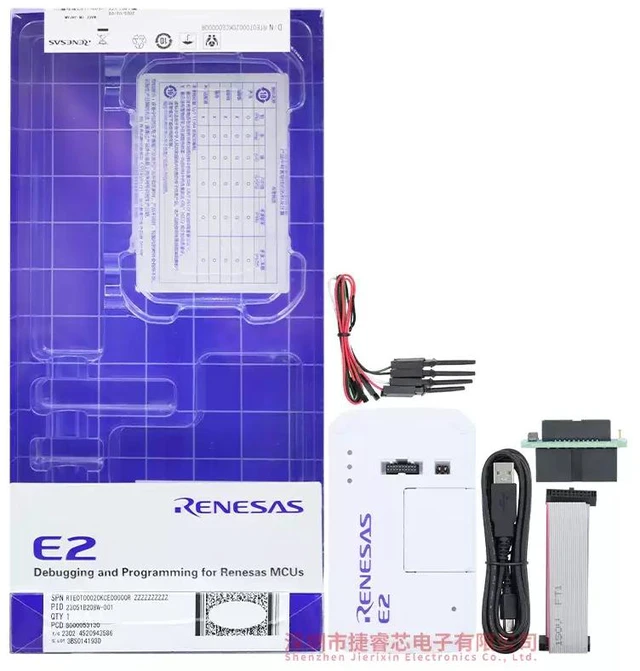



Any questions? Ask CelesteSM will help you find out quickly.
RH850, RL78, RX
[More details]
List of Functions Supported by CS+ V8.03.00 Jan. 20, 2020 Operating Environment
e? studio
*Download RE, RH850 Note2, RL78, RX
[More details]
*See "Release notes" V7.7.0 Jan. 20, 2020
IAR Embedded Workbench Note1 RH850, RL78, RX For the details of support for E2, contact IAR Systems.
Green Hills Multi Note1 RH850, R-Car D1
For the details of support for E2, contact Green Hills Software.
Flash Programming Renesas Flash Programmer V3
*Evaluation Software Download RE, RH850, RL78, RX
[More details]
List of MCUs supported by Renesas Flash Programmer
V3.06.01 Oct. 08, 2019 Operating Environment
Notes:
Features
High-speed download up to twice as fast as E1
The download speed is up to twice as fast as the E1 emulator. This substantially reduces waiting time for downloading the control programs to one-half at a maximum.
CAN Communications Time Measurement Solution (for RH850 Family)
The following CAN-related tasks are possible in conjunction with the CS+ integrated development environment or the MULTI? integrated development environment (GHS MULTI) from Green Hills Software. This eases verifying the speed of CAN communications in terms of system requirements.
Measuring the reception processing time in CAN communications with the E2 emulator alone
Stopping a program when the reception processing time exceeds the design value
Visualizing the history of CAN communications
Learn More (CAN Communication Time Measurement Solution (CS+)) >>
Application note: For RH850 (CS+)
Tool News: E2 Emulator for Reducing the Time Required to Solve Problems >>
Tool News: Quickly Resolve the Reception Processing Time Problem in CAN Communications in GHS MULTI >>
Current Consumption Tuning Solution (for RL78 and RX Families)
In conjunction with the QE for Current Consumption, a dedicated tool for measuring current draw, the E2 emulator is capable of the following items. These shorten the time taken to tune currents.
Measuring current with the E2 emulator alone
Stopping a program when an excessive current is detected
Visualizing the relationship between program operations and current
Learn More (QE for Current Consumption)>>
Watch the demonstration video of debugging techniques for reducing system currents. >>
Application notes:
For RL78 (CS+ edition)
For RL78 (e? studio edition)
For RX (CS+ edition)
For RX (e? studio edition)
Support for the input and output of external triggers (For RH850 family)
For example, you can set up the stopping of programs or of the movement of waveforms by simply using the test lead which comes with the E2 emulator to connect the emulator to an external measuring instrument with the CS+ integrated development environment or the MULTI? integrated development environment (GHS MULTI) from Green Hills Software.
Tool News: Detect Program Errors Easily in GHS MULTI by Linking with an External Measuring Instrument >>
Hot plug-in function available without an optional adapter
Although the E1 emulator required an optional hot plug adapter sold separately to use the hot plug-in function, the E2 emulator does not need it.
Board interface compatible with that of E1
The E2 emulator can be connected to the user system that was designed for the E1 emulator because the pin arrangement to be connected to the user system has compatibility with the E1 emulator. The optional products for E1 emulator are available. See the optional products for E2 for the details.
Support for new MCUs with next-generation cores
MCUs that have next-generation cores, such as those of the RH850/E2x series (which incorporate the G4MH core) or the RX66T group (which incorporate the new RXv3 core for the RX family) can be debugged.
Software Trace Function (For RH850 family)
The function enables users to view the execution history of the programs such as the values of the program counter (PC) and the register values together with the debug


