Your Browsing History
Meet Your Seller
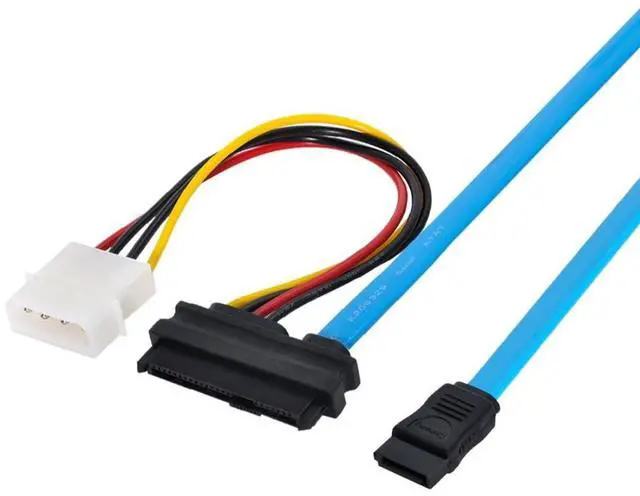
SAS to SATA Cable,SFF-8482 29Pin to SATA 7Pin Hard Drive Server Data Cable with 4Pin Power Cable 2.3FT/0.7M
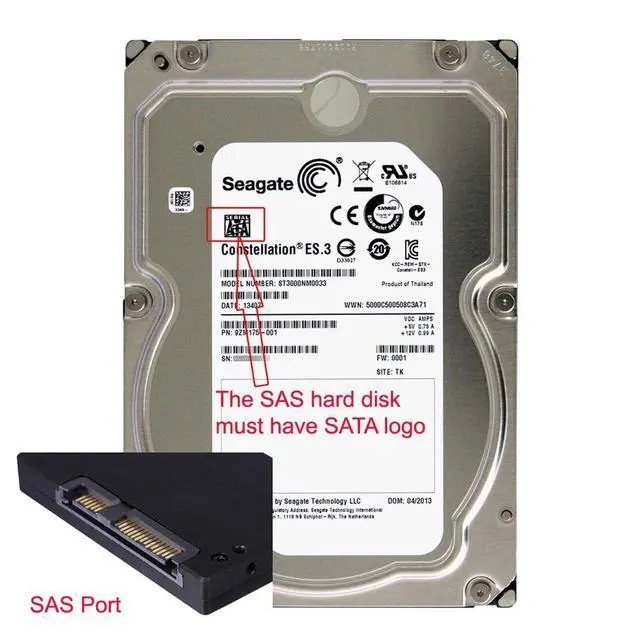
- 1) Connecting a SATA motherboard to a SAS hard drive requires one of the following conditions: 1. The motherboard must support SAS. 2. You must use an external SAS card. 3. Your SAS hard drive must support SATA mode.
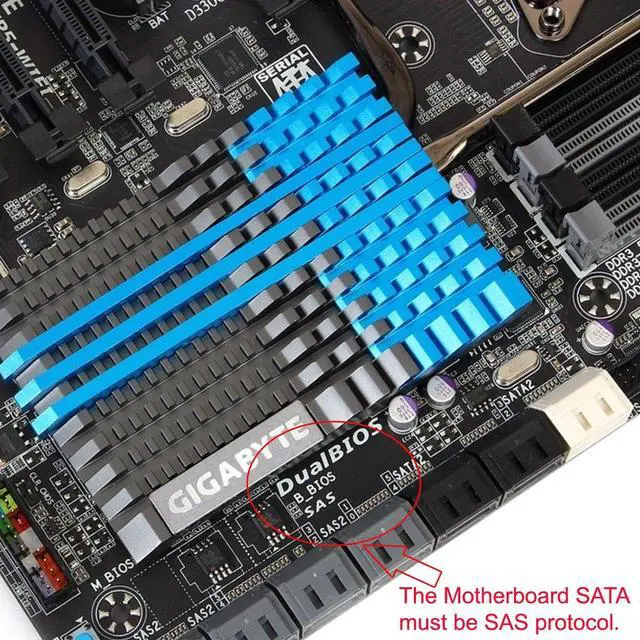
- 2) The motherboard must support SAS (you can use a SATA cable), but it must be connected to a SAS port. Connecting the hard drive to a SATA port will not recognize the hard drive. Motherboards without a SAS port will not support this adapter. It must have a port marked with SAS.
- 3) Note: When using this product, do not plug or unplug it while it is powered on to avoid damage.
- 4) Method of use 1: Separate the data and power supply of the SATA hard drive interface. Connect the motherboard's SATA interface and power cable. This can be connected directly. Some motherboards must set the BIOS to AHCI mode before use (optional RAID mode for RAID configuration).
- 5) Method of use 2: Separate the data and power supply of the SAS hard drive interface. Connect the motherboard's SFF-8482 SAS interface and power cable. This can be connected directly.

+
+
Overview
Specs
Reviews
Any questions? Our AI mode will help you find out quickly.
Try me now
1) Connecting a SATA motherboard to a SAS hard drive requires one of the following conditions: 1. The motherboard must support SAS. 2. You must use an external SAS card. 3. Your SAS hard drive must support SATA mode.
2) The motherboard must support SAS (you can use a SATA cable), but it must be connected to a SAS port. Connecting the hard drive to a SATA port will not recognize the hard drive. Motherboards without a SAS port will not support this adapter. It must have a port marked with SAS.
3) Note: When using this product, do not plug or unplug it while it is powered on to avoid damage.
4) Method of use 1: Separate the data and power supply of the SATA hard drive interface. Connect the motherboard's SATA interface and power cable. This can be connected directly. Some motherboards must set the BIOS to AHCI mode before use (optional RAID mode for RAID configuration).
5) Method of use 2: Separate the data and power supply of the SAS hard drive interface. Connect the motherboard's SFF-8482 SAS interface and power cable. This can be connected directly.
2) The motherboard must support SAS (you can use a SATA cable), but it must be connected to a SAS port. Connecting the hard drive to a SATA port will not recognize the hard drive. Motherboards without a SAS port will not support this adapter. It must have a port marked with SAS.
3) Note: When using this product, do not plug or unplug it while it is powered on to avoid damage.
4) Method of use 1: Separate the data and power supply of the SATA hard drive interface. Connect the motherboard's SATA interface and power cable. This can be connected directly. Some motherboards must set the BIOS to AHCI mode before use (optional RAID mode for RAID configuration).
5) Method of use 2: Separate the data and power supply of the SAS hard drive interface. Connect the motherboard's SFF-8482 SAS interface and power cable. This can be connected directly.
Warranty & Returns
Warranty, Returns, And Additional Information
Warranty
- Please contact the Seller directly for warranty information. Warranty information may also be found on the Manufacturer's website.
- CONTACT
Return Policies
- Return for refund within: 45 days
- Return for replacement within: 30 days
- This item is covered by TechDen Return Policy
Manufacturer Contact Info
- For a directory of all our manufacturers, please click below.
- Manufacturers Directory
LOADING...