Your Browsing History
Meet Your Seller
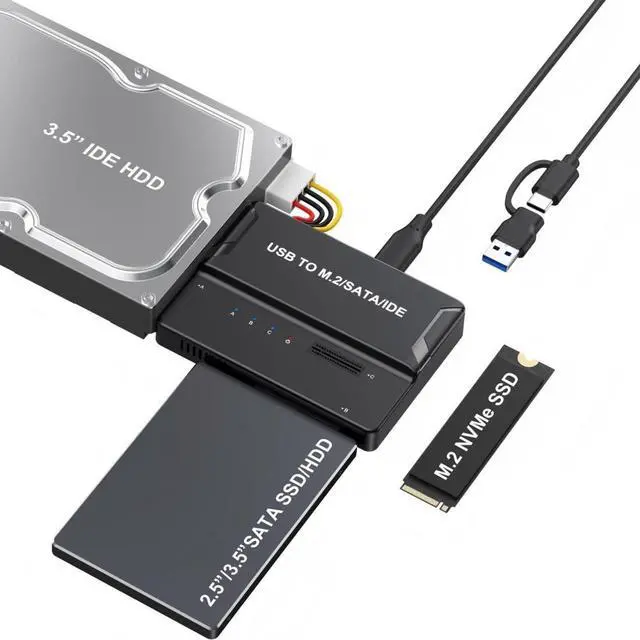
3 in 1 USB A/C to M.2 NVMe/IDE/SATA Hard Drive Docking Station for M.2 NVMe SSD, 3.5" IDE and 2.5/3.5" SATA SSD/HDD(Note: Requires a DC 12V/2A Power Supply (not Included)
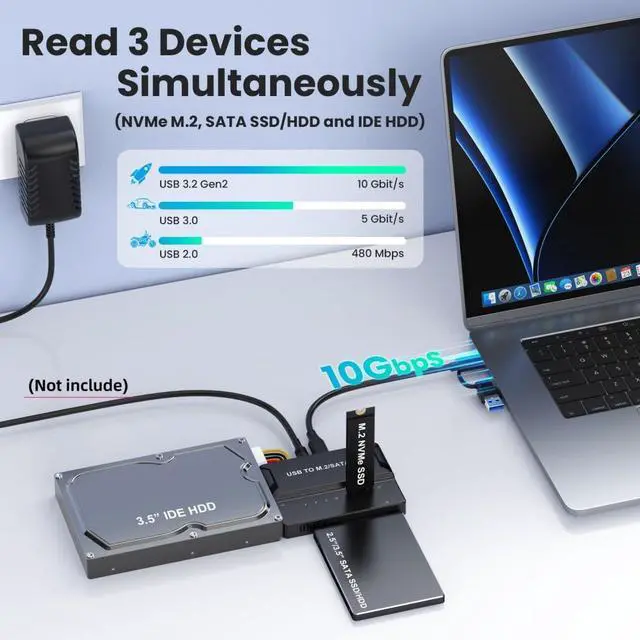
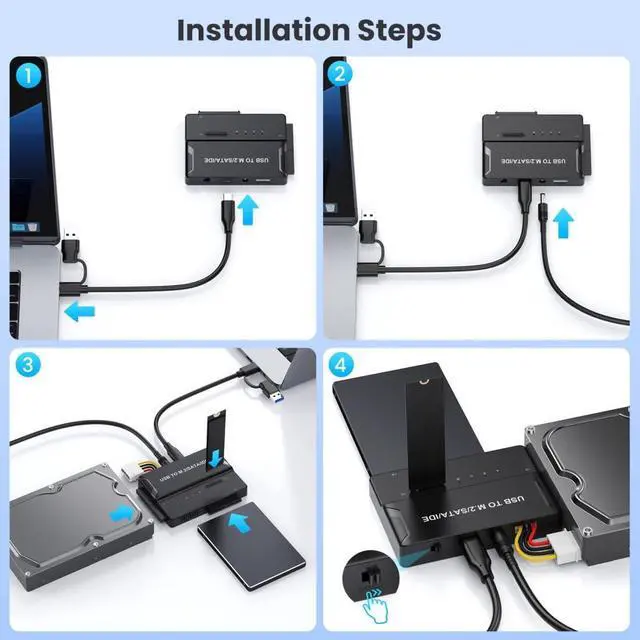
- 1) Note: This device can only connect one hard drive at a time. If both an M.2 and a SATA/IDE hard drive are inserted into the same enclosure, only the SATA drive will function. (Hot-swapping is not supported for any hard drives
- do not replace the SSD while connected to the computer.)
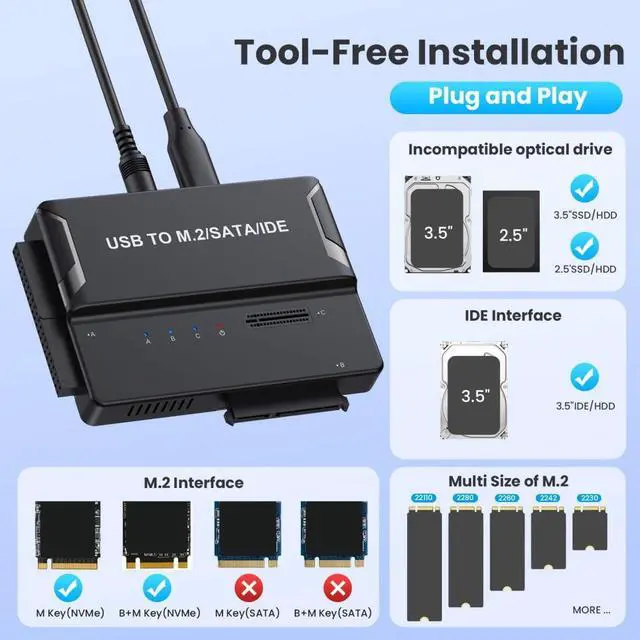
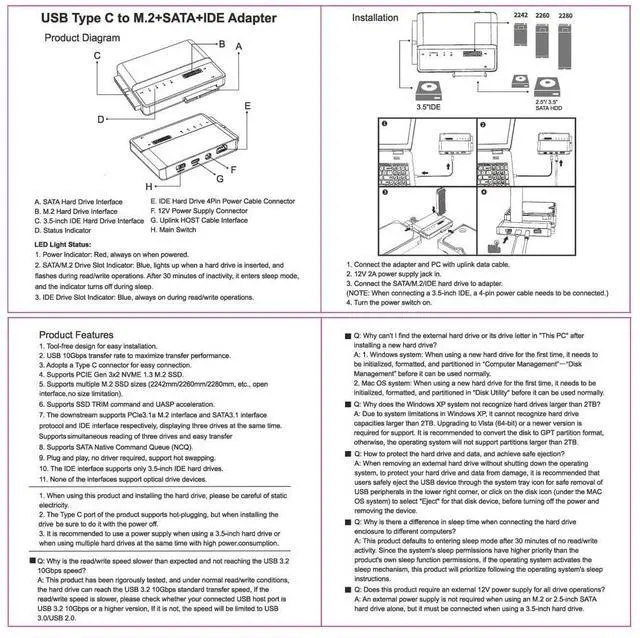
- 2) Note: This USB 3.0 to M.2 SSD enclosure is compatible with NVMe PCIe M-Key/B+M interface M.2 SSDs. It supports 2242/2260/2280 form factors
- it does not support M.2 PCIe AHCI SSDs, M.2 PCIe devices (such as WiFi and capture cards), mSATA SSDs, or non-M.2 form factors SSDs. (M.2 NVMe SSD maximum speed is 10Gbps, M.2 SATA SSD maximum speed is 5Gbps)
- 3) Note: This USB 3.0 to SATA SSD enclosure is compatible with 2.5-inch laptop SATA SSDs/SSDs
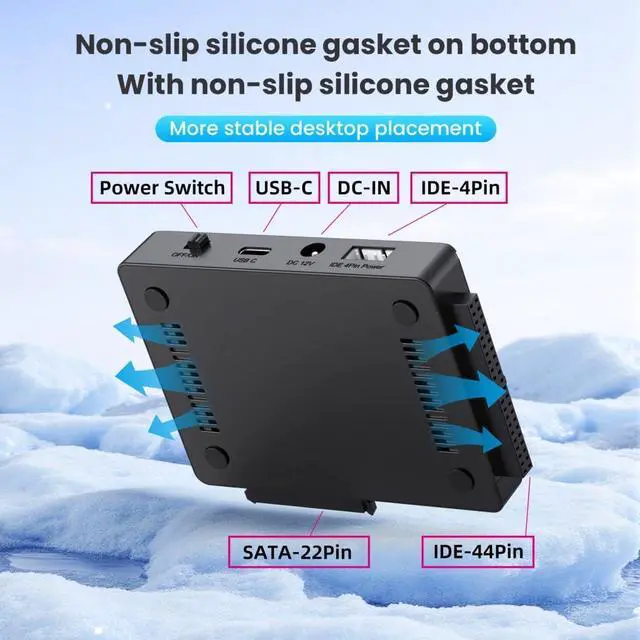
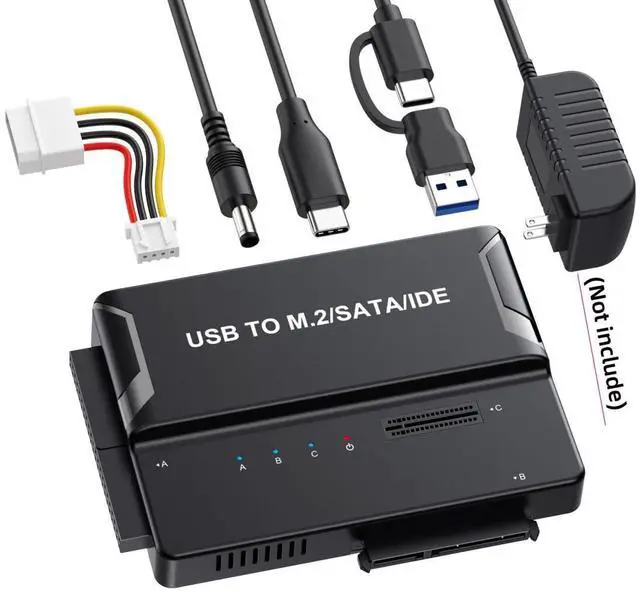
- it is also compatible with 3.5-inch desktop IDE/PATA and SATA SSDs/SSDs. It requires a 12V DC power supply (power adapter sold separately)
- 4) Includes Type-C and Type-A data cables
- the Type-C cable can be plugged into either end. For M.2 NVMe, it is recommended to use a USB-C Gen 2 10Gbps or USB4/TB3/TB4 interface for maximum speed. Backward compatible with USB 3.1 Gen1 and USB 3.0, with maximum speeds up to 5Gbps.
- 5) Features an aluminum alloy casing, slim design, durability, excellent heat dissipation, and portability.

+
+
Overview
Specs
Reviews
Any questions? Our AI mode will help you find out quickly.
Try me now
1)
Note: This device can only connect one hard drive at a time. If both an M. 2 and a SATA/IDE hard drive are inserted into the same enclosure, only the SATA drive will function. (Hot-swapping is not supported for any hard drives
do not replace the SSD while connected to the computer. )
2) Note: This USB 3.0 to M. 2 SSD enclosure is compatible with NVMe PCIe M-Key/B+M interface M. 2 SSDs. It supports 2242/2260/2280 form factors
it does not support M. 2 PCIe AHCI SSDs, M. 2 PCIe devices (such as WiFi and capture cards), mSATA SSDs, or non-M. 2 form factors SSDs. (M. 2 NVMe SSD maximum speed is 10Gbps, M. 2 SATA SSD maximum speed is 5Gbps)
3) Note: This USB 3.0 to SATA SSD enclosure is compatible with 2.5 -inch laptop SATA SSDs/SSDs
it is also compatible with 3.5 -inch desktop IDE/PATA and SATA SSDs/SSDs. It requires a 12V DC power supply (power adapter sold separately)
4) Includes Type-C and Type-A data cables
the Type-C cable can be plugged into either end. For M. 2 NVMe, it is recommended to use a USB-C Gen 2 10Gbps or USB4/TB3/TB4 interface for maximum speed. Backward compatible with USB 3.1 Gen1 and USB 3.0, with maximum speeds up to 5Gbps.
5) Features an aluminum alloy casing, slim design, durability, excellent heat dissipation, and portability.
Note: This device can only connect one hard drive at a time. If both an M. 2 and a SATA/IDE hard drive are inserted into the same enclosure, only the SATA drive will function. (Hot-swapping is not supported for any hard drives
do not replace the SSD while connected to the computer. )
2) Note: This USB 3.0 to M. 2 SSD enclosure is compatible with NVMe PCIe M-Key/B+M interface M. 2 SSDs. It supports 2242/2260/2280 form factors
it does not support M. 2 PCIe AHCI SSDs, M. 2 PCIe devices (such as WiFi and capture cards), mSATA SSDs, or non-M. 2 form factors SSDs. (M. 2 NVMe SSD maximum speed is 10Gbps, M. 2 SATA SSD maximum speed is 5Gbps)
3) Note: This USB 3.0 to SATA SSD enclosure is compatible with 2.5 -inch laptop SATA SSDs/SSDs
it is also compatible with 3.5 -inch desktop IDE/PATA and SATA SSDs/SSDs. It requires a 12V DC power supply (power adapter sold separately)
4) Includes Type-C and Type-A data cables
the Type-C cable can be plugged into either end. For M. 2 NVMe, it is recommended to use a USB-C Gen 2 10Gbps or USB4/TB3/TB4 interface for maximum speed. Backward compatible with USB 3.1 Gen1 and USB 3.0, with maximum speeds up to 5Gbps.
5) Features an aluminum alloy casing, slim design, durability, excellent heat dissipation, and portability.
Warranty & Returns
Warranty, Returns, And Additional Information
Warranty
- Please contact the Seller directly for warranty information. Warranty information may also be found on the Manufacturer's website.
- CONTACT
Return Policies
- Return for refund within: 30 days
- Return for replacement within: 30 days
- This item is covered by GearZap Return Policy
Manufacturer Contact Info
- For a directory of all our manufacturers, please click below.
- Manufacturers Directory
LOADING...