Your Browsing History
Meet Your Seller
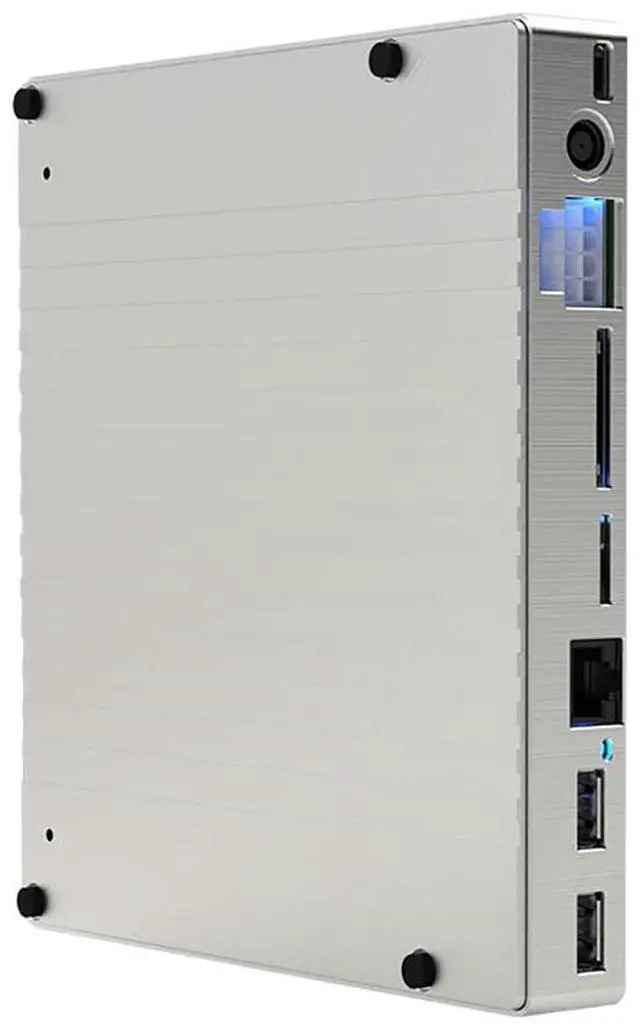
USB4 Graphics Docking Station with 2.5Gbps RJ45 Ethernet Port + USB-A 10Gbps Port +SD/TF Card Slot Compatible with Thunderbolt 4 3 C3893-1
- Slot specification is x16, the actual maximum support PCle3.0x4 24Gbps link rate (backward compatible).; Standard CPU 8PIN ATX power connector, can be automatically switched in input/output mode.; Must be plugged into an adapter with a power supply voltage of 19V~20V and an interface of DC7450 specification.; Must be connected to USB-c power adapter with PD protocol, the port supports PD3.0 20V5A 100W power supply (backward compatible).; When port 1C is used for power supply output, please make sure that one of ports 1A, 1B and 1D is plugged into the power supply, and the maximum output power of this port should not exceed the power supply of input power or 330W limit.

+
+
Overview
Specs
Reviews
Any questions? Our AI mode will help you find out quickly.
Try me now
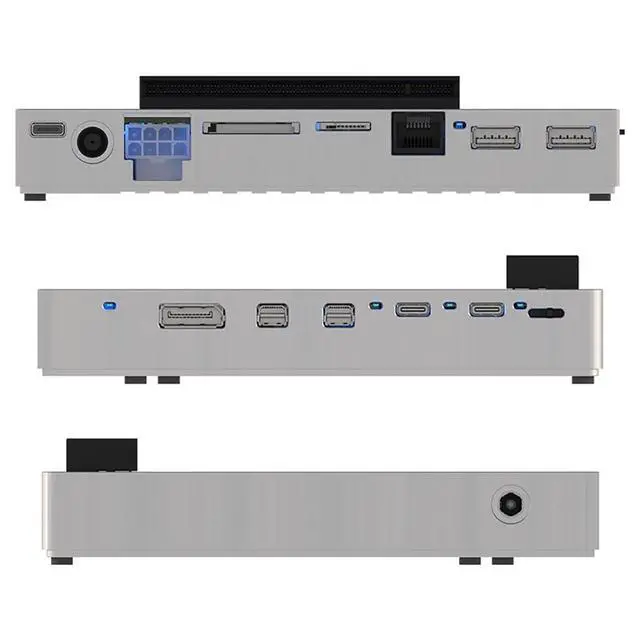
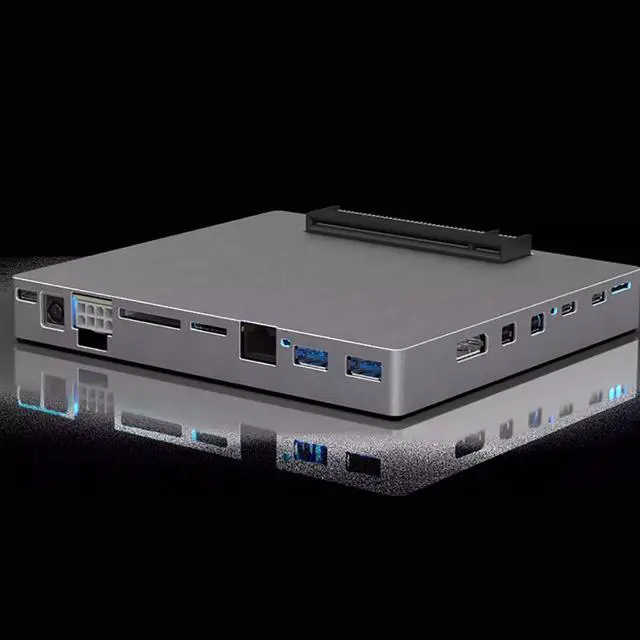
JMT USB4 Graphics Docking Station with 2.5G bps RJ45 Ethernet Port + USB-A 10Gbps Port +SD/TF Card Slot Compatible with Thunderbolt 4 3 C3893-1 Connector Type.
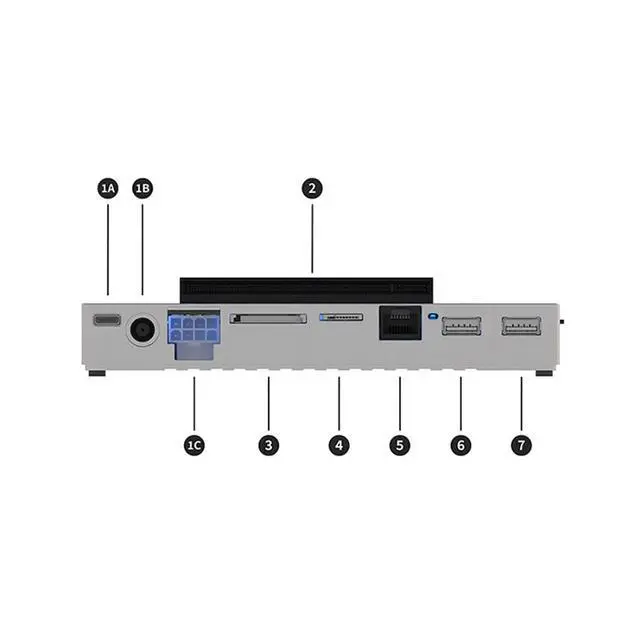
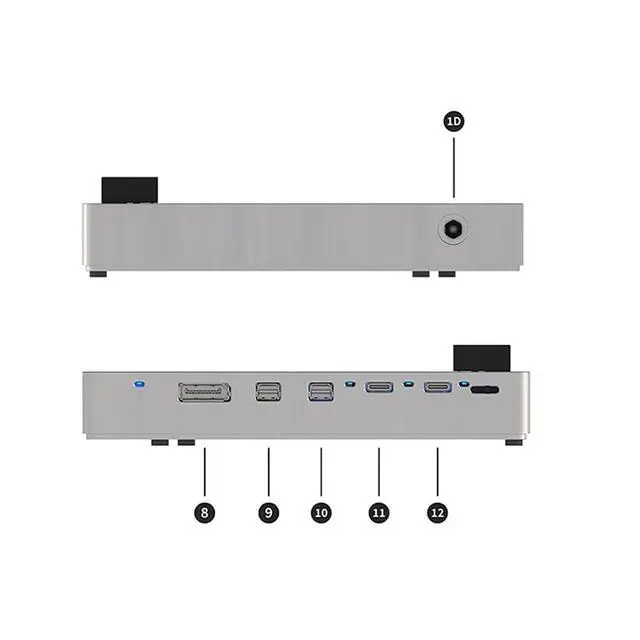
1A: USB-C PD power supply input 1B: DC745020V
power input terminal 1C: 8PIN bidirectional power supply port 1D: DC552520V
power supply input 2: Side-insert PCI
Express 3.0 ×16 slot 3: U HS-II SD card slot 4: U HS-II TF card slot 5: RJ45 2.5G bps
Ethernet port 6: USB-A
10Gbps port 7: USB-A
10Gbps port 8: DP
1.4 output port 9: miniDP
1.4 input port 10: miniDP 1.4
Input Port 11: Interface Compatible with
Thunderbolt 12: Interface Compatible with Thunderbolt Detailed Description. Must be connected to USB-c power adapter with PD protocol, the port supports PD 3.0 20V5A 100W power supply (backward compatible). Must be plugged into an adapter with a power supply voltage of 19V~20V and an interface of DC7450 specification. Standard CPU 8PIN ATX power connector, can be automatically switched in input/output mode. Slot specification is x16, the actual maximum support PCle 3.0 x4 24Gbps link rate (backward compatible). [1] Ports 1A, 1B, 1C, and 1D can all be used to power the docking station, just choose one of them during actual use. [2] When port 1C is used for power supply output, please make sure that one of ports 1A, 1B and 1D is plugged into the power supply, and the maximum output power of this port should not exceed the power supply of input power or 330W limit.
1A: USB-C PD power supply input 1B: DC745020V
power input terminal 1C: 8PIN bidirectional power supply port 1D: DC552520V
power supply input 2: Side-insert PCI
Express 3.0 ×16 slot 3: U HS-II SD card slot 4: U HS-II TF card slot 5: RJ45 2.5G bps
Ethernet port 6: USB-A
10Gbps port 7: USB-A
10Gbps port 8: DP
1.4 output port 9: miniDP
1.4 input port 10: miniDP 1.4
Input Port 11: Interface Compatible with
Thunderbolt 12: Interface Compatible with Thunderbolt Detailed Description. Must be connected to USB-c power adapter with PD protocol, the port supports PD 3.0 20V5A 100W power supply (backward compatible). Must be plugged into an adapter with a power supply voltage of 19V~20V and an interface of DC7450 specification. Standard CPU 8PIN ATX power connector, can be automatically switched in input/output mode. Slot specification is x16, the actual maximum support PCle 3.0 x4 24Gbps link rate (backward compatible). [1] Ports 1A, 1B, 1C, and 1D can all be used to power the docking station, just choose one of them during actual use. [2] When port 1C is used for power supply output, please make sure that one of ports 1A, 1B and 1D is plugged into the power supply, and the maximum output power of this port should not exceed the power supply of input power or 330W limit.
Warranty & Returns
Warranty, Returns, And Additional Information
Warranty
- Please contact the Seller directly for warranty information. Warranty information may also be found on the Manufacturer's website.
- CONTACT
Return Policies
- Return for refund within: 30 days
- Return for replacement within: 30 days
- This item is covered by GearZap Return Policy
Manufacturer Contact Info
- For a directory of all our manufacturers, please click below.
- Manufacturers Directory
LOADING...