

Your Browsing History
- Free 30-day Returns
$203.00

Meet Your Seller

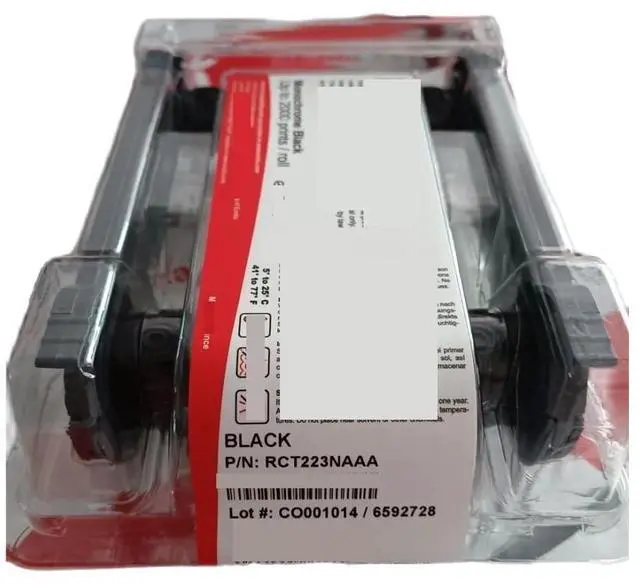

RCT223NAAA Black Monochrome Ribbon Cassette 2000 Prints Fit for Evolis Primacy2
Limited time offer, ends 10/07 By Dazan Technology
- Fit For Evolis Primacy2 card printers OEM: RCT223NAAA Size: 110*60 Product name: Monochrome Ribbon Cassette; There are two ways to check the use of the right region code. 1. Before getting started with the printer The printer region code is indicated on the ID printer label from the external box The ribbon region code is indicated in the ribbon part number, on the last three digits This part number is printed on the ribbon box label as well as on the drop-in cassette label.; The two codes have to be similar as indicated below: Note: The ribbons with a NAA code can be used on all the printer region codes. The ribbons with SAA, S13, S14 and S22 codes can be used only with the SAA printer region code.; 2. At any time when using the printer In the Evolis Premium Suite PrintCenter, in the 'Ribbon' tab, the part number and the type of ribbon is indicated 'Ribbon not valid' message means that the region code is not appropriate between the printer and the ribbon.; What happens if the printer and ribbon region codes are not appropriate? Check the table with countries above and you will see that there are 3 major regions and 2 sub-zones. Region AMERICAS ribbons won't work in Region EMEA, Region EMEA ribbons won't work in Region APAC.; In short, the region where the ribbon has been purchased can only be used on printer from that particular region. Note: Please contact us to confirm your Printer Ribbon P/N!; Supports blackoverlay, black, blue, red, green, white, metallic gold and silver
+
+
Overview
Specs
Reviews

Any questions? Our AI mode will help you find out quickly.
Try me now
Manufacturer and item: RCT223NAAA Fit For Primacy2 Printers Monochrome ribbon: Black-overley, Black, Blue, Red, Green, White, Metallic Gold and Metallic Silver Number of prints per roll: up to 2000 Therearetwowaystochecktheuseoftherightregioncode. 1. Beforegettingstartedwiththeprinter TheprinterregioncodeisindicatedontheIDprinterlabelfromtheexternalbox. Theribbonregioncodeisindicated intheribbonpartnumber, onthelastthreedigits. Thispartnumberisprintedontheribbonboxlabelaswellason thedrop-incassettelabel.
Thetwocodeshavetobesimilarasindicatedbelow:
Note: TheribbonswithaNAAcodecanbeusedonalltheprinterregioncodes. TheribbonswithSAA, S13, S14andS22codescanbeusedonlywiththeSAAprinterregioncode. 2. Atanytimewhenusingtheprinter Inthe For EvolisPremiumSuitePrintCenter, inthe'Ribbon'tab, thepartnumberandthetypeofribbonisindicated. 'Ribbonnotvalid'messagemeansthattheregioncodeisnotappropriatebetweentheprinterandtheribbon. Whathappensiftheprinterandribbonregioncodesarenotappropriate? Checkthetablewithcountriesaboveandyouwillseethatthereare3majorregionsand2sub-zones. RegionAMERICA
Sribbonswon'tworkinRegionEMEA, RegionEME
Aribbonswon'tworkinRegionAPAC. Inshort, theregionwheretheribbonhasbeenpurchasedcan'only'beusedonprinterfromthatparticularregion.
Size: 110*60
Note: Please contact us to confirm your For PrinterRibbon P/N!
Packaging quantity: 1pcs
Thetwocodeshavetobesimilarasindicatedbelow:
Note: TheribbonswithaNAAcodecanbeusedonalltheprinterregioncodes. TheribbonswithSAA, S13, S14andS22codescanbeusedonlywiththeSAAprinterregioncode. 2. Atanytimewhenusingtheprinter Inthe For EvolisPremiumSuitePrintCenter, inthe'Ribbon'tab, thepartnumberandthetypeofribbonisindicated. 'Ribbonnotvalid'messagemeansthattheregioncodeisnotappropriatebetweentheprinterandtheribbon. Whathappensiftheprinterandribbonregioncodesarenotappropriate? Checkthetablewithcountriesaboveandyouwillseethatthereare3majorregionsand2sub-zones. RegionAMERICA
Sribbonswon'tworkinRegionEMEA, RegionEME
Aribbonswon'tworkinRegionAPAC. Inshort, theregionwheretheribbonhasbeenpurchasedcan'only'beusedonprinterfromthatparticularregion.
Size: 110*60
Note: Please contact us to confirm your For PrinterRibbon P/N!
Packaging quantity: 1pcs
Warranty & Returns
Warranty, Returns, And Additional Information
Warranty
- Please contact the Seller directly for warranty information. Warranty information may also be found on the Manufacturer's website.
- CONTACT
Return Policies
- Return for refund within: 30 days
- Return for replacement within: 30 days
- This item is covered by Dazan Technology Return Policy
Manufacturer Contact Info
- For a directory of all our manufacturers, please click below.
- Manufacturers Directory
LOADING...