





Note:
1. Our bleutooth 5.3 Adapter does not support amplifiers such as Yamaha amplifiers and audio converters.
2. Please read manual carefully before using and set correct mode.
3. Note: No battery! The Bluetooth receiver must be connected via USB cable (included) to power source (excluded).
4.Note: Our Bluetooth Transmitter Receiver can only remenber the last connected device!
5.Bluetooth audio transmission (especially in TX transmission mode) inherently has a signal conversion and processing delay of 200 to 300 milliseconds
The audio processing of some smart TVS themselves will add extra latency
6.Please pay attention to whether the mode setting is incorrect when there is no sound.


Package:
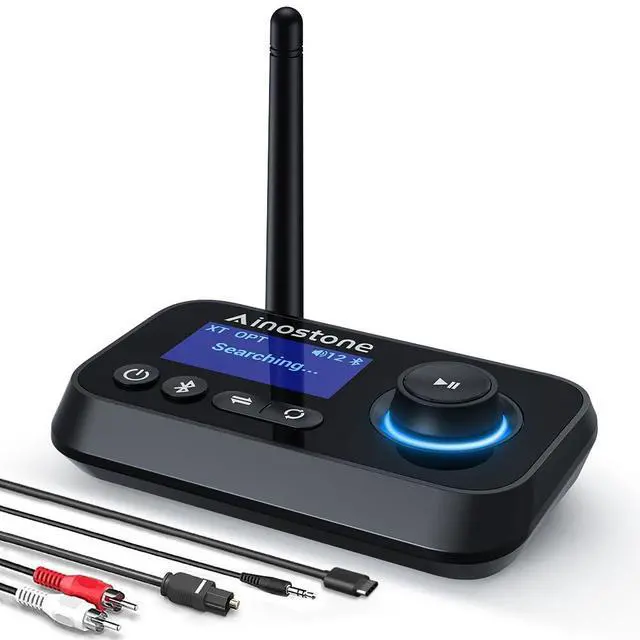
- Bluetooth 5.3 receiver transmitter *1
- Optical Audio Cable *1
- 3.5mm Audio Cable *1
- 3.5mm to RCA Audio Cable *1
- Type-C Power Cable *1
Note: No battery! The Bluetooth receiver must be connected via USB cable (included) to power source (excluded).
- Bluetooth Version: Bluetooth 5.3
- Bluetooth Frequency: 2402-2480 MHz
- Power Supply: DC 5V
- Working Mode: TX / RX / Bypass
- Bluetooth TX/RX Distance:45ft (no object)
- Support Dual Connection: YES
- With Switch Button: YES
- Support Volume Control: YES
3-IN-1 Bluetooth Receiver Transmitter
Are you looking for a Bluetooth audio adapter that can convert your non-Bluetooth home device into Bluetooth?
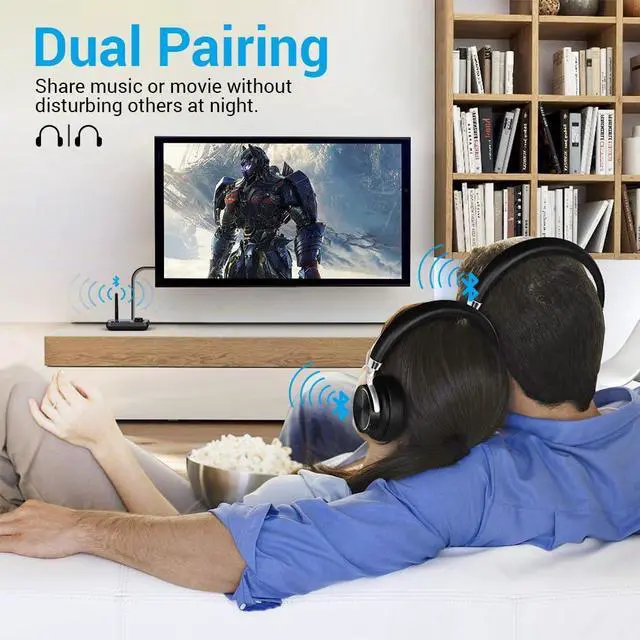
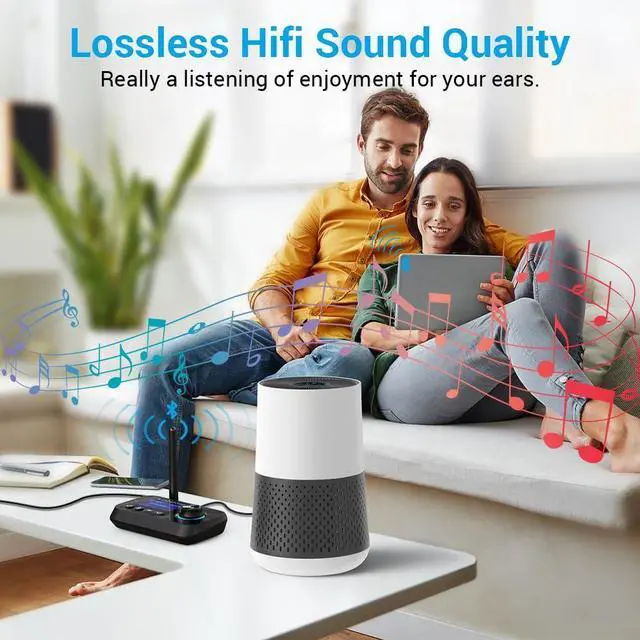
Best that the Bluetooth transmitter receiver allows you and your partner to watch movie or enjoy music in the evening, where it does not disturb your neighbors.
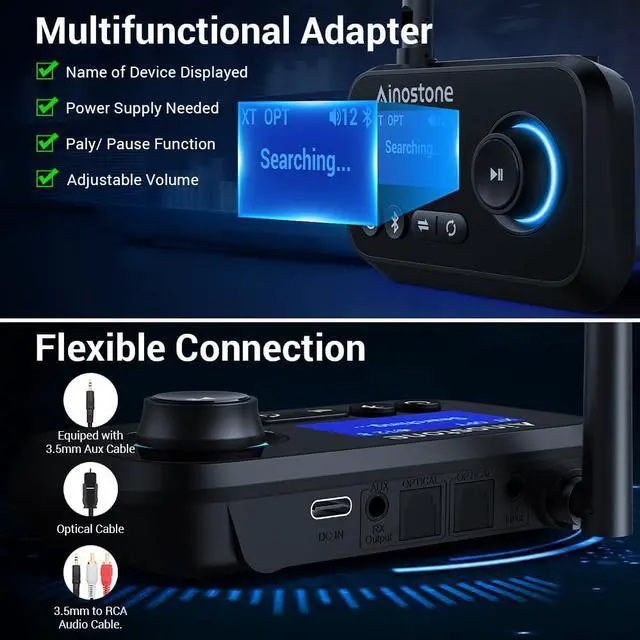
Best to equiped with LCD display, then you know what kind of mode you were in and which devices are connected.
Ainostone Bluetooth 5.3 Transmitter Receiver -Perfect Bluetooth for old home stereo with all functions you wanna!
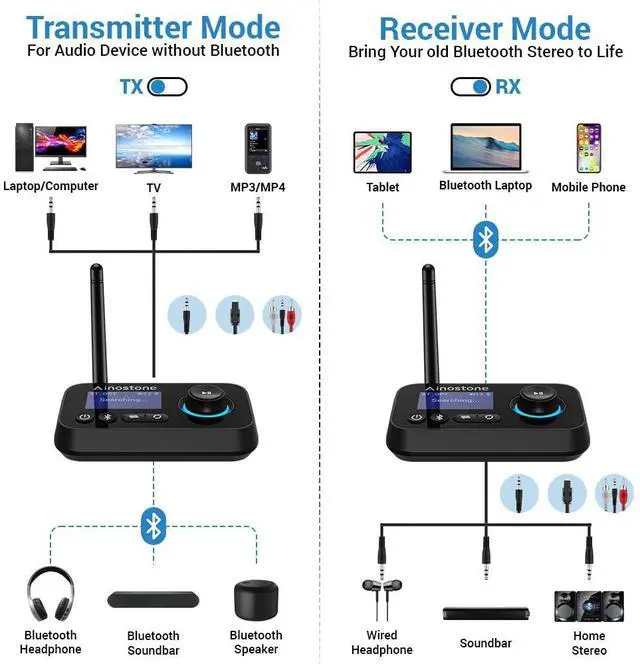
- Transmitter Mode allows non-Bluetooth-devices to retrofitted into Bluetooth. Receiver Mode is enable Bluetooth on your wired speakers, stereo. Receive audio wirelessly from any Bluetooth device.
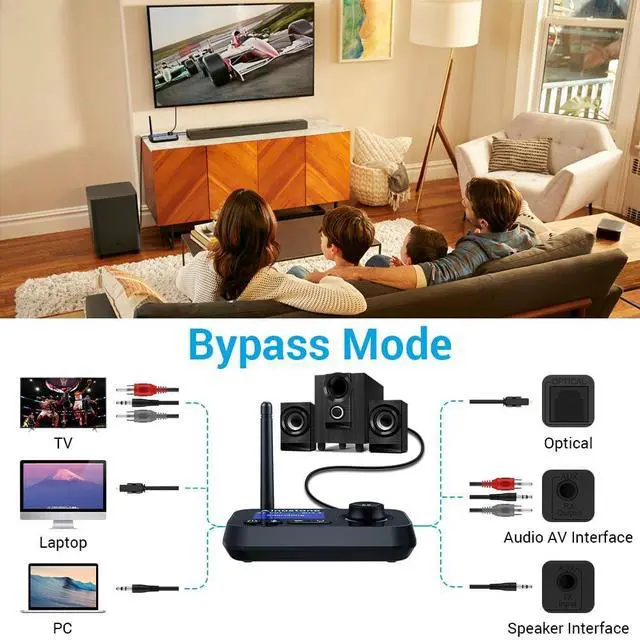
- Bypass Mode: In Bypass mode, you can easily connect various audio systems to TV using optical/ aux or RCA cables. When connecting the TV, please set to PCM Audio on TV.
- Bluetooth 5.3: Equipped with Bluetooth 5.3 chip for the faster data and music transmission, the Bluetooth TV Adapter improves the performance of Bluetooth audio.
- Dual Connection & Memory Function: The TV Transmitter supports audio streaming to 2 Bluetooth headphones simultaneously in TX mode, and it will automatically re-connect the last connected devices.
- 1.8-Inch LCD Display: You can immediately knows whether the Bluetooth 5.3 Transmitter Receiver recognizes a nearby headphones or not, then select it in the display and confirm with OK.
- ON/OFF Switch Button: It prevents annoying and unnecessary connections, while eliminating frequent disconnection of the plug.
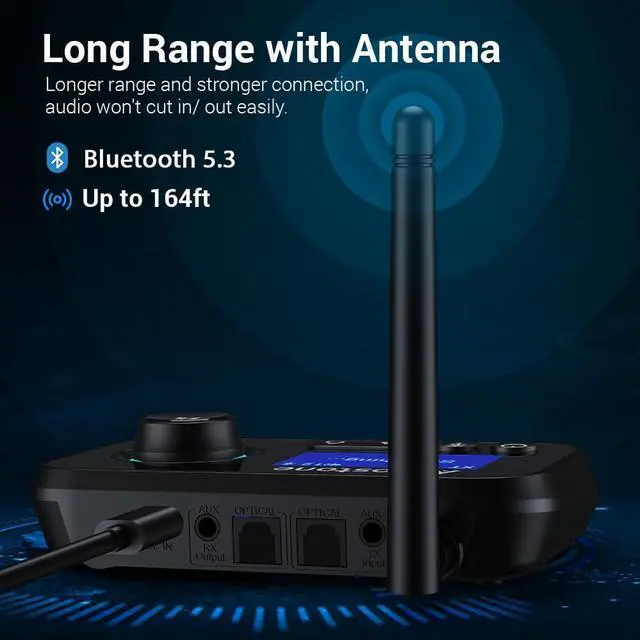
- Long Range: So that you can enjoy the music from every corner of the room when carrying your mobile phone.
- Volume Control: Volume control function allows you adjust the volume through adapter. Please note that when adjusting the volume, the volume of both headphones will be adjusted simultaneously.


3 Options & Wide Compatibility
Bluetooth Bluetooth transmitter is packed with optical audio cable, 3.5mm aux cable and 3.5mm to RCA audio cable. 3 output ways makes the bluetooth audio adapter compatible with 99% of the TVs, Receivers, Projectors, Home Stereo on the market.
Note:
- In three modes (TX/RX/BYPASS), optical is default. In the case of optical fiber insertion, if AUX is connected at the same time, AUX will take precedence, the machine will automatically recognize AUX and display it. But RCA cannot be used with optical fiber at the same time, you need to unplug the unused cable, otherwise both will not work.
- When using fiber optic interfaces to connect TVs and devices, if there is a delay, it is recommended to prioritize using 3.5mm aux interfaces and RCA interfaces.

Multifunctional Button
- Power on/off
- Bluetooth Pairing/Repairing
- Mode Switch TX/RX/BYPASS
- Search and pair Bluetooth devices (TX)
- MFB (RX:Pause/ Volume+/-; TX:Up/Down/Confirm)
Note:
1.If the signal connection is unstable, you can try resetting the transmitter and Bluetooth device.
Transmitter initialization:
Long press the Bluetooth identification button to disconnect, then turn off and restart.
2.If you adjust the volume through the bluetooth Adapter, the volume of both output devices will be adjusted simultaneously.
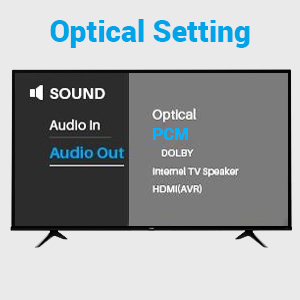
What should I do if connect to TV?
If you connect the adapter to tv through optical cable, PCM SETTING on TV is required!!!
Generally, in TV settings, find the audio mode and click on Settings - Sound - Digital Audio Output - Select "PCM".

Frequently Asked Questions:
Q1. After power off, it does not remember the last paired devices.
Please initialize the Bluetooth adapter and then connect again.
How to initialize adapter: Long press the Bluetooth identification key to disconnect, then deactivate and restart.
Q2: Cannot connect to device.
A: Please confirm:1. You have selected the correct mode. 2. your Bluetooth device was in pairing status and that the both devices are within 1m during pairing.
Q3: The Bluetooth audio transmitter is connected to my TV via fiber optic but there is no sound.
A:Please check you have set PCM on the TV. In general, you will find the audio mode in the TV settings and click "Settings - Sound - Digital Audio Output - Select "PCM"".
Q4: Connection is unstable and easy to disconnect.
A: Please initialize the Bluetooth transmitter, and then reconnect again to see whether there is still the same problem.
Transmitter initialization: Long press the Bluetooth identification button to disconnect, then turn off and restart.
Q5: There is delay.
A: The delay is also related to the connected devices, and surrounding Bluetooth devices can also affect signal transmission. It is recommended to turn off other surrounding Bluetooth devices and try to connect to other devices to confirm if the same problem persists.
Q5:There is sound noise.
It may be that other Bluetooth electronic devices are causing a interference. Please try to turn off other Bluetooth devices or wireless devices.
Note:
1. Our bleutooth 5.3 Adapter does not support amplifiers such as Yamaha amplifiers and audio converters.
2. Please read manual carefully before using and set correct mode.
3. Note: No battery! The Bluetooth receiver must be connected via USB cable (included) to power source (excluded).
4.Note: Our Bluetooth Transmitter Receiver can only remenber the last connected device!
5.Bluetooth audio transmission (especially in TX transmission mode) inherently has a signal conversion and processing delay of 200 to 300 milliseconds
The audio processing of some smart TVS themselves will add extra latency
6.Please pay attention to whether the mode setting is incorrect when there is no sound.
3-IN-1 Bluetooth Receiver Transmitter
Package:
- Bluetooth 5.3 receiver transmitter *1
- Optical Audio Cable *1
- 3.5mm Audio Cable *1
- 3.5mm to RCA Audio Cable *1
- Type-C Power Cable *1
Note: No battery! The Bluetooth receiver must be connected via USB cable (included) to power source (excluded).
- Bluetooth Version: Bluetooth 5.3
- Bluetooth Frequency: 2402-2480 MHz
- Power Supply: DC 5V
- Working Mode: TX / RX / Bypass
- Bluetooth TX/RX Distance:45ft (no object)
- Support Dual Connection: YES
- With Switch Button: YES
- Support Volume Control: YES
Are you looking for a Bluetooth audio adapter that can convert your non-Bluetooth home device into Bluetooth?
Best that the Bluetooth transmitter receiver allows you and your partner to watch movie or enjoy music in the evening, where it does not disturb your neighbors.
Best to equiped with LCD display, then you know what kind of mode you were in and which devices are connected.
Ainostone Bluetooth 5.3 Transmitter Receiver -Perfect Bluetooth for old home stereo with all functions you wanna!
- Transmitter Mode allows non-Bluetooth-devices to retrofitted into Bluetooth. Receiver Mode is enable Bluetooth on your wired speakers, stereo. Receive audio wirelessly from any Bluetooth device.
- Bypass Mode: In Bypass mode, you can easily connect various audio systems to TV using optical/ aux or RCA cables. When connecting the TV, please set to PCM Audio on TV.
- Bluetooth 5.3: Equipped with Bluetooth 5.3 chip for the faster data and music transmission, the Bluetooth TV Adapter improves the performance of Bluetooth audio.
- Dual Connection & Memory Function: The TV Transmitter supports audio streaming to 2 Bluetooth headphones simultaneously in TX mode, and it will automatically re-connect the last connected devices.
- 1.8-Inch LCD Display: You can immediately knows whether the Bluetooth 5.3 Transmitter Receiver recognizes a nearby headphones or not, then select it in the display and confirm with OK.
- ON/OFF Switch Button: It prevents annoying and unnecessary connections, while eliminating frequent disconnection of the plug.
- Long Range: So that you can enjoy the music from every corner of the room when carrying your mobile phone.
- Volume Control: Volume control function allows you adjust the volume through adapter. Please note that when adjusting the volume, the volume of both headphones will be adjusted simultaneously.
3 Options & Wide Compatibility
Bluetooth Bluetooth transmitter is packed with optical audio cable, 3.5mm aux cable and 3.5mm to RCA audio cable. 3 output ways makes the bluetooth audio adapter compatible with 99% of the TVs, Receivers, Projectors, Home Stereo on the market.
Note:
- In three modes (TX/RX/BYPASS), optical is default. In the case of optical fiber insertion, if AUX is connected at the same time, AUX will take precedence, the machine will automatically recognize AUX and display it. But RCA cannot be used with optical fiber at the same time, you need to unplug the unused cable, otherwise both will not work.
- When using fiber optic interfaces to connect TVs and devices, if there is a delay, it is recommended to prioritize using 3.5mm aux interfaces and RCA interfaces.
Multifunctional Button
- Power on/off
- Bluetooth Pairing/Repairing
- Mode Switch TX/RX/BYPASS
- Search and pair Bluetooth devices (TX)
- MFB (RX:Pause/ Volume+/-; TX:Up/Down/Confirm)
Note:
1.If the signal connection is unstable, you can try resetting the transmitter and Bluetooth device.
Transmitter initialization:
Long press the Bluetooth identification button to disconnect, then turn off and restart.
2.If you adjust the volume through the bluetooth Adapter, the volume of both output devices will be adjusted simultaneously.
What should I do if connect to TV?
If you connect the adapter to tv through optical cable, PCM SETTING on TV is required!!!
Generally, in TV settings, find the audio mode and click on Settings - Sound - Digital Audio Output - Select "PCM".
Frequently Asked Questions:
Q1. After power off, it does not remember the last paired devices.
Please initialize the Bluetooth adapter and then connect again.
How to initialize adapter: Long press the Bluetooth identification key to disconnect, then deactivate and restart.
Q2: Cannot connect to device.
A: Please confirm:1. You have selected the correct mode. 2. your Bluetooth device was in pairing status and that the both devices are within 1m during pairing.
Q3: The Bluetooth audio transmitter is connected to my TV via fiber optic but there is no sound.
A:Please check you have set PCM on the TV. In general, you will find the audio mode in the TV settings and click "Settings - Sound - Digital Audio Output - Select "PCM"".
Q4: Connection is unstable and easy to disconnect.
A: Please initialize the Bluetooth transmitter, and then reconnect again to see whether there is still the same problem.
Transmitter initialization: Long press the Bluetooth identification button to disconnect, then turn off and restart.
Q5: There is delay.
A: The delay is also related to the connected devices, and surrounding Bluetooth devices can also affect signal transmission. It is recommended to turn off other surrounding Bluetooth devices and try to connect to other devices to confirm if the same problem persists.
Q5:There is sound noise.
It may be that other Bluetooth electronic devices are causing a interference. Please try to turn off other Bluetooth devices or wireless devices.