Your Browsing History
Meet Your Seller
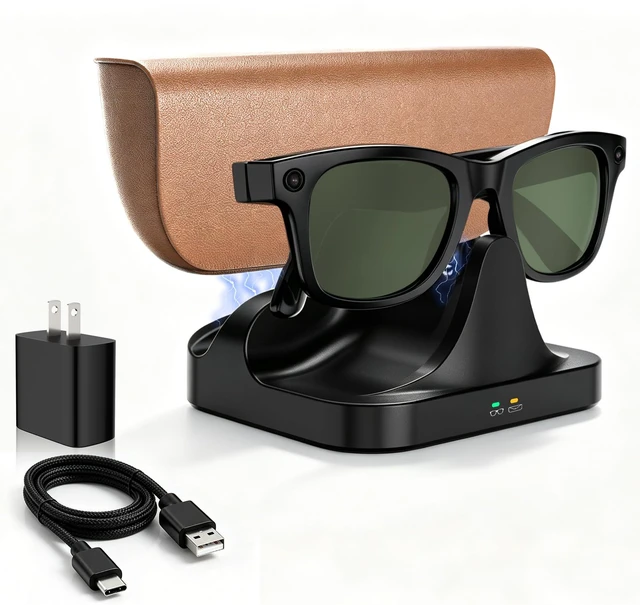
Magnetic 2-in-1 Charging Stand Compatible with Ray-Ban Meta Glasses Gen 1&2 Compatible with Wayfarer, Skyler, Blayzer/Scriber Optics(NOT for Headliner, Oakley Meta HSTN)
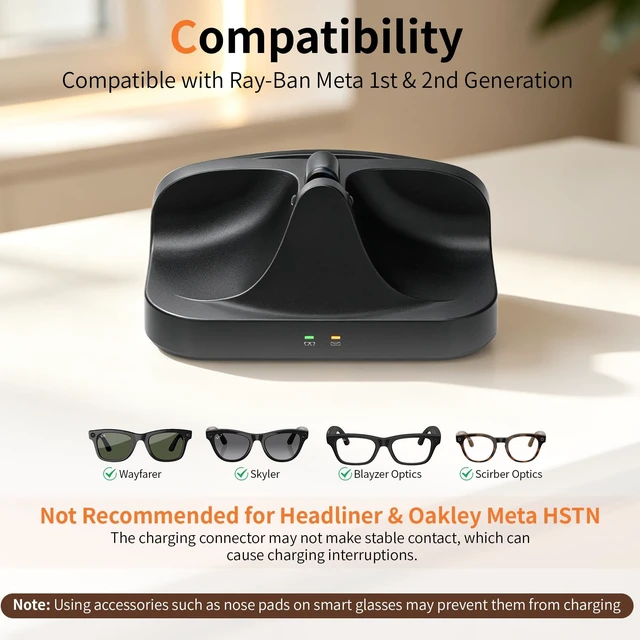
- [Compatibility] Compatible with Ray-Ban Meta Wayfarer, Skyler, Blayzer Optics, and Scriber Optics smart glasses and their charging cases. (Please Note: Not compatible with Headliner, Oakley Meta HSTN, Fury, Adventurer, Starfire, or Display series. These models may have poor contact, which can cause charging interruptions.) Please wipe the charging contacts clean before charging, as dirt or sweat may interfere with the connection and prevent charging. Important Note: To charge the glasses case, insert the Type-C Magnetic Connector into the case's charging port, then connect it to the magnetic charging port on the charging dock. [Magnetic Alignment] Strong magnetic connection keeps your glasses and charging case securely in place and precisely aligned for stable, efficient charging every time. Please Note: Using accessories such as nose pads on your smart glasses may prevent proper contact and cause charging failure. [LED Indicator] The indicator lights red while charging. Note: If the indicator does not turn green after the glasses are fully charged, this may be due to the glasses version and is not a cause for concern. When the glasses are fully charged or above 90%, the indicator stays solid green and will not turn red. If the glasses have low battery but the indicator still does not turn red during charging, please clean the charging contacts and reconnect the glasses several times, or wait a while before trying again. [Portable Charging] This magnetic charging stand for
+
+
Overview
Specs
Reviews
Any questions? Our AI mode will help you find out quickly.
Try me now
[Compatibility] Compatible with Ray-Ban Meta Wayfarer, Skyler, Blayzer Optics, and Scriber Optics smart glasses and their charging cases.
(Please Note: Not compatible with Headliner, Oakley Meta HSTN, Fury, Adventurer, Starfire, or Display series. These models may have poor contact, which can cause charging interruptions. ) Please wipe the charging contacts clean before charging, as dirt or sweat may interfere with the connection and prevent charging.
Important Note: To charge the glasses case, insert the Type-C Magnetic Connector into the case's charging port, then connect it to the magnetic charging port on the charging dock. [Magnetic Alignment] Strong magnetic connection keeps your glasses and charging case securely in place and precisely aligned for stable, efficient charging every time.
Please Note: Using accessories such as nose pads on your smart glasses may prevent proper contact and cause charging failure. [LED Indicator] The indicator lights red while charging.
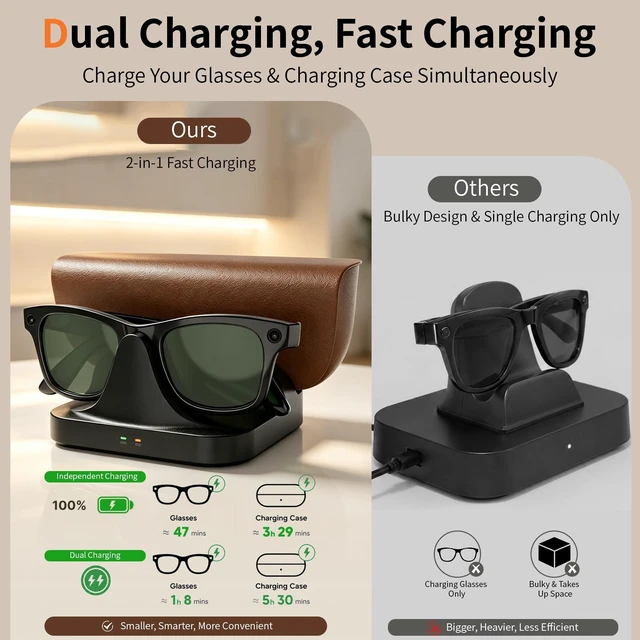
Note: If the indicator does not turn green after the glasses are fully charged, this may be due to the glasses version and is not a cause for concern. When the glasses are fully charged or above 90%, the indicator stays solid green and will not turn red. If the glasses have low battery but the indicator still does not turn red during charging, please clean the charging contacts and reconnect the glasses several times, or wait a while before trying again. [Portable Charging] This magnetic charging stand for Ray-Ban Meta charger can simultaneously charge your smart glasses and charging case, eliminating tangled cables and keeping your charging setup neat, organized, and convenient

(Please Note: Not compatible with Headliner, Oakley Meta HSTN, Fury, Adventurer, Starfire, or Display series. These models may have poor contact, which can cause charging interruptions. ) Please wipe the charging contacts clean before charging, as dirt or sweat may interfere with the connection and prevent charging.
Important Note: To charge the glasses case, insert the Type-C Magnetic Connector into the case's charging port, then connect it to the magnetic charging port on the charging dock. [Magnetic Alignment] Strong magnetic connection keeps your glasses and charging case securely in place and precisely aligned for stable, efficient charging every time.
Please Note: Using accessories such as nose pads on your smart glasses may prevent proper contact and cause charging failure. [LED Indicator] The indicator lights red while charging.
Note: If the indicator does not turn green after the glasses are fully charged, this may be due to the glasses version and is not a cause for concern. When the glasses are fully charged or above 90%, the indicator stays solid green and will not turn red. If the glasses have low battery but the indicator still does not turn red during charging, please clean the charging contacts and reconnect the glasses several times, or wait a while before trying again. [Portable Charging] This magnetic charging stand for Ray-Ban Meta charger can simultaneously charge your smart glasses and charging case, eliminating tangled cables and keeping your charging setup neat, organized, and convenient
Warranty & Returns
Warranty, Returns, And Additional Information
Warranty
- Please contact the Seller directly for warranty information. Warranty information may also be found on the Manufacturer's website.
- CONTACT
Return Policies
- Return for refund within: 30 days
- Return for replacement within: 30 days
- This item is covered by PureSpring Trading Shop Return Policy
Manufacturer Contact Info
- For a directory of all our manufacturers, please click below.
- Manufacturers Directory
LOADING...