Meet Your Seller
Ergonomic Vertical Mouse, 2.4G Wireless Mouse, Rechargeable, 4-DPI | Right-handed vertical design with 2.4G USB-A connection, rechargeable battery and visible battery level.
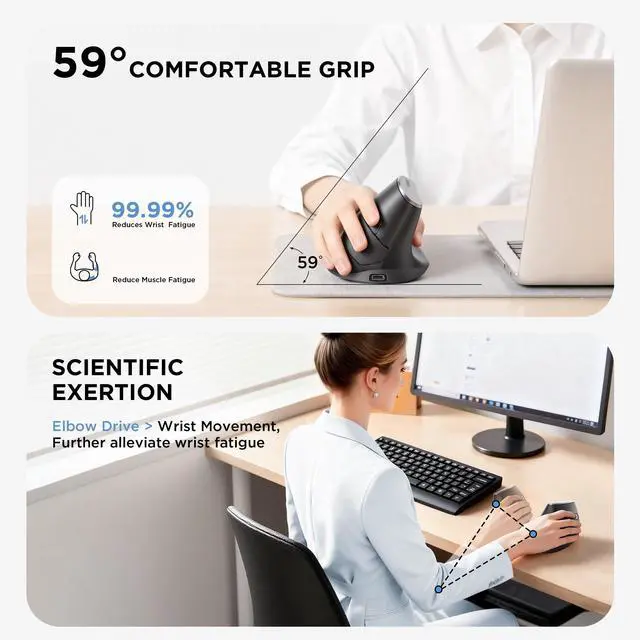
- Ergonomic Vertical DesignThis ergonomic wireless mouse keeps your wrist naturally extended, positioning your forearm and wrist in a more natural, relaxed posture. Compared to standard mice, it reduces discomfort and fatigue, helping boost productivity while lowering the risk of repetitive strain injuries. Optimized for right-handed use, it promotes healthy posture for all-day work, study, or gaming. This mouse for laptops features a side scroll wheel for efficient horizontal scrolling, along with forward and back buttons for quick page switching or returning to the previous page, making web browsing and document editing effortless.
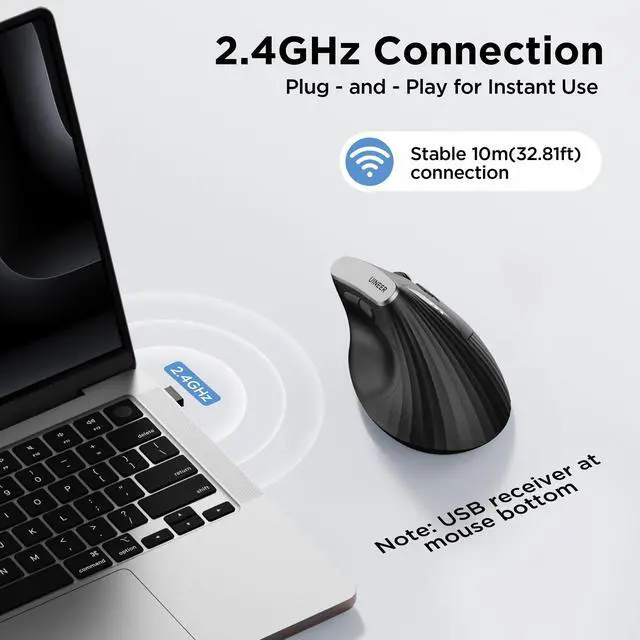
- Plug-and-play 2.4G wireless connection for stable transmission This wireless mouse utilizes 2.4G wireless technology with plug-and-play functionalitysimply insert the USB receiver (built into the mouse bottom) into any USB-A port for a stable connection. Its one-to-one receiver design minimizes interference, delivering faster transmission speeds and more reliable connectivity. With an effective working range of up to 10 meters, this vertical wireless mouse is highly portable. Its lightweight and minimalist design makes it an ideal choice for travel, office, and home use.
Any questions? Ask CelesteSM will help you find out quickly.
How to Use the Mouse:
1. Before using the mouse for the first time, charge it for approximately 2 hours.
2.Take out the USB receiver( stored at the bottom of the mouse), and turn on the mouse.
3. Insert the USB receiver into an available USB port on your device.
4. Wait a few seconds then you can start using the mouse.
Notes:
1. If your computer is Type-C port, you may need to add a Type-C adapter to connect the mouse with your device.
2. If you found the mouse cursor moves slowly or stop working, please try to charge the mouse.
3.Recommended to use the USB interface on your computer to charge the wireless mouse.
4.While the mouse is charging, red light on the gap of the scroll wheel will always on and will turn off when it's fully charged
Warranty & Returns
Warranty, Returns, And Additional Information
Warranty
- Please contact the Seller directly for warranty information. Warranty information may also be found on the Manufacturer's website.
- CONTACT
Return Policies
- Return for refund within: 30 days
- Return for replacement within: 30 days
- This item is covered by Games Partner Return Policy
Manufacturer Contact Info
- For a directory of all our manufacturers, please click below.
- Manufacturers Directory