Your Browsing History
Meet Your Seller
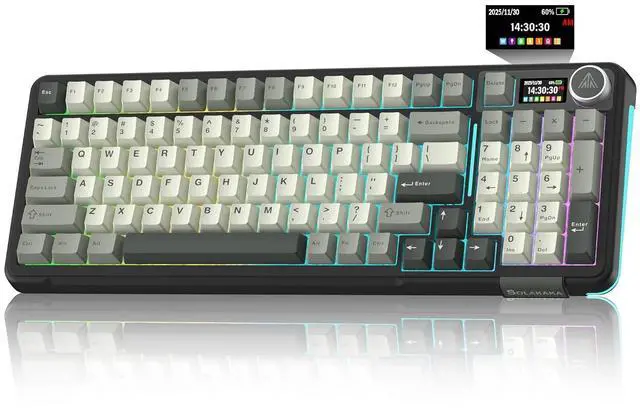
A99 Pro Wireless Mechanical Keyboard with LCD Screen & Metal Knob, 2.4GHz/BT5.0/USB-C, RGB Backlit G
- Multifunctional Screen Display: This gaming keyboard features a LCD screen for more convenient operation. The screen displays information such as date, time, battery level, connected system, connection mode and GIF image, allowing you to obtain this information more quickly. And the wireless gaming keyboard features a multi-functional knob, allowing you to easily set the time, switch systems, change lighting modes, switch lighting colors, adjust lighting brightness and control volume by rotating, short-pressing or long-pressing the button. This way you can easily configure your pc gaming keyboards and make it your own.; Compatible with Multiple Devices and Systems: The SOLAKAKA A99 Pro wireless keyboard is equipped with high-end tri-mode connectivity technology, supporting BT5.0, 2.4GHz wireless connectivity and USB-C wired connectivity. It can also support up to five devices simultaneously. And all connection methods offer fast response times. Furthermore, this wireless mechanical keyboard is compatible with Windows, Mac, IOS and Android systems, enabling smooth switching between different operating systems.; Full-Key Hot Swappable Keyboard: Our mechanical keyboard adopts full hot-swappable technology that supports 3/5 pins. It allows you to replace switches and keycaps to your liking without soldering. The mechanical gaming keyboard comes with a keycap puller, making replacement easy for both experienced users and beginners. And the it also uses pre-lubricated LEOBOG star
+
+
Overview
Specs
Reviews
Any questions? Our AI beta will help you find out quickly.
Try me now
Product description Full Hot-Swappable Linear Switch Gasket Structure Backlit Keyboard High-Capacity
Battery Web Driver: solakakadriver.
com (Note: Please access this webpage using a wired connection. ) What should I do if the plastic covering on the screen has scratches or curled edges? How to set the time on the screen? How do I set up the GIF image? How can I prevent the GIF image on the screen from switching back to the home page after entering the sleep mode? How to Switch Systems?
Battery Web Driver: solakakadriver.
com (Note: Please access this webpage using a wired connection. ) What should I do if the plastic covering on the screen has scratches or curled edges? How to set the time on the screen? How do I set up the GIF image? How can I prevent the GIF image on the screen from switching back to the home page after entering the sleep mode? How to Switch Systems?
Warranty & Returns
Warranty, Returns, And Additional Information
Warranty
- Please contact the Seller directly for warranty information. Warranty information may also be found on the Manufacturer's website.
- CONTACT
Return Policies
- Return for refund within: 30 days
- Return for replacement within: non-replaceable
- This item is covered by Glovibe Tech Return Policy
Manufacturer Contact Info
- For a directory of all our manufacturers, please click below.
- Manufacturers Directory
LOADING...