• $88.99
  • Free 30-day Returns
  • Ships from China.
    Sold by Glovibe Tech

    Shipped by Glovibe Tech

    Price alert
    Shop it at NeweggBusiness.

    Meet Your Seller

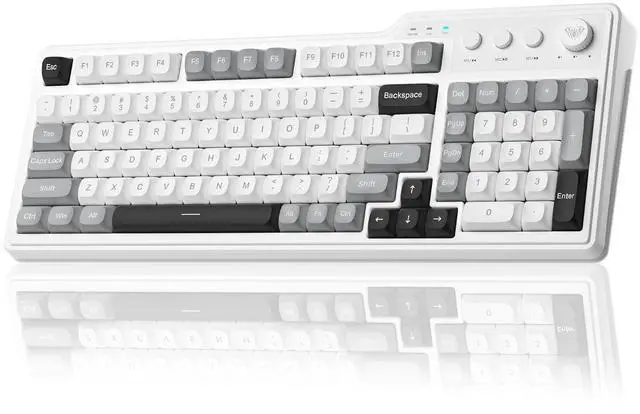
    Aula F3099 Wireless Keyboard with Media Knob, Tri-Mode BT5.0/2.4GHz/USB-C Cute Creamy Keyboard with

    • Triple-Mode Connectivity Keyboard: The AULA F3099 wireless keyboard can easily switch to 2.4G wireless mode by pressing Fn and ~, connect up to three devices via BT mode by pressing Fn and 1/2/3, and switch to wired mode by pressing Fn and 4. This creamy keyboard with number pad can save up to five different devices, suitable for PCs, laptops, etc. Whether for office work, gaming, or mobile devices, this AULA keyboard is your perfect companion; 2-in-1 Multifunction Knob & Media Keys: This cute keyboard with dual-mode knob seamlessly blends elegant design with practical functionality, significantly enhancing your desktop experience. Long-press the knob for 3 seconds to switch between gaming mode and office mode. In gaming mode, press the knob to cycle through backlight effects and rotate it to adjust brightness. In office mode, the knob controls computer volume or mutes audio with a press. The three multimedia buttons beside the knob enable quick adjustments for previous song, the next song and pause, which also enable macro shortcut recording in gaming mode.; Gaming Keyboard with Programmable Driver: Every key on this F3099 keyboard supports macro customization. This computer keyboard enables assigning additional functions to a single key, including various complex actions. As a wireless gaming keyboard, it also enhances gaming win rates during critical moments. For more stable connectivity, the driver only supports wired mode operation on Windows systems. Please note: This
    +
    +
    Overview
    Specs
    Reviews
    avatar

    Any questions? Our AI beta will help you find out quickly.

    Product description AULA F3099 Wireless Keyboard with Media Knob Multimedia Keys Keyboard Knob Why can't my device detect the AULA F3099 keyboard when I press FN+1/2/3 to switch to BT mode? Why isn't the F3099 keyboard working after I plug it in? How do I reattach the key that came off? Why won't this wireless keyboard charge? What are the precautions? Why can't I install the driver after downloading it? Why can't the keyboard be detected after installing the driver? What should I do if some keys on this F3099 quiet keyboard stop working? Why did I receive a keyboard in the wrong color?

    Warranty & Returns

    Warranty, Returns, And Additional Information

    Warranty

    • Please contact the Seller directly for warranty information. Warranty information may also be found on the Manufacturer's website.
    • CONTACT

    Return Policies

    • Return for refund within: 30 days
    • Return for replacement within: non-replaceable
    • This item is covered by Glovibe Tech Return Policy

    Manufacturer Contact Info

    LOADING...