




 here!
here!
I’m your shopping assistant for PC builds, upgrades, and everything tech.
Got questions? Ask away!
Start a conversation
here!
I’m your shopping assistant for PC builds, upgrades, and everything tech.
Got questions? Ask away!
Start a conversation


Any questions? Ask CelesteSM will help you find out quickly.


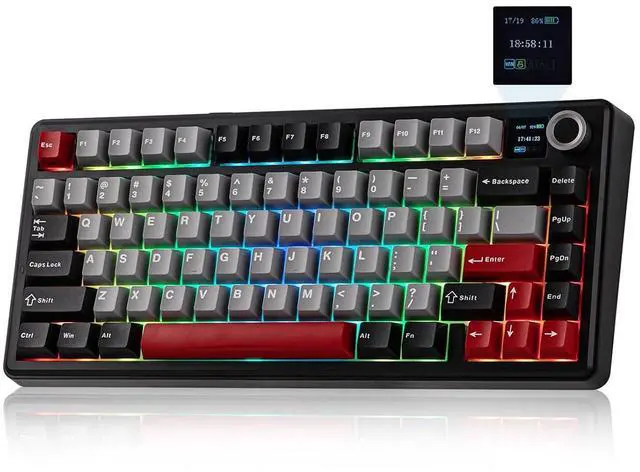
AULA F75 MAX mechanical keyboard equipped with a multifunctional knob and smart display for intuitive operation.
Rotate the knob to adjust volume precisely or browse screen menus effortlessly. Press to mute or confirm selections with one hand. The integrated screen clearly shows battery level, connection status, RGB effects, and system information in real time. Enjoy convenient, efficient control and a smarter typing experience.

Adjust the Backlights by Knob or Shortcut Keys:

What is the polling rate of this gaming keyboard?
The polling rate: 1000Hz (USB Wired & 2.4G Wireless), 125Hz (BT)
What is the battery capacity of the F75 MAX mechanical keyboard?
The battery capacity is 4000mAh. Which can be used for 30H (RGB light on) / 80H (RGB light off).
Is the F75 MAX keyboard compatible with mac OS? Does it include Mac keycaps?
Yes, this wireless keyboard supports BT/2.4GHz/USB wired connections and is compatible with multiple systems, including Windows, Mac, iOS, Android, etc.
But the Mac keycaps are not included.
How to change screen settings?
FN+Knob: Enter settings ? Rotate to navigate, press to confirm ? FN+Knob to exit
Where can I download the software?
You can download the software from Mechlands website.

F75 PRO |

Mini60 HE PRO |

QK75 |

Hero84 HE |

Alice80 |
|
|---|---|---|---|---|---|
|
Customer Reviews
|
— | — | — | — | — |
|
Price
|
— | — | — | — | — |
|
Layout & Keys
|
75% ANSI US, 80 Keys | 60% ANSI US, 61 Keys | 75% ANSI US, 81 Keys | 75% ANSI US, 84 Keys | 65% ANSI US, 68 Keys |
|
Connectivity
|
BT/2.4GHz Wireless, USB Wired | BT/2.4GHz Wireless, USB Wired | BT/2.4GHz Wireless, USB Wired | USB Wired | USB Wired |
|
Battery Capacity
|
4000 mAh | 4000 mAh | 4000 mAh | / | / |
|
Keyboard Structure
|
Creamy Gasket | Stable Tray | Creamy Gasket | Stable Tray | Creamy Gasket |
|
Keycaps
|
PBT, Cherry Profile | PBT, Cherry Profile | PBT, Cherry Profile | PBT, Cherry Profile | PBT, Cherry Profile |
|
With Screen
|
? | ? | ? | ? | ? |
|
NKRO
|
? | ? | ? | ? | ? |
|
Hot Swappable
|
? | ? | ? | ? | ? |
|
RGB Backlit
|
? | ? | ? | ? | ? |


AULA F75 MAX mechanical keyboard equipped with a multifunctional knob and smart display for intuitive operation.
Rotate the knob to adjust volume precisely or browse screen menus effortlessly. Press to mute or confirm selections with one hand. The integrated screen clearly shows battery level, connection status, RGB effects, and system information in real time. Enjoy convenient, efficient control and a smarter typing experience.
Adjust the Backlights by Knob or Shortcut Keys:
What is the polling rate of this gaming keyboard?
The polling rate: 1000Hz (USB Wired & 2.4G Wireless), 125Hz (BT)
What is the battery capacity of the F75 MAX mechanical keyboard?
The battery capacity is 4000mAh. Which can be used for 30H (RGB light on) / 80H (RGB light off).
Is the F75 MAX keyboard compatible with mac OS? Does it include Mac keycaps?
Yes, this wireless keyboard supports BT/2.4GHz/USB wired connections and is compatible with multiple systems, including Windows, Mac, iOS, Android, etc.
But the Mac keycaps are not included.
How to change screen settings?
FN+Knob: Enter settings ? Rotate to navigate, press to confirm ? FN+Knob to exit
Where can I download the software?
You can download the software from Mechlands website.
|
F75 PRO |
Mini60 HE PRO |

QK75 |
Hero84 HE |

Alice80 |
|---|---|---|---|---|
| Customer Reviews | ||||
| — | — | — | — | — |
| Price | ||||
| — | — | — | — | — |
| Layout & Keys | ||||
| 75% ANSI US, 80 Keys | 60% ANSI US, 61 Keys | 75% ANSI US, 81 Keys | 75% ANSI US, 84 Keys | 65% ANSI US, 68 Keys |
| Connectivity | ||||
| BT/2.4GHz Wireless, USB Wired | BT/2.4GHz Wireless, USB Wired | BT/2.4GHz Wireless, USB Wired | USB Wired | USB Wired |
| Battery Capacity | ||||
| 4000 mAh | 4000 mAh | 4000 mAh | / | / |
| Keyboard Structure | ||||
| Creamy Gasket | Stable Tray | Creamy Gasket | Stable Tray | Creamy Gasket |
| Keycaps | ||||
| PBT, Cherry Profile | PBT, Cherry Profile | PBT, Cherry Profile | PBT, Cherry Profile | PBT, Cherry Profile |
| With Screen | ||||
| ? | ? | ? | ? | ? |
| NKRO | ||||
| ? | ? | ? | ? | ? |
| Hot Swappable | ||||
| ? | ? | ? | ? | ? |
| RGB Backlit | ||||
| ? | ? | ? | ? | ? |


