




 here!
here!
I’m your shopping assistant for PC builds, upgrades, and everything tech.
Got questions? Ask away!
Start a conversation
here!
I’m your shopping assistant for PC builds, upgrades, and everything tech.
Got questions? Ask away!
Start a conversation


Any questions? Ask CelesteSM will help you find out quickly.


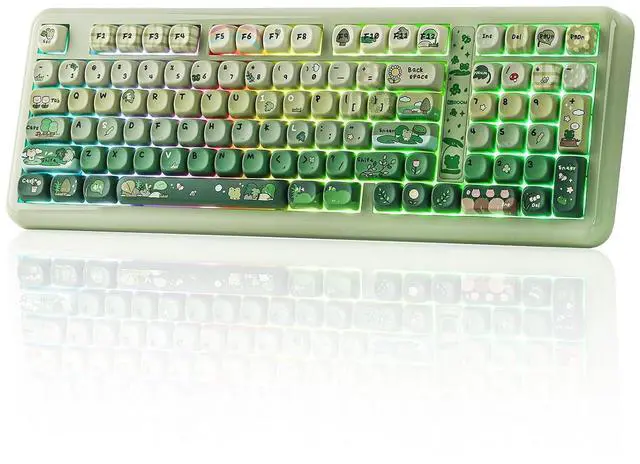
The Phantom98 Lite keyboard features a dedicated numeric keypad—ideal for crunching spreadsheets, balancing budgets, or inputting in-game codes without tab-switching. Plus, its full row of function keys lets you adjust volume, skip tracks, or launch shortcuts in one tap, boosting workflow efficiency.

The built-in magnetic storage slot securely holds the 2.4G receiver when not in use, effectively preventing loss and keeping your workspace clean and organized. Its magnetic design ensures easy insertion and removal, while making the keyboard more compact and portable for travel and daily use. This thoughtful feature brings better convenience and a tidier experience to your daily typing or gaming.


Where can I download the JSON file of the Phantom98 Lite keyboard to customize? Can I remap the FN key?
You can download it on the KiiBOOM official website. And yes, you can use QMK/VIA to remap the FN key.
Why isn't the VIA software detecting my keyboard?
1. Make sure your keyboard is connected in wired mode.
2. Verify you have downloaded the correct JSON file for the Phantom 98 Lite in the software.
3. Try resetting the keyboard to factory settings.
Why does my keyboard's RGB turn off suddenly?
1. Sleep mode: The keyboard enters sleep mode after two minutes without key presses, turning off the RGB. Press any key to wake it up.
2. Connection problems: Check if the cable is loose or if there are issues with the wireless connection.
Can I use this keyboard with a Mac system?
Yes, the KiiBOOM Phantom 98 Lite keyboard is compatible with both Windows and Mac systems. You can toggle between the two modes by pressing Fn + A (for Windows) or Fn + S (for Mac).
Why are my Alt key and Win key swapped functions?
The keyboard might be in Mac mode. Press Fn + A to switch the keyboard back to Windows mode


The Phantom98 Lite keyboard features a dedicated numeric keypad—ideal for crunching spreadsheets, balancing budgets, or inputting in-game codes without tab-switching. Plus, its full row of function keys lets you adjust volume, skip tracks, or launch shortcuts in one tap, boosting workflow efficiency.
The built-in magnetic storage slot securely holds the 2.4G receiver when not in use, effectively preventing loss and keeping your workspace clean and organized. Its magnetic design ensures easy insertion and removal, while making the keyboard more compact and portable for travel and daily use. This thoughtful feature brings better convenience and a tidier experience to your daily typing or gaming.
Where can I download the JSON file of the Phantom98 Lite keyboard to customize? Can I remap the FN key?
You can download it on the KiiBOOM official website. And yes, you can use QMK/VIA to remap the FN key.
Why isn't the VIA software detecting my keyboard?
1. Make sure your keyboard is connected in wired mode.
2. Verify you have downloaded the correct JSON file for the Phantom 98 Lite in the software.
3. Try resetting the keyboard to factory settings.
Why does my keyboard's RGB turn off suddenly?
1. Sleep mode: The keyboard enters sleep mode after two minutes without key presses, turning off the RGB. Press any key to wake it up.
2. Connection problems: Check if the cable is loose or if there are issues with the wireless connection.
Can I use this keyboard with a Mac system?
Yes, the KiiBOOM Phantom 98 Lite keyboard is compatible with both Windows and Mac systems. You can toggle between the two modes by pressing Fn + A (for Windows) or Fn + S (for Mac).
Why are my Alt key and Win key swapped functions?
The keyboard might be in Mac mode. Press Fn + A to switch the keyboard back to Windows mode


